We are all aware that high-quality video tends to have a large file size. If we want to reduce the file size of our video, we must lower the video resolution. We should expect a huge file size because of the high-quality production. This post will look at the most straightforward approach to downscale 4K to 1080p. The following material will tell you about the sets of tools you may use to downscale the resolution of your video.
Reasons and Benefits for Downscaling 4K Video to 1080p
Before you start reducing the resolution, you can first understand the benefits of lowering 4K to 4080p/720p. This will help you determine more clearly which resolution level to reduce to.
Reduce file size to save storage space
4K video resolution is four times that of 1080p, resulting in significantly larger file sizes. Lowering the resolution can substantially reduce file size, making storage, transfer, and archiving more convenient.
Improve playback compatibility and smoothness
Not all devices or players support 4K playback. Downgrading to 1080p or lower enables smooth playback on older computers, standard TVs, smartphones, and other devices, avoiding stuttering or decoding failures.
Reduce editing and rendering workload
Editing, applying effects, or exporting 4K footage demands high CPU/GPU and memory resources. Downgrading footage to 1080p accelerates rendering, reduces crashes, and boosts editing efficiency.
Minimal Difference on Small Screen
On smaller displays like phones or tablets, the visual distinction between 4K and 1080p is negligible. Using 1080p or lower resolutions conserves resources without compromising the viewing experience.
Part 1. The Easiest Way to Downscale 4K to 1080p/HD
If you're looking for the best way to downscale 4K to Full HD or HD, there's the perfect tool for that. AVAide Video Converter can help you quickly downscale the video resolution using the most convenient and most outstanding downscaling feature. You can freely use this excellent software to finish the task without hassle.
Furthermore, this excellent tool allows you to convert multiple files simultaneously thanks to the high-level acceleration technology, which can convert 30x faster than the other conventional converters. The most outstanding feature includes an integrated media editor for improving and editing videos. It is compatible practically with both Mac and Windows PC. It is also adaptable and quick to use. Its feature is highly customizable so that other software can't match. If you want to use this fantastic tool to downscale your video, follow the instructions below to learn how it works.
- Allows for the production of 1080p/4K/5K/8K video without decreasing the visual quality.
- It can easily convert MP4, MOV, MKV, FLV, SWF, and 300+ more formats.
- With the finest toolbox, you can edit the video like cut, merge, trim, crop, and do many amazing things.
- It has more than 8,000,000 happy consumers in the entire world.

 Secure Download
Step 1Download the Outstanding Software
Click the download button presented above, choose whether you are using a Windows or Mac. If you are done downloading the outstanding software, click the file to install it immediately. After all of the process, you've been through, launch it to continue the next process.
Step 2Upload Media File
After you've launched the program, go to the middle of the screen and click the Plus (+) icon to upload your file. With this tool, you can also begin mass altering by immediately uploading multiple video files.

Step 3Convert to 1080p
Press the Convert All to, the setlist of formats and resolutions will show on the left part of the tool’s interface. Choose the MP4 HD 1080P to make your video resolution into 1080p.

Step 4Convert & Save your Video
Finally, click the Convert All button to convert it once you've finished choosing the resolution of your movie. Within a split of seconds, you have now decreased the video resolution as easily as that.

Use VLC Media Player to Downscale 4K to 1080p
VLC Media Player can also convert 4K videos to 1080p or lower resolutions. Its built-in "Convert/Save" feature allows direct adjustment of output resolution and encoding format, featuring a clean interface and intuitive operation. Additionally, it supports batch conversion of multiple video files and handles various video encoding formats (such as H.264, HEVC, MPEG-4). However, its conversion speed is relatively slow, and parameter adjustments are fairly basic.
Step 1Click Media, Convert/Save, then find Add to import your video and click Convert. Select 1080p as the profile setting.
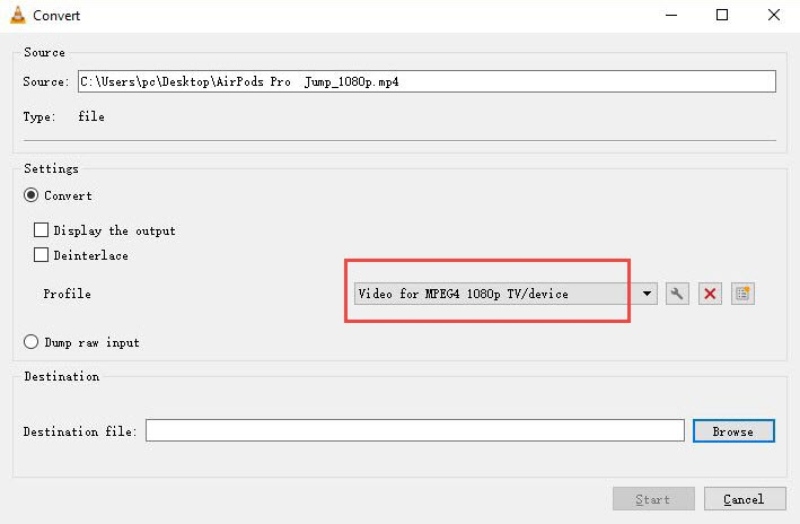
Step 2Click Browse to choose the output folder location, then click Start to convert your 4K video to 1080p.
Part 2. Another 3 Effective Ways on Downscaling 4K to 1080p/720p Online
1. Use AVAide Free Video Converter Online
AVAide Free Video Converter Online will provide you with a user-friendly video converter online that will allow you to instantly downscale the video resolution. It performs the conversion and modification procedures based on the internet connection speed. This free online program is simple to use. It allows you to convert your video file quickly and effectively downsize your bigger file. This makes it user-friendly since even individuals with non-high-end computers may convert their films from 4K to 1080p formats in minutes. Take a look at how to utilize this fantastic 4K to full HD converter online.
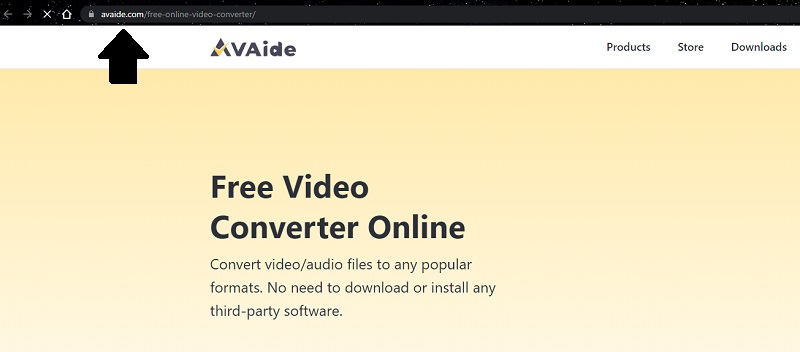
Step 1Launch the Official Website
To begin, use the search engine to find the official page of AVAide Free Video Converter Online.
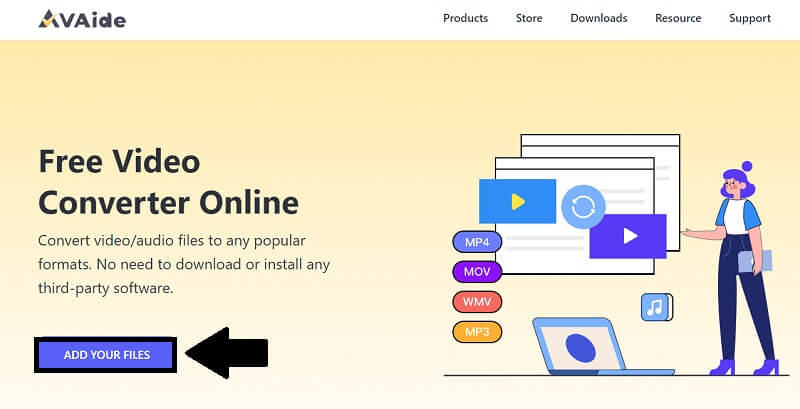
Step 2Add Your Files
Click the Add Your Files option to add your video clip. Choose the file on the folder that will show on your screen and click Open.
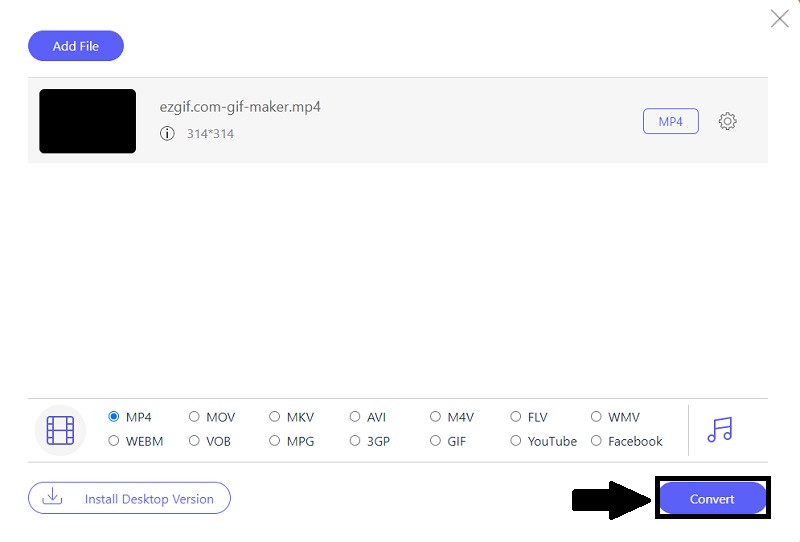
Step 3Change the Resolution
You may now change the resolution by clicking the gear button, under it tick Resolution, and then select 1080p before hitting the OK button.
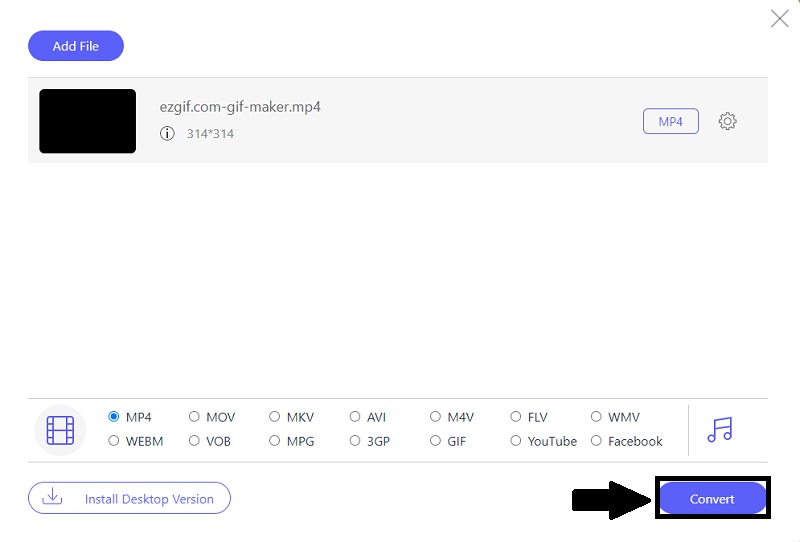
Step 4Convert Your File
Finally, after converting your 4K video to 1080p, click the Convert option to save your clip instantly.
2. Use Fast Online HD Video Converter
If you're seeking a fantastic tool for downscaling your video, go no further. There is a great tool available to you on the web. Fast Online HD Video Converter is an option you can choose. This excellent program can assist you in converting your 4K TO 1080p or vice versa. Also, it enables you to compress your video in the most straightforward method possible. In addition to that, it may help you convert your video fast and efficiently. Here are the fundamental procedures for downscaling your movie from 4K to 1080p.
Step 1Visit the Page
First and foremost, use the search box to find the official page of Fast Online HD Video Converter.
Step 2Convert Your File
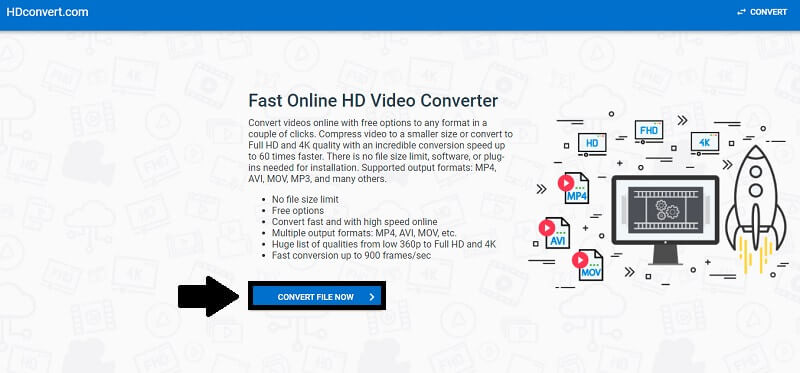
To continue, click the Convert File Now button and then pick the video file you wish to convert.
Step 3Select Output Quality
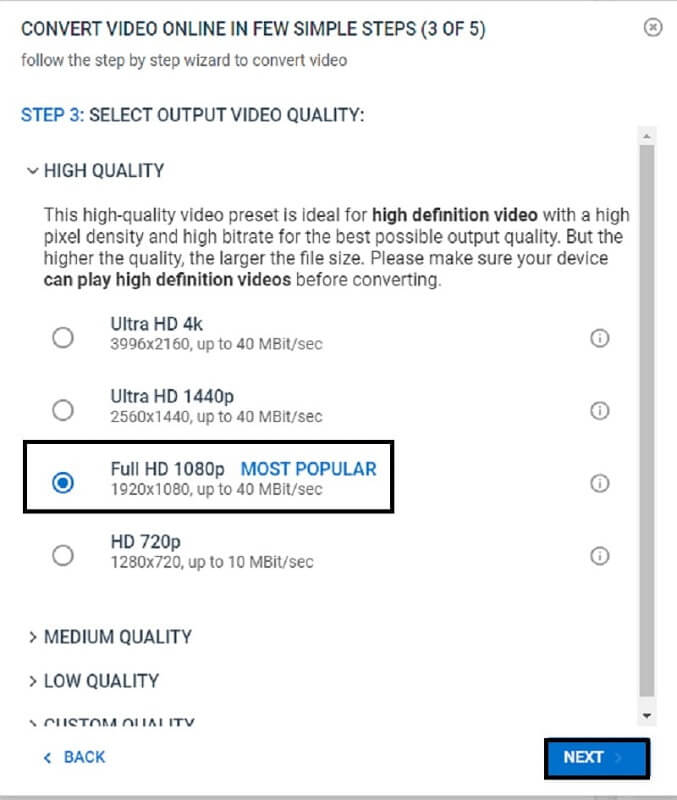
You may now adjust the resolution of your 4K video to 1080P by selecting the choices. Then press the next button.
Step 4Convert for Free or with Premium
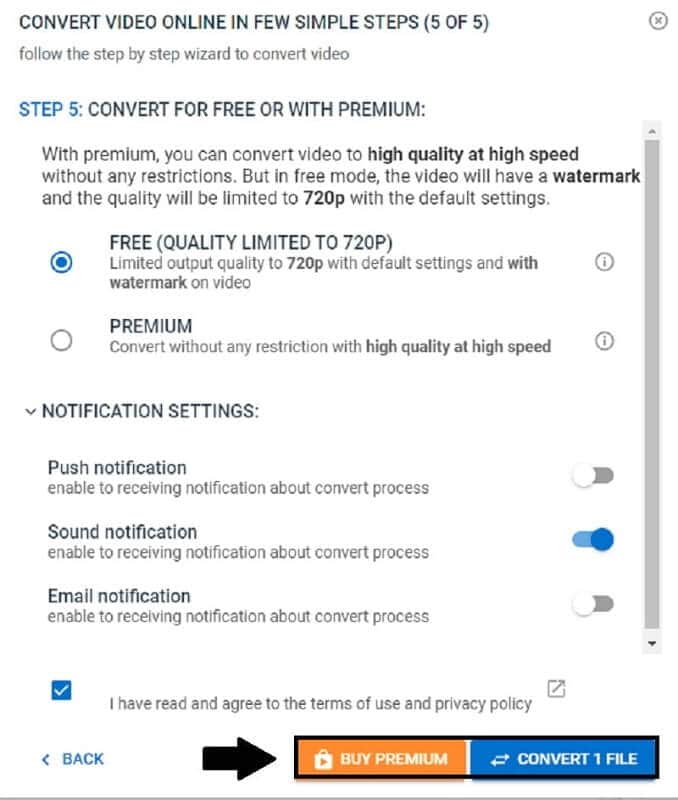
Finally, you may save your video clip by selecting the Convert File button. If you want to use their premium service, click the Buy Premium option.
Part 3. FAQs about Downscaling 4K to 1080p/720p
Does downscale video improve quality?
It does not improve the quality. However, you won't notice a particular change if you convert the 4k to 1080p because they both support high-definition.
Can I use AVAide Video Converter to downscale my video offline?
Yes, this remarkable program is intended to function even without an internet connection. To use it, simply download the application, install it, and run it on your computer. In that case, you may convert files whenever and anywhere you choose, regardless of whether or not you have access to the internet.
How to downscale 4K to 1080p on a Mac?
Reducing video resolution on a Mac requires specialized tools. You can use AVAide Video Converter to achieve this. It quickly lowers resolution within minutes while maintaining quality.
That's it. When downscaling your video, you should choose the most powerful software available. AVAide Video Converter and AVAide Free Video Converter Online are highly recommended and practical tools. Without a doubt, it is the most helpful and convenient software. These excellent tools can assist you in converting your video to high quality. It is also offered as free online software installed and downloaded. This application helps you boost your creativity while also giving you all the necessary features. You will utilize the finest among other tools as easily as it is.
ABOUT THE AUTHOR

Your complete video toolbox that supports 350+ formats for conversion in lossless quality.
Video Enhancement
- Upscale 1080p to 4K
- Upscale 480p to 1080p
- Downscale 4K to 1080p/720p
- Downscale 1080p to 480p
- Upscale DVD to 1080p/720p
- Fix Bad Quality Video
- AI Video Upscale
- Enhance Video Quality
- Improve TikTok Video Quality
- Best Video Enhancer
- Video Enhancer App for iPhone & Android
- Best 4K Video Enhancer
- AI Upscale Video
- Clean up Video Quality
- Make Video Higher Quality
- Make a Video Brighter
- Best Blur Video App
- Fix Blurry Videos
- Improve Zoom Video Quality
- Improve GoPro Video Quality
- Improve Instagram Video Quality
- Improve Facebook Video Quality
- Improve Video Quality on Anroid & iPhone
- Improve Video Quality in Windows Movie Maker
- Improve Video Quality in Premiere
- Restore Old Video Quality
- Sharpen Video Quality
- Make Video More Clearer
- What is 8K Resolution
- 4K Resolution: Everything Your Need To Know [Explained]
- 2 Amazing Ways to Increase Video Resolution Losslessly
- Video Resolution Converter: Things to Ponder in Getting One
- The Outstanding 5K to 8K Converter You Shouldn’t Miss!
- Remove Background Noise From Video: With Three Efficient Ways
- How to Remove Grain from Video Using the 3 Remarkable Ways