When we need to reduce the size of video files, one option is to lower the video resolution. High-quality videos typically result in larger file sizes. If you wish to reduce video resolution, there's an excellent program that can significantly lighten the file load while preserving some of the original video quality. This article compiles a list of reliable, efficient, and powerful 1080p to 480p converters tailored to different needs.
Part 1. The Most Effective Way to Downscale/Convert 1080p to 480p
If you're looking for software that efficiently reduces or converts video resolution, AVAide Video Converter is definitely your ideal choice. With this video resolution converter, you can reduce video resolution to 480p in just minutes. Of course, if you wish to enhance video quality, it can also upscale to 4K. Moreover, even users less familiar with such tools can easily reduce video resolution through its clean interface and clear step-by-step instructions. Additionally, AVAide Video Converter utilizes advanced video conversion technologies, including speed optimization and hardware acceleration. This enables the conversion of large numbers of files in just one minute.
- With over 300 input and output formats supported.
- With the ability to output video resolutions of 8K/5K/4K/1080p.
- Compress while preserving the original video quality to the greatest extent possible.
- Fast conversion speed with support for batch reduction of resolution to 480p.

 Secure Download
Step 1Download the Amazing Tool
To begin, click on the download icon above and choose whether you are using Windows or a Mac. When you've completed downloading the fantastic program, double-click the file to begin installing it right away.
Step 2Upload your Video File
Travel to the middle of the screen and click the Plus (+) symbol after running the software to upload your file. You may also use this tool to upscale your video right away by uploading many video files.

Step 3Downscale 1080p to 480p
When you click the Convert All to button, a list of formats and resolutions will appear on the tool's left side. Choose MP4 HD 480P to downscale your 1080p video.

Step 4Convert your Video File
After you've done picking the resolution of your video, click the Convert All option to convert it. You've just reduced the video resolution in a couple of seconds.

Part 2. How to Convert 1080p to 480p Online?
1. Free Online File Converter
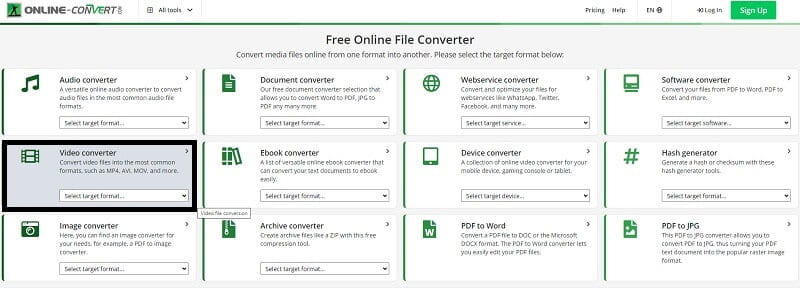
Assume you're looking for online software that's simple to use. Free Online File Converter has been created specifically for you. This useful software allows you to convert media from one format to another quickly and efficiently and change the Resolution. It accepts a wide variety of different source formats. You can restore your file to the most popular formats, such as MP4, AVI, MOV, and so on. Learn how to use this helpful feature to downscale your video.
Step 1Open the Official Website
Go to the tool's official website first. In the search bar, type Free Online File Converter.
Step 2Make a Video Conversion
To proceed, press the Video Converter button to convert your video resolution.
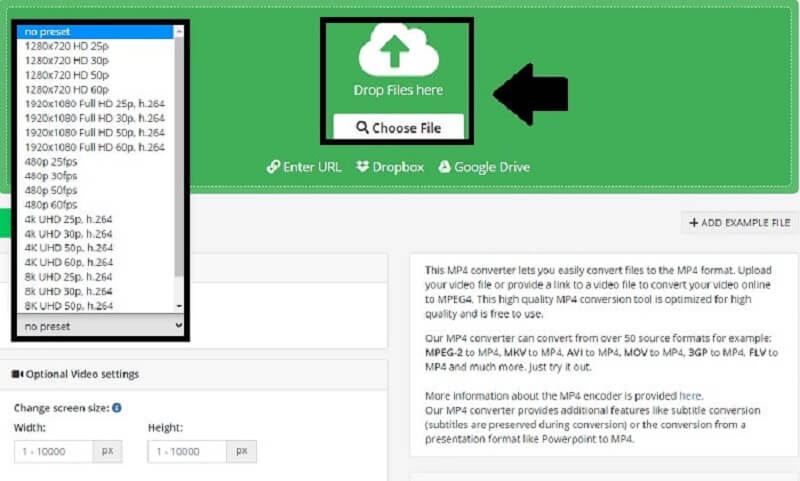
Step 3Select a Preset and Convert
Once you've dropped your files, select the 480p presets and click Start to begin the process.
2. Video Converter Online
This convenient tool is a file converter that works online. Almost all audio formats are supported. Video Converter Online is an excellent program that can assist you in converting your 1080p to 480p if you want to downsize your video. Also, it enables you to compress your video in the most straightforward method possible. In addition to that, it may help you convert your video fast and efficiently. Here are the fundamental procedures for downscaling your movie from 1080p to 480p.
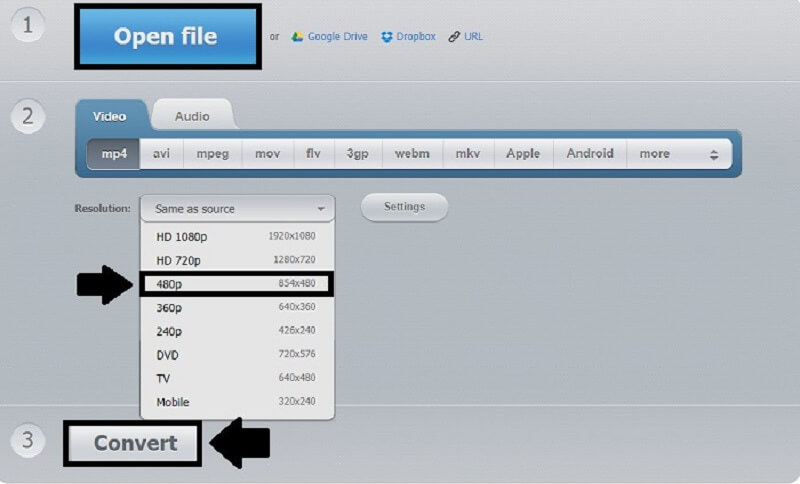
Step 1Open File
You can now pick your video file by selecting the Open File button. Then choose the video to be downscaled.
Step 2Make a Video Conversion
To proceed, press the Video Converter button to convert your video resolution.
Step 3Change the Resolution
By selecting the options, you may now change the Resolution of your 1080p video to 480P.
Step 4Convert Video
Finally, when you've changed the resolution of your video, you may convert it.
AVAide Free Video Converter Online
This online tool also provides a simple-to-use video converter that lets you quickly reduce video resolution. It performs conversions and modifications based on your internet connection speed. Therefore, you can easily convert videos from 1080p to 480p format in minutes without any prior experience. Learn how to use this excellent 1080p to 480p online converter below.
Step 1Launch the Official Website
To begin, use the search engine to find the official page of AVAide Free Video Converter Online.
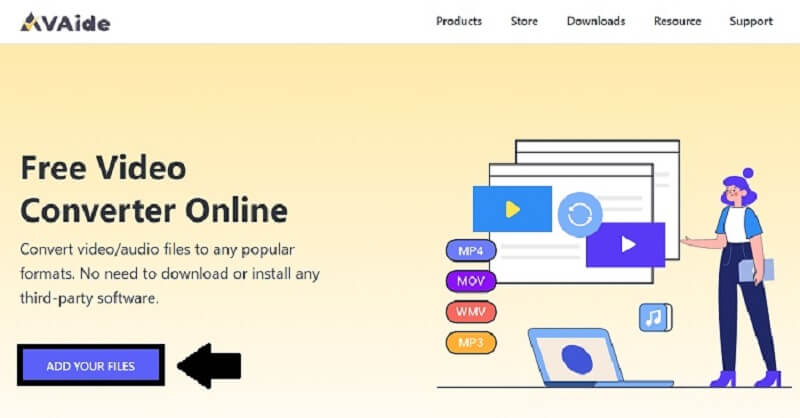
Step 2Add Your Files
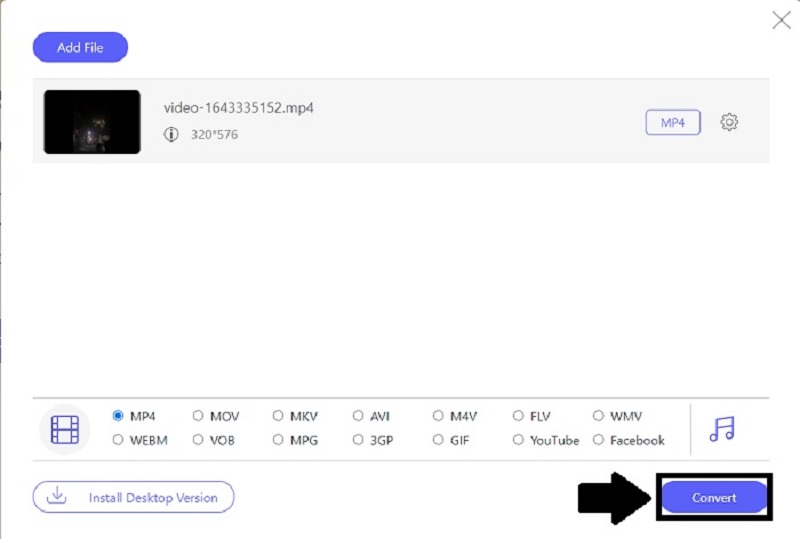
To add your video clip, select the Add Your Files option. Tap Open after selecting a file from the folder that appears on your screen.
Step 3Change the Resolution
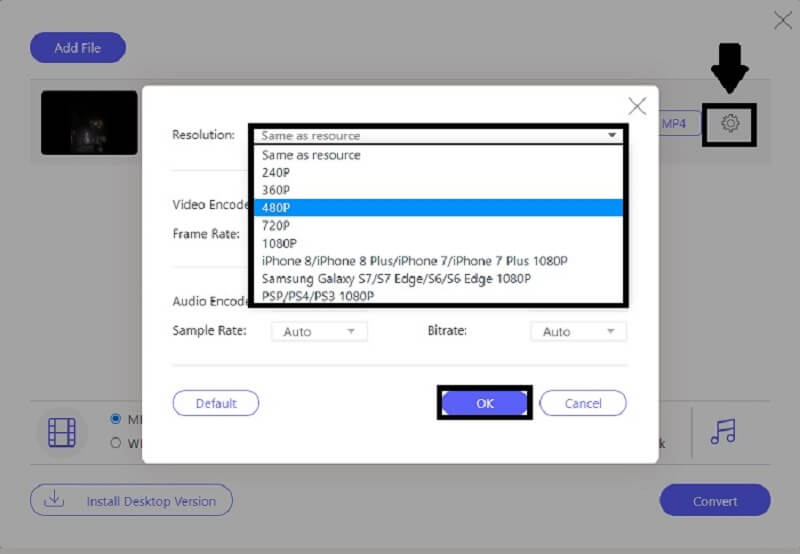
You may now adjust the Resolution by clicking the gear icon, ticking Resolution, and selecting 480p before pressing the OK button.
Step 4Convert Your File
Finally, once you've converted your 1080p video to 480p, click the Convert button to save your film right away.
Part 3. FAQs about Downscaling
How to convert 1080p to 480p using FFmpeg?
To begin, download FFmpeg to your desktop and launch the ffmpeg.exe path to the system. Next, on your PC, hit the Windows icon and type CMD. Finally, use the cd command to navigate to the file folder. Then enter the command ffmpeg-i input.mp4 -vf scale=480:-1 output.mp4 and click Enter on the keyboard.
Can I convert 1080p to 480p in handbrake?
Yes, handbrake includes a downscale option. Install the current version of the tool, import the source file, install and run the application, manually select width and height, specify a target directory, and begin converting the 1080p film to 480p.
How do I downscale a video on my iPhone?
You can only use third-party apps to downscale videos on iPhone. Also, those apps and the iOS have great limitations. You can use AVAide Video Converter to easily downscale any video.
That's all. Now that you know what you're doing and which tools to use, you'll be able to convert your 1080p video to 480p fast and confidently. Finally, it is up to you to make a decision. You'll need to download AVAide Video Converter and other desktop software like it to get the most out of them. However, instead of installing an app to convert files, you may use a free online tool.
Your complete video toolbox that supports 350+ formats for conversion in lossless quality.
Video Enhancement
- Upscale 1080p to 4K
- Upscale 480p to 1080p
- Downscale 4K to 1080p/720p
- Downscale 1080p to 480p
- Upscale DVD to 1080p/720p
- Fix Bad Quality Video
- AI Video Upscale
- Enhance Video Quality
- Improve TikTok Video Quality
- Best Video Enhancer
- Video Enhancer App for iPhone & Android
- Best 4K Video Enhancer
- AI Upscale Video
- Clean up Video Quality
- Make Video Higher Quality
- Make a Video Brighter
- Best Blur Video App
- Fix Blurry Videos
- Improve Zoom Video Quality
- Improve GoPro Video Quality
- Improve Instagram Video Quality
- Improve Facebook Video Quality
- Improve Video Quality on Anroid & iPhone
- Improve Video Quality in Windows Movie Maker
- Improve Video Quality in Premiere
- Restore Old Video Quality
- Sharpen Video Quality
- Make Video More Clearer
- What is 8K Resolution
- 4K Resolution: Everything Your Need To Know [Explained]
- 2 Amazing Ways to Increase Video Resolution Losslessly
- Video Resolution Converter: Things to Ponder in Getting One
- The Outstanding 5K to 8K Converter You Shouldn’t Miss!
- Remove Background Noise From Video: With Three Efficient Ways
- How to Remove Grain from Video Using the 3 Remarkable Ways