The BDMV file extension is used to record the contents of Blu-ray discs, but it does not store multimedia data itself. Popular Blu-ray players and burning tools, such as VLC, can play BDMV files. These players can present disc content in its original format, ensuring optimal playback quality.
If you're concerned about compatibility issues, you can also convert BDMV files to common digital video formats. This article will introduce you to BDMV files and explain how to play them using a BDMV player.
Part 1. Play BDMV Folder/Files with Avaide Blu-ray Player
AVAide Blu-ray Player is the most recommended choice for playing BDMV files. This program can play all Blu-ray discs and DVDs, ISO files and folders, movies, and music. You can also customize playlists and playback options. This Blu-ray and DVD player utilizes hardware decoding technology to deliver smooth, stable, and exceptionally high-definition image quality. In short, you can use this program to play BDMV files.
Step 1To download the application, click the button below. Then click the installer that you just downloaded to begin installing the software. Then, to proceed, launch the application.

FREE DOWNLOAD For Windows 7 or later
 Secure Download
FREE DOWNLOAD For Mac OS X 10.13 or later
Secure DownloadStep 2Use the program interface's Open Disc or Open File buttons to import the file you wish to play. When the file finder appears, you may then choose the file.

Step 3Personalize your playlist and explore the program features that interest you. To capture a screenshot of your currently playing BDMV, click the Camera button below.

Part 2. Play BDMV Folder/Files with VLC
VLC (VideoLAN Client) is a cross-platform multimedia player that is free and open-source. It can play almost any media file including DVD, Audio CD, VCD, etc. It is a simple and powerful media player that can be customized. For example, you can use filters for distorting, rotating, splitting, deinterlacing, and mirroring films and the ability to make display walls and apply a logo overlay during playing. It is free and safe, and it works well on all platforms. Finally, this tool can be used to play your BDMV files.
Step 1To get the software, go to videolan.org on your browser. Navigate to the download section by selecting VLC from the nav menu. Double-click the downloaded file to install it on your device. The app will then be launched.
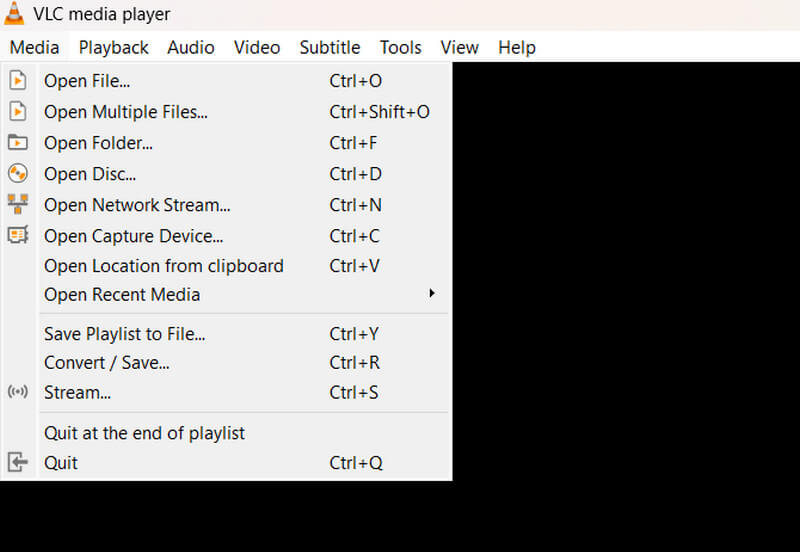
Step 2Click Media in the navigation menu, and click Open Folder. Select the desired BDMV folder to start playing. Then, press the play button. That should be the end of it!
Play BDMV Folder/Files with VLC Using Mobile Device
If you ever need to play a BDMV file on your mobile device, VLC for Android fully adapts the VLC video player to the Android™ platform. It can play video and audio files, network streams, and DVD ISOs, much like the original VLC.
Part 3. Convert BDMV Files to Digital Video with Tipard Blu-ray Converter
Tipard Blu-ray Converter is the best application for converting BDMV files to digital format. It supports over 500 formats to provide users with various options. It is highly recommended for its conversion speed and customization options. It also includes other utilities like the disc ripper and video editing tools. Furthermore, converting your BDMV files to digital video could have a lot of benefits, such as compatibility, accessibility, and even for editing purposes.
Step 1To get the program, click the button below. To begin the installation procedure, double-click the downloaded file. Then, run the application.
FREE DOWNLOAD For Windows 7 or later
Secure DownloadFREE DOWNLOAD For Mac OS X 10.13 or later
Secure DownloadStep 2In the menu, select Load Blu-ray or click the Plus button in the center. Select the Blu-ray file that you wish to rip.
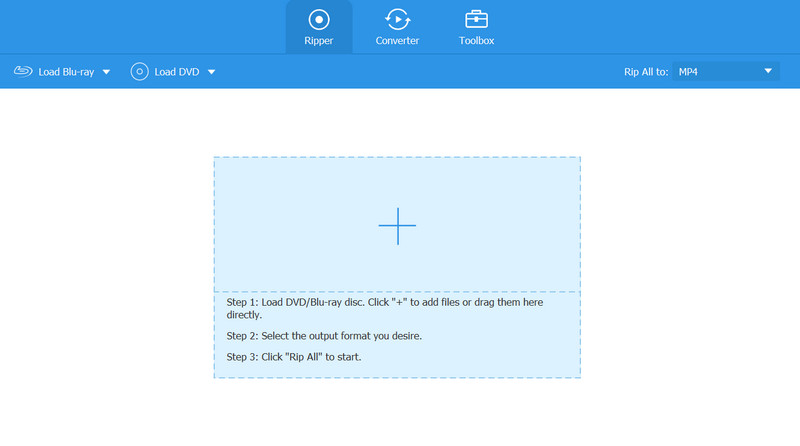
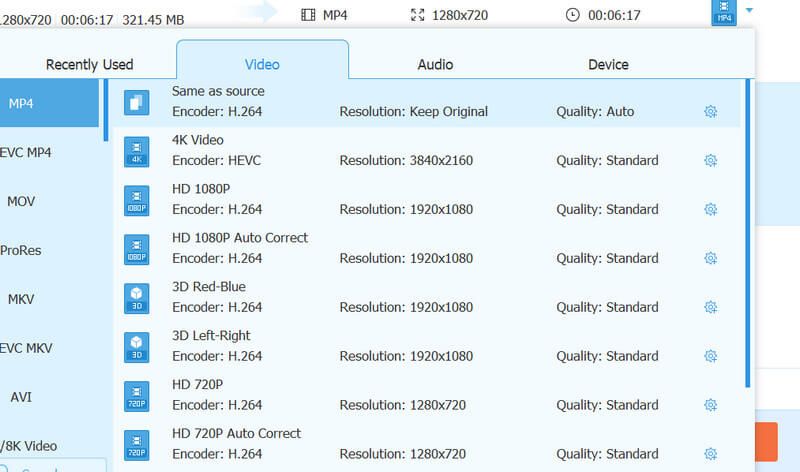
Step 3Click the Format button in the file's upper right corner. Choose your preferred format and modify the codec settings accordingly. When you're finished, click the Rip All button in the lower right corner of the software.
Part 4. FAQs About BDMV Files
What application is capable of playing BDMV files?
Media Players supporting BDMV files include the Tipard Blu-ray Converter, and various Blu-ray-related media players can play BDMV files.
What is the difference between BDMV and Blu-ray?
BDMV is a file format used to record content information on Blu-ray discs, but it does not store video or audio data itself. Blu-ray, on the other hand, refers to the entire disc and its physical medium, encompassing video, audio, menus, BD-LIVE features, and more. Simply put, Blu-ray is the disc itself, while BDMV is the structured file containing the disc's content.
What is the best way to convert MP4 to BDMV?
Tipard Blu-ray Converter can also be used to convert MP4 to BDMV files.
Why do we use BDMV?
BDMV stores high-definition video, audio, and other content on Blu-ray discs.
What exactly is a BDMV file?
The term “BDMV” refers to the Blu-ray information file, which is also called the Blu-ray disc movie information file. Blu-ray discs utilize this file to describe the contents of their directories.
We hope you can learn how to play BDMV files with these recommended programs. If you're still having trouble opening your file, AVAide Blu-ray Player can help you convert it to a digital format like MP4. It is safe and easy to convert BDMV to digital videos for convenient access and to resolve compatibility issues.
Full-featured multimedia player to play Blu-rays, DVDs, 4K UHDs, and other video/audio files.