DVD players are one of the best ways to enjoy your DVD collection and relive the nostalgic charm of entertainment from the past. Since you're here, you probably still have your collection and are wondering which DVD players are the best for playing them. We've got you covered!
Having these players will ensure you can enjoy any region-coded DVDs from around the globe.This comprehensive guide presents the top 6 region-free DVD players and explores the advantages of owning one.
Part 1. Explanation of DVD Regions
Do you have an old DVD player that can't play your new DVD collection? If you think there's something wrong with your DVDs, it might be due to certain restrictions known as DVD Regions. These regions are a form of digital rights management (DRM) designed to control where and when DVDs can be sold and played worldwide.
There are six primary DVD regions, each representing a different geographical area:
• Region 1 - USA, Canada, U.S. Territories
• Region 2 - Japan, Europe, South Africa, Greenland, and the Middle East (including Egypt)
• Region 3 - Southeast Asia (including Hong Kong, South Korea, and Taiwan)
• Region 4 - Australia, New Zealand, Pacific Islands, Central America, Mexico, South America, and the Caribbean
• Region 5 - Eastern Europe (Russia and the former Soviet Union), the Indian subcontinent, Africa, and Mongolia
• Region 6 - China
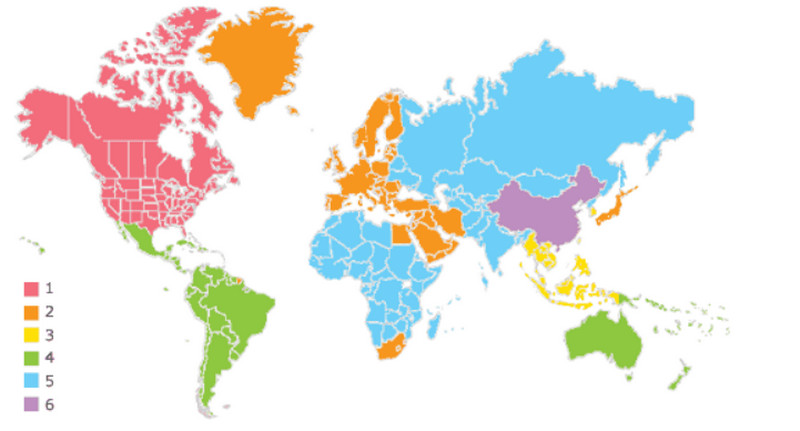
When you first bought your DVD, it was likely encoded with a region code that corresponds to the area where it was sold. For example, a DVD from Region 2 probably won't work in a player purchased in Region 1. If you try to play a DVD from a different region, you'll either see an error message or the disc won't play at all, which can be frustrating when you're simply trying to enjoy a relaxing movie night.
So, why have these codes been developed? DVD regions were put in place by the film industry to monitor film releases in various areas worldwide. As such, studios could stretch out release dates and price variations, thus maximizing their profits and preventing early DVD sales across borders. However, it can also be said that this system limits consumers' access to movies and other content that should normally have been easily accessible.
Part 2. The Difference Between Region-free Hardware and Software Player
Before selecting a hardware or software all-region player, you can first use this table to understand the differences and key features between these two types of players.
| Comparison Dimension | Hardware Region-Free | Software / Firmware Unlock |
| How Region Lock Is Bypassed | Blocks region verification at the hardware level | Alters the region recognition logic at the software level |
| Stability | High, long-term stable | Moderate, may revert to the original region |
| Reversible | Usually not reversible (physical modification) | Can be restored to factory settings |
| Compatibility | Supports nearly all region-coded discs | May have compatibility limitations |
| Firmware Update Impact | Not affected by firmware updates | Firmware updates may relock the device |
| Warranty Impact | May void the manufacturer’s warranty | Usually does not affect the warranty |
| Operation Difficulty | Requires hardware modification or purchasing a pre-modified unit | User can perform via remote codes or firmware flashing |
| Cost | Higher cost | Usually free |
Part 3. Best Region-Free DVD Player
Check out our list of the top six region-free DVD players, including their features, prices, pros, and cons. The list is divided into hardware DVD players and software players.
1. Sony BDP-S1700 Blu-ray Player
This model can play DVDs from any region (0-8) without region restrictions. It also supports PAL ⇄ and NTSC conversion, making DVDs from various parts of the world compatible with different TV standards. Users report that it can automatically switch between DVD region codes. Standard DVDs can be upscaled to 1080p Full HD output via HDMI.

- Pros
- Reliable DVD & Blu-ray playback including multi-region discs.
- Built-in PAL/NTSC conversion for global DVD formats.
- HDMI output with upscaling to 1080p.
- Cons
- May need pre-modification for region-free.
- Not 4K UHD capable.
- Smart features are limited compared to newer 4K players.
2. Panasonic DVD-S700EG-K DVD-Player
This is a dedicated DVD player capable of handling discs from all DVD regions (Region 0-6) and supporting standard DVD video formats. Online comparisons list it among region-free DVD players that play international DVDs without restrictions. It outputs an upscaled video up to 1080p through HDMI, improving picture clarity on modern TVs.

- Pros
- Fully plays Region 0–6 DVDs with PAL/NTSC conversion.
- 1080p upscaling via HDMI improves standard DVD picture quality.
- Good price-to-performance ratio.
- Cons
- No Blu-ray or 4K support
- Basic remote / UI.
3. Philips TAEP200 DVD-Player
This DVD player from Philips is widely recognized as a multi-region/region-free capable DVD player that plays DVDs from all region codes (0–8), including commercial and RCE/REA protected discs sold worldwide. It also has built-in PAL/NTSC conversion, which ensures compatibility with both European and US television standards.

- Pros
- Automatic signal conversion adapts to international TV standards.
- Stable output compatible with various DVD burning formats (DVD-R/RW, etc.).
- Moderate price range with high user ratings, approximately 4.5+.
- Cons
- Does not support Blu-ray / 4K UHD.
- Lacks smart features/network connectivity and other advanced functions.
- Limited proprietary image processing enhancements.
| Evaluation Item | Sony BDP-S1700 | Panasonic DVD-S700EG-K | Philips TAEP200 |
| Release / Model Type | Blu-ray + DVD Player | DVD-Only Player | DVD-Only Player |
| Region-Free DVD Support | Region 0–8 | Region 0–6 | Region 0–8 |
| Blu-ray Support | √ | × | × |
| Additional Media Support | CD, CD-R/RW | MP3, JPEG | MP3, JPEG |
| Region Lock Behavior | Region lock removed when unit is region-free | Region lock disabled | Region lock disabled |
4. AVAide Blu-ray Player
AVAide Blu-ray Player is one of the best media players for playing DVDs. It can play DVDs from any region and supports Blu-rays, ISO files, and popular digital formats such as MP4, AVI, MKV, M2TS, and more. You can customize playlists and adjust playback options for added convenience. Also, it features hardware decoding, ensuring smooth, high-quality images. Additionally, it can easily handle 4K videos. Don't miss out on this incredible software for your next movie night!
Step 1To get the software, simply click the Free Download button below. Double-click the installer you downloaded to install it on your device. Then, run it.

FREE DOWNLOAD For Windows 7 or later
 Secure Download
FREE DOWNLOAD For Mac OS X 10.13 or later
Secure DownloadStep 2Select the Open Disc or Open File button to import the file you wish to play.

Step 3Now, you can personalize the playlist and explore other features. To capture a screenshot, click the Camera button below.

- Pros
- It supports various discs, including DVDs, and formats such as MP4, MP3, AVI, MKV, M2TS, and more.
- It updates regularly for smooth and enhanced features.
- It has adjustable video effects that are available for HD and 4K videos.
- It provides a free trial and offers discounts for both monthly and lifetime access.
- Cons
- Limited features in the free version.
- It has a simple user interface.
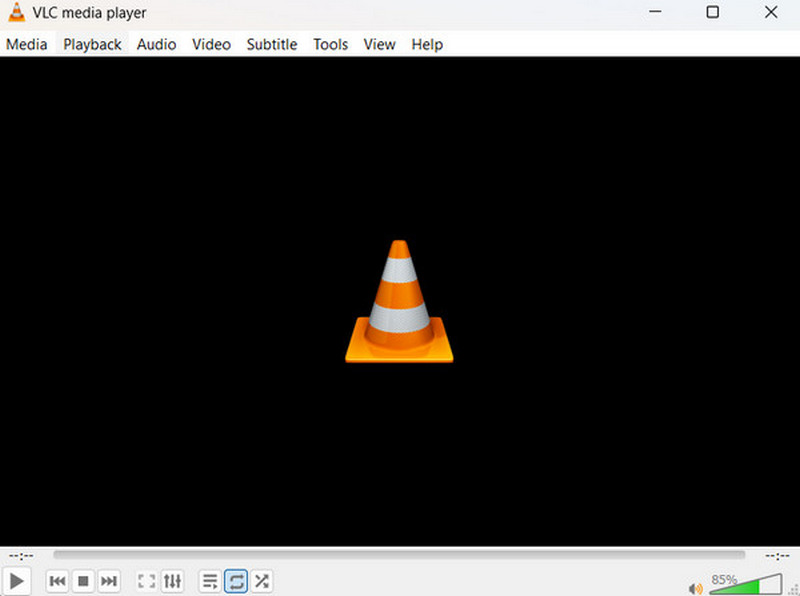
5. VLC Media Player
VLC Media Player is an open-source multimedia player perfect for playing any type of disc, including region-coded DVDs. It's free and highly recommended for users. People appreciate its advanced features, such as video filters, rotation, distortion, deinterlacing, and mirroring. Also, safety isn't a concern, as VLC is a widely trusted player and works perfectly across most operating systems.
- Pros
- It is open-source software and runs on any operating system.
- It supports playing any disc and almost all digital video formats.
- It offers built-in tools like conversion options and is highly customizable with online extensions.
- Cons
- The user interface is basic.
- Navigating through the settings can be challenging for some users.
6. Leawo Free DVD Player
Leawo Free DVD Player is a completely free multimedia player for Windows/Mac platforms that supports playback of region-locked DVDs. It features built-in region-free decoding logic, eliminating the need for additional cracks or plugins. It supports numerous video formats and is compatible with common audio formats like AC-3, DTS, AAC, and more. With its clean interface and stable playback, it's a region-free software player worth trying.

- Pros
- Completely free to use, with no trial restrictions or subscription requirements.
- Built-in region code bypass mechanism supports playback of most international DVDs.
- Supports both Windows and macOS systems.
- Cons
- Limited to DVDs; cannot play region-locked Blu-ray discs.
- Version updates are infrequent, resulting in slightly delayed compatibility with new formats.
- The main interface may contain third-party recommendations or advertising components.
- Lacks advanced playback features such as detail enhancement and HDR support.
Bonus: How to Change DVD Player Region Code
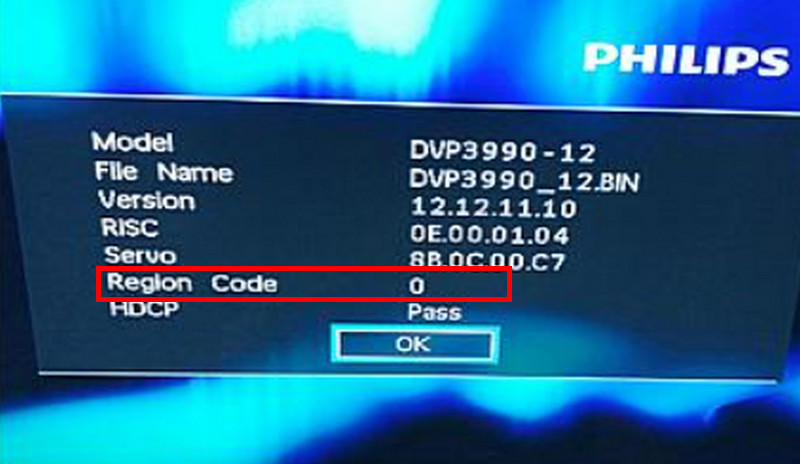
Most standard DVD players don’t have the option to change the region setting. However, some versions of the players enable you to change the region code a limited number of times. If your player has this feature, check the current region code first. Follow the steps below:
Step 1Access your DVD player's settings. Make sure no disc is inserted to easily access the settings menu.
Step 2Look for an option related to the region code. If available, follow the region code map from Part 1 and change the code to your desired region. If possible, set the region code to 0, which makes the player region-free.
We hope you found the best region-free DVD player for your collection. Recent models have rich features that enhance video quality and provide an excellent experience. However, if you're using a PC, your default media player may not support all DVDs, especially region-coded ones. Consider using AVAide Blu-ray Player for a simple and convenient solution to your movie night plans.
ABOUT THE AUTHOR

Full-featured multimedia player to play Blu-rays, DVDs, 4K UHDs, and other video/audio files.