Imagine transferring a massive batch of photos or documents to your computer, only to find their "Date Created" or "Date Modified" fields completely scrambled. Whether it's a backup glitch or a timezone mismatch, incorrect file timestamps can ruin your digital archiving and throw your workflow into chaos.
Fortunately, you don't have to live with the mess. A dedicated file date changer gives you absolute control over your metadata, letting you batch-edit file timestamps with just a few clicks. In this guide, we’ve rounded up the 5 best file date changers for Windows and Mac to help you regain control of your digital organization. Let's dive in!
Part 1. Master Review of 5 Best File Date Changers
This section will present the best file date changer you can rely on. Keep reading to find out how these tools can help you achieve your task!
1. AVAide Video Converter
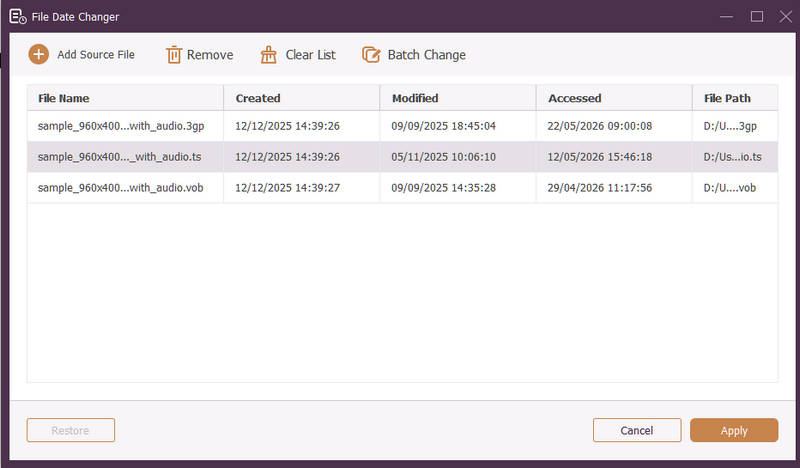
Available for both Windows and Mac, AVAide Video Converter is a versatile platform equipped with a powerful, built-in File Date Changer. This intuitive feature allows you to effortlessly modify comprehensive timestamp details, including creation, modification, and last-accessed dates.
- Seamlessly handle many media formats across video, audio, and images.
- Import and update multiple files simultaneously to save time and streamline your workflow.
- Feature a clean, user-friendly interface for you to change file date quickly.
- Keep your file seamless after date changes.
2. File Date Changer
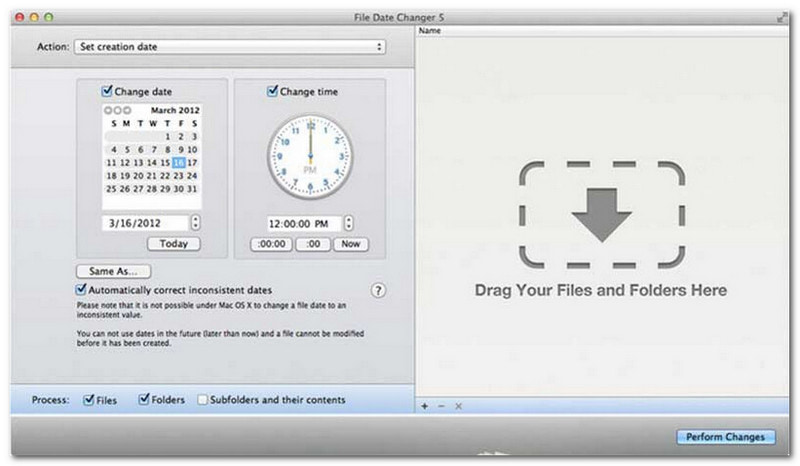
File Date Changer lives up to its name by offering a dedicated solution to change file creation dates. It provides a simple design, making it accessible to users of all levels. It supports modification for both creation and modification dates. Whether you need to change dates for individual files or entire folders, this file date changer on Mac simplifies the process with its efficient functionality.
While the File Date Changer is a paid tool, its value depends on your specific needs regarding cost and functionality. Some users may find its feature set somewhat basic relative to the price point. However, for those prioritizing efficiency and a seamless workflow, it remains a highly reliable and worthwhile investment for a file date changer.
Key Features of File Date Changer:
- Modify the creation, modification, and last-accessed dates and times for multiple files.
- Support adding or subtracting specific days, hours, minutes, or seconds.
- Change file properties like Read-Only or Hidden, and update EXIF metadata.
- The file date changer runs instantly and offer a clear interface.
3. ExifTool
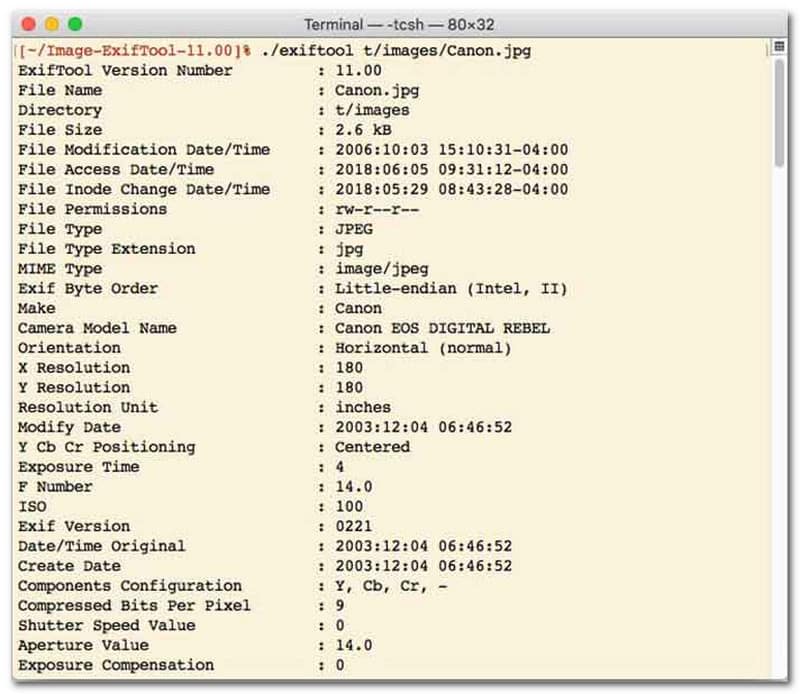
For users who prefer a file date changer with command-line interface (CLI), ExifTool is the gold standard for ultra-precise file management. This exceptionally versatile file date changer tool supports a vast range of file types, including photos, videos, documents, and audio. Beyond simply editing creation and modification dates, ExifTool allows you to seamlessly copy timestamp metadata from one file to another, ensuring your entire media library stays perfectly synchronized without hassle.
Key Features of ExifTool:
- Seamlessly read and modify file-system timestamps.
- Copy dates between completely different layers of metadata.
- Support advanced date and time math to help you change file dates in batches.
- Extract date and media info from all types of files.
4. BulkFileChanger
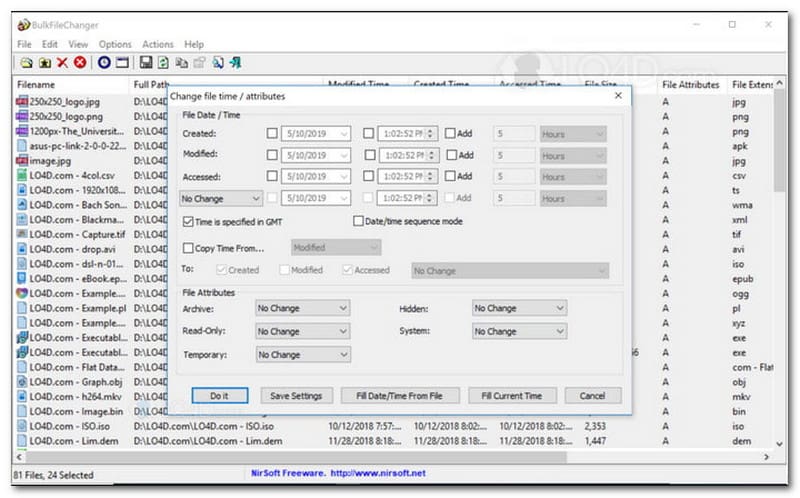
BulkFileChanger is a lightweight, high-performance file date changer utility designed for effortless file timestamp management on Windows. It allows users to quickly modify various date and time attributes, including creation, modification, and last-accessed times, across virtually any file type, from documents and images to videos. While its cross-format versatility and speed make it an excellent file date changer for organizing digital archives, its availability is strictly limited to the Windows operating system, meaning macOS and Linux users will need to look elsewhere.
Key Features of BulkFileChanger:
- Modify file creation, modification, and last-accessed dates.
- Seamlessly handles almost all file types, including documents, images, and videos.
- Feature a lightweight design that allows for ultra-fast, bulk metadata updating.
- Add or extract specific days, hours, minutes, and seconds.
5. AttributeMagic
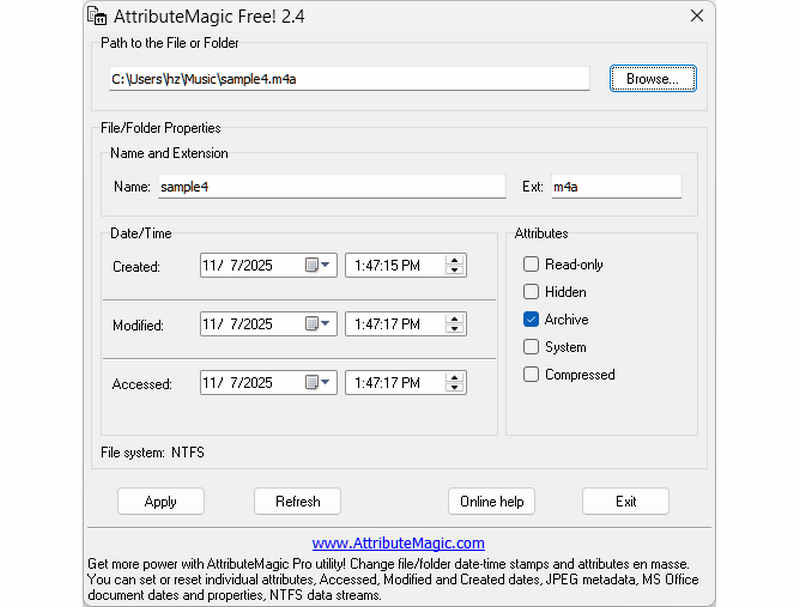
AttributeMagic goes far beyond a simple file date changer by offering an advanced solution for managing both folder and file attributes. This comprehensive utility enables precision timestamp modification, allowing users to effortlessly rewrite creation, modification, and last-accessed dates. Beyond its capabilities as a dedicated file date changer, AttributeMagic provides deep customization over file system properties to suit your specific archiving needs. While the free version delivers essential timestamp editing functionality, upgrading to the premium edition unlocks advanced metadata control and powerful automation features.
Key Features of AttributeMagic:
- Modify or mask creation, modification, and last-accessed timestamps.
- Change file date for both single file or an entire file folder.
- Easily increment, decrement, or shift file timestamps forward or backward.
- set, reset, or invert core file-system attributes such as Read-Only, Hidden, and System.
Part 2. Comparison of the 5 File Date Changers
| Product | Supported Platforms | User Interface | Batch Editing | Extra Capabilities |
| AVAide Video Converter | Windows & macOS | Modern, Clean & Fluid | Yes (Ultra-Fast) | Full Suite: 8K Video Conversion, DVD Ripping, Metadata Editing, MV/Slideshow Creation |
| File Date Changer (NirSoft) | Mac Only | Outdated (Legacy Web/UI) | Limited | None (Single-purpose) |
| ExifTool | Windows, macOS, Linux | Command-Line Only (No GUI) | Yes (Requires complex scripts) | Metadata reading/writing only |
| BulkFileChanger | Windows Only | Classic Windows Utility | Yes | Basic Windows file attribute tweaking |
| AttributeMagic | Windows Only | Rigid / Complex | Yes | File system flag management only |
Part 3. How to Change File Data in AVAide Video Converter
Have you ever needed to change the creation date of a file to organize your digital files better? You can do that using AVAide Video Converter! Keep reading to learn how to change the date created on a file to help you manage your file.
Step 1Download and Install AVAide Video Converter from the official website for complete access.

FREE DOWNLOAD For Windows 7 or later
 Secure Download
FREE DOWNLOAD For Mac OS X 10.13 or later
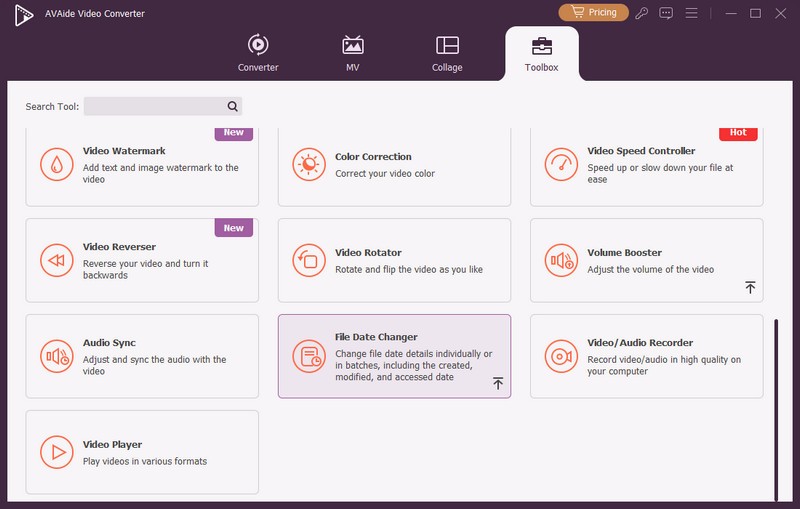
Secure DownloadStep 1Open the program on your computer to get started. Head to the Toolbox tab to access several features. Scroll down your mouse, look for File Date Changer among the options, and click it. It is the feature you will use to change the file date details.
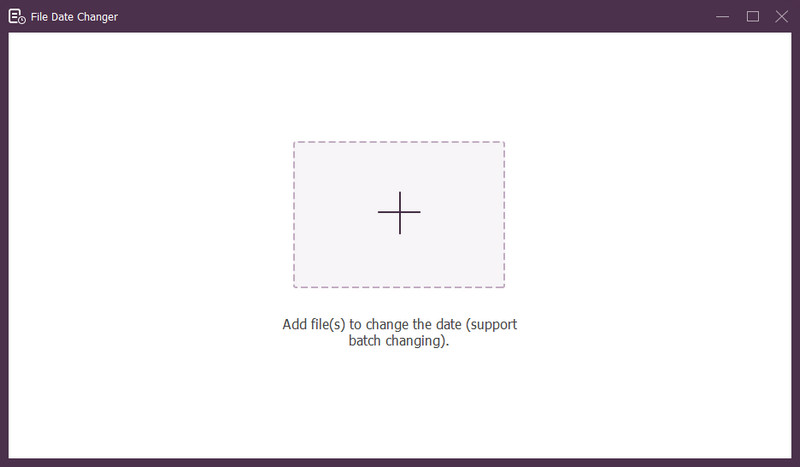
Step 3Press the (+) button to import files. This can be audio, image, and audio files. You can import more than one file to change the file details.
Step 4You can start changing their dates once all files are imported. You can change the created, modified, and accessed dates accordingly. To do that, click the item until the Arrow appears, indicating for edit.
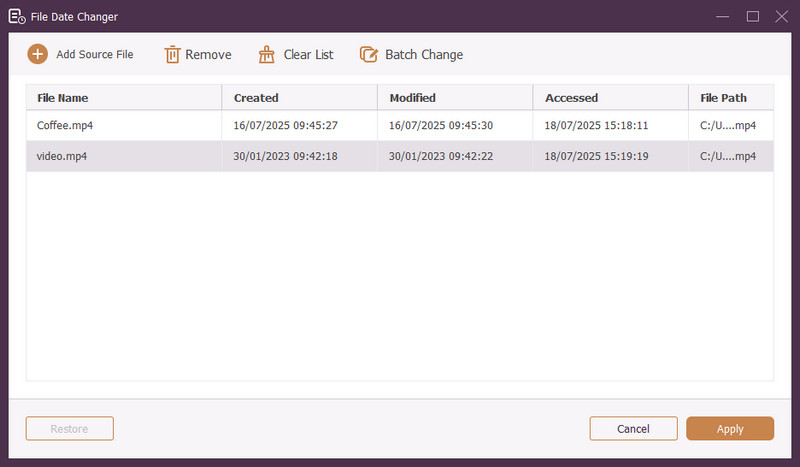
Step 5After editing all the file dates, click the Apply button to confirm the changes. After the changes are applied, review the updated file data details to ensure accuracy.
Part 4. FAQs about Best File Date Changer
How can I view the date information of a file?
If you want to check when a file was created or last modified, you can do it right on your computer. Please find the file, right-click on it, and choose Properties. Then, you can see all the details about the file. These include the creation and modification dates.
Will anyone know when I change the file's date?
No! Changing a file's date would not leave any trace. So, no one will know when you made the change.
What is the reason why dates and times disappear from the file?
There are a few reasons why dates and times might disappear from files. It could happen when you download a file and lose some information due to a poor internet connection. Sometimes, it is because of the website where you downloaded the file.
Can I retrieve the modified creation date of the file?
Yes! You can restore the original date by manually setting it back to its initial value. It is the only way to retrieve the creation date of the file.
Does changing file date and time affect file integrity or content?
No! Changing a file's dates and times would not affect the content or integrity. It only alters the metadata, like creation and modification dates. It leaves the actual file unchanged.
There you have it! You have learned how to change the date created on a file, which can be helpful for various reasons. For a more streamlined and beginner-friendly experience, consider using AVAide Video Converter as your go-to file date changer. It is the best choice for managing your digital files. Try it out and share your thoughts below!
ABOUT THE AUTHOR

The most comprehensive media converter to convert video & audio without quality loss.