Can a DVD player play a Blu-ray? When it comes to home entertainment, one of the questions people ask is whether a regular/standard DVD player can deal with Blu-ray discs. Well, at first glance, both formats are similar. However, the technology behind them is actually different. A Blu-ray disc relies on a blue-violet laser, while a DVD uses a red laser to read data. Plus, a Blu-ray allows a superior image and sound quality. With these fundamental differences, a traditional DVD player cannot play a Blu-ray disc. On the other hand, Blu-ray players were designed to be backward compatible, which means you can play both DVD and Blu-ray. Now, if you are interested in learning more about the discussion, it would be easy to read everything in this article.
Part 1. Can a DVD Player Play Blu-ray
Can you play Blu-ray on a DVD player? Well, a standard DVD player cannot play Blu-ray discs. It is because DVD and Blu-ray are built on different technologies. While DVDs use a red laser to read data stored at a lower density, Blu-ray discs rely on a blue-violet laser. The laser from Blu-ray can read much finer data patterns, allowing for higher resolution video and more storage capacity. With this difference, you can tell that the hardware inside a DVD player simply isn't equipped to interpret the information encoded on a Blu-ray disc. To make it simple, it is too much for the DVD player to handle Blu-ray.
Furthermore, Blu-ray players are designed and created with backward compatibility. It means that they can play both Blu-ray and DVDs. This makes Blu-ray players a more useful and versatile choice for users who like to enjoy older DVD collections while also enjoying the superior quality of Blu-ray movies. If you're considering upgrading your home entertainment system, investing in a Blu-ray player ensures you won't lose access to your existing DVDs while gaining the ability to enjoy high-definition content. Thus, for a smooth Blu-ray playback, using a Blu-ray player is the best solution.
For more insight on why DVD players can't play Blu-ray discs, see more details below.
- Laser Technology Mismatch - A DVD player can only use red lasers to read data from the disc. On the other hand, a Blu-ray requires blue-violet lasers, which are perfect for playing Blu-ray discs.
- Data Density Difference - Compared to DVD, a Blu-ray disc can store data at a higher density.
- Hardware Limitations - DVD players are lacking optical components required to read Blu-ray discs.
- Software Incompatibility - DVD players are designed to deal with DVDs. It is not programmed to decode Blu-ray formats.
- Resolution Support - DVD players can only deal with standard definition, not high-definition Blu-ray content.
Part 2. Differences Between a Blu-ray and a DVD Player
Do you want to learn more about the differences between DVD and Blu-ray players? In that case, you can check the comparison table below. After that, we will also offer a simple explanation to get more information.
| Blu-ray Player | vs. | DVD Player |
| Blue-violet laser (shorter wavelength) | Laser Technology | Red laser (longer wavelength) |
| Reads discs up to 25–50 GB | Storage Capacity | Reads discs up to 4.7–8.5 GB |
| Supports HD (1080p) and 4K Ultra HD | Video Quality | Standard Definition (480p) |
| Advanced formats (Dolby TrueHD, DTS-HD) | Audio Quality | Basic Dolby Digital, DTS |
| Plays both Blu-ray and DVDs | Compatibility | Plays only DVDs |
| Higher data transfer rate | Disc Reading Speed | Lower data transfer rate |
| Often includes HDMI, internet, and USB | Connectivity | Usually limited to composite/HDMI |
| Interactive menus, streaming apps | Extra Features | Basic menus, limited interactivity |
After viewing the comparison table above, you can now see the differences and give a summary. If you are dealing with a DVD, then it would be best to access a DVD player since it can give you various benefits. You can deal with a 4 to 8.5 GB, making it ideal for watching long-form content. It can even offer an excellent audio quality since it is supported by DTS and Dolby Digital. However, you can only watch the video with a lower quality for up to 480p. With that, you need to upscale a DVD and convert it to another format for better playback.
On the other hand, if you want to play both Blu-ray and DVDs, then there is no doubt that a Blu-ray player is the best choice. As you can see, the Blu-ray player can give you a lot of benefits than a DVD player. You can deal with a disc with up to 50 GB, get a higher data transfer rate, can even support a higher video quality for up to 4K. Thus, for a better performance, it would be best to choose a Blu-ray player when playing Blu-ray discs.
Part 3. Alternative Way to Play Blu-ray Disc
Can you play Blu-ray on a regular DVD player? Since you have found out that it is impossible to play Blu-ray on a DVD player for some reason, maybe you wonder what's the best thing to do. Well, for a smoother and better Blu-ray playback, using a Blu-ray player is the wisest choice. However, with so many Blu-ray players available out there, it might be confusing about what to access. Thankfully, we are here to give you the best Blu-ray player. We recommend AVAide Blu-ray Player for dealing with Blu-ray content.
This program is perfect for dealing with Blu-ray discs since it can give you all the features you need for better video playback. Plus, it has an easy-to-understand layout, allowing you to navigate everything without any difficulties. You can even play various files, especially Blu-ray folders and ISO. The best part here is that you can watch a 4K Blu-ray for a satisfying viewing experience. Another good thing here is that you can even insert various videos with different digital formats, such as MP4, WMV, FLV, MOV, AVI, VOB, and more.
If you want to start playing your Blu-ray, you can use the simple instructions below.
Step 1Download and install AVAide Blu-ray Player on your Windows or Mac. After that, run it to begin the procedure.

FREE DOWNLOAD For Windows 7 or later
 Secure Download
FREE DOWNLOAD For Mac OS X 10.13 or later
Secure DownloadStep 2From the main interface, click the Open Disc button to start adding the Blu-ray content from your computer.
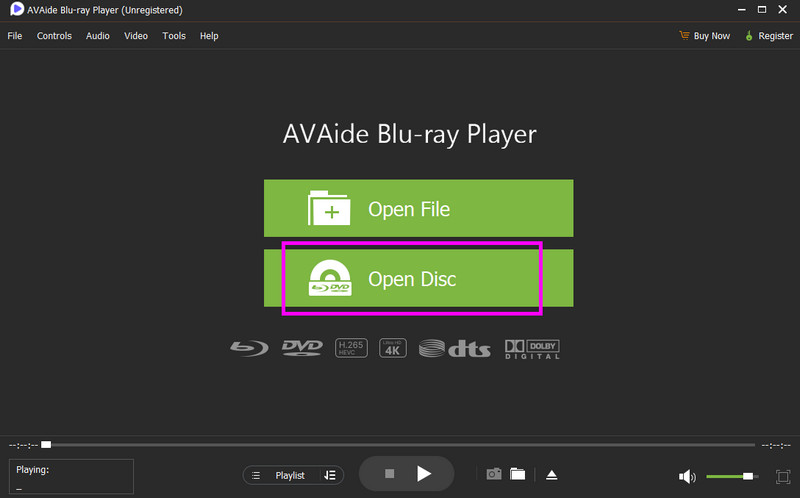
You can even add a 4K Blu-ray since the software is considered one of the best 4K Blu-ray players.
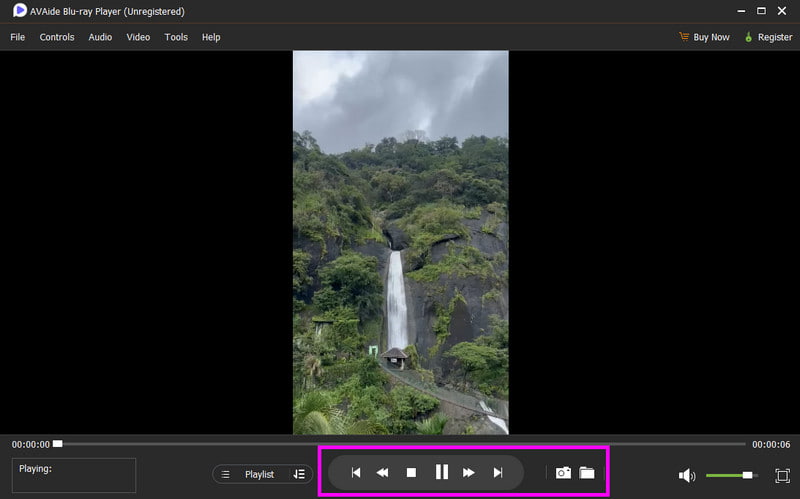
Step 3Now, you can start enjoying the Blu-ray content on your media player. Use all the control playback options to deal with your video.
Can you play Blu-ray on a DVD player? Well, after reading everything in this article, we can tell that you already found your answer. There is no doubt that it is impossible to play Blu-ray on a DVD player for some reasons. With that, to play your Blu-rays perfectly, we suggest using AVAide Blu-ray Player. With this software, you can insert and play your Blu-ray and enjoy the content without encountering any issues, making it the best program for all users.
Full-featured multimedia player to play Blu-rays, DVDs, 4K UHDs, and other video/audio files.