Adding subtitles not in time with your content can be troublesome. Luckily, software like Subtitle Edit can aid you in achieving this task effortlessly. This application is widely used to create and apply subtitles to project videos. In this article, we have conducted an in-depth review of why this app is considered one of the top-tier software to add and edit subtitles.
Part 1: Subtitle Edit Full Review
Subtitle Edit is an open-source subtitle or closed caption editing tool that enables users to create, edit, and sync subtitles on their project videos. It primarily allows users to create subtitle files like SRT, SSA, and ASS. It is favorable for video enthusiasts, novice users, and professionals who need to create, modify, or add subtitles to videos. The app is only compatible with Windows, and you can check and download the versions of the app on its main product page.
1. Features
Subtitle Edit Whisper comes with a plethora of features. One of its features is enabling users to create subtitles in its intuitive interface. The app allows users to access its functions easily in a single facade. All buttons are presented and allocated according to the need and compatibility of each function, which is better for seamless creation of subtitles. It comes with spell-checking and translation features suitable for creating comprehensive texts and translating them into other languages. Subtitle Edit also enables batch processing, allowing users to edit or convert multiple files at once. The app also has an option to preview the changes you have created on subtitles, which enhances your workflow and easily modify editing mistakes. What is more, you can also style your subtitle texts according to your liking. It can bold, italicize, and underline specific texts on your subtitles effortlessly.
2. Price
As an open-source application, Subtitle Edit is a free-to-use program. Downloading its latest version will not cost you a dime. Since it is an open-source software, you can modify and change functionalities within the software itself, allowing you to have a better workflow and speed. Also, regular updates and a strong community ensure ongoing improvements and support.
3. Pros and Cons
- Pros
- It has Google Translate integration and tools for subtitle translation.
- The app supports generating subtitles from audio using speech recognition engines.
- Subtitle Edit automatically creates and generates timecodes.
- It has basic editing functions like cut, copy, trim, and more.
- The app can directly download subtitles from cloud-based services and online databases.
- Cons
- The primary release is for Windows devices only.
- As with most open-source projects, some bugs or crashes may occur, especially with less common formats.
- Subtitle Edit is focused on subtitles; it does not offer video editing tools.
- For some features, you may need to install additional codecs or video players.
- No options to download Subtitle Edit on your computer.
4. User Review
Since the application is a free, open-source subtitle editing software, it does not have a user review on trusted sites such as TrustPilot. These platforms require the platform to be paid for users to be able to add reviews and ratings. Nonetheless, different forums and communities always rate this application. There may not be a definitive number of ratings and legitimacy on the reviews as well, but you can definitely check Reddit, Videohelp, Quora, and other platforms where users of this tool express their sentiments and satisfaction.
Part 2: How to Download and Use Subtitle Edit
In this section, we will be providing you with a sample process on how Subtitle Edit Whisper works and functions.
Step 1Download Subtitle Edit
The first step in creating and editing subtitles on the app is to download the application on your computer. As we mentioned, it is only intended for Windows devices. Go to your web browser and search for the product page of Subtitle Edit. Click on the Discover More button to access the page where you can download its file installer. Run the file to access the main interface of the app.

Step 2Add and Edit Subtitle File
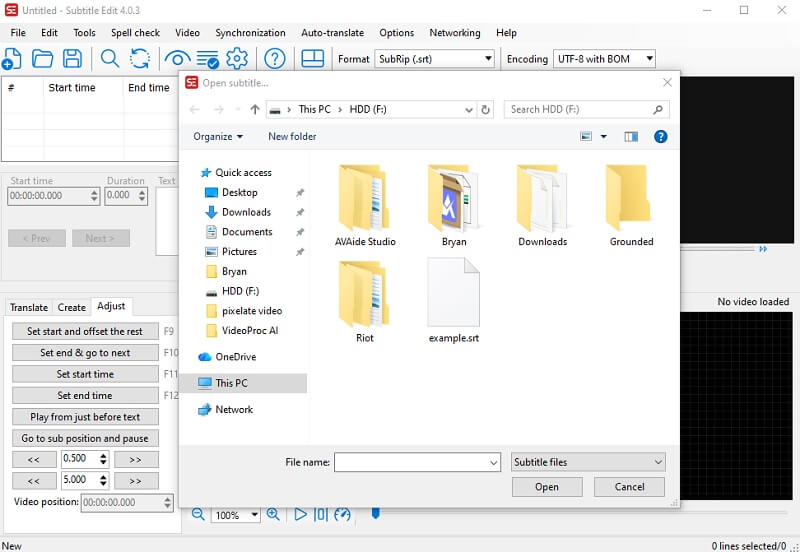
Next, on the interface of the tool, click on the File button and select the Open option to import your subtitle file. Utilize the tool's functionalities and features to modify your file. You can directly edit the text, adjust the duration, and more. You can also use its translate option and its waveform feature.
Step 3Export Edited Subtitle
Finally, once the modification has been completed, you can directly save and export the file. On the main interface, click the File button to access the dropdown menu. Choose the Save button to directly save the changes to the file, or select Save As to export the file as a different version from the source.

Part 3: Subtitle Edit Alternatives for Subtitling
Since Subtitle Edit only works for Windows devices, we have gathered alternatives that you can choose from in case your device is a Mac or a different operating system.
1. AVAide Video Converter
One of the well-known alternatives for Subtitle Edit for Mac and Windows, AVAide Video Converter, is a reliable tool to edit and enhance subtitles for your project videos and clips. It comes with robust features to modify subtitles. The app has a dedicated tab for editing subtitle texts and appearance. You can directly change the position of the subtitle. The opacity can also be adjusted. In addition, you can change the color and outline of the subtitle in different hues and schemes. What is more, you can exactly adjust the synchronization of the subtitle and the font of the text within the application.

FREE DOWNLOAD For Windows 7 or later
 Secure Download
FREE DOWNLOAD For Mac OS X 10.13 or later
Secure Download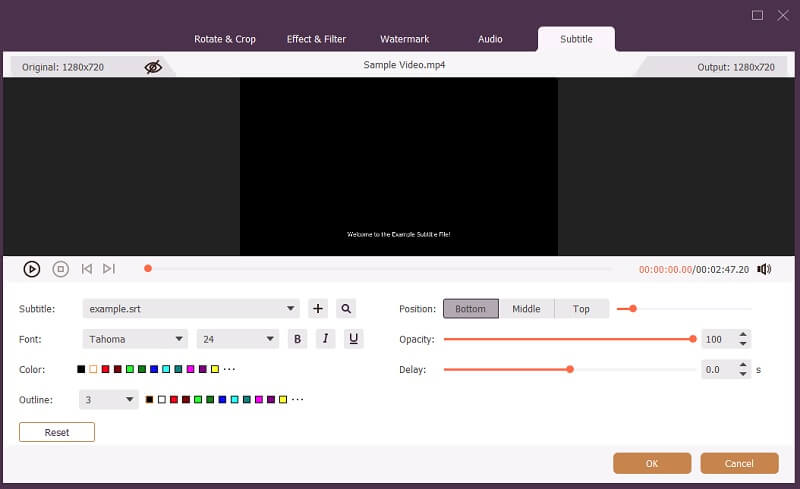
2. EditingTools.io
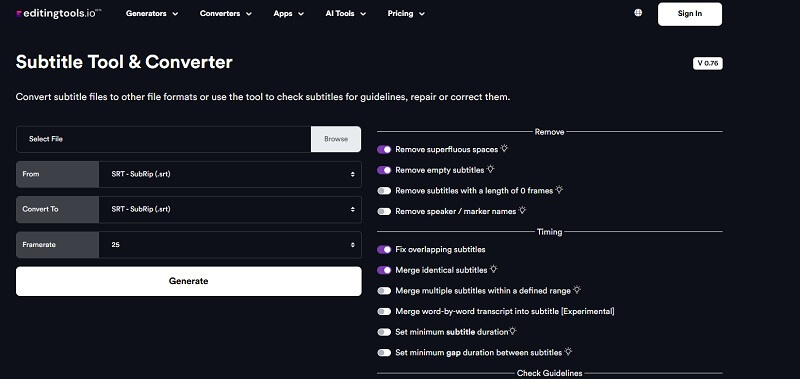
Another Subtitle Edit Mac alternative, EditingTools.io, is a lightweight subtitle editor that provides users with a convenient way to modify subtitle files. It has a set of features that can convert subtitles to different formats. Also, it has well-featured functions to remove, adjust, timing, and encrypt your subtitle files, which can resolve issues like VLC subtitle delay, and more. The interface is intuitive, as you only need to enable each function you want to use and directly generate the new, modified subtitle on your device. It requires you to sign in for an account to use its functions, and its feature to encrypt subtitle files comes with the Pro version for 4 euros per month.
To conclude, Subtitle Edit stands out as a powerful ally for anyone looking to create, edit, or fine-tune subtitles with ease. Its set of features is undeniably useful for many users who need modification for their subtitles. The tool's attention to detail, from precise timing controls to translation support, ensures that your subtitles will be both accurate and viewer-friendly. If you want a reliable, flexible solution for subtitling, Subtitle Edit is definitely worth trying. It's a testament to how open-source software can empower creativity and accessibility for everyone. Moreover, the article provided the alternative that you need in case Subtitle Edit Whisper did not work for you.
Your complete video toolbox that supports 350+ formats for conversion in lossless quality.