Social media and video-sharing websites continue to dominate our digital platforms. Many individuals make this their hobby, main source of income, and passion to pursue. Yet, in a world of digital creation where competition is quite compelling and harder to dominate, many content creators really stand out. Good video content comes with great editing skills. That is the main reason why most of the content creators and social media celebrities have their own video editors and post-production staff. Many of these professionals use various tools to create and edit compelling clips. One of these video editors is VideoProc Vlogger. If you haven't come across this app, this is a great time for you to read our full review of this video editing tool. Read through below to learn how this video editing software provides a set of features for many video-sharing professionals.
Part 1. VideoProc Vlogger Full Review
VideoProc Vlogger is one of the most well-known software programs for editing videos. It was developed and made available last 2006. Back then, it was mostly used for DVD and video enthusiasts who wanted to rip, copy, and convert DVD files. As time goes by, and social media rises, VideoProc Vlogger, shifted to digital files such as videos and audio files. It paved the way for novice users and individuals to have knowledge of video editing to edit videos from the comfort of their computers and laptops. To learn more about this VideoProc Vlogger review, we have analyzed its overall functionalities below.
1. Features
VideoProc Vlogger is a free, beginner-friendly video editing software designed for Windows and Mac users. It offers a wide range of features to streamline the editing process, including a drag-and-drop timeline, multi-track editing, and intuitive controls. The software supports 4K video editing, hardware acceleration for smooth performance, and a broad selection of video, audio, and image formats. Key features include advanced speed ramping, motion effects, keyframe animation, and color grading tools. VideoProc Vlogger also provides a variety of built-in transitions, filters, and title templates to enhance creativity. Audio editing capabilities include an audio editor, audio analysis, and sound effects such as fade-in/out and noise reduction. The software allows for split-screen video creation, green screen, or what they call chroma key, and video stabilization.
2. Price
The VideoProc Vlogger download software is conveniently compatible with Windows and Mac devices, with a free installation process. You can also use and edit within the app for free without the need for a license code or pay for premium services. The app offers a full set of features without worrying about a watermark or restriction on its advanced features. In addition, the app provides support and service for those users who are having issues within the app. Just like its features, this service is free to use anytime users are having glitches within their own VideoProc Vlogger.
3. Pros and Cons
- Pros
- It has a hardware acceleration that provides smoother rendering of videos.
- The app contains a multi-tracking feature that helps users to edit multiple video and audio files.
- It handles a wide range of video and audio formats such as MP4, MOV, AVI, MP3, WAV, AAC, and more.
- The final export does not have a watermark.
- The audio editing tools contain noise reduction and stabilization features.
- It supports video stabilization and editing in green-screen settings.
- Cons
- Not available for Linux and other operating systems.
- No mobile counterpart to edit videos for TikTok, Facebook Reels, and other smaller project videos.
- It has fewer built-in music, videos, footage, and other files that you can incorporate into your videos.
- It can crash sometimes.
- Unable to create computer-generated images and animations.
- It does not have a screen-recording function, unlike other robust video editing tools.
4. User Review
As this tool is a friendly user and the best free movie maker for beginners, the tool received great reviews and recommendations from its users. Suppose you are going to check the TrustPilot rating of this app, which is one of the most reputable and trustworthy review platforms for apps and digital software. The app received 4.1 ratings within the platform with 487 reviews in total. With these comments and ratings, it surely is a reputable app to edit videos and audio files.
Part 2. Make an Easy Video Using VideoProc
In this part, we will be teaching you how to use VideoProc Vlogger to perform simple editing functions. Read through the steps below to learn more about its processes.
Step 1Install VideoProc Vlogger
The first thing you need to learn is to get the app on your computer. Go to your web browser and look for the product page of VideoProc Vlogger. On its web interface, click the Free Download button to download VideoProc Vlogger. Run the file installer to successfully access the tool's interface.
Step 2Upload Your Project Video
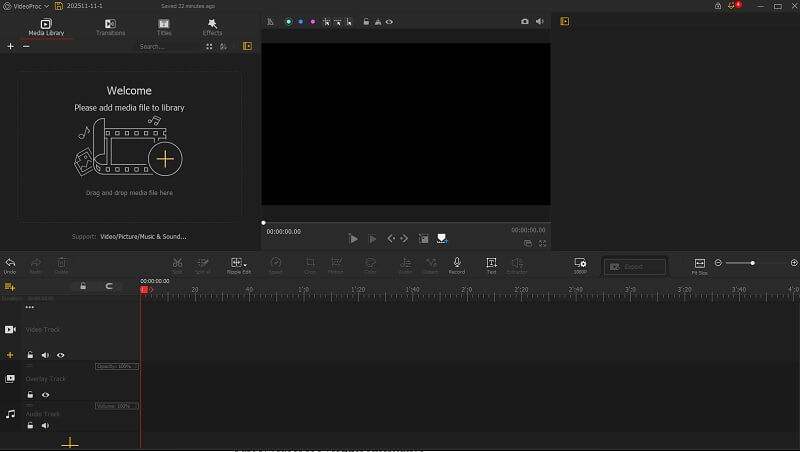
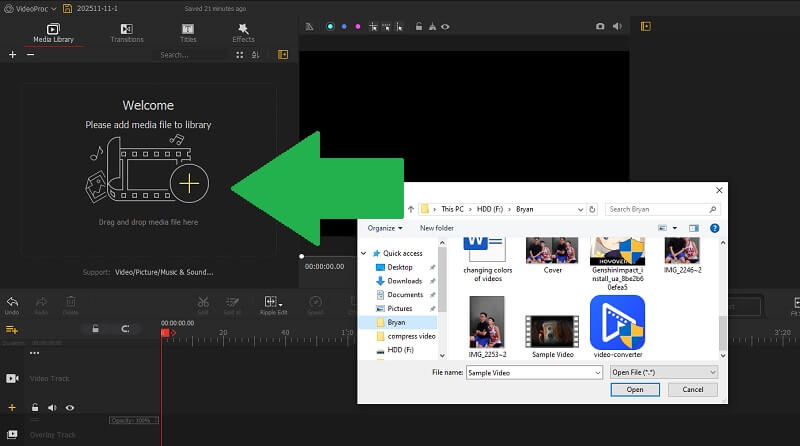
Next, on its interface, there will be a smaller pop-up window which will provide you with a button for Create New Project. Once clicked, it will route you to the tool's timeline panel. Drag-and-drop your video on the Media tab. Afterward, drag the video file into its timeline section, where you can gain access to the overall video parameters.
Step 3Edit Video and Export
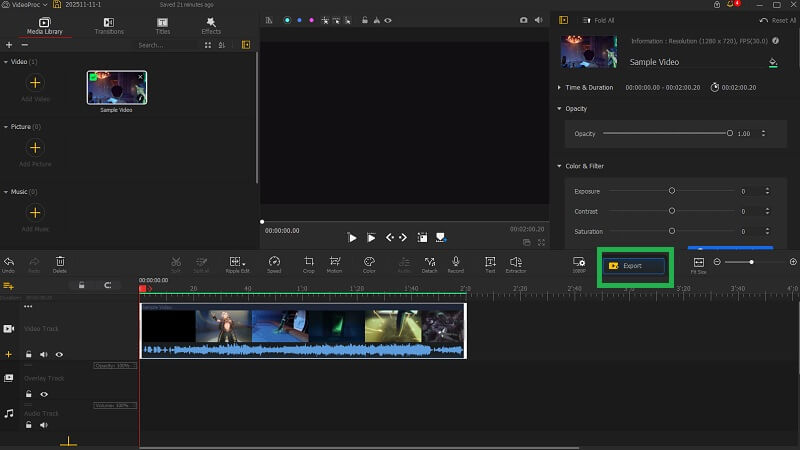
The final step is to access different editing features of the app, you can use the filter, simple crop and trim function, and more. Once you have completed the editing tasks, click the Export button to complete the process.
Part 3. VideoProc Vlogger Alternative
Above are the features, functions, and overall review of VideoProc Vlogger that you need to know. If you are not satisfied with its process or are looking for a companion app that works with VideoProc Vlogger, AVAide Video Converter is the tool you need to have. This application contains functionalities that are lacking in the VideoProc Vlogger app. One of these is extensive video compression and conversion features. This app is a dedicated video converter that transforms videos into different formats with multiple video and audio codecs. Its compression function as well provides an extensive and advanced settings wherein you can reduce the size of your videos precisely. In addition, it has a plethora of advanced features such as GIF maker, media, metadata editor, best 3D movie maker, file data changer, and more that are suitable for your video-editing tasks.

FREE DOWNLOAD For Windows 7 or later
 Secure Download
FREE DOWNLOAD For Mac OS X 10.13 or later
Secure Download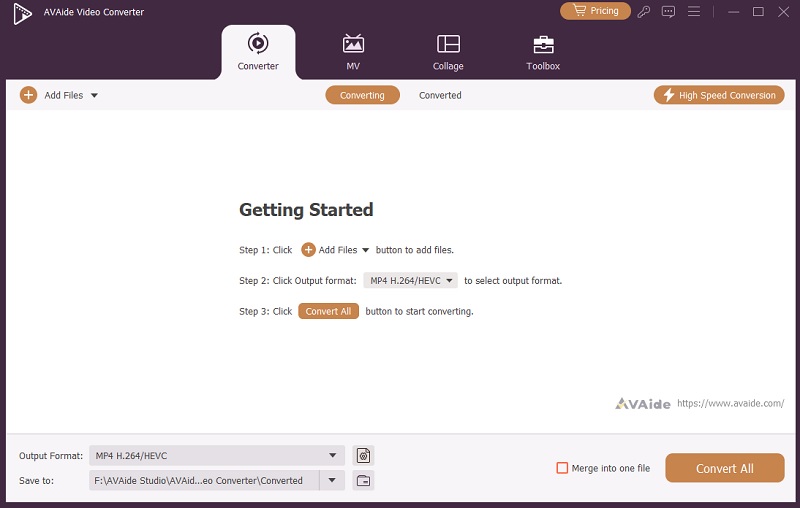
In summary, VideoProc Vlogger stands out as a valuable tool for both aspiring and seasoned content creators who want a no-cost solution for professional video editing. Its user-friendly interface, robust set of features, and free access make it an appealing choice, especially for those just starting their creative journey. While it may lack a few advanced functionalities found in paid or more complex editors, its performance, broad format support, and helpful editing tools are more than enough for most projects. In addition, it is also compatible with other video editing tools that you can use to fill in the gap that VideoProc is currently missing. If you're searching for a reliable way to bring your video ideas to life without breaking the bank, VideoProc Vlogger is definitely worth considering.
Your complete video toolbox that supports 350+ formats for conversion in lossless quality.