It's normal for us to watch videos for hours every day. Courses, lectures, Netflix series... Some of them are worth the time; others are not. We can manage our days better if we can freely speed up the video to save time, or slow it down to see details more clearly. That's why we need video speed controllers.
In this list, we carefully selected the 8 best video speed changers for a wide range of scenarios. Feel free to pick the best one for you.
Part 1. Top 5 Video Speed Controller Browser Extensions
Global Speed
Global Speed is a feature-rich video speed adjuster on various browsers. It's compatible with almost all types of video platforms, including YouTube, Netflix, Spotify, and more. You can set the same speed for all video and audio on the browser with a click on the extension, or set different speeds for different sites using URL rules.
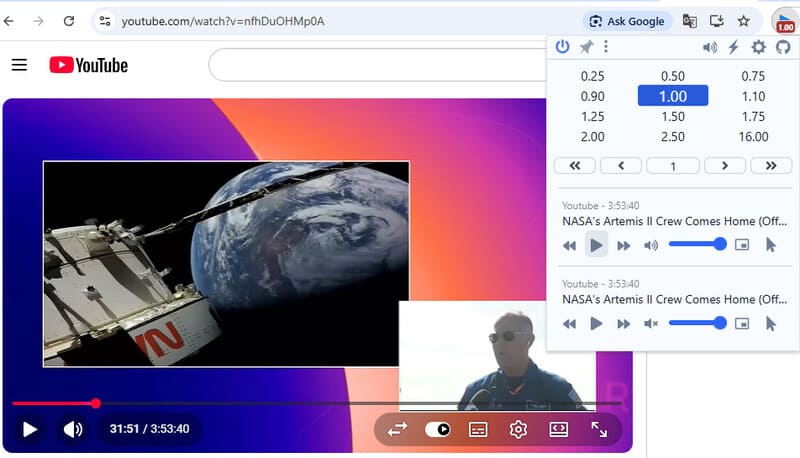
The audio speed control is excellent. Global Speed uses pitch correction to handle sped-up audio, so it sounds realistic. Apart from speed, it can also adjust the video's visual effects, such as contrast, brightness, and grayscale. Its versatility is impressive, but on the other hand, its interface is denser than the others'. If you are a heavy user, it's a perfect all-in-one tool for you; but if not, it may feel like overkill.
Speed Range: 0.25 – 16.00
Supported Browsers: Chrome / Edge / Firefox
- Pros
- A wide range of speeds and supported platforms.
- Excellent audio adjustment.
- Ghost Mode to avoid being detected by the website.
- Supports real-time visual customization and picture-in-picture playing.
- Frequently updates and responds to users.
- Cons
- Interface looks cluttered.
- Doesn't display the changed speed on the video itself.
- May be too much for casual use only.
Super Video Speed Controller
Super Video Speed Controller is a pleasant balance between lightweight and powerful. It offers both automatic presets and manual tweaks: you can either choose from the 12 preset speeds from 0.25 to 16.00, or fine-tune it by 0.01 or 0.05 at each step.
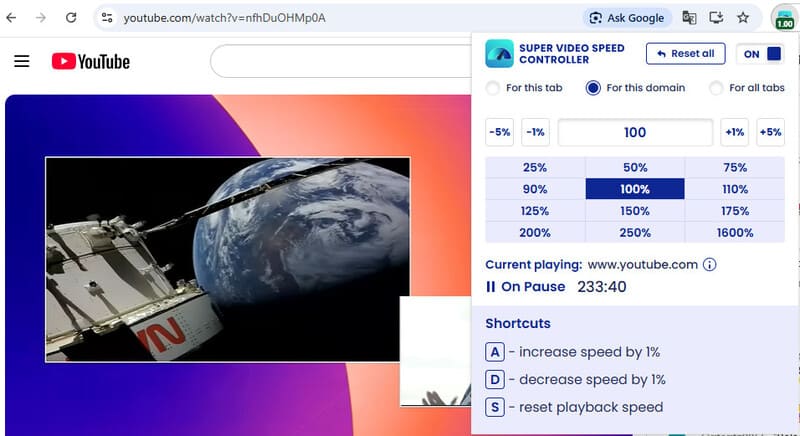
Super Video Speed lets you apply speed changes to a single tab, a specific domain, or all tabs on the window. But it doesn't overlay the change on the video either; you have to click on the extension to see if it's on and what speed is applied to this tab. Plus, the shortcuts for speed adjustment are locked to A, D, and S, which can be annoying when you want to type those letters.
Speed Range: 0.25 – 16.00
Supported Browsers: Chrome / Edge / Firefox
- Pros
- A wide range of target speeds.
- Supports small adjustments up to 0.01 at a step.
- Applies speed changes to selected tabs or all tabs.
- Easy to use with a clean interface.
- Cons
- Shortcuts are frequently used keys and cannot be turned off or changed.
- Doesn't show speed change on videos.
Video Speed Controller by igrigorik
This is probably the most famous Chrome video speed controller extension on the list. By now, it has reached more than 3,000,000 users, and maintains an average rating of 4.5/5 on every extension store. Its stability is well proven. The speed control ranges from 0.5 to 2.5, which is slim but enough for everyday use.
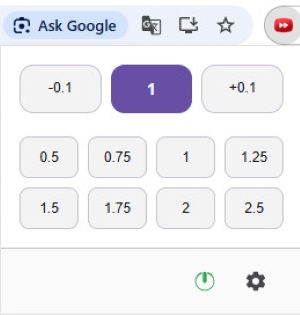
Video Speed Controller is extremely lightweight – there are only buttons for changing speed on the interface, with a switch and a Settings button; nothing else. But during our test in July 2026, the buttons were unresponsive; we could only adjust the speed by pressing keyboard shortcuts. This seems to be a common issue according to recent user reviews. We hope it will be fixed in the near future.
Speed Range: 0.5 – 2.5
Supported Browsers: Chrome / Edge / Firefox
- Pros
- Proven reliability from 3,000,000+ users.
- Lightweight and easy to use.
- There's a workaround to skip ads: keep pressing X to jump forward 10 seconds.
- Displays changes on the video when pressing shortcuts.
- Cons
- Buttons on the workboard are not working currently.
- Update frequency has been slow in recent years.
- No speed memory; you have to reset the speed on every new page.
YouTube Playback Speed Control
YouTube Playback Speed Control is a video speed controller for Chrome and Firefox. It is designed specifically for YouTube videos. It doesn't have a real interface; instead, it appears as a pair of speed-changing buttons in the top-right corner of the video.

You can either click on the buttons or press "+" and "-" to adjust the speed. You can also customize shortcuts, speed change step, display options, and memory options in Settings. As a video speed increaser, it's clean and basic: no bonus features, just speed-up-and-down.
Speed Range: 0.25 – 8.00
Supported Browsers: Chrome / Firefox
- Pros
- Adds small buttons on YouTube videos without blocking anything.
- Features are simple yet effective.
- Cons
- Default shortcuts overlap with the ones for YouTube subtitle size, which can be confusing.
Accelerate for Safari
Accelerate is a powerful and customizable extension for controlling the playback speed of HTML5 videos in Safari. It also offers media controls like pause, mute, skipping, etc. It is functional on many popular platforms, including YouTube, Netflix, Apple TV+, and Prime Video.
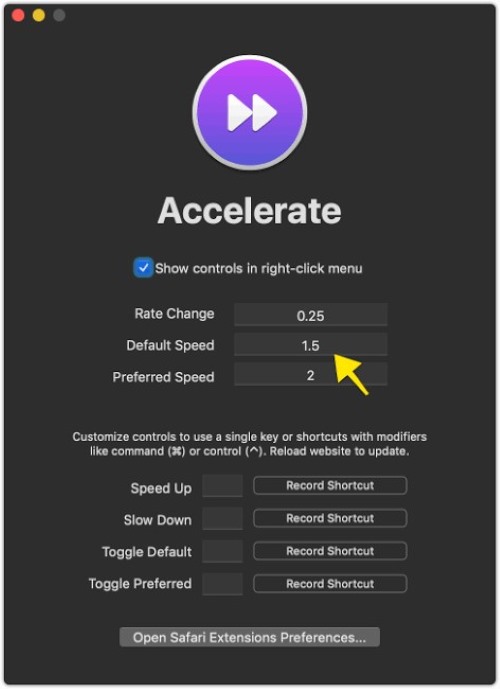
Accelerate lets you speed up videos on iPhone, iPad, and Mac. The mobile version is a bit laggier than the Mac version, but overall it works well.
Speed Range: 0.25 – 8.00
Supported Browsers: Safari
- Pros
- Compatible with a lot of popular video services.
- Supports picture-in-picture and AirPlay.
- Interface is clean and modern.
- Cons
- Sped-up audio feels weird.
- Lacks overlay buttons on videos.
Part 2. Top 3 Video Speed Controllers for Local Video Files
AVAide Video Converter
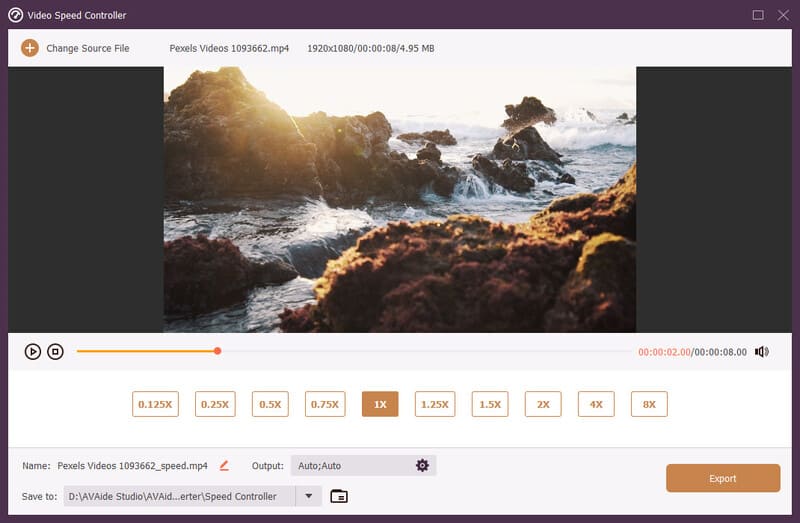
To change video speed on a Mac or PC, try AVAide Video Converter. It's a one-stop toolbox for almost all video editing tasks. It can speed up your videos up to 8× faster, and then export them to your selected location. Additionally, you can crop, trim, cut the video, adjust its resolution, and more. If you want the best video editing tool, you can rely on AVAide Video Converter.

FREE DOWNLOAD For Windows 7 or later
 Secure Download
FREE DOWNLOAD For Mac OS X 10.13 or later
Secure DownloadSpeed Range: 0.125 – 8.00
Supported Browsers: Windows / Mac
- Pros
- A considerable range of target speeds.
- Allows saving sped-up videos to local storage.
- Powerful video-editing tools.
- Supports more than 1000 video formats and up to 8K output quality.
- Cons
- Some advanced features require an upgrade.
VLC Media Player
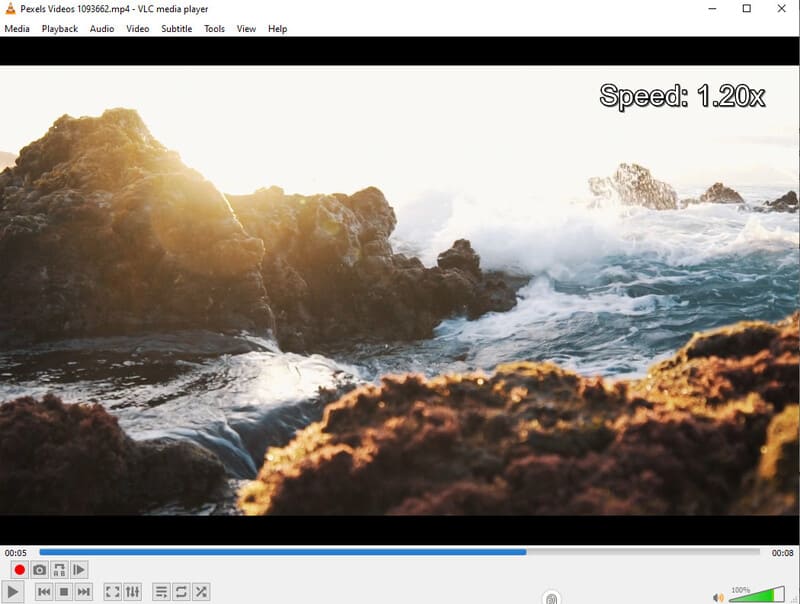
VLC Media Player is an old friend for many of us. When it comes to changing speed during local playback, VLC is a good option. It's easy to adjust speed on VLC using its keyboard shortcuts. What's even better is VLC's compatibility – it works on Windows, Mac, Linux, and mobiles.
Speed Range: 0.03 – 32.00
Supported Browsers: Windows / Linux / iOS / Android
- Pros
- Can play videos extremely fast.
- Works on almost all devices.
- Completely free.
- Cons
- Interface feels dated.
- Some speed control options are buried deep in menus.
- No permanent export.
IINA Media Player

IINA is a free and open-source media player for Mac. Built on the powerful mpv engine, it's an extremely competitive video speed upper – it can reach roughly 100x. But for our daily use, 16x is enough.
IINA uses mpv's audio filters so audio remains natural at different speeds. What's more, it provides a plugin system for advanced users to customize the program at will.
Speed Range: 0.01 – 100.00
Supported Browsers: Mac
- Pros
- An extremely broad speed range.
- Good pitch correction with mpv's audio filters.
- Allows customizations on shortcuts, default speeds, and more.
- Offers a plugin system based on JavaScript.
- Cons
- Available only on Mac.
- Can't export or save videos.
Part 3. How to Choose the Best Video Speed Controller
- Names
- Global Speed
- Super Video Speed Controller
- Video Speed Controller
- YouTube Playback Speed Controller
- Accelerate for Safari
- AVAide Video Converter
- VLC Media Player
- IINA Media Player
| Speed Range | Supported Browsers / OS | Can Save Locally |
| 0.25 – 16.00 | Chrome / Edge / Firefox | No |
| 0.25 – 16.00 | Chrome / Edge / Firefox | No |
| 0.5 – 2.5 | Chrome / Edge / Firefox | No |
| 0.25 – 8.00 | Chrome / Firefox | No |
| 0.25 – 8.00 | Safari | No |
| 0.125 – 8.00 | Windows / Mac | Yes |
| 0.03 – 32.00 | Windows / Linux / iOS / Android | No |
| 0.01 – 100.00 | Mac | No |
For online playback, we would recommend Global Speed and Accelerate, considering their reliability and frequent updates.
For local files, AVAide Video Converter is the best option, for it can not only adjust playback speed, but also edit the video and save the output.
Part 4. FAQs About Video Speed Controllers
Do video speed controllers work on YouTube?
Yes, all the video speed controller extensions above work on YouTube, and the software applications can change the speed of downloaded YouTube videos just fine.
What is the best speed for watching videos faster?
Usually, an acceleration of 1.25 to 2.0 keeps a good balance between speed and quality. The video plays fast without being weird.
Can I permanently save a sped-up video?
Yes. You only need to download the video from the website, then use AVAide Video Converter to speed it up and save to a selected folder on your device.
With video speed controllers, you can skim videos at any speed you want. Adjust online videos with browser extensions, and local video files with AVAide Video Converter or media players. Start saving your time today.
ABOUT THE AUTHOR

Your complete video toolbox that supports 350+ formats for conversion in lossless quality.