Imagine that your favorite song comes to life on the screen, with the lyrics moving in time with each beat. This is made possible by a lyric video maker and transforms music into a visual experience. We will discuss trends in this guide, the idea behind successful videos, and show you step-by-step tricks for creating professional-looking, best-selling lyric material.
Part 1: Popular Styles of Lyric Videos
You should also know what you can do before you begin. If you want to make a lyric video that stands out, choosing the right style is key. All styles can make your song sound in different moods and keep viewers interested. We will discuss the most popular approaches.
1. Kinetic Typography
Words move, bounce, and animate in sync with the music, creating a lively and energetic feel. This style is perfect for upbeat tracks, as it emphasizes rhythm and keeps viewers visually engaged throughout the song. Try this style with a free online lyric video maker.
2. Lyric Overlay on Video
Lyrics are displayed directly on top of video footage, whether it’s live-action clips, performances, or stock visuals. This approach adds context, mood, and storytelling, giving the audience a mini-music-video experience. This is key if you want to know how to create lyric videos effectively.
3. Animated Backgrounds
Dynamic colors, shapes, or abstract patterns shift behind the lyrics, making them stand out while complementing the music. It is an effective style for modern and polished videos without overcrowding the visuals. Perfect for how to make a lyric video on your phone.
4. Handwritten or Sketch Style
The lyrics are written as though a person is writing or drawing them on the spot. It is a personal and artistic style that can be very effective for acoustic, indie, or intimate songs. This is one way to create a lyric video on YouTube without any problems.
5. 3D Lyric Effects
There is popping, spinning, or moving text in three-dimensional space, giving it depth and a cinematic touch. This style makes the lyrics feel immersive, creating a visual effect that provides the song with more energy. In case you want to know how to make a video with music and lyrics.
6. Photo-Based Lyrics
Pair meaningful photos, illustrations, or imagery with lyrics to emphasize emotion or narrative. This style is ideal for storytelling, as it connects visuals to the songs mood or theme. This approach helps you how to make a music video with lyrics.
7. Minimalist Text
A clean font on a simple background lets the lyrics take center stage. This style is distraction-free, professional, and works well for formal, calm, or lyrical songs where simplicity strengthens the focus on the words. You can quickly create a lyric video in this style online.
8. Narrative or Storytelling Style
Lyrics are combined with visuals that follow a story, concept, or theme. It is like a mini music video, offering viewers both a visual and emotional journey that complements the song. Best when you want to create lyric videos that engage viewers.
Part 2: Thought Process Behind Making Lyric Videos
1. Choosing Clips or Visuals
Decide whether to use animated clips, anime samples, stock footage, or original visuals. A playful, artistic atmosphere is created by anime or stylized animations, while a sense of realism is achieved through stock or live-action clips. With an AI lyric video maker, you can automatically create animations and adjust timing and transitions.
2. Font Selection
Fonts present moods and legibility. Sans-serif and bold fonts are effective for fast songs, whereas handwritten or decorated fonts are suited to soft, emotional songs. The font used should be personality-balanced, particularly among the small-screen viewers. Free lyric video maker tools usually include built-in fonts that anyone can easily test.
3. Song and Background Music
The song drives the video, but background music or sound effects enhance it. Ensure any additional audio complements the track and does not overpower the lyrics. Instrumentals or subtle BGM can keep focus on the words. Understanding how to make lyric videos helps in syncing lyrics with both the main song and optional BGM when you add music to a YouTube video.
4. Color and Brightness
Visual tone is critical. High-contrast text is easier to read and brighter, whereas a soft palette creates the mood. Colors must be consistent with the emotional tone and legible. The instructional materials on how to create a lyric video usually recommend experimenting with various color combinations to find the best harmony.
5. Timing and Placement
Every lyric must be in accordance with the rhythm of the song. Key visuals should not be covered, and text should be readable. Think about the distance and the speed of the animation; the audience should have time to process the lyrics without feeling rushed. Automation of specific timing can be achieved with tools such as AI lyric video maker software, though it is safer to ensure that such adjustments are made manually.
6. Video Length and Flow
Remain natural and at your own pace. Make more readable lines out of the longer ones and provide precise movements between phrases. This enhances engagement and retains viewers who follow the lyrics.
7. Consistency and Style Cohesion
Decide on a unified style - fonts, colors, animation patterns, and backgrounds should feel consistent throughout. Consistency helps the video appear polished and professional, whether using a free lyric video maker or paid software.
8. Workflow and Tool Choice
Select the tools based on your level of control and creativity. Others can do either complete customization or automate animations to provide a faster outcome. Novices may start with a make lyric video free tool, which can be upgraded when necessary.
Part 3: How to Make a Lyric Video: Step-by-Step
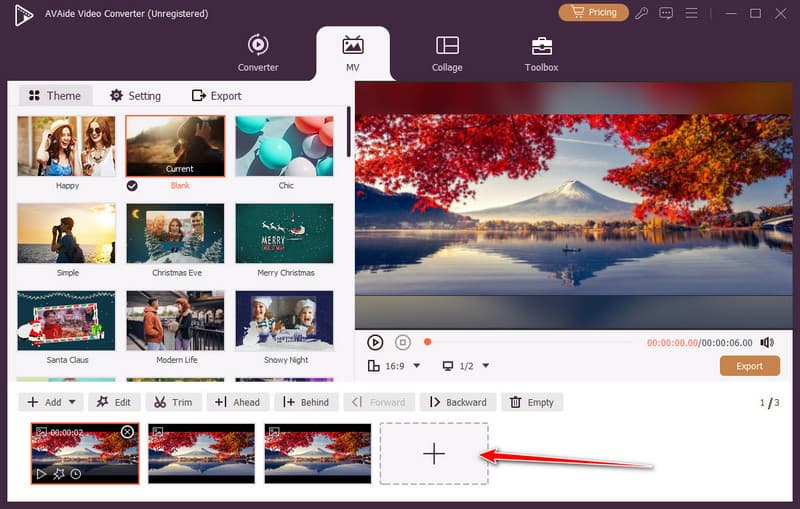
The MV feature in AVAide Video Converter allows one to create a lyric video content with templates and themes, as well as text and music that anyone can customize. You can import clips or pictures, add titles, pair lyrics to audio, and time stuff and font colors and brightness; all in a user-friendly interface. To refine your final product, in-app editing features such as trimming, cropping, and video improvements make it easy and user-friendly to edit, while providing sufficient options to achieve a professional look.
Step 1. Download the AVAide and Use the MV Feature
Press the download button below to get AVAide Video Converter for Windows or Mac. Once the download and installation are complete, launch it and go to the MV.

FREE DOWNLOAD For Windows 7 or later
 Secure Download
FREE DOWNLOAD For Mac OS X 10.13 or later
Secure DownloadStep 2. Upload the Video or Images
When creating a lyric video, each line of lyrics should be assigned to a separate image or clip. Click the + button to upload your files.
Step 3. Add Lyrics to the Video
On each video frame, you see a wand; click it to open the additional editor. Go to the Watermark, and type in the text area the lyrics you want to appear on the video.
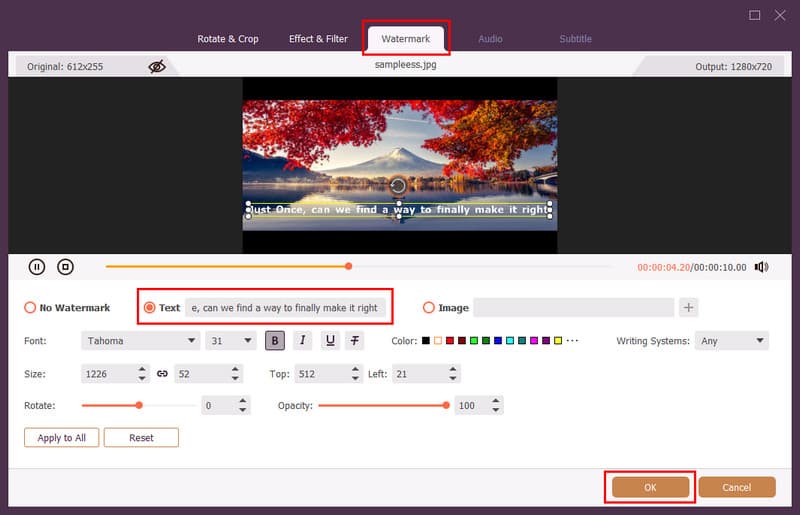
Place the lyrics to the area where you want them to appear, and edit them out using the tools, such as:
- Font size
- Font style
- Text formatting
- Text color
- Text orientation
Repeat the steps for all the videos and images until you complete the lyric video. Do not forget to click OK to save the lyrics you have added.
Step 4. Import the Audio
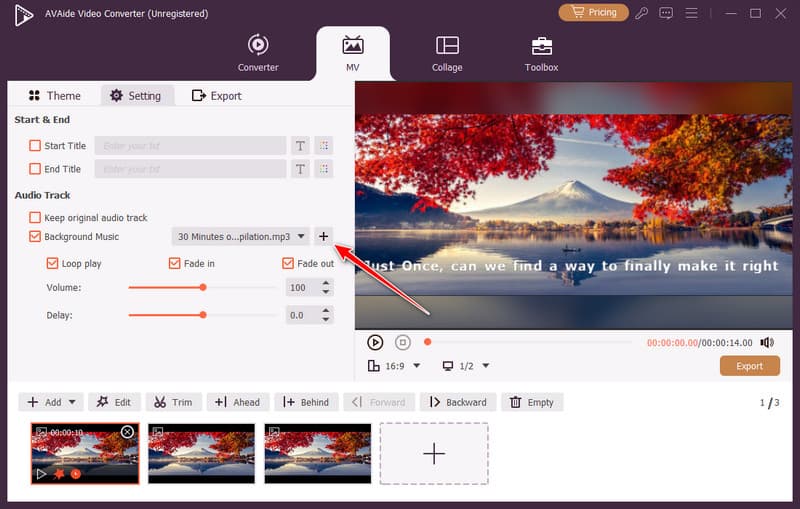
Under settings, you need to upload the music. Then tick the background music > plus button to import the audio file here.
Step 5. Match the Duration of Each Lyric to the Song
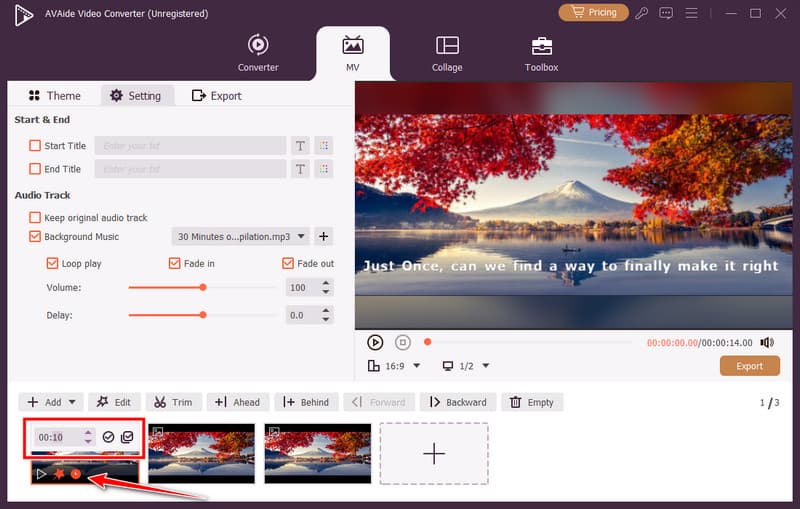
Adjust the duration of each image to match the tempo of the song. This ensures that each lyric appears at the right moment and stays on screen long enough to be read comfortably.
Step 6. Export the Lyrics Video
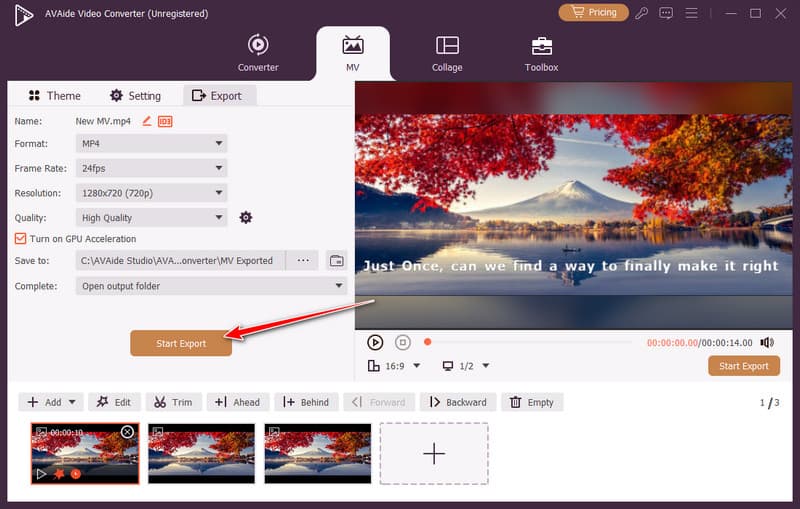
Finally, you can now go to Export, select the format, quality, frame rate, and resolution for the video, then click Start Export to get the final output in no time.
Pro Tips: Manage Copyright & Formats for Your Lyric Videos
Copyright laws should be respected when creating lyric videos. Always use music that you possess or have the right to use, or royalty-free music. For uploaded images or videos, they should be licensed or open source. Moreover, select the video format and resolutions that are supported by your target platform. MP4 is compatible with most of the video-sharing platforms, such as YouTube, Instagram, and TikTok. However, when you have a large video, the MP4 file cannot be shared and will require an MP4 compressor to fix it. The right format choice will avoid playback problems, maintain sound, and make your lyric videos look professional across devices.
To create a lyric video on YouTube, it is easier to plan the style, align the lyrics with the music, and select appropriate visuals. Videomaker tools such as the MV feature of AVAide can assist you in making and editing your video within a short period. By following these steps and using the correct formats, you can create a lyric video for YouTube that looks professional and engages viewers.
ABOUT THE AUTHOR

Create, edit, and convert lyric videos and other clips in 350+ formats with high quality.