Posting videos where you make it feel like a Christmas video is always a trend when the season comes. Many of us come up with plans and skits on how we entertain and enjoy the Christmas season. Whether it is a funny, magical, scary, or wondrous vibe, we always come up with certain or unique ideas. Luckily, creating Christmas videos is no longer a daunting task. We have a plethora of software, apps, and online tools that help us achieve the Christmas video that we need to create. If you haven't gotten one, this article reviews four of the most used apps to create videos most especially with Christmas effects. Read through to learn more about these apps.
Comparison of the Top 4 Christmas Makers
| Solutions | Distinctive Feature | Cons | Pricing |
| AVAide Video Converter | It has a plethora of Christmas-themed layouts for your MV. | It has no mobile version yet to create project videos on mobile devices. | The application is a freemium service, meaning you can use its basic functionalities and its advanced features cost around $39 -$59, depending on your plan. |
| Canva | It comes with royalty-free animation, videos, logos, symbols, and more. | The animated logos are limited, and some have watermarks. | It costs $12.99 for Canva Pro, $14.99 for Canva team to access its full features every month. |
| Animaker | Full AI process | It does not allow you to edit the generated video. | The premium costs around $15 to $43 per month. |
| Mootion | It allows users to set a tone for the generated Christmas video. | Only allows you to create AI-generated videos. | The advanced feature of the online tool is around $12-$20 per month. |
Top 1. Beginner Friendly: AVAide
When it comes to a Christmas video maker, AVAide Video Converter is a well-respected app by many users, as it can get the job done. The application is a one-stop shop for editing, creating, and converting videos. It comes with a reliable video maker setup, which provides you with different functions. One of these features is the timeline panel, where you can upload multiple videos to add to your project video. The application also has plenty of Christmas-themed layouts and other video layouts, such as weddings, and more. It also comes with a media player where you can preview your edited Christmas video to have real-time access to the possible outcome. What is more, the application is equipped with basic editing functions such as trim, applying filters, and other sets of editing functions to create the best Christmas movie.

FREE DOWNLOAD For Windows 7 or later
 Secure Download
FREE DOWNLOAD For Mac OS X 10.13 or later
Secure Download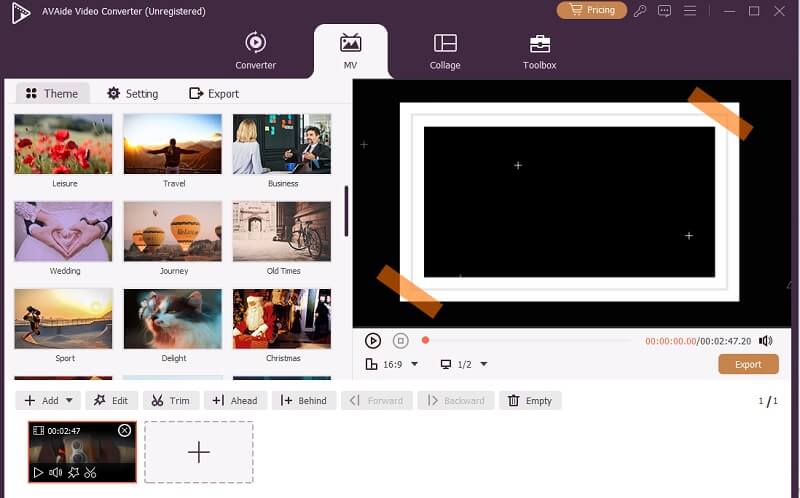
Top 2. Online Tool: Canva
Canva is another Christmas video maker funny, magical, or scary themes. The online tool is well-known for professional users and other professions that are needed to create 2D animations, presentations, logos, and portfolios. It has a set of animated images, GIFs, and even royalty-free videos. Its interface is user-friendly, with a large portion where you can edit your Christmas videos. It utilizes timeline editing panels that you can use to drag-and-drop your videos and edit them with its basic editing features. You can also use and choose from its different layouts for Christmas-themed videos, which will help your workflow. In addition, since it is an online editing tool, you can always access your project videos anytime and anywhere as long as you have a web browser.

Top 3. Free but Limited: Animaker
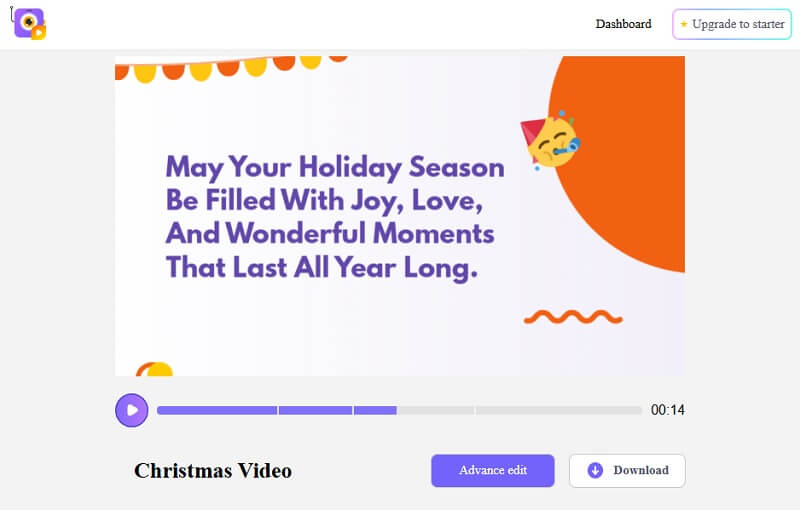
Another solution that can make a video for Christmas is Animaker, a free online tool that you can easily access. The online video editor comes with multiple video presets, which you can use for creating Christmas videos. The best feature it has is its ability to use Artificial Intelligence, or AI, to generate a video for you. You can use its description box to describe the Christmas video that you need to create. The tip that we can provide to you is to be more concise and precise in the generated videos. This will help the AI to automatically generate the content that you need for occasions, such as Christmas, Birthday wishes for girls or boys, and more. You can also use the AI-generated voice listed on the online tool to dub or input voice lines on your Christmas video. Perfect for personalized Christmas video greetings and invitations.
Top 4. AI Paid Tool: Mootion
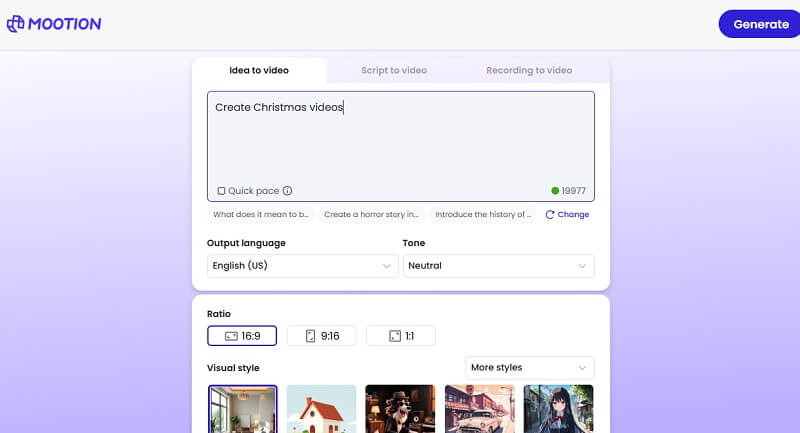
Similar to Animaker, Mootion is an AI online video maker. Claimed to be used by two million content creators, all over 50 countries, this online video maker is loved by many users. The online tool comes with 10 supported languages, so you can definitely greet and create Christmas videos for your international friends and followers. The interface is clean and free of ads. With its one search bar to input text, new users of this platform can definitely create Christmas videos at ease. In addition, it enables you to choose which aspect ratio you should choose for your project video. Also, there are a plethora of video styles you can choose from. Most recommended by users is its Anime style, which creates Christmas videos with Anime subjects and settings. You can also add a script for the video if you want to make it more personalized.
Tips and Ideas About Making a Christmas Video
When it comes to how to make a Christmas video, you may be unique and relatable to your audience or to your viewers. Christmas brings family and people together. Therefore, we listed different creative ideas to help you make engaging and heartfelt Christmas videos.
- • Share a cherished Christmas memory of your childhood. Personal stories make your video relatable and warm, which is the essence of Christmas.
- • If you are a content creator, use Christmas activities for your videos. These include cooking Christmas foods, decorating, gift giving, and wrapping presents.
- • As we all know, Christmas is a season that makes families bond together. Invite loved ones to join your video. They can share wishes, sing, or just wave hello. This adds variety and a sense of togetherness.
- • Christmas is a worldwide tradition. Different countries have unique Christmas traditions. Showcase unique holiday traditions from your family or culture, like dishes, games, or decorations.
- • Background holiday music sets the mood but keeps it soft so your voice shines through.
- • Worry not for fancy editing, as the Christmas video makers mentioned in this article can greatly help you achieve your desired Christmas video content.
Christmas is more than just a holiday; it's a season of joy, togetherness, and cherished traditions. Creating a Christmas video is a wonderful way to capture these moments and share them with friends, family, or your audience around the world. With the right tools and a touch of creativity, anyone can bring their unique holiday stories to life. So whether you're crafting a funny skit, sharing a treasured memory, or simply inviting loved ones to join in the celebration, remember that it's the warmth and authenticity you put into your video that truly makes it special. The Christmas video makers we provided in this article are the most beloved tools that can greatly help you achieve your desired Holiday videos. Grab your camera and enjoy the festive season of Christmas.
Your complete video toolbox that supports 350+ formats for conversion in lossless quality.