Do you want to cut a song for a ringtone, remove extra parts from a recording, or save only your favorite section of music? For that, you need a reliable MP3 cutter. This write-up will focus on the top MP3 cutter tools for desktop and online use. Get to know the best options now without further waiting!
Part 1. Why You Need a Reliable MP3 Cutter in 2026
Anyone who works with music or audio in 2026 should have a dependable MP3 cutter. It lets you shorten songs, create ringtones, and sort recordings with ease. A good cutter also keeps audio quality high, saves time, and lets you adjust files to fit devices or projects. Whether for podcasts, playlists, or personal use, the right tool makes editing fast, simple, and precise.
In the following parts, you will discover the top MP3 cutters for desktop and online, so check them out now!
Part 2. Top 7 MP3 Cutters on Desktop
1. AVAide Video Converter (Windows & Mac)
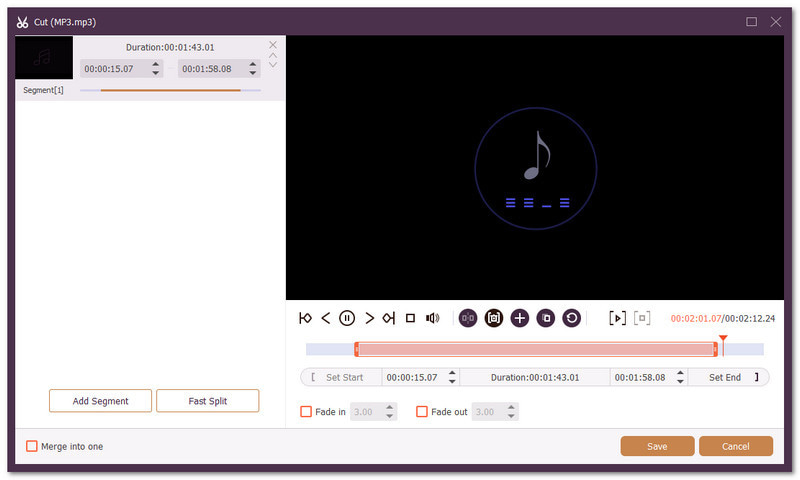
Top MP3 cutters available on Windows and Mac include AVAide Video Converter. This tool lets you easily clip MP3 files by the second, so you can make ringtones or remove unwanted parts immediately.
It also offers audio enhancer tools like volume booster and noise remover, helping your audio sound clear and balanced. You can import and export MP3s with different codecs and adjust parameters like bitrate and sample rate, giving you full control over quality.
- Quickly split audio into segments.
- Add smooth fade-in and fade-out effects.
- Adjust volume levels and set audio delay easily.
- Trim audio by setting start and end points or dragging timeline bars.

 Secure Download
Follow the steps below to cut an MP3 with AVAide Video Converter:
Step 1Get AVAide Video Converter Installed
Download and install AVAide Video Converter. Then, please launch the program after installation.
Step 2Add Your MP3 File
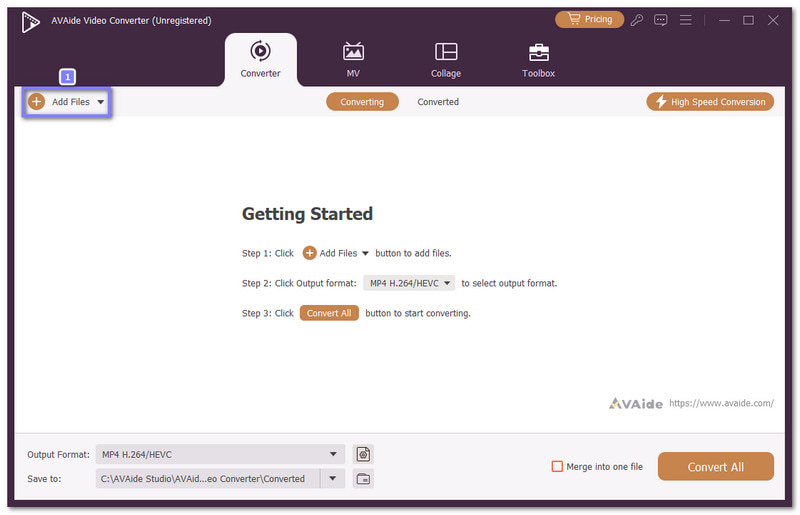
Press the Add Files button in the main interface. Browse your folders, select the MP3 file you want to edit, and press the Open button.
Step 3Cut MP3 File
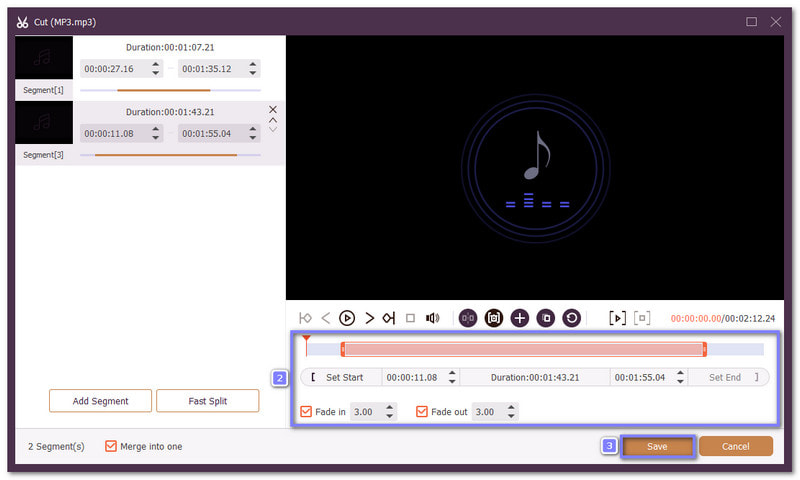
Click the Scissors button to start cutting. Move the sliders on the timeline to choose the part you want to remain. You can also set start and end points manually. The unhighlighted parts will be removed later. Once you are done, click the Save button, and you will be back to the main interface.
Step 4Save Edited MP3
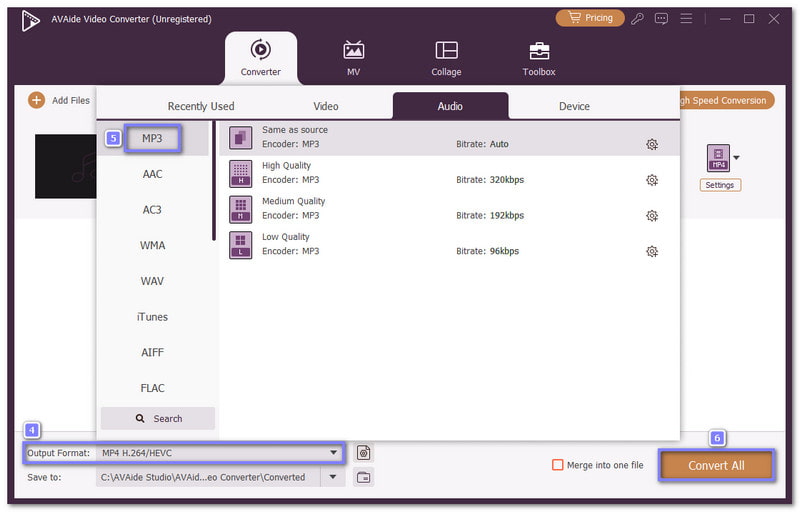
Now, go to the Profile menu, select MP3 as the output format, and fine-tune settings like bitrate and sample rate if needed. Once you are settled, press the Convert All button to save your edited MP3 to your local folder. Now feel free to use it for ringtones, podcasts, playlists, or any other purpose you like.
- Pros
- Simple and easy to use for beginners.
- Combine multiple audio files into one track.
- Import multiple MP3s, edit, and export them together.
- Provides audio tools like a compressor, noise remover, and audio sync.
- Cons
- Free version has limitations; full features require upgrade starting at $39 with a 30-day money-back guarantee.
2. Audacity (Windows, Mac & Linux)
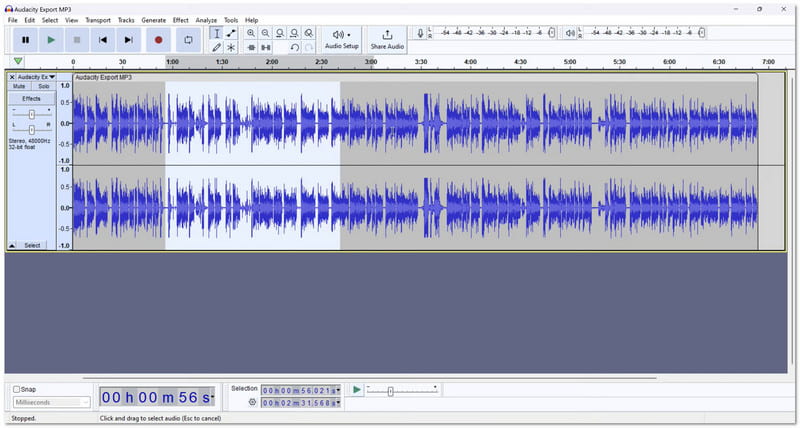
Many users love it because it can record live songs, cut parts of audio, remove noise, and combine tracks easily. This free MP3 cutter program also lets you add effects and use third-party plug-ins. It gives full control with keyboard shortcuts. It is ideal if you want a program that manages lots of tasks.
- Pros
- Apply effects and plug-ins.
- Adjust format and sample rate.
- Record computer audio, trim, and merge audio.
- Cons
- Learning curve for beginners.
- Some effects fail occasionally.
3. mp3DirectCut (Windows & Linux)
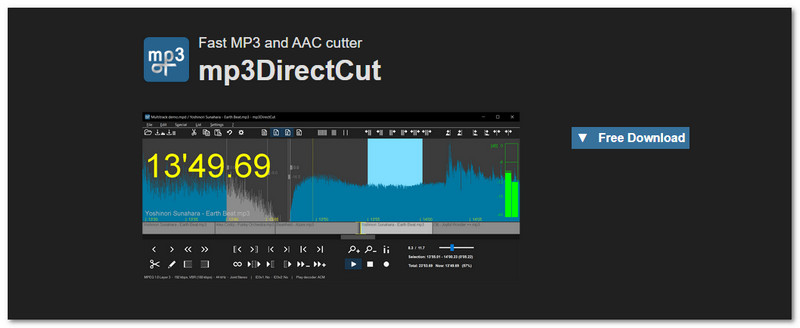
If you need a lossless MP3 cutter, mp3DirectCut is recommended. This MP3 file trimmer works without re-encoding, so audio clarity stays perfect. It can detect pauses automatically and split long files fast. In addition, it supports AAC and can save files in PCM format. The waveform view is basic, so trimming is not precise, but it is handy for fast editing of podcasts or long recordings.
- Pros
- Detect pauses automatically.
- Save space with PCM format.
- Cut MP3 without losing clarity.
- Cons
- Basic waveform view.
- Trimming is not precise.
4. MP3 Toolkit (Windows)
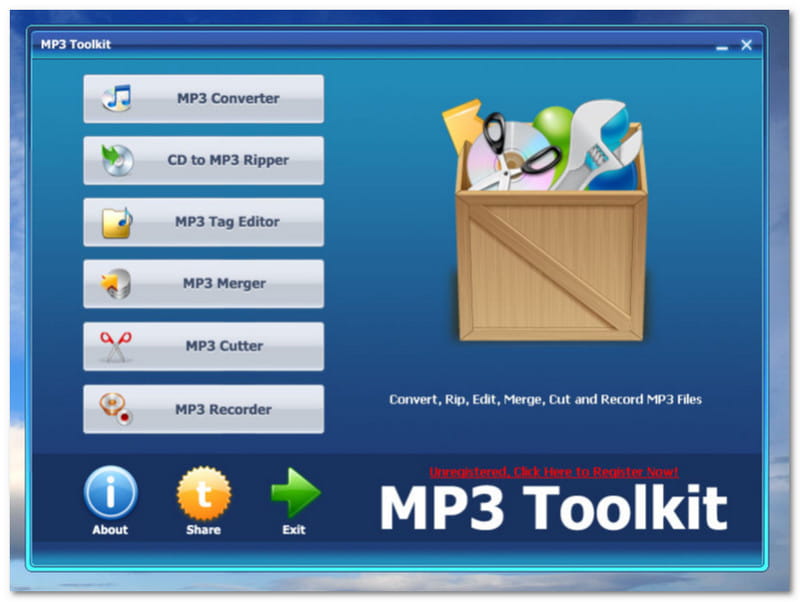
This all-in-one program cuts, merges, records, and converts MP3s easily. Plus, it supports many formats, including MP4, FLAC, and WAV. It is perfect for making ringtones or combining audio clips. Beginners get tutorials and guidance. You can do almost everything audio-related in one tool, which saves time and space on your computer.
- Pros
- Rip CDs and edit tags.
- Supports many formats.
- Cut, merge, record, and convert audio.
- Cons
- Windows only.
- The interface may feel busy.
5. Weeny Free Audio Cutter (Windows)
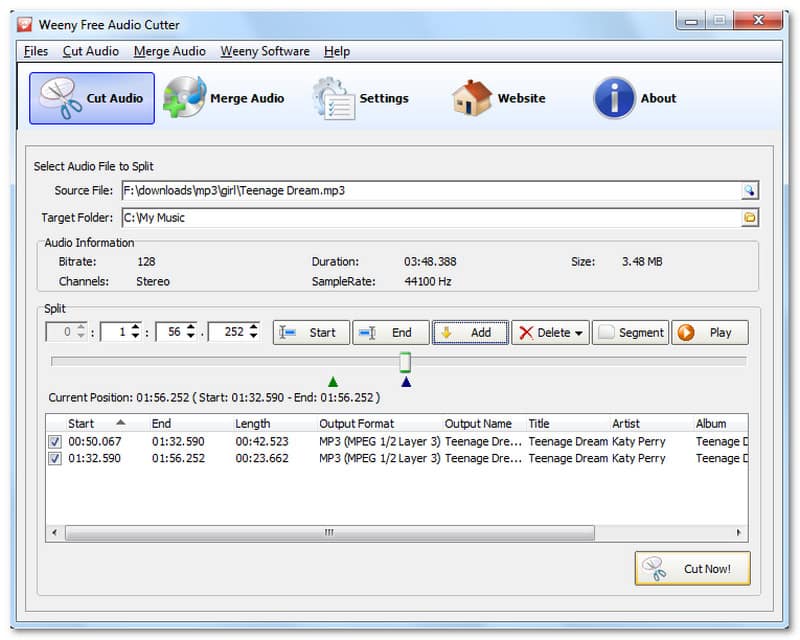
Weeny Free Audio Cutter is a simple and easy free MP3 trimmer and merger. It lets you pick cut points manually or split files into equal pieces. You can also merge many files into one. It works well for ringtones or organizing long recordings. Unfortunately, it cannot handle DRM-protected WMA files. But it is reliable for normal audio files.
- Pros
- Easy cut and merge.
- Clean and simple interface.
- Supports common audio formats.
- Cons
- Limited advanced features.
- Cannot edit DRM-protected WMA.
6. WavePad Audio File Splitter (Windows & Mac)
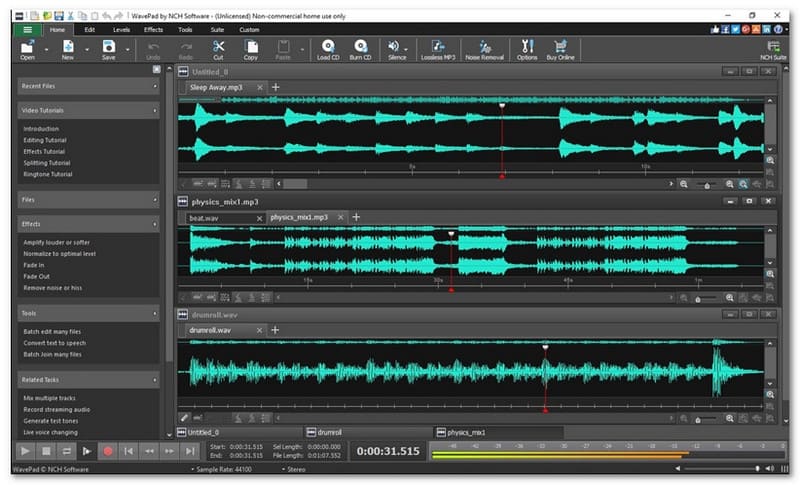
This program is smart and flexible for splitting large audio files. You can slice files by number, duration, or silence detection. It works with MP3, WAV, FLAC, and more. Drag-and-drop makes it easy to add files. It is perfect for splitting long recordings or CDs into smaller tracks. You can start fast and see results in minutes.
- Pros
- Batch processing supported.
- Easy drag-and-drop interface.
- Split by length, number, or silence.
- Cons
- Non-commercial only.
- The free version lacks some effects.
7. TwistedWave (Mac)
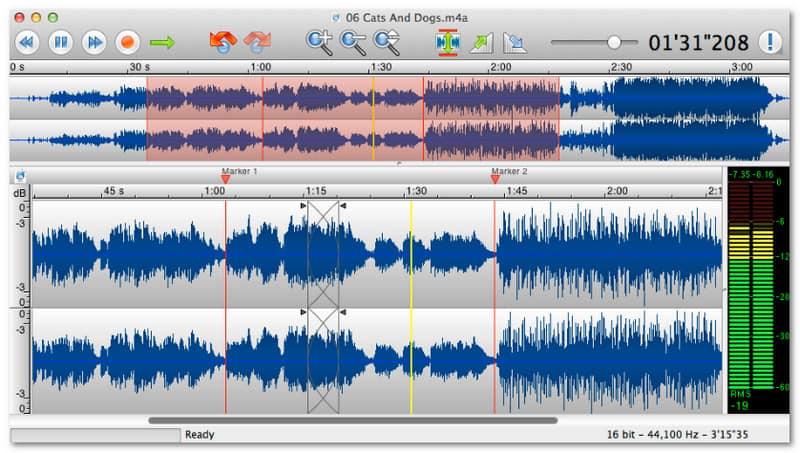
Known for its clean design and precise trimming, TwistedWave is a reliable MP3 audio cutter. It works well on Mac and allows zooming in on waveforms for exact cuts. You can normalize volume and apply basic effects. Batch processing helps with many files at once. It is simple, effective, and good for users who want accuracy without a complex program.
- Pros
- Supports cloud storage.
- Simple and clear interface.
- Precise waveform trimming.
- Cons
- It is a paid program.
- Lacks advanced mixing tools.
Part 3. Top 3 MP3 Cutters Free Online
1. 123APPS: Audio Cutter
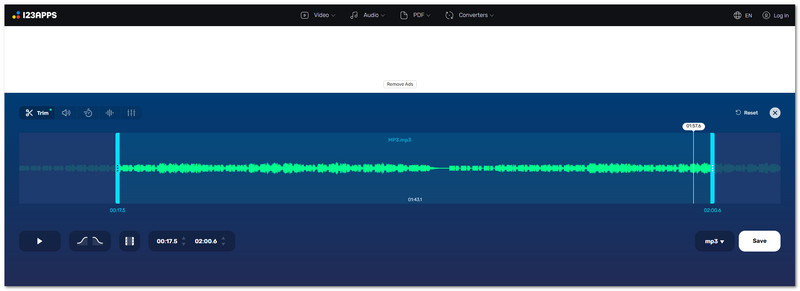
This online platform is known for being simple and fast. Just upload your audio and drag the sliders to cut the part you want. It works as an easy MP3 cutter online and can make smooth fade-in and fade-out effects. You can even turn your cut audio into a ringtone for your iPhone. With support for over 300 formats, 123APPS is really flexible. Beginners can use it in a few clicks.
- Pros
- Supports over 300 formats.
- Fade in and fade out effects.
- No program installation needed.
- Cons
- Internet connection required.
- Limited advanced editing tools.
2. VEED: MP3 Cutter
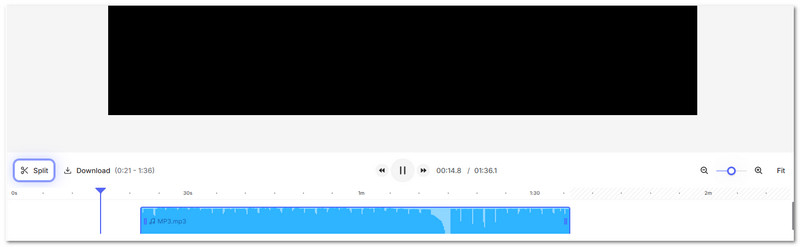
Unlike 123APPS, VEED: MP3 Cutter focuses on online timeline editing. You can upload your MP3 and cut it in a few clicks using this MP3 trimmer online. It also lets you split, trim, and merge audio files easily. In addition, it cleans up audio automatically, making voices clear and louder.
- Pros
- Cut, split, and merge online.
- Clean up noisy audio automatically.
- Drag and drop clips on the timeline.
- Cons
- The free version has limits on export quality.
- Some advanced features require a subscription.
3. Clideo: Audio Cutter Online
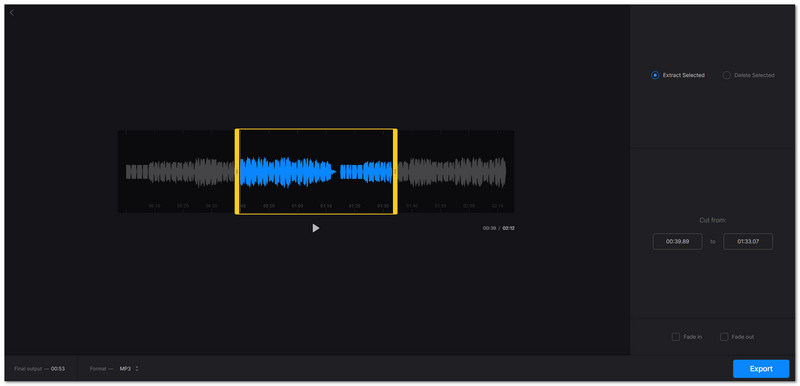
You can trim MP3 files or other formats like WAV, WMA, and OGG using this MP3 cutter online free tool. It can also fade in and fade out music. Everything is done in your browser, so no program is needed. Files stay high quality after cutting. Clideo works on any device and protects your audio from others. It is perfect for beginners who want safe and fast results.
- Pros
- Keeps audio quality high.
- Works on any device online.
- Fade in and fade out supported.
- Cons
- Advanced editing is limited.
- Needs an internet connection.
Part 4. Comparison of the 10 MP3 Cutters
Below is a comparison of the 10 MP3 audio cutters. It shows their platforms, main strengths, formats, extra features, and ease of use. It helps you quickly see which tool fits your needs best!
| Tool | Ease of Use | Main Strengths | Extra Features | Formats Supported | Platform |
|---|---|---|---|---|---|
| AVAide Video Converter | easy | Clip by second, merge, and enhance audio | Compressor, noise remover, volume adjust, delay | MP3, WAV, AAC, more | Windows & Mac |
| Audacity | Medium | Advanced editing, effects | Record, plug-ins, noise removal | MP3, WAV, OGG, more | Windows, Mac, Linux |
| mp3DirectCut | Medium | Fast, lossless cutting | Pause detection, auto cue | MP3, AAC | Windows, Linux |
AVAide Video Converter vs. Online Tools
While online cutters like 123APPS, VEED, and Clideo are fast, they need the internet and have file limits.
AVAide Video Converter works offline, handles large files, and supports multiple formats. More than that, it offers tools like a compressor, noise remover, and volume control. It also lets you merge or split audio precisely.
For frequent or serious editing, AVAide Video Converter provides more speed, control, and flexibility than online tools.
Which MP3 cutter online or offline tool caught your attention the most? Let us know in the comment section!
If you are still undecided, AVAide Video Converter is a strong choice, especially for desktop users. It is easy to use, works smoothly, and gives you more control over your audio. Try it and explore what it can do for your files!
ABOUT THE AUTHOR

Your complete video toolbox that supports 350+ formats for conversion in lossless quality.