Are you planning on creating an excellent and engaging tutorial video? Well, there are various factors you must consider when creating one. It includes the video topic, a script, an outline, an editor, and more. Thankfully, this article will assist you on how to create the best tutorial videos you can share on various platforms. You will also learn how to record your tutorial and enhance it for better video playback. Without further ado, come to this post and discover everything, especially on how to make a tutorial video.
Part 1. Brainstorm Your Video Topic
When creating a tutorial video, the first thing you have to consider is your video topic. You must first brainstorm on what kind of topic and information you will impart to your target audience. With that, you know what materials and contents you will include in your masterpiece. In addition to that, the benefits of brainstorming your video topic are that you will get the main foundation of your content, which lets you know the first to the last part of your tutorial video.
Part 2. Create Your Outline
After knowing your main video topic, the next thing you must do is to create an outline. Well, creating an outline is the most crucial part when making a tutorial video. It is because it is considered a blueprint that transforms a vague idea into a well-structured, effective tutorial video. There are more things you can get when outlining, such as:
Clarifies Your Own Thinking
The method of outlining enables you to structure the information logically. You have to answer the questions like "What is the video all about?" and "What are the main objectives of the tutorial video?" The good part of outlining is that you will have a guide that lets you realize that you might have skipped a crucial step in your content.
Save More Time
A good outline can prevent rambling. You can have an efficient recording session during the process. The best part here is that the editing procedure will become easier since the footage is already well-arranged.
Ensures Accuracy and Completeness
The outline will serve as your checklist. It will tell you whether you have covered all the single points you want to include in your video. In this way, you won't leave gaps in the instructions.
Thus, when creating the best tutorial video, it is better to create an outline for well-structured and neat content.
Part 3. Write a Script
Once you are done creating your outline, the next step you must take is to write your script. Creating a script is perfect if you want to have a smooth recording process. The script will tell you what to say and how you say it. It will also force you to find the clearest and most concise way to phrase each point. With the help of a script, you can deliver the message professionally.
In addition to that, recording your video with a script is faster. You don't have to think on the spot about what to say, which can mess up your recording. You can speak continuously and just focus on how you will deliver the message that can attract your viewers.
Part 4. Start Recording Your Tutorial Video
Once you are done thinking about your topic, creating an outline and script, the next thing you can do is start the recording process. So, if you are looking for an excellent screen recorder, the best tool we can recommend is AVAide Screen Recorder. With the help of this software, you can ensure that you can record everything during the process. You can even open your camera to insert your own face on your screen, making it the best program for creating tutorials. The best part here is that you can navigate all the functions easily, thanks to its clean and comprehensive user interface.
What's more, you can use various annotation tools, such as lines, pencils, arrows, and more. You can even ensure that both your video and audio are in sync. Therefore, if you need a reliable screen recorder, look no further than AVAide Screen Recorder.
You can use the instructions below and learn how to create a tutorial video by recording your screen.
Step 1Download AVAide Screen Recorder on your computer. Then, install and run it to start the recording process.

FREE DOWNLOAD For Windows 7 or later
 Secure Download
FREE DOWNLOAD For Mac OS X 10.13 or later
Secure DownloadStep 2From the main interface, click the Full or Custom option to choose how you want to record your screen. Then, you can also turn on the Camera if you want to include your face on your screen.
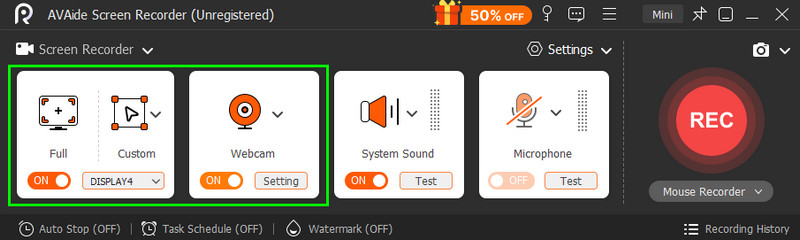
Ensure that the System Sound is also turned on.
Step 3To start the recording process, tap the REC button. After the three-second countdown, the official recording procedure will begin.
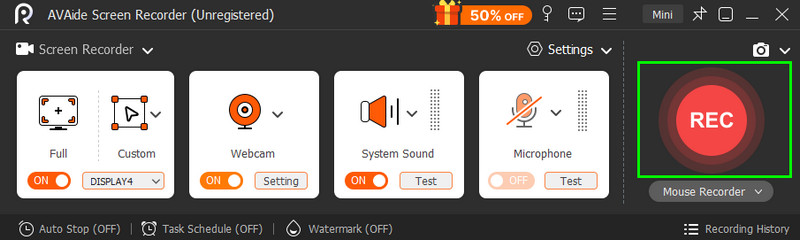
You can click the Stop button once you are done recording.
Step 4To save the tutorial video, hit the Export button. After the saving process, you can now play your video.
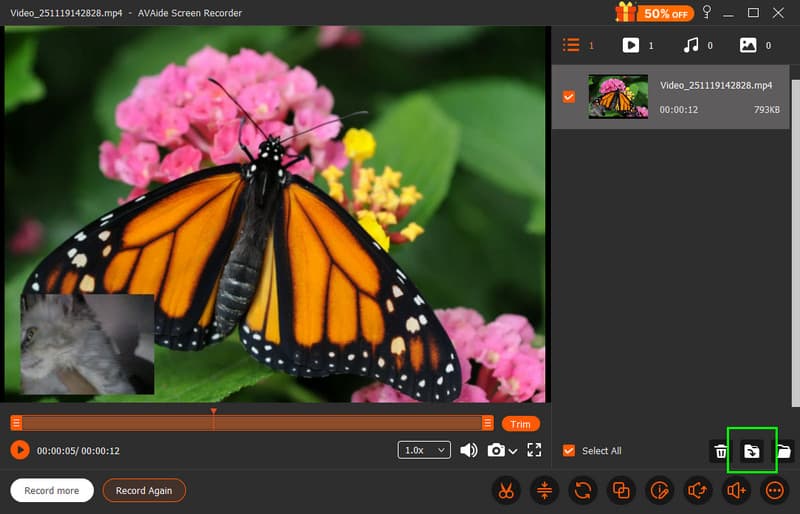
With the best and free screen recorder, you can ensure that you can get the result you need. It can even give you a simple layout for a smooth recording process.
Part 5. Edit Your Tutorial Video
Do you want to enhance your tutorial video for better playback? In that case, you must access an excellent video editor, like AVAide Video Converter. This program can give you all the best editing tools you can access to improve your tutorial video. You can crop your clip, trim, adjust the brightness, add filters, insert subtitles, and more. The best part here is that you can even save your video in your preferred formats, such as MP4, MOV, WMV, FLV, AVI, VOB, etc. You can even pick your preferred video quality for up to 4K. Thus, if you want to start editing your video, you can use the simple steps below.
Step 1Download AVAide Video Converter on your desktop. Launch it to start the video editing process.
FREE DOWNLOAD For Windows 7 or later
Secure DownloadFREE DOWNLOAD For Mac OS X 10.13 or later
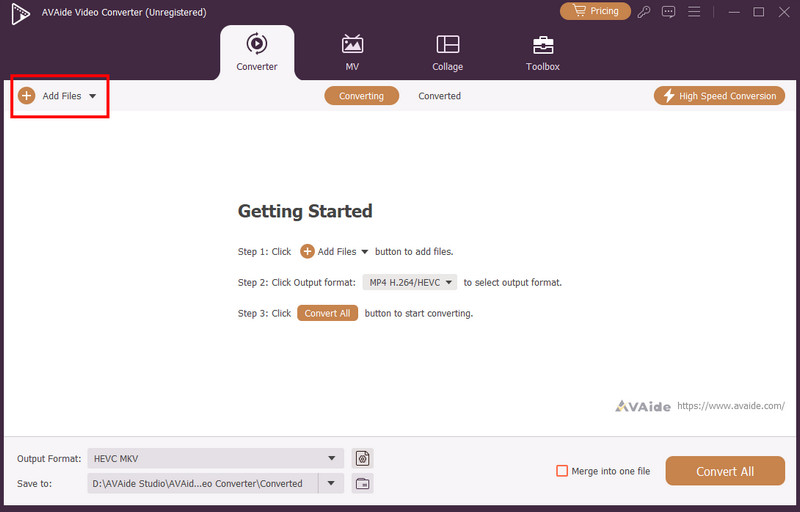
Secure DownloadStep 2After you launch the main interface, tap the Add Files button to insert the tutorial video you want to edit.
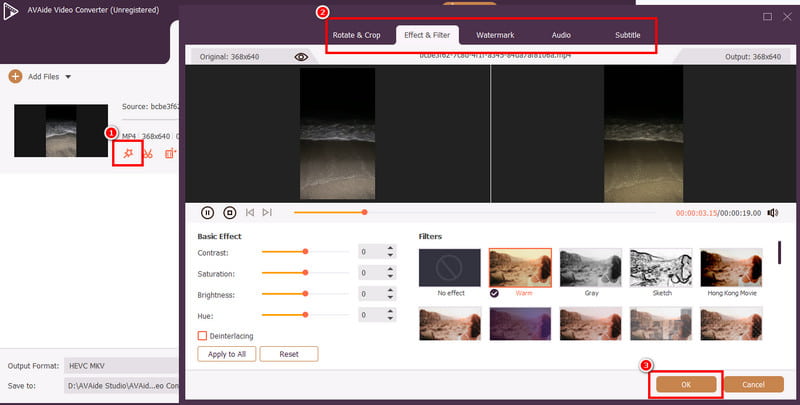
Step 3You can now tap the Edit function and begin editing the video. You can crop and rotate the video, add a filter, adjust the video color, brighten the video, and more. Once done editing, tap the OK button below.
Step 4You can now proceed to the Format section to select your preferred format and quality. Then, hit the Convert All button to start the saving process.

Bonus: Tips to Make Your Tutorial Video Appealing
If you want to learn the best tips to make your tutorial video appealing, you can check the information below.
• You must craft a compelling hook. Your goal is to get your viewer's attention for the first 15 seconds of your content.
• It would be best to add a subtitle to your video to make it more comprehensive.
• Make the video simple. Too much design can only distract your audience.
• Always produce a video with excellent video and audio quality for better playback.
• When recording, ensure that the video is not shaking.
• Always consider good lighting for better visuals.
If you want to learn how to create a good tutorial video, there are various factors you must consider. It includes thinking about the topic, creating an outline, making a script, and more. So, to get all the details you need, you must read everything in this post. Plus, if you want the best screen recorder that can help you finish your tutorial video, you must access AVAide Screen Recorder. The software can give you a smooth screen recording process, making it an ideal program for users. On the other hand, if you want to edit and improve your tutorial video, we prefer using AVAide Video Converter. It has all the video editing functions you need to achieve the best version of your video. Thus, download these programs and obtain your desired outcome.
ABOUT THE AUTHOR

Record screen, audio, webcam, gameplay, online meetings, as well as iPhone/Android screen on your computer.