Turning DVD to H.264 format has become the most effective and popular solution in terms of preserving video collections. The advantage of the H.264 format is that it offers better compatibility, quality, and efficiency. Well, we all know that DVDs nowadays are no longer supported on some platforms. It even has an outdated codec, making it less practical for video enthusiasts. So, if you have your favorite videos on your DVDs and want to watch and keep them, turning them into H.264 is an ideal process. Thankfully, this guide will provide various effective methods to instantly turn DVDs into H.264 on your Windows and Mac computers. Thus, read here and explore the most effective conversion and ripping processes.
Part 1. DVD vs. H.264: Why Convert DVD to H.264
There are various reasons why you need to turn your DVDs into 2.644 format. Read this section and learn more about the reasons.
- Compatibility - If you want to experience a smooth video playback, it would be better to turn the DVD into H.264 since the format is more compatible with various media platforms.
- Smaller file size - H.264 can offer a smaller file size, making it perfect for collecting files without consuming much storage space.
- Future-proofing your media - When it comes to future-proofing, we can tell that H.264 is better since it is easy to back up, duplicate, and share.
Part 2. Best Method to Convert DVD to H.264
Do you need the best converter that can help you transform DVd into H.264 format? Then, we recommend AVAide DVD Ripper. This program is perfect since it has all the features you need. What we like here is that you can rip your DVD without losing the quality. It also has a simple UI, allowing you to convert your files without facing any trouble. The best part here is that you can deal with copy-protected DVDs. You can also customize some parameters, such as frame rate, resolution, bitrate, sample rate, channel, and many more. It can also support various digital formats, like MP4, MKV, VOB, MOV, AVI, FLV, etc.
To check this software's capability, follow the steps below and start ripping the DVD into H.264 format.
Step 1Download AVAide DVD Ripper on your computer. For easier access, use the buttons below.

FREE DOWNLOAD For Windows 7 or later
 Secure Download
FREE DOWNLOAD For Mac OS X 10.13 or later
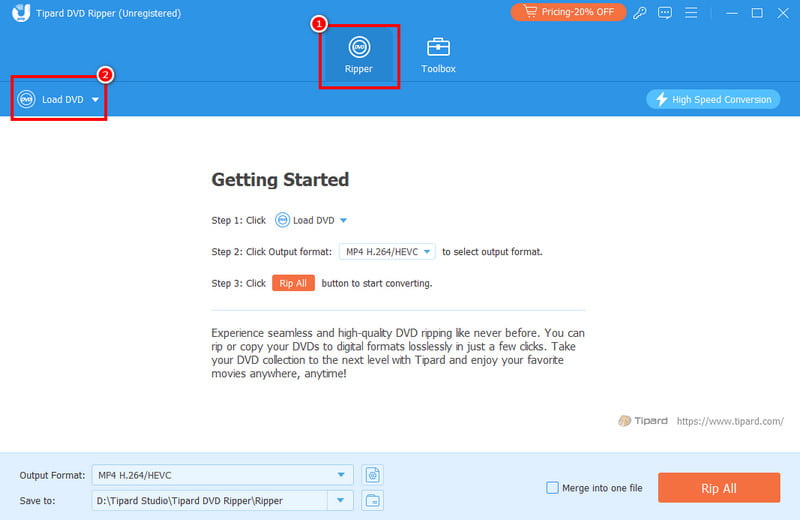
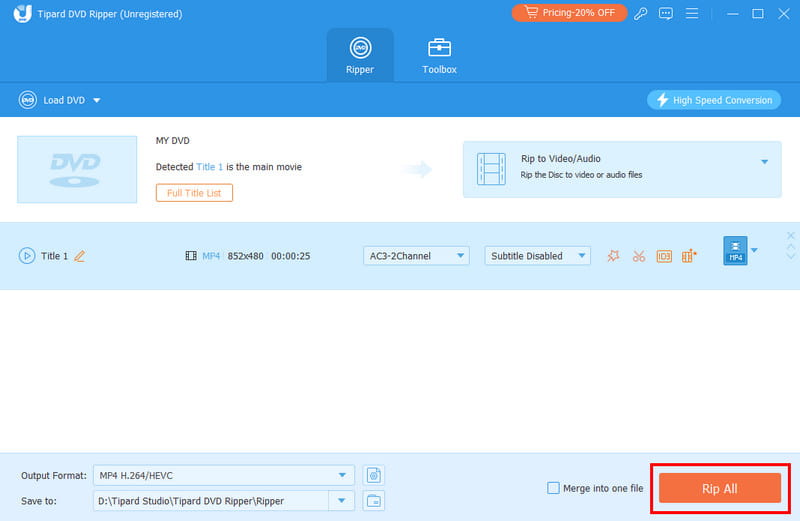
Secure DownloadStep 2Then, from the Ripper feature, click the Load DVD to insert the DVD you want to convert.
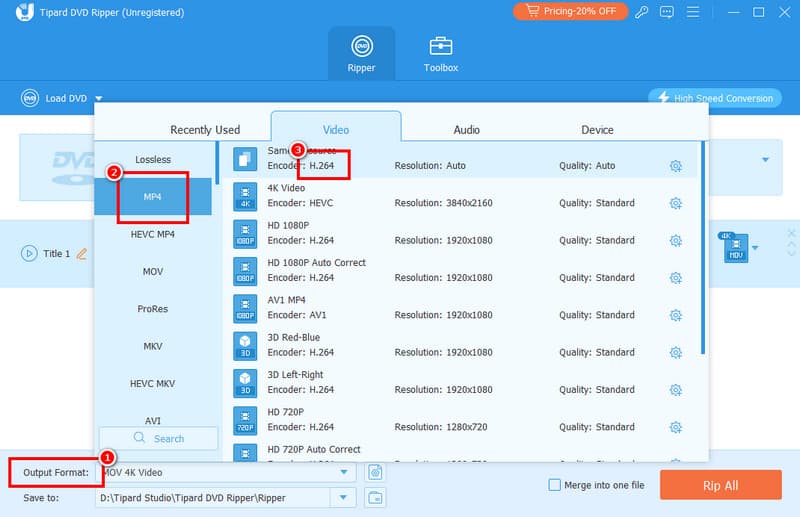
Step 3After that, proceed to the Output Format and select your preferred format. Then, ensure that the format has the H.264 codec.
Step 4Finally, click the Rip All button below to start turning your DVD into H.264.
Part 3. Rip DVD DVD to H/264 Using VLC
If you want to convert a DVD to H.264 for free, you can also rely on VLC Media Player. This software is not just an excellent video and audio player. You can also use this as an excellent and free DVD ripper to rip and convert DVDs. The best part about this program is that it has a simple user interface and a fast conversion process. It can also offer you various editing tools that allow you to enhance your videos. You can crop, change the aspect ratio, adjust brightness, change video speed, and more. The only problem here is that its layout is looking outdated, making it not ideal for users who prefer an engaging user interface. But still, if you want to start converting DVD into H.264, see the steps below
Step 1Download and run VLC on your computer. After that, proceed to the Media section. Then, click the Open Disc, and another mini interface will appear on your screen.
Step 2Click the Browse option to add the DVD you want to rip. Once done, proceed to the next process.
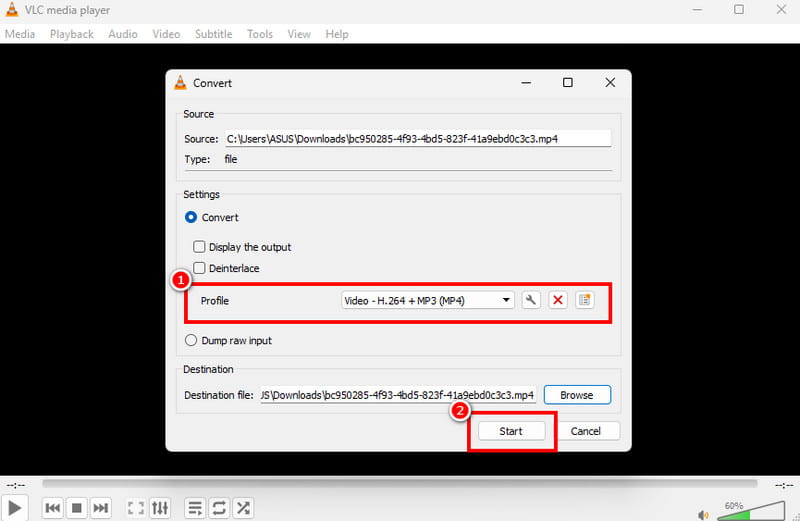
Step 3Navigate to the Profile section and select your preferred format with H.264 codec. For the last process, hit the Start button to begin the DVD to H.264 conversion process.
Part 4. Turn DVD to H.264 via Handbrake
Handbrake is also an effective tool you can access on your Windows and Mac to turn your DVDs into H.264. This free and open-source program lets you achieve the result you need easily, thanks to its smooth ripping process and simple user interface. What's good about this software is that it is not just an excellent ripper. You can also access basic editing tools that can improve your video. You can add a filter, denoise video, sharpen, change the format, rotate, and crop, making it the best DVD ripper and editor. The only drawback here is that the program lacks advanced features that can enhance your videos. There are also times when it crashes for some reason. But still, when it comes to ripping DVDs, we can tell that this program is reliable. See the steps below and learn how to convert a DVD to H.264 using Handbrake.
Step 1Download and install Handbrake on your computer. Then, launch it to start the DVD to H.264 conversion process.
Step 2Then, click the File button to add the DVD file from your computer.
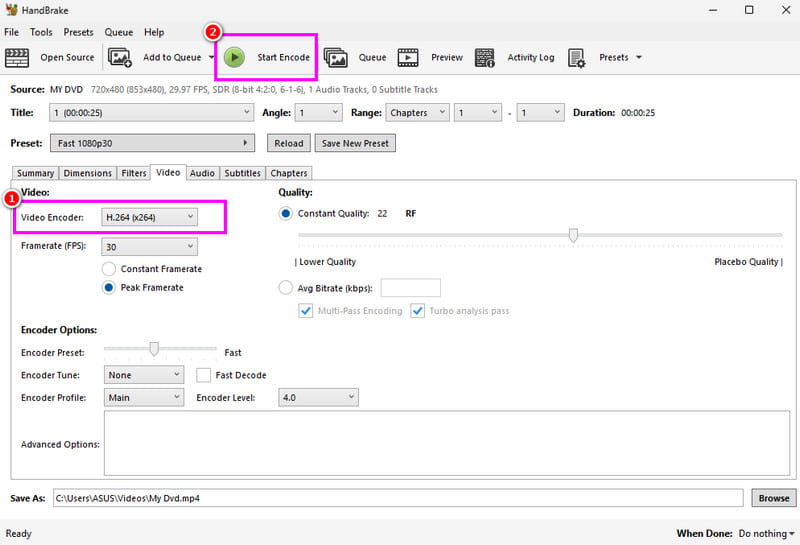
Step 3Once added, proceed to the Video setting and select the H.264 option from the Video Encoder section.
Step 4For the last process, hit the Start Encode button above to begin the process of converting the DVD to H.264.
Part 5. Comparison of the Best DVD to H.264 Converters
If you want to get more insights about the best DVD to H.264 converters, see the comparison table provided below.
| DVD to H.264 Converters | AVAide DVD Ripper | VLC Media Player | Handbrake |
| Ease of Use | Simple | Simple | Simple |
| Output Quality | High-quality H.264 with customizable settings. | Good, but limited fine-tuning. | Excellent; advanced controls for bitrate, RF, and filter. |
| Conversion Speed | Fast | Standard | Fast |
| Editing Tools | Advanced and Basic | Basic | Basic |
| Platform Availability | Windows and Mac | Windows and Mac | Windows and Mac |
| Supported Format | MP4, MKV, WMV, AVI, FLV, M4V, and more. | MP4, AVI, TS, and WebM | MP4, MKV, and WebM |
With this tutorial, you have learned how to convert a DVD to H.264 format easily and smoothly. So, for better video playback, start converting your DVDs right away. Plus, if you need the best converter, we suggest using AVAide DVD Ripper. This converter/ripper can give you a fast conversion process, good quality, and an identifying function, allowing you to get the result you need after the process.
Rip DVDs to H.264, MP4, MOV, and 300+ formats with high quality and fast speed.