Facebook is an excellent application that can show various videos. You can watch a short clip, a long-form video, and other video content. There are also times when you want to save the videos you have watched from Facebook so you can watch them again. The good news here is that we can teach you how to save and download any video from the Facebook platform. We will offer various downloading procedures, so you can get more options to achieve your desired goal. Without anything else, read this post and learn how to download Facebook videos.
Part 1. Can You Download Facebook Videos
Facebook is a popular application founded in 2004. It lets users connect with family, friends, and communities by sharing updates, photos, and videos. With billions of active users worldwide, it serves as a space for news, entertainment, communication, and business. Videos on Facebook range from personal clips to professional content, often going viral through shares and likes. If you wonder if you want to download Facebook videos, the answer is yes. The Facebook platform can offer its Download feature that lets you save your preferred Facebook videos. The best part here is that it also allows you to use third-party software for a better downloading process. Thus, if you want to save any videos from Facebook, you can do it as long as you know the procedure.
Part 2. How to Download a Video on Facebook for Later Watching
Do you want to download a video from Facebook in HD so you can watch it later? Then the best solution you can do is to save it. Saving the video is perfect if you want to keep it on your Facebook account. The best part here is that as long as you save the video, it won't disappear. Allowing you to watch it anytime you want. In addition, saving the video from Facebook is an easy task. What we like about this process is that you can also save as many Facebook videos as you want. With that, if you want to start learning how to save your favorite Facebook videos to watch them later, follow the steps we have provided below.
Step 1Go to your browser and start logging in to your Facebook account. After that, you can start looking for the video you want to record.
Step 2From the video, click the three-dots option and hit the Save Video button. Once done, the saving process will begin.
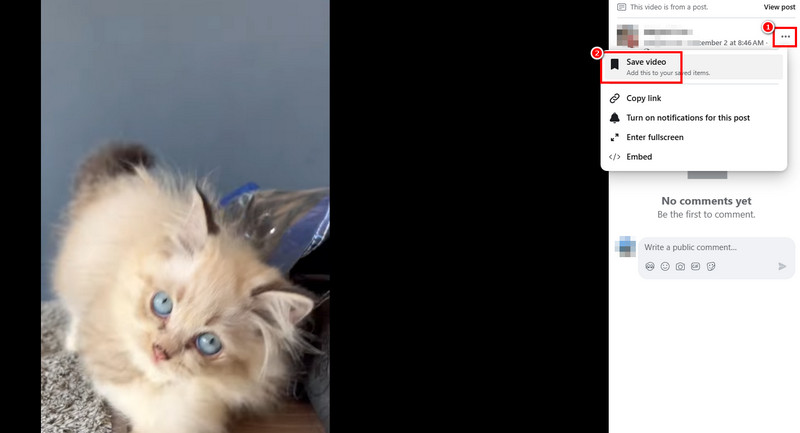
Step 3Now, if you want to watch the video, go to your profile and proceed to the Save section. Then, under the Saved Items section, you can watch all the saved videos.
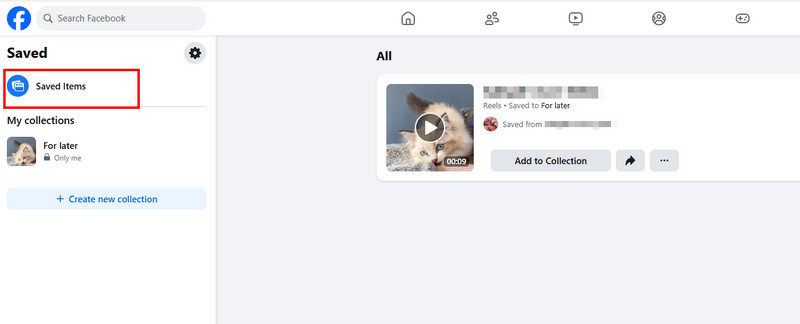
With this process, you can tell that saving your video is an easy task. You can even watch them anytime, making it ideal for all users. However, since the videos are only saved on your Facebook, you must have an internet connection to effectively watch the videos. Thus, if you have the internet, use the instructions above for watching your videos.
Part 3. How to Download Video on Facebook Using Facebook Downloader Online
Are you looking for an excellent Facebook video downloader so you can save and download the video for offline viewing? In that case, we suggest using Facebook Video Downloader Online. This tool is perfect if you want to download any video from Facebook with a satisfying quality. In addition, the tool's layout is simple to understand, so you can ensure a smooth downloading process. What's more, you can access this tool on various browsers, such as Google, Microsoft Edge, Safari, Firefox, and more. You can even get a fast downloading process as long as you have a stable internet connection. With that, you can check the instructions below and learn how to download a Facebook video online.
Step 1Go to your main browser and visit the website of Facebook Video Downloader Online. Before going to the next step, ensure that you have already copied the URL from the Facebook video.
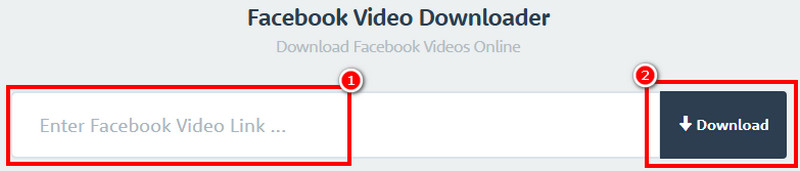
Step 2Then, paste the copied link to the Box and hit the Download button. After the loading process, you will see various options on your screen.
Step 3Then, you can choose how you want to download the video. You can click either Download Video in Normal Quality or Download Video in HD Quality. Once done, the tool will automatically save the video on your device.
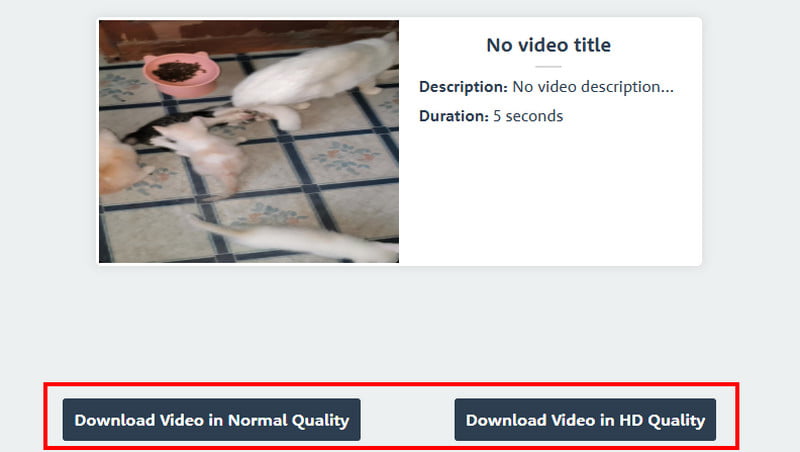
Thanks to this method, you can effectively download your video for offline viewing. It can even give you a simple method, making it the best online tool for all video enthusiasts. The only problem here is that it shows various ads on your screen, making the downloading process annoying.
Part 4. How to Download Video on Facebook Using Facebook MBasic
Looking for another way to download Facebook videos? In that case, try using Facebook MBasic. This tool is a lightweight and text-oriented version of Facebook. It was designed for users with poor internet connections, limited data plans, and older mobile devices. The good thing about this tool is that you can download and save any Facebook videos smoothly. It also has the same interface as Facebook, so you can navigate everything easily, which makes it a perfect tool for all users. The only drawback here is that since it is a lightweight version of Facebook, the video quality is also poor, which might be disappointing. Thus, if you want to improve the Facebook video quality, you have to use an excellent video enhancer.
Follow the simple methods below and learn how to download Facebook videos.
Step 1On your Facebook, proceed to the video you want to download and copy the URL.
Step 2After that, open a tab on your browser and paste the copied link. Once done, change the www into mbasic. Then, after the loading process, the Facebook video will appear on your screen.
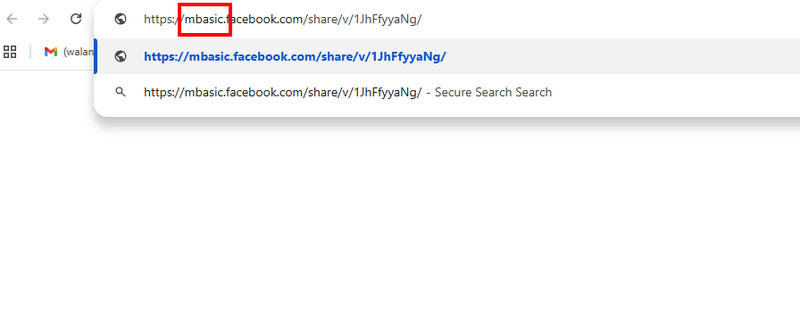
Step 3Right-click the video and tap the Save as option. Then, you can select your preferred format and folder. Lastly, tap the Save button to start the saving process.
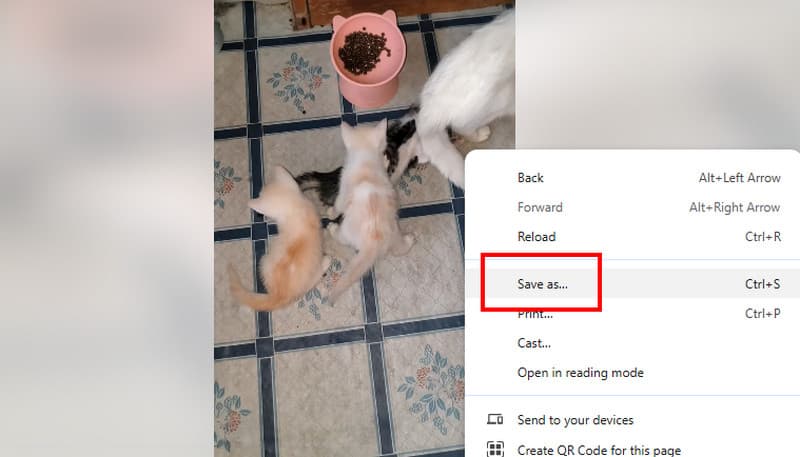
After using this lightweight tool, we can tell that downloading the Facebook video is possible. However, expect a lower quality since the tool is only capable of helping users with a poor internet connection and outdated devices.
Part 5. How to Download Video on Facebook in iOS/Android
Want to learn how to download videos on Facebook when using Android and iOS devices? In that case, we recommend using the Friendly Social Browser app. This app is effective for an instant video downloading process. What makes this app ideal is that you can download any video from Facebook. It also has the same interface on Facebook, making the tool simple to navigate.
Additionally, the downloading process is fast, allowing you to get your favorite Facebook video in just a few seconds. Moreover, you can also access more social media platforms, such as X, YouTube, Pinterest, Reddit, and more. You can even download an Instagram video if you want to. With that, you can try using this app and save your favorite videos on your iOS and Android devices.
To discover how to download videos from Facebook when using Android and iOS, see the instructions we have provided below.
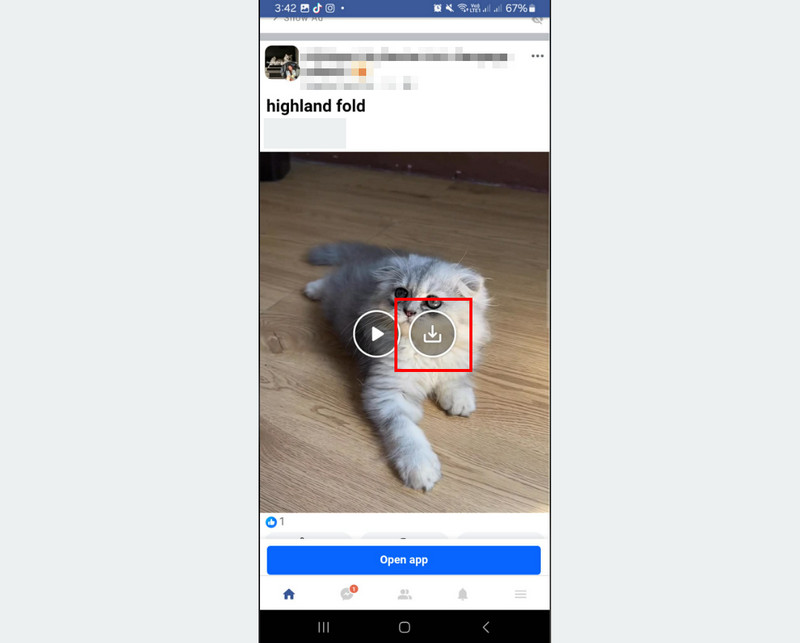
Step 1Go to your Play Store or Apple Store and download the Friendly Social Browser app. After that, install and launch it to start the process.
Step 2After you open the app, click the Facebook app and start logging in to your account. Then, proceed to the video you want to download.
Step 3Finally, you can press the Download symbol in the video. After the downloading and saving process, you can start watching the video on your mobile phone.
After following this method, you can effectively download any Facebook videos on your Android and iOS devices. It can even give you a video with the same quality. Thus, if you want to get your favorite videos, consider using this app.
Bonus: Record Facebook Video to Watch Them Anytime in HD
Besides downloading, you can also record a Facebook video so you can watch it anytime. If you are looking for an excellent video recorder, we suggest using AVAide Screen Recorder. This recorder is helpful if you want to record your favorite Facebook video with the best quality. You can record the video in 1080p and 4K. The best part here is that the recorder can offer a neat and simple-to-use interface. You can also decide if you want to record your whole screen or a specific area. The best part here is that the software can offer its Snapshot feature. This feature is perfect if you want to take a screenshot of your favorite scene from a Facebook video.
Furthermore, AVAide Screen Recorder can offer various basic video editing tools to improve the recorded video. You can trim the clip, add effects, crop, and more. You can even save it in various formats, such as MP4, WMV, M4V, MKV, FLV, AVI, MOV, VOB, and more. Thus, if you need an astounding video recorder, access this program right away. You can use the instructions below to check the recorder's capability.
Step 1Download and install AVAide Screen Recorder on your desktop. After that, launch it to start the recording process.

FREE DOWNLOAD For Windows 7 or later
 Secure Download
FREE DOWNLOAD For Mac OS X 10.13 or later
Secure DownloadStep 2When the interface shows up, click the Screen Recorder feature and start choosing how you want to record the video. You can choose Full or Custom based on your needs.
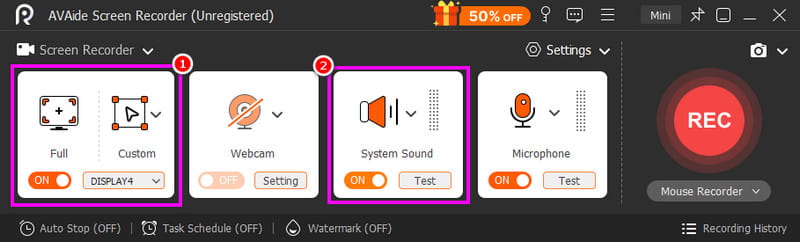
You also need to turn on the System Sound function so you can record both video and audio from Facebook.
Step 3To start the video-recording process, click the REC button on the right interface. Then, to finish the recording, hit Stop.
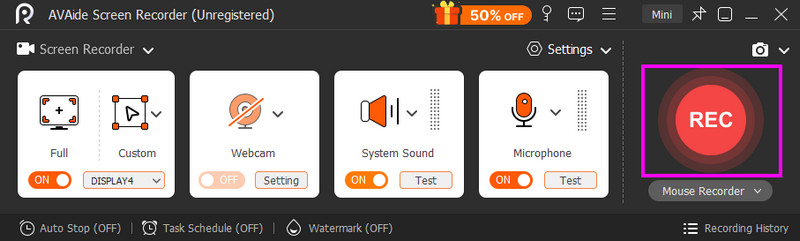
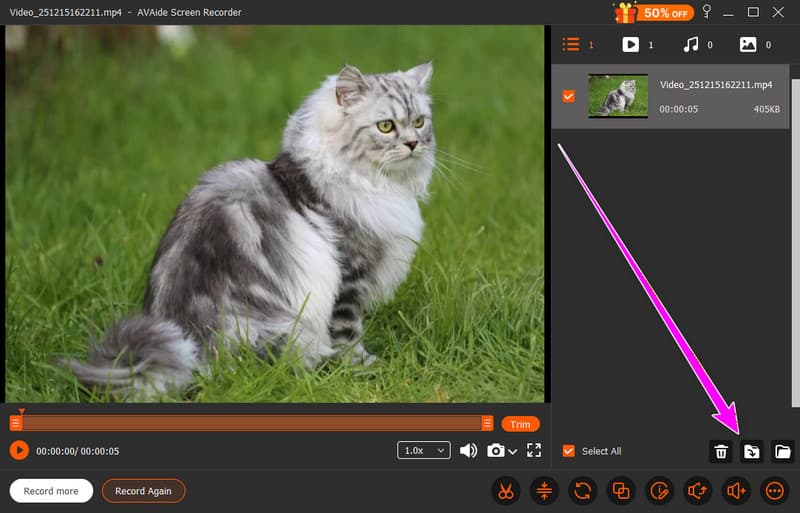
Step 4For the last step, tap the Export button below. Once done, start watching the Facebook video on your media player.
To download a video from Facebook, check and use all the methods we have provided above. With that, you can watch them anytime and anywhere. Also, if you prefer recording the video to get an HD quality, look no further than AVAide Screen Recorder. This program ensures to give you the best quality and fast recording process, making it the best recorder for users.
ABOUT THE AUTHOR

Record screen, audio, webcam, gameplay, online meetings, as well as iPhone/Android screen on your computer.