Do you remember AirShou Screen Recorder? Before Apple released its first built-in screen recorder with iOS 11 in 2017, AirShou had been a top go-to for millions of iOS users. But after being officially discontinued, is it still a practical option in 2026? We will share our thoughts in the following review and introduce some modern ways to screen record on smartphones.
Part 1. What Is AirShou Screen Recorder & Is It Still Available
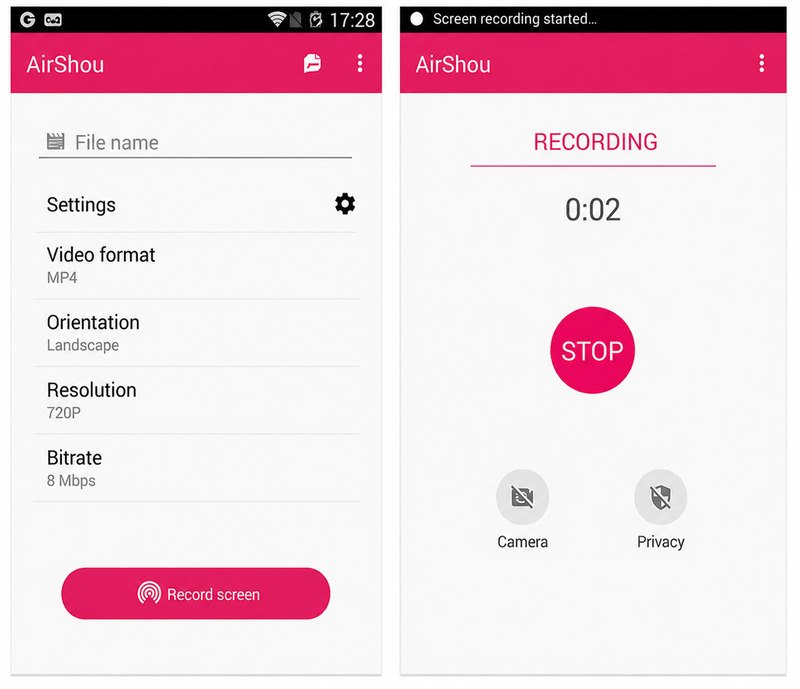
AirShou Screen Recorder was a free screen-recording app designed mainly for iPhones and iPads, but also available for Android. It let you record everything on your phone screen, as well as microphone audio at the same time.
Key Features:
- One-tap screen recording
- Choice of resolution up to 1080p
- Record portrait and landscape
- Capture microphone
- Save recordings as MP4 files
- No watermarks and no time limits in most versions
The AirShou app was very popular in the 2010s, when the App Store still banned most screen-recording apps and iOS itself had no built-in recorder. Due to Apple's restrictions, AirShou was rarely available in the official App Store. Most iOS users installed it by sideloading.
But those were a thing of the past. The developers behind it, Shou.tv, stopped its service in 2016. AirShou is no longer available in the App Store or Google Play. Although you can still get an IPA or APK file from third-party platforms, I don't recommend it.
AirShou doesn't have any customer support now. And since it no longer receives updates, it is incompatible with many modern OS. You might have to do a jailbreak. What's worse, there's a high chance that third-party IPAs or APKs carry malware. You can't discover this until they've already damaged your device.
Considering all the drawbacks, I suggest that you use the default screen recorder on your device, or turn to a modern third-party app. If you still insist on trying AirShou, read Part 2 for a relatively reliable way.
Part 2. How to Download and Use AirShou in 2026
Before you proceed, I have to remind you once again that sideloaded sources are not 100% secure, and this app has been abandoned for so long that it's only predictable if it has glitches. This part is more for reference than for practice.
Download AirShou for iOS
Go to archive.org and search for AirShou. Look through the files for a software application uploaded by Shou.TV, open the page, and on the right there's the Download Options panel. Download the iOS App Store Package.
Download AirShou for Android
Go to APKMirror and search for AirShou. You'll find two versions of AirShou APK. Choose the one you prefer and open it, then click Download APK.
Use AirShou to Record the Screen
Step 1Open AirShou and grant the necessary permissions.
Step 2Tap the Record button at the center. Then perform what you want to capture on your screen.
Step 3Tap the red status bar at the top of the screen to end recording. The video is saved as an MP4.
Part 3. Is AirShou Still Practical for Screen Recording?
No, you have better choices. Although AirShou used to be one of the best free screen recorders, now the pre-installed screen recorders of Apple and Android can do the same things. Moreover, if you want advanced control, there are many powerful recording apps better than AirShou. AirShou might hold a special place for some users, but mostly for their nostalgia.
Part 4. How to Screen Record Your Phone in 2026 Without AirShou
AirShou was a great solution when Apple did not have its own native screen recorder. But now we can easily record the screen on any device without it.
Screen Record on iPhone/iPad
Step 1Swipe down from the top-right corner of your screen to open Control Center.
Step 2Tap the Screen Recording button, which appears as two gray circles. Wait for 3 seconds before it begins.
Step 3To stop recording, tap the Screen Recording button at the top, then the Stop button (a square inside a circle).
Screen Record on Android
Step 1Swipe down twice from the top of your screen to open Quick Settings.
Step 2Tap the Screen Recorder tile. When a small floating bar appears, tap Start.
Step 3To finish recording, swipe down the notification panel and tap Stop.
AVAide Screen Recorder (Advanced)
If you want more than basic screen recording, you will find AVAide Screen Recorder fascinating. It's an extremely feature-rich desktop screen recorder for Windows and Mac, but it also supports screen mirroring of iPhone or Android, so you can use its advanced recording tools on your phone too.
Aside from basic full-screen, window recording, and free-form recording, you can also record audio, gameplay, and webcam, and take screenshots. You can set a task schedule and auto-stop for the recording, making it fully automatic.
- Record the screen, window, webcam, audio, and gameplay.
- Mirror iPhone or Android screen to the computer and record it.
- Highly customizable recording settings.
- Edit the captured video, audio, or screenshot.

 Secure Download
Step 1Download and install AVAide Screen Recorder on your Mac or Windows. Then open the software.
Step 2(OPTIONAL) If you want to record your phone screen, click the arrow button next to Screen Recorder at the top-left corner. Select Phone Recorder in the dropdown, choose the right phone type, then follow the on-screen guide to cast your phone screen to the computer.
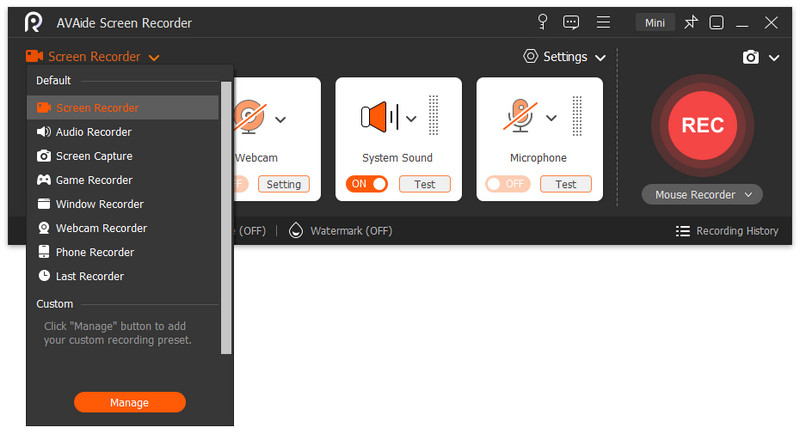
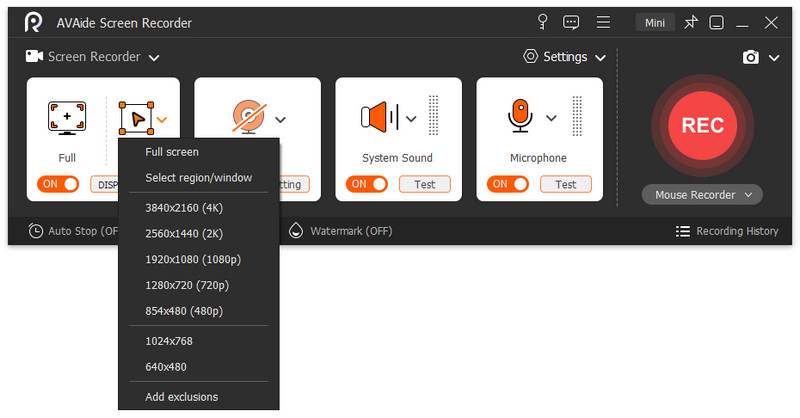
Step 3Customize the recording area in the Custom option. If you want to capture the whole screen, hit the Full tab.
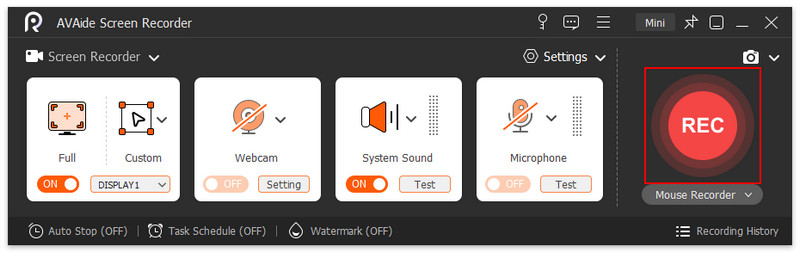
Step 4To start the recording, hit the REC button.
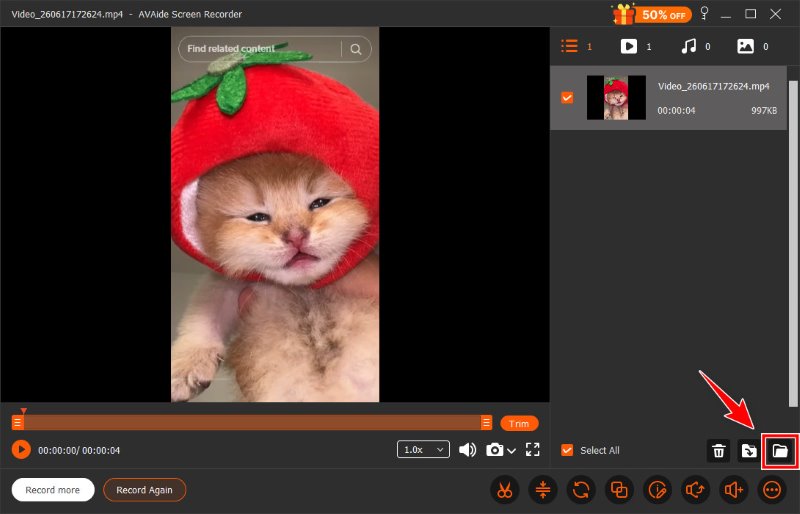
Step 5Click the square button to finish. Once you stop the recording, you will enter the editing window where you can trim, compress, merge videos, and more. Click on the folder button to save the result.
Part 5. FAQs about AirShou and Screen Recording
Why can't I download AirShou Screen Recorder on my desktop?
Because AirShou is a mobile-only app. Using it on your computer would require an emulator.
Can I use AirShou with my Android?
Yes. It was one of the best screen recorders for Android. But now that it is discontinued, you need to get an AirShou APK from third-party sources, which is risky.
Why can't I download AirShou with my iPhone 5, even with an emulator?
AirShou is only compatible with iOS 7.1 - 10.3. Check your iOS version to see if it's supported.
AirShou is an outdated app in 2026. To do basic screen recording on iPhone or Android, you don't have to install AirShou – the built-in recorders are enough. If you need an advanced screen recorder for your computer, we recommend using the AVAide Screen Recorder.
ABOUT THE AUTHOR

Capture the best moment with AVAide Screen Recorder. Screencast, customize, and share in seconds.