Copying DVD files directly often leaves you with unplayable VOB or VIDEO_TS folders. To watch your collection on any device, you need a reliable free DVD ripper on Windows 10 or 11 to convert discs into digital formats like MP4 or MKV.
We've tested and ranked the 10 best free DVD rippers that deliver high-quality results without the cost. Whether you're digitizing home movies or 4K UHD discs, here are the top tools to get the job done.
Part 1: Top Picks of Best Free DVD Rippers on Windows 10
Best for fast ripping: AVAide DVD Ripper
Support full hardware and software acceleration to let you quickly decode discs, edit media files, and re-encode or remux DVDs to a digital format. It takes little CPU resources so that you can use other programs with ease.
Best for customization: HandBrake
Offer many modern and rare video/audio codecs and provide great customization on video resolution, frame rate, bitrate, and more parameters, allowing you to output a video file compatible with different platforms and devices.
Best for lossless ripping: MakeMKV
MakeMKV can rip a DVD to a lossless MKV format, keeping the original video and audio files without changing codecs, frame rate, resolution, bitrate, sample rate, and all parameters. You can get the full structure in an MKV file.
Part 2: Review of Top 10 Free DVD Rippers for Windows 10
Here, you can have a detailed view of those free DVD rippers for Windows 10. Then, according to your purposes and intentions, you can find the one that suits you.
1. AVAide DVD Ripper
AVAide DVD Ripper is a professional DVD-ripping software for Windows 10. It has stable and robust DVD decoding and encryption removal capabilities, helping you to rip DVD to MP4, MOV, AVI, and more digital formats. You can also back up your DVD to ISO image or DVD folder with the original structure. Moreover, this DVD ripper on Windows 10 can also support GPU acceleration so that you can rip a DVD quickly within 12 minutes. It also offer AI 4K upscaling and many video editing features.

Why we select it: It's a very stable and powerful DVD ripping program. The interface is very easy to understand, and the workflow is friendly for beginners. The wide output formats and codecs can meet different tpes of purposes.
- Easily rip both homemade and copy-protected DVDs.
- Support GPU acceleration to faster the ripping process.
- Provide lossless MKV, HEVC MP4, and more modern and high-quality presets.
- Offer practical video editing features and AI-upscaling tools.

 Secure Download
- Pros
- Clear interface with simple workflow.
- Support the latest DVD encryption methods.
- Work stably on Windows 10, 11, and 7.
- The ripping speed is very fast while taking little CPU resources.
- Cons
- The interface is kind of outdated.
- Not easy to find the output folder.
2. HandBrake
As a popular free DVD ripper for Windows 10 and 11, HandBrake excels at converting physical discs into highly compatible formats like MP4, MKV, and WebM. It offers granular control over your output, allowing you to fine-tune frame rates, resolution, and advanced video encoders (like H.264 or H.265).
Important Note: To rip encrypted commercial DVDs, you will need to manually install the libdvdcss library. Without this add-on, you can only use HandBrake to rip DVD with no encryption.
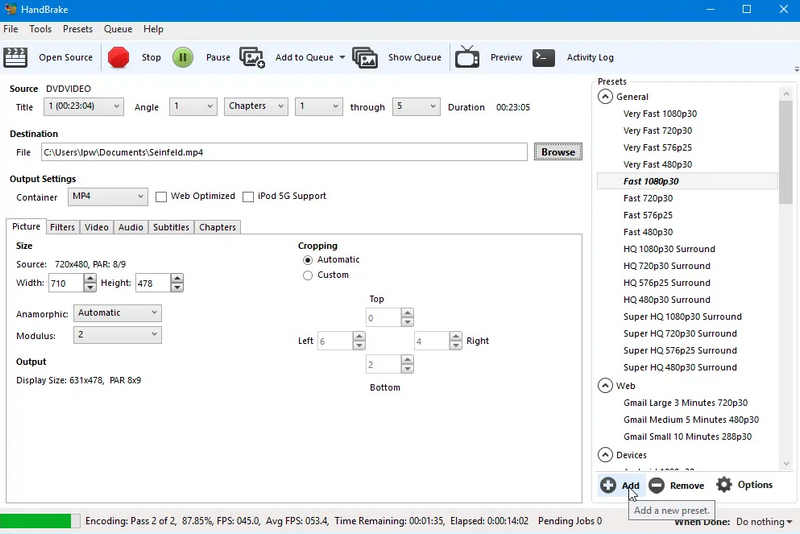
Why we select it: HandBrake is almost a necessary choice when you need to convert multimedia files. It's totally free but has strong and stable performance. As long as you get familiar with digital knowledge and this program, you can easily and quickly rip a DVD and convert it to a popular or rare output format.
Key Features of HandBrake:
- Convert DVD to many popular and rare codecs.
- Upscale DVD videos to 1080p and 4K resolution.
- Deal with all media files in a DVD one by one.
- Support re-encoding and remixing features.
- Pros
- Free, open-source, and stable on Windows 10.
- Support GPU acceleration.
- Great customization on codecs and video parameters.
- Cons
- Only three output containers.
- The batch conversion feature is not convenient.
- No preview feature.
3. Magic DVD Ripper
If you are looking for a fast and efficient free DVD ripper for Windows 10, Magic DVD Ripper is a standout choice. It specializes in converting both homemade and copy-protected DVDs into popular formats like MP4, WMV, and even high-quality MP3 audio.
What sets this tool apart is its 1:1 Clone Mode, which allows you to backup an entire disc with zero quality loss in record time. While it may lack the complex editing features of high-end suites, its lightweight design ensures it won't hog your CPU or system memory. It’s the perfect "set-and-forget" tool for users who prioritize speed and storage efficiency over advanced post-production.
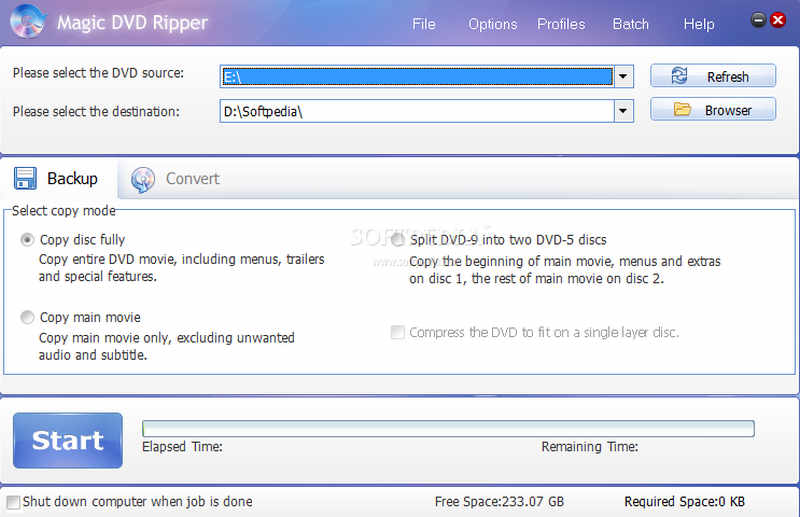
Why we select it: It has a very clear interface that can help you quickly load and start conversion. Also, the ripping speed is very fast. You don't need to wait too much time to get a seamless media file.
Key Features of Magic DVD Ripper
- Quickly converts DVDs to MP4, WMV, AVI, and more, with wide compatibility.
- Seamlessly bypasses CSS, Region Codes, and Sony ARccOS protections.
- Supports high-speed, and 1:1 disc backup.
- Pros
- Offer fast ripping process.
- Support wide output formats and codecs.
- Clear interface and easy workflow.
- Cons
- Very limited editing tools.
- No 4K upscaling feature.
4. Prism Video Converter
Beyond its standard file conversion capabilities, Prism Video Converter serves as a robust free DVD ripper for Windows 10 and 11. It allows you to digitize physical discs into high-definition formats like MP4, MOV, and AVI with ease.
Unlike basic tools, this free DVD ripper software on Windows 10 excels at processing DVD folders and ISO image files, giving you total control over the output. You can optimize videos for specific devices, including iPhones, Android phones, and gaming consoles, by fine-tuning critical parameters like frame rate, bitrate, and resolution. If you need a versatile, all-in-one utility that handles both digital files and physical media, this is a top-tier choice for Windows users.
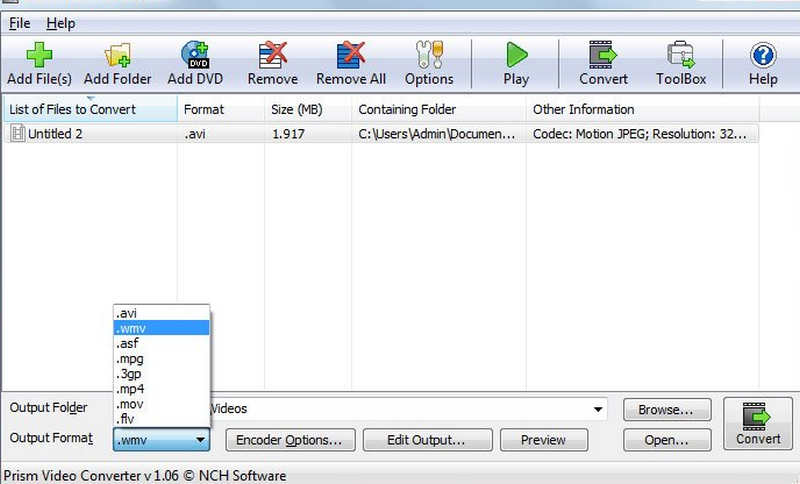
Why we select it: it bridges the gap between a dedicated DVD ripper on Windows 10 and a versatile media converter. It is the ideal choice for users who don't just want to digitize a disc, but also need to ensure the final file is perfectly optimized for specific device.
Key Features of Prism Video Converter
- Handles physical DVDs, local DVD folders (VIDEO_TS), and ISO image files.
- Vast library of pre-configured profiles for iPhone, Android, PS5, and PSP.
- Tweak technical parameters, including bitrate, frame rate, and custom resolutions.
- Batch convert multiple DVD titles to save time on large collections.
- Pros
- It's an all-in-one utility.
- Broad output format support.
- Wide editing capabilities.
- Cons
- Difficult to learn for beginners.
- The ripping speed is not fast.
5. DVDFab
While widely recognized for its high-end Blu-ray capabilities, DVDFab is equally exceptional as a free DVD ripper for Windows 10 and macOS. It leverages advanced lossless backup technology to digitize DVDs without compromising a single pixel of original quality.
This tool is a favorite for users with large collections, as it can automatically bypass almost all known DVD protections, including CSS, APS, and D-S-S. Whether you need a 1:1 backup or a compressed file for mobile viewing, DVDFab ensures seamless playback across all your modern devices.
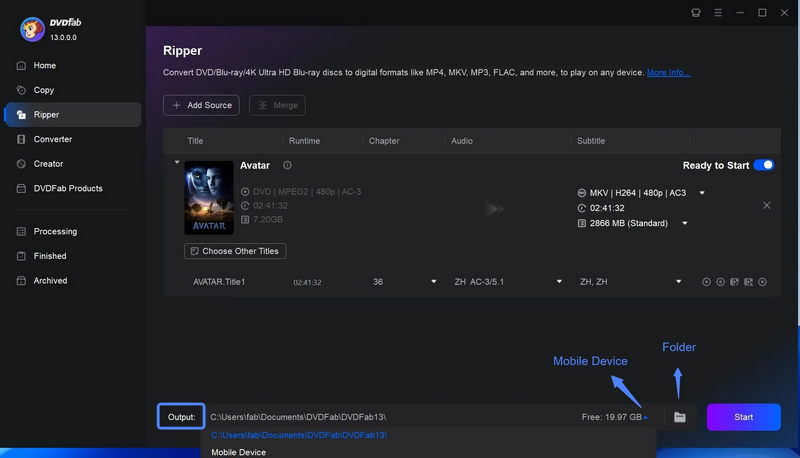
Why we select it: We selected DVDFab for its unrivaled decryption capabilities. It is one of the few rippers that consistently stays ahead of new copy protection methods, making it the most reliable "all-in-one" solution for both legacy discs and newer commercial releases.
Key Features of DVDFab:
- Automatically removes RCE, Sony ARccOS, and Cinavia watermarks.
- Extracts video and audio streams at original bitrates to ensure no quality loss.
- Shrink large DVD-9 files into smaller formats optimized for mobile storage.
- Automatically fetches movie posters, cast info, and chapter titles.
- Pros
- Very fast ripping speed.
- Multi-format support.
- Stylish interface and simple workflow.
- Cons
- Large installation size.
- Heavy and consume much CPU resources.
6. VLC Media Player
While world-famous as a versatile media player, VLC doubles as a surprisingly effective free DVD ripper for Windows 10 and 11. It is the ultimate swiss army knife for media, capable of bypassing simple protections to digitize your discs into modern formats like H.265 (HEVC), MP4, and WebM.
If you already have VLC installed, you don't need additional software to rip your DVD for free on Windows 10. Its Convert/Save feature allows you to stream DVD content directly into high-quality digital files, utilizing the same vast codec library that makes its playback so reliable. This is the best free DVD ripper on Windows 10.
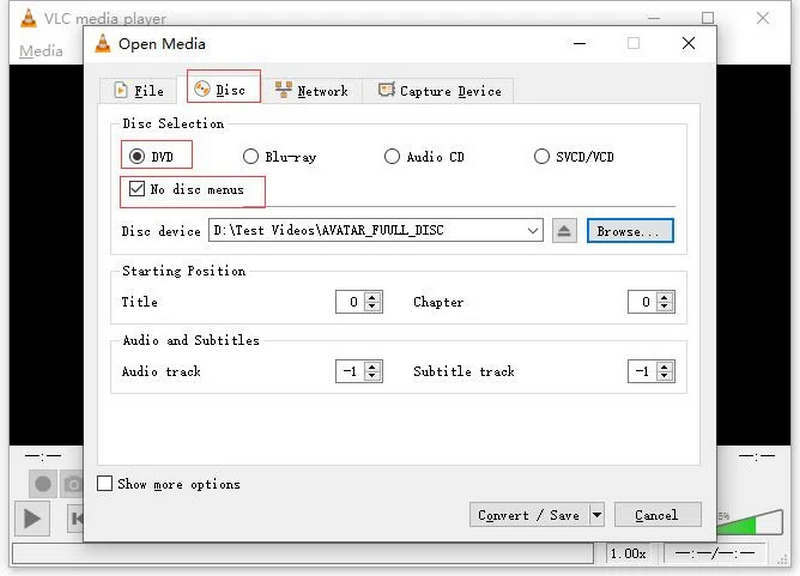
Why we select it: it is completely free, open-source, and already present on millions of PCs. It eliminates the need to download potentially bloated third-party software, offering a clean, ad-free environment for basic DVD ripping and conversion tasks.
Key Features of VLC Media Player:
- Offer many common and standard output presets.
- Export DVD content to almost any format with customization.
- Deinterlace DVD videos for older DVD recordings.
- Offer a direct player for DVD content.
- Pros
- Free, open-source, and stable.
- Highly customizable for the program and output format.
- Preview your DVD movies.
- Cons
- The conversion feature is not easy to find.
- Doesn't support GPU acceleration for re-encoding.
7. WinX DVD Ripper
WinX DVD Ripper stands out as a top-tier free DVD ripper on Windows 10 without losing quality, especially when dealing with problematic media. While many rippers struggle with corrupted sectors or complex 99-title encryptions, WinX utilizes a unique "DVD Backup" sector-by-sector mode to rescue damaged discs that other software might reject.
By leveraging level-3 hardware acceleration (Intel, NVIDIA, and AMD), this free DVD ripper on Windows 10 can digitize a full DVD in as little as 5 minutes without sacrificing original quality. Whether you need to export your collection to a USB drive, a smartphone, or a Plex server, WinX provides a fast, stable, and error-free workflow.
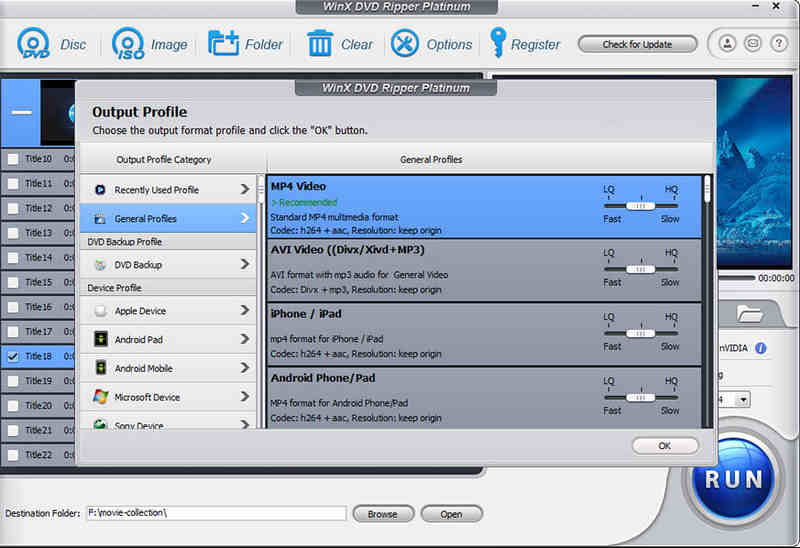
Why we select it: It is specifically engineered to handle the most difficult commercial protections and physical disc errors, like dirt and scratch, making it the most reliable recovery tool in our list for Windows users.
Key Features of WinX DVD Ripper:
- Fully utilizes your GPU to deliver fast ripping speed.
- Able to read scratched and dirty DVDs.
- Support the latest encryption methods like 99-Titles.
- Pros
- Fast DVD ripping with lossless quality.
- Large compatibility for output formats.
- Simple and easy workflow.
- Cons
- The interface is slightly dated.
- Limited free output.
8. MakeMKV
If your priority is preserving every bit of original video and audio data, MakeMKV is the definitive free DVD ripper for Windows 10 and 11. Unlike most converters that re-encode video (which can lower quality), MakeMKV simply remuxes the disc content into an MKV container. This means you get a bit-perfect digital replica of your DVD or Blu-ray with all original chapters and meta-information intact.
While it is famously fast, MakeMKV follows a strict quality-first philosophy: it only outputs to the MKV format and does not offer compression tools. So, this lossless free DVD ripper for Windows 10 will output large MKV file. You may need to compress the MKV file manually.
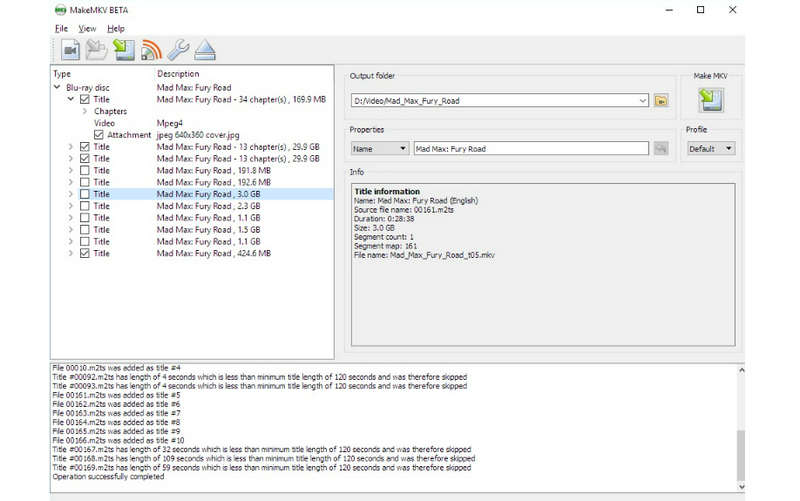
Why we select it: It is one of the few programs that can handle even the most complex copy protections (like AACS and BD+) without requiring additional decrypters, all while remaining completely free during its extended beta phase.
Key Features of MakeMKV:
- Support bit-perfect extraction to keep the original file and quality.
- Support many standard and rare DVD types.
- Doesn't use your CPU or GPU for decoding.
- Pros
- Lossless MKV output.
- Free beta with full features.
- Cons
- Large output file size.
- Cannot deal with discs with errors.
9. Aimersoft DVD Ripper
Aimersoft DVD Ripper is a versatile and user-friendly free DVD ripper for Windows 10 and 11, designed with a clean, straightforward interface. It excels at digitizing physical DVDs, ISO image files, and DVD folders, allowing you to transfer your movie collection to your computer or convert it into any popular format compatible with iPhones, smart TVs, and external hard drives.
Beyond simple ripping, this Windows 10 DVD ripper for free offers a suite of built-in editing tools. Once you've extracted your footage, you can trim unwanted scenes, apply color corrections, and fine-tune technical settings like resolution and frame rate, all within a single program.
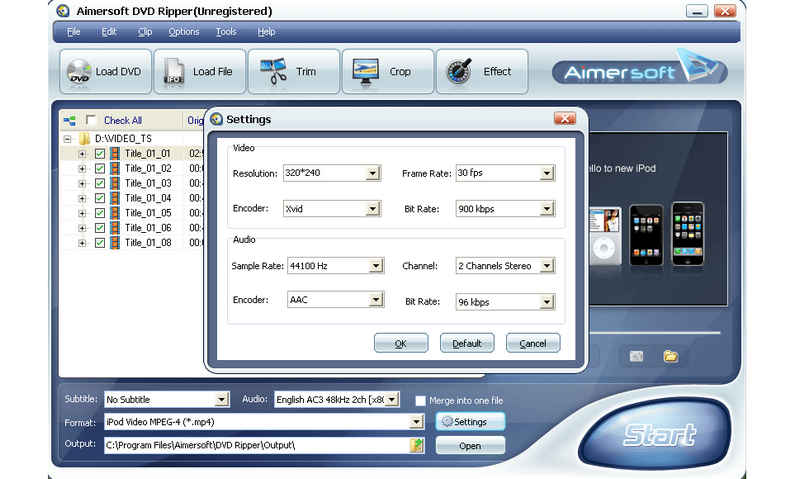
Why we select it: It provides more than just basic conversion; the integrated basic video editor makes it an excellent choice for users who want to polish their DVD clips for social media or personal archives without needing a second application.
Key Features:
- Converts DVDs to over 200 formats.
- Support many device-optimized presets.
- Offer many basic and practical video editing features.
- Rip DVD ISO and folder.
- Pros
- Clear interface and easy workflow.
- Offer versatile media features.
- Fast and batch conversion.
- Cons
- Limited features in free version.
- Update frequently.
10. WonderFox DVD Ripper
WonderFox DVD Ripper is a highly adaptable free DVD ripper for Windows 10 and 11, capable of handling a vast array of media, including read-only (ROM), recordable (+/-R), and rewritable (+/-RW) discs. It features a sophisticated decryption engine that bypasses almost all standard copy protections, allowing for a flawless 1:1 digital backup of your favorite movies.
What truly makes this free DVD ripper tool on Windows 10 special is its focus on device compatibility. It offers optimized presets for a massive range of electronics, from the latest Android and iOS smartphones to high-end tablets and gaming consoles like the PS5. If you are a tech enthusiast who wants to carry your media library across multiple devices, WonderFox is a top-tier contender.
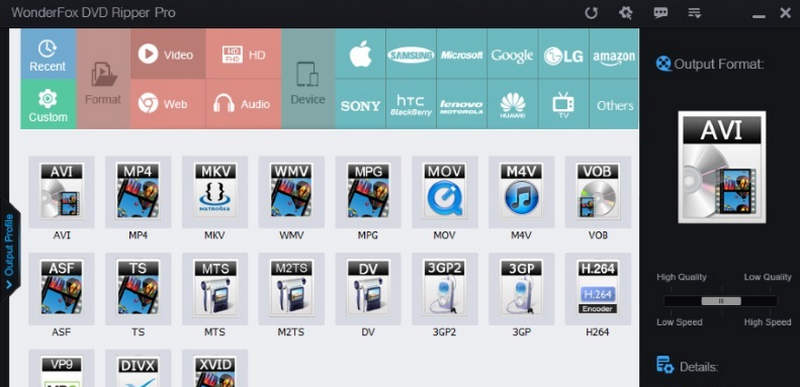
Why we select it: This free DVD ripper for Windows 10 is particularly good at identifying the correct movie file on discs with multiple titles, saving users from the trial-and-error process common in other free rippers. Its optimization for game consoles also makes it a standout for the gaming community.
Key Features of WonderFox DVD Ripper:
- Remove CSS, Region Codes, RCE, and Sony ARccOS protections automatically.
- Feature dedicated output profiles for the PS5, Xbox Series X, and high-res tablets.
- Use a smart compression algorithm to reduce file sizes.
- Easily rip different DVD types.
- Pros
- Easy workflow with simple interface.
- Fast decoding and ren-encoding.
- Accurate title selection.
- Cons
- Limited editing features in the free version.
- Frequent ad popups.
Part 3: Comparison of the 10 Free DVD Rippers for Windows 10
| Best For | Decryption | Ease of Use | |
| AVAide DVD Ripper | Fast DVD ripping and re-encoding | Strong | High |
| HandBrake | Advanced users & high-quality encodes | Needs libdvdcss | Moderate |
| Magic DVD Ripper | Fast 1:1 cloning & lightweight use | Strong | High |
| Prism Video Converter | All-in-one file & disc management | Basic | High |
| DVDFab | Complex commercial & protected discs | Superior | Moderate |
| VLC Media Player | Quick rips with software you already own | Basic | Moderate |
| WinX DVD Ripper | Recovering damaged or 99-title DVDs | Superior | High |
| MakeMKV | Bit-perfect, lossless archiving | Strong | High |
| Aimersoft | Simple editing and color correction | Moderate | High |
| WonderFox | Gaming consoles (PS5/Xbox) & gadgets | Strong | High |
Part 4: FAQs of Free DVD Ripper on Windows 10
Is it illegal if I rip DVDs with copy-protection?
It depends. If you rip the DVDs only for fair use, not for commercial purposes, then it is not illegal. Also, in some countries or regions, it is always illegal to rip DVDs free, no matter your purpose.
What is the best free DVD ripper on Windows 10/11?
It's difficult to determine which is the best because everyone has different intentions and purposes. However, if you want a free DVD ripper that can quickly convert all DVDs to any possible format, AVAide DVD Ripper may be your best choice.
Why does the video lose quality when I rip DVDs to MP4?
That's because MP4 format will give up some video quality to reduce the video's size when you rip DVDs to MP4. Therefore, you can change to other high-quality video formats, like HEVC MP4.
This article has introduced the 10 best free DVD rippers on Windows 10 and 11. According to your actual needs, you can determine which free DVD ripper is your best choice. Different programs put their emphasis on different points. If you want to find a comprehensive and very compatible free DVD ripper, AVAide DVD Ripper can meet your needs and expectations. Thank you for reading, and we'll keep offering you our best help.
ABOUT THE AUTHOR

Best tool for ripping and converting DVD Disc/Folder/ISO image file into over various formats.