At the beginning of the 2000s, there came two competing platforms that were to transform home entertainment: HD DVD and Blu-ray. Cinema enthusiasts had to make difficult decisions and find out which one presented a superior image, sound, and storage. These differences are still significant even 40 years later to collectors and streaming enthusiasts. This guide walks you through HD DVD vs. Blu-ray, compares their strengths, and shows how to play or rip discs on Windows and Mac.
Part 1: HD DVD vs Blu-ray: What's the Difference
In this part, we discuss the key differences between Blu-ray vs. HD DVD. The question many users ask is why Blu-ray is the standard and HD DVD is out of the market. Here, we shall discuss major technical aspects, storage capacity, video/audio quality, interactivity options, and general durability. We will also briefly cover availability and ecosystem support, and you will be in a better position to not only know the specs but also the real-life reasons one format performed better than the other.
1. Storage Capacity
Blu-ray discs have a single-layer capacity of 25GB and a dual-layer capacity of 50GB, and BDXL up to 128GB. By comparison, HD DVD offers 15GB per single layer, 30GB per dual layer, with an indicated capacity of 51GB ROM, which never saw broad commercial adoption.
2. Video and Audio Quality
A top video bitrate of 40 Mbps and a total AV of 48 Mbps is available in Blu-ray, and up to 29.4 Mbps at video and 30.24 Mbps total in HD DVD. Both formats accept both MPEG-2 and AVC/H. 264 as well as VC-1 video encoding. In audio, Blu-ray supports LPCM, Dolby TrueHD, and DTS-HD Master Audio, and HD DVD supports LPCM and Dolby TrueHD (mandatory) and optional DTS-HD MA.
3. Interactivity and Networking
Blu-ray features BD-J with Bonus View and BD-Live for advanced interactive content, whereas HD DVD uses Advanced Content/ HDi.
4. Region Coding and Durability
Blu-ray has region codes A/B/C (though some discs are region-free) and a durable 0.1mm cover layer with hard coating (Durabis). HD DVD has no region restrictions but uses a thicker 0.6mm DVD-style structure that is less robust.
5. Ecosystem and Availability
Blu-ray continues to see releases, including UHD BDs in 2025. HD DVD was discontinued in 2008, and new players are no longer in production, available only in second-hand markets.
Part 2: Blu-ray vs HD DVD: Which One Is Better
When comparing Blu-ray discs vs. HD DVD, Blu-ray is generally the better choice. It has bigger storage, better video and audio, as well as more interactive functions. Blu-ray discs are durable and can still be played with existing players and home theater systems, whereas HD DVD is no longer produced and is just found in second-hand markets. Blu-ray is more secure and viable for its future in terms of performance, Blu-ray resolution, compatibility, and media.
Part 3: How to Play DVD/Blu-ray on Windows/Mac
It is painful to see a DVD or Blu-ray capture on your computer when you can not watch it because your playback device is not compatible with high-definition playback, but AVAide Blu-ray Player changes all this. Got the old school HD DVD or the new Blu-ray, it is still delivering a video that is brighter than ever with a crystal clear audio and playback without a hiccup.
The interface is smooth and user-friendly, and you can easily navigate menus, stop or skip scenes with little effort, and advanced features enable you to adjust picture and sound to suit a home theater setup best. AVAide will convert your computer into an entertainment powerhouse, offering high definition and turning all of your movie nights into a movie theater.
Step 1Download the video player on your Windows or Mac by clicking the button below. Then, follow the installation process, and click the Start Now button to launch the program.

FREE DOWNLOAD For Windows 7 or later
 Secure Download
FREE DOWNLOAD For Mac OS X 10.13 or later
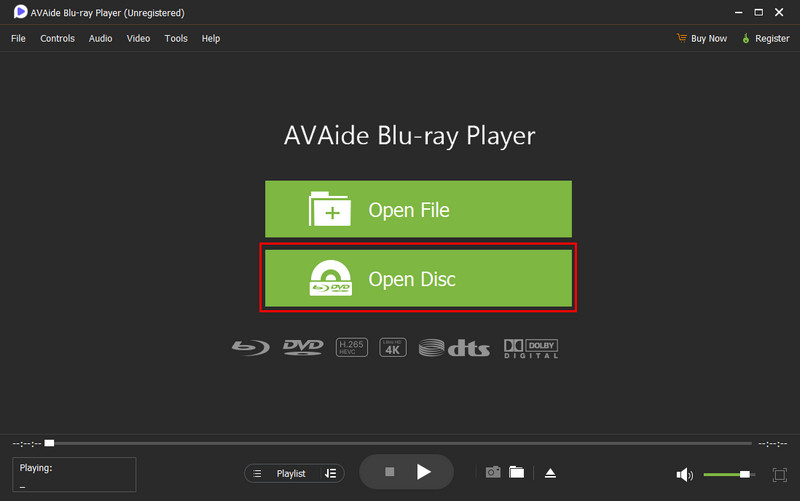
Secure DownloadStep 2Now that the app is launched and the DVD or Blu-ray disc is in the optical drive, click the Open Disc button to load it up.
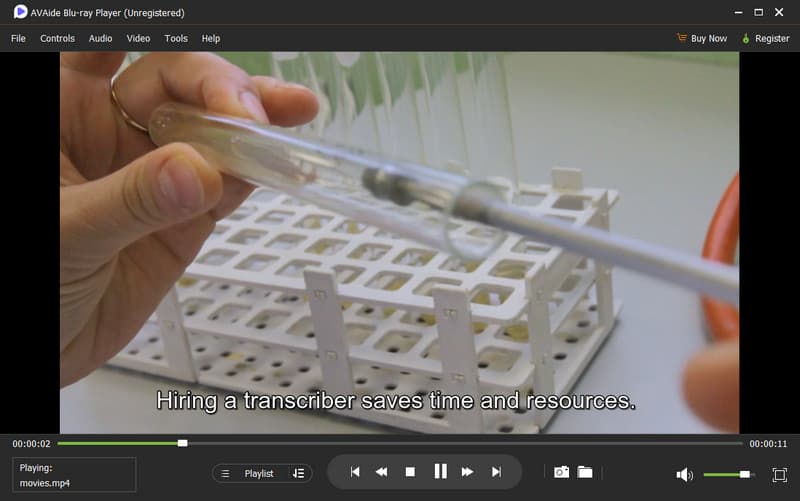
Step 3After analyzing the disc, the video will automatically play on your screen. Enjoy watching the content from your disc with the best 4K video player.
Part 4: How to Rip DVD/Blu-ray on Windows/Mac
AVAide DVD Ripper is simple to use and has never been as easy and reliable as it has been to convert the collection of your DVD or Blu-ray into digital files. It is an excellent tool because it is a fast processing tool with a good output, and it supports a wide range of formats, which makes it suitable for both beginners and advanced users. Either you have doubts about the 4K Ultra HD DVD vs. Blu-ray, or you wish to save your old discs, AVAide makes sure that all the videos will be kept in their full-resolution quality, sound quality, and subtitles. Ripping discs is an easy and efficient process due to its intuitive interface, adjustable settings, and ability to perform batches.
Step 1Download AVAide DVD Ripper from the official website or a trusted source. Ensure it is compatible with your computer, then follow the installation instructions that it requires before you can launch.
FREE DOWNLOAD For Windows 7 or later
Secure DownloadFREE DOWNLOAD For Mac OS X 10.13 or later
Secure DownloadStep 2Insert your disc into the drive. Open the software, click the Ripper tab, and choose Load DVD to import the content you want to convert.
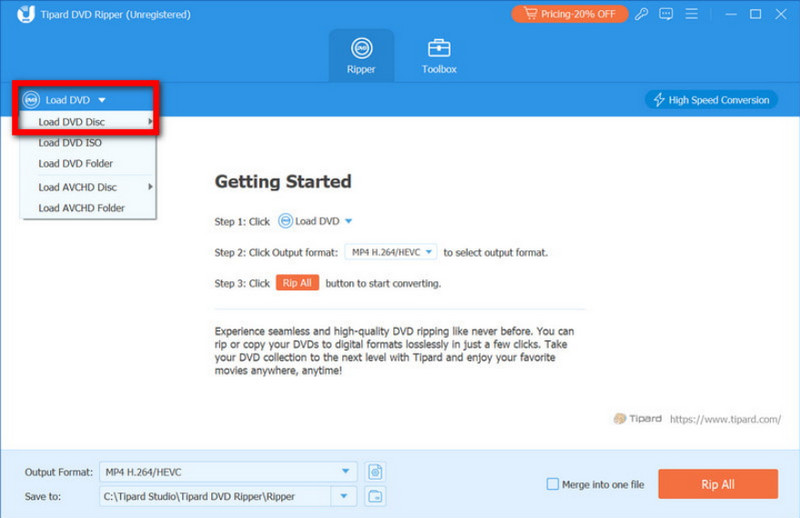
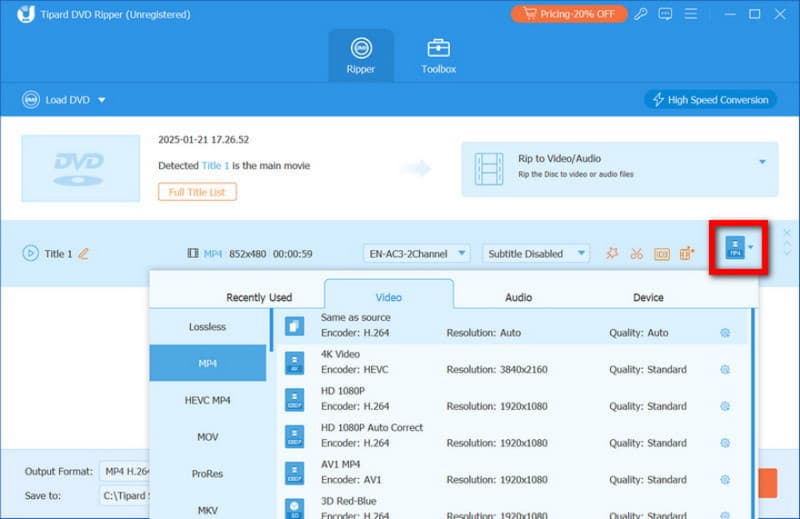
Step 3From the Format menu, select an output format that supports 4K, like MKV or MP4. Adjust frame rate, bitrate, encoder, and other settings to preserve high-definition quality.
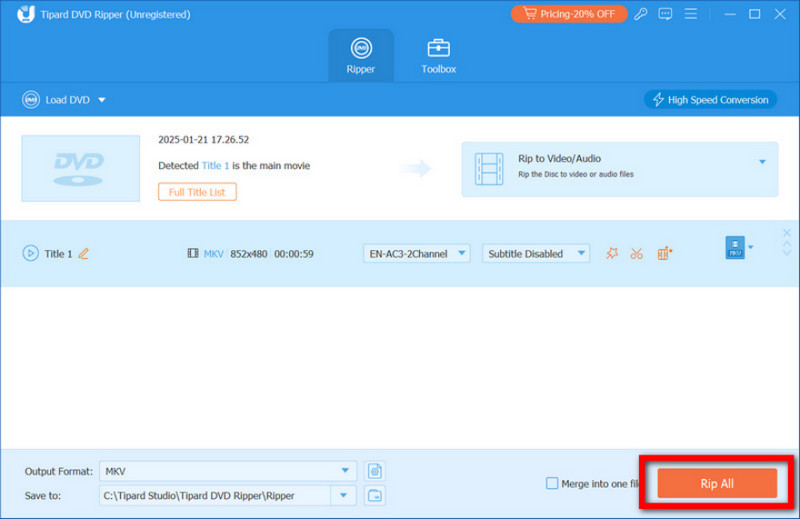
Step 4Hit Rip All to begin. AVAide processes files quickly while keeping maximum quality intact. Once complete, locate your digital files in the selected folder and enjoy your movies anywhere.
In the comparison of HD DVD vs Blu-ray, Blu-ray clearly became the more successful format because it offers higher storage and better support from the industry. Even so, both Blu-ray and HD DVDs can still be enjoyed today. With tools like AVAide Blu-ray Player for watching discs and AVAide DVD Ripper for converting them to digital files, you can easily access and preserve your movies on Windows or Mac.
ABOUT THE AUTHOR

Best tool for ripping and converting DVD Disc/Folder/ISO image file into over various formats.