Have you ever tried to play a Blu-ray disc, only to find that it does not work? It usually happens because of Blu-ray region codes, which restrict where discs can be played. Not sure what region codes are? Do not worry; we are here to help you understand them.
We will explain what the Blu-ray region code is. Plus, we will provide effective ways to play any Blu-ray disc without restrictions and use a Blu-ray region code remover to unlock the Blu-ray region code. With that, you can watch your movies freely on any device.
Part 1: What Is Blu-ray Region Code
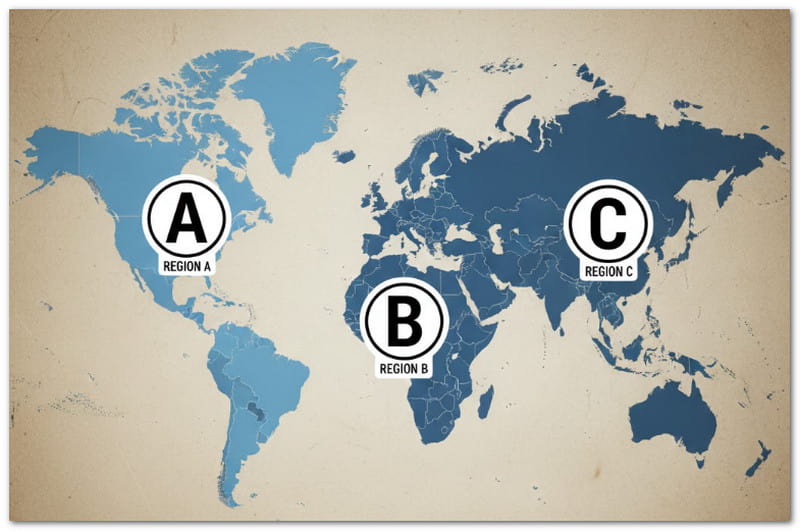
Blu-ray region codes are used to control where discs can be played. They divide the world into three main zones: A, B, and C. Each disc has a code, and your player must match it to play the movie. There are also region-free discs that work anywhere. The code is usually on the disc's packaging as a small symbol. Knowing your disc's region helps you avoid playback problems and choose the right player.
Here is a breakdown of each Blu-ray region:
- Region A: It covers North and South America, Japan, Korea, Taiwan, and Southeast Asia.
- Region B: It includes Europe, Africa, the Middle East, Australia, and New Zealand.
- Region C: It covers Russia, India, China, and Central & South Asia.
- Region Free (ABC): These discs can play on any player from any region. They are often marked with a triangle logo showing A/B/C.
With this knowledge, you can enjoy your Blu-ray movies and make sure every movie plays perfectly, no matter where it comes from. If you want to watch Blu-rays without any region restrictions, please keep reading to learn how.
Part 2: How to Play Blu-ray Without Region Code Restrictions
Is it really possible to play any Blu-ray disc without being stopped by region codes? Yes, it is possible using AVAide Blu-ray Player. It works as a Blu-ray player unlock region code solution, allowing you to enjoy Blu-ray movies from any region, including Region A, B, and C, without limits.
It also supports multiple formats like MP4, VOB, WMV, MKV, AVI, MOV, and more. You also get high-clarity playback with original clarity. Furthermore, it provides flexible control, letting you customize and adjust your viewing experience. These include start, pause, rewind, boost volume, and adjust video effects.
Step 1Get AVAide Blu-ray Player Downloaded & Installed
Download the AVAide Blu-ray Player by going to the primary website or relying on the Download buttons below. Once the file is downloaded, please run it and follow the procedures to install it on your computer. After installation, launch the program and get ready to enjoy your Blu-ray movies freely.

FREE DOWNLOAD For Windows 7 or later
 Secure Download
FREE DOWNLOAD For Mac OS X 10.13 or later
Secure DownloadStep 2Insert Your Blu-ray Disc & Load It
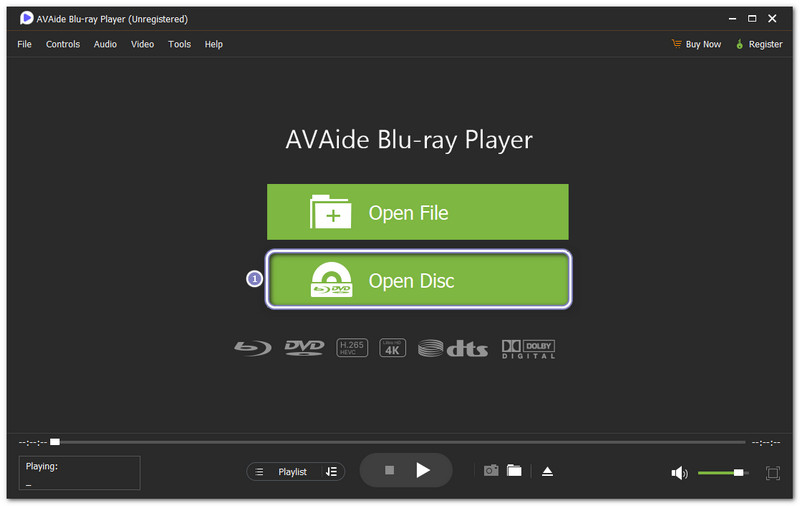
Take your Blu-ray disc and insert it into your computer's drive. In AVAide Blu-ray Player, click the Open Disc button. The program will immediately detect your disc and load the movie.
You do not need to worry about region codes because AVAide Blu-ray Player automatically bypasses them, letting you watch any Blu-ray disc from any region.
Step 3Enjoy & Control Playback
Once your movie is loaded, use the Playback Controls to play, pause, or skip scenes. You can also boost the volume if you like, change the frame size to full screen or a size you prefer, and add subtitles if needed.
If you see a scene you like, take a screenshot with just one click. The screenshot will be stored automatically in your local folder. Now, sit back and enjoy your high-quality Blu-ray movie without being stopped by region restrictions or codes.
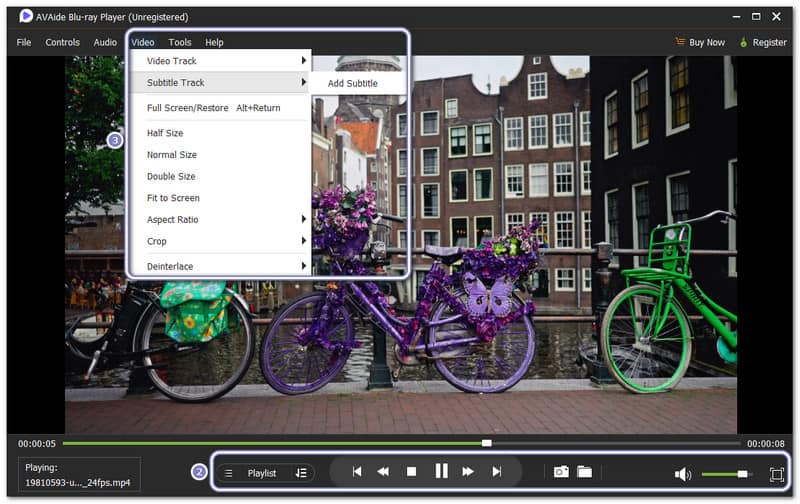
Other perks the AVAide Blu-ray Player offers:
- Dolby Digital & DTS Audio Support
Listen to rich and clear sound. Movies feel more realistic with surround sound effects. - Take Screenshots
Capture your favorite moments with one click. Screenshots are saved automatically to your computer. - Select Audio Track & Subtitle
Pick the soundtrack you prefer and add subtitles. Many subtitle formats are supported for easier viewing. - Custom Playlists
Create and manage playlists for continuous viewing. Arrange your movies in any order and enjoy them without interruptions. - Play Blu-ray Discs, ISO Files & Folders
Play Blu-ray ISO files, folders, or discs with full menus and original resolution.
Part 3: Unlock Blu-ray Region Code Using Blu-ray Region Code Remover
Using a dependable Blu-ray region code remover is the best way to unlock region restrictions and enjoy your Blu-ray discs freely. Tipard Blu-ray Converter removes these limits and converts your movies into common formats like MP4, MKV, AVI, and MOV.
In addition, Tipard Blu-ray Converter keeps the original clarity, and can even improve up to 4K. With 30× faster ripping speed, powered by 3-level GPU acceleration, it finishes the ripping process quickly and efficiently.
So, how to unlock Blu-ray region code? Find out below!
Step 1Download & Install Tipard Blu-ray Converter
You must download the Tipard Blu-ray Converter before anything else. When downloaded, open the setup file and follow the steps to complete the installation.
FREE DOWNLOAD For Windows 7 or later
Secure DownloadFREE DOWNLOAD For Mac OS X 10.13 or later
Secure DownloadStep 2Launch & Load Your Blu-ray Disc
Proceed to launch Tipard Blu-ray Converter and click the Load Blu-ray button. A menu will pop up to let you select your Blu-ray disc. The Blu-ray region code remover will automatically detect the main movie. If you want to rip other segments, click Full Movie List.
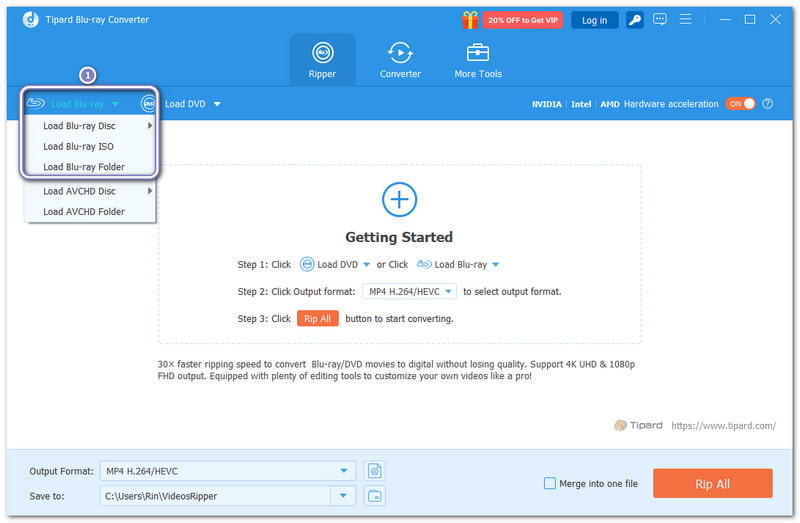
Step 3Choose Your Output Format
After loading the Blu-ray, click the Output Format drop-down menu and select a digital format under the Video or Audio section. If you want to fine-tune the output settings, click the Cogwheel button. You can change resolution, bitrate, or audio settings to suit your needs.
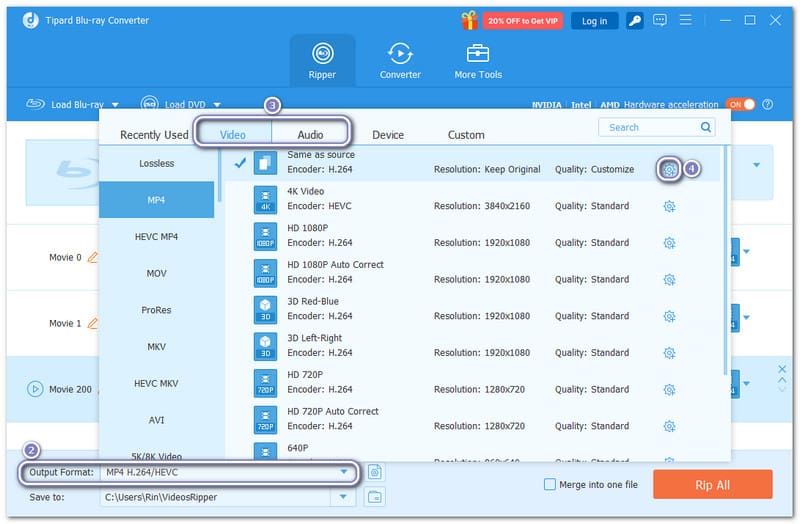
Step 4Rip the Blu-ray & Unlock Region Code
Finally, click the Rip All button. The program will start converting your Blu-ray to your selected format. Once it finishes, it will be saved as a regular file. Now, it is free from any region codes. You can watch it on any device without restrictions.
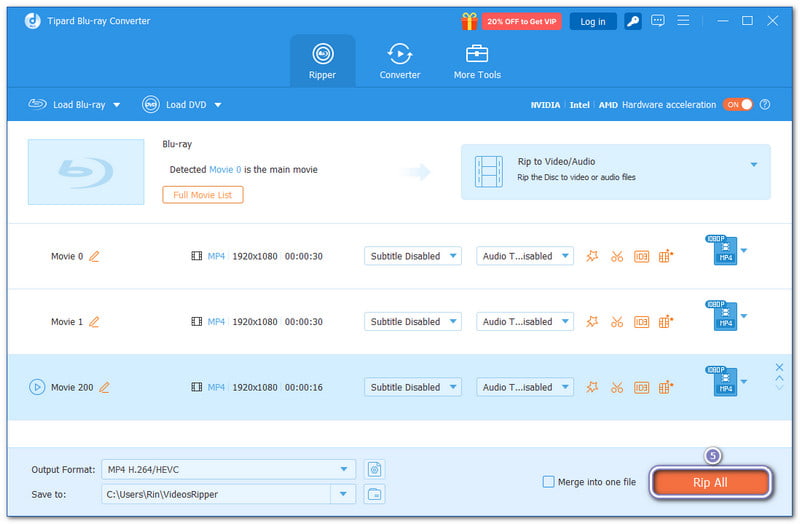
Other perks Tipard Blu-ray Converter offers:
- Super Fast Ripping
Rip your Blu-ray movies up to 30× faster with advanced GPU acceleration. - Edit & Customize Videos
Trim, crop, rotate, or apply effects to your Blu-ray videos to make them more refined. - Adjust Output Settings
Customize video frame rate, codec, resolution, audio bitrate, and more for perfect output. - Add Audio & Subtitles
Include your favorite soundtracks and add subtitles for better viewing or multiple languages. - Convert to Many Formats
Rip Blu-ray to MKV, MP4, MPG, AVI, MOV, and over 500 other video formats for any device.
No matter which Blu-ray region you have, with AVAide Blu-ray Player, you can play Blu-ray discs from Region A, B, or C without limits. It makes it a dependable Blu-ray player region unlock code solution.
Plus, with the help of Tipard Blu-ray Converter, you can unlock the Blu-ray Region code. It lets you rip discs easily, save them in common formats, and play them on any device. It really acts as a Blu-ray region code remover.
Together, these tools give you full freedom to watch, convert, and enjoy Blu-ray movies anytime, anywhere.
Full-featured multimedia player to play Blu-rays, DVDs, 4K UHDs, and other video/audio files.