AVCLabs Photo Enhancer AI became a reliable tool when it comes to enhancing images. With its AI-driven technology, it can help you get a higher quality for your images. The good part here is that the tool can reduce the image noise, sharpen details, and upscale photos. Now, are you interested in learning more about this excellent photo enhancer? Luckily, this review will give you all the details you need, including the features, use cases, pricing, and more. Thus, read this review and learn everything about AVCLabs Photo Enhancer AI.
Part 1. What is AVCLabs Photo Enhancer AI
AVCLabs Photo Enhancer is a sophisticated image editing software that automatically enhances photo quality with artificial intelligence. It is intended to preserve natural textures while enhancing low-resolution photos, enhancing details, and lowering noise. In addition, the program has helpful features like background removal, color correction, and even the ability to colorize black-and-white images. Professionals who require batch processing and high-quality results can use it with ease because of its user-friendly interface. With that, it is a flexible way to improve old or damaged images, landscapes, and portraits.
Key Features
To learn more about the capabilities of the photo enhancer, check the information below.
1. AI Upscaling up to 400%
The core feature of the tool is to enhance JPG and PNG quality up to 400%. With this feature, you can ensure that you can get a better version of your photo. What we like here is that you can enhance your images easily since the tool has a neat and simple user interface.
2. AI Denoise
Another helpful feature you can access is its AI Denoiser. This feature is ideal if you want to reduce the noise and grain from your photos. With that, if you want to restore and sharpen your grainy and blurry image, feel free to access this feature.
3. AI Colorizer
What we like about the program is that it can help you colorize your photo. This feature is ideal if you want to sharpen the color of your image. It can even turn your black-and-white image into a colorful one. Plus, you can also manually adjust the color of your image. You can adjust/modify the brightness, contrast, and saturation.
4. Batch Processing
What makes the AVCLabs Photo Enhancer program powerful is its batch processing feature. This feature allows you to upscale/enhance multiple images in a single process.
5. AI BG Remover
Do you want to make an image background transparent? Then, you can access the program's AI BG Remover. This feature is perfect if you want to delete the background from your pictures. The software is also the best choice if you want to make your photo neat and look professional.
Pricing Plans
Check the pricing plans below to get more ideas about its subscription plan.
| Plans | 1-Month Plan | Perpetual Plan | 1-Year Plan |
| Price | $39.95 | $99.90 | $89.95 |
| Inclusions | • Auto-Renew. Cancel Anytime • 1-License for 1-PC • 5-Day Money Back Guarantee • Free Update & 24/7 Support | • One-Time Payment • 1-License for 1-PC • 30-Day Money Back Guarantee • Free Update & 24/7 Support | • Auto-Renew. Cancel Anytime • 1-License for 1-PC • 5-Day Money Back Guarantee • Free Update & 24/7 Support |
Part 2. Use Cases for AVCLabs Photo Enhancer AI
There are various use cases where you need to use the tool. To learn some of them, you can read the details below.
- Restore Old Photos - The tool is ideal if you want to restore your old photos. It can ensure that you can get a brand-new image after the restoration process.
- Upscaling Low-Resolution - The software is perfect for enlarging small and pixelated images for professional presentations and prints.
- E-Commerce Product Images - If you are a seller, you can rely on the program to sharpen your images and make them more vibrant, perfect for attracting buyers.
- Colorizing Black-and-White Photos - You can use the photo enhancer if you want to bring life to your old photos.
Part 3. Detailed AVCLabs Photo Enhancer AI Review
For more details about the program, you can check all the information provided in this section.
Basic Editing Features
Besides upscaling images, the software can also offer basic editing tools. The software can let you crop the image and choose your preferred aspect ratio. It is ideal if you want to view the image on a certain platform.
Compatibility
The good thing about the image enhancer is that you can access it on both Mac and Windows. With that, no matter what OS you use, accessing the program is easy.
Good Things about AVCLabs Photo Enhancer AI
- Utilizing the photo enhancer is easy to operate.
- It has various AI models to enhance the overall appearance of photos.
- The software has a fast upscaling process.
Drawbacks of AVCLabs Photo Enhancer AI
- The program is resource-intensive.
- To access all the features, accessing the paid version is highly recommended.
Part 4. How to Use AVCLabs Photo Enhancer AI
Want to use the photo enhancer to upscale your image? Then, you can use the steps below.
Step 1Download the AVCLabs Photo Enhancer AI for free. Then, install it to start the image upscaling process.
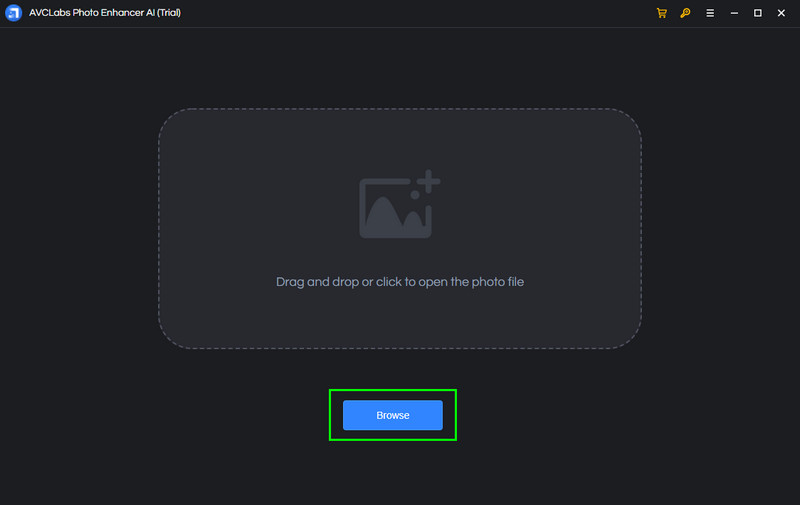
Step 2After you launch the program, tap the Browse button to add the image from your device. You can even add more than one image if you want.
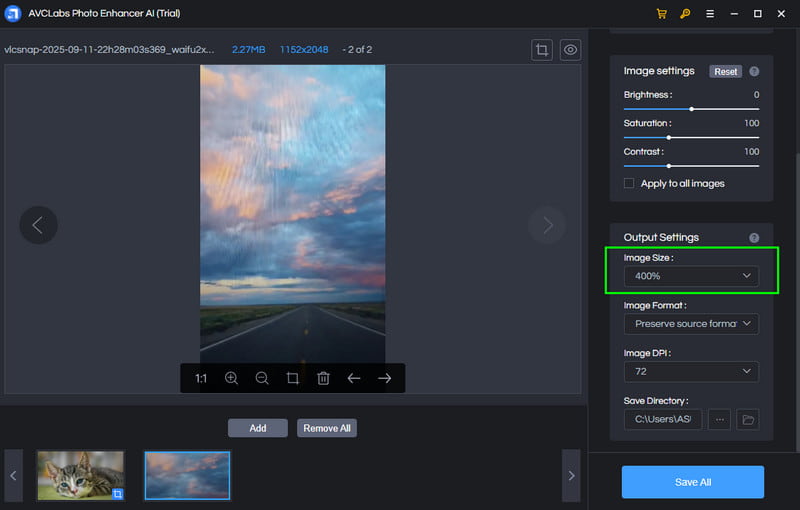
Step 3Proceed to the right interface and go to the Image Size. You can start improving your photo by up to 400%.
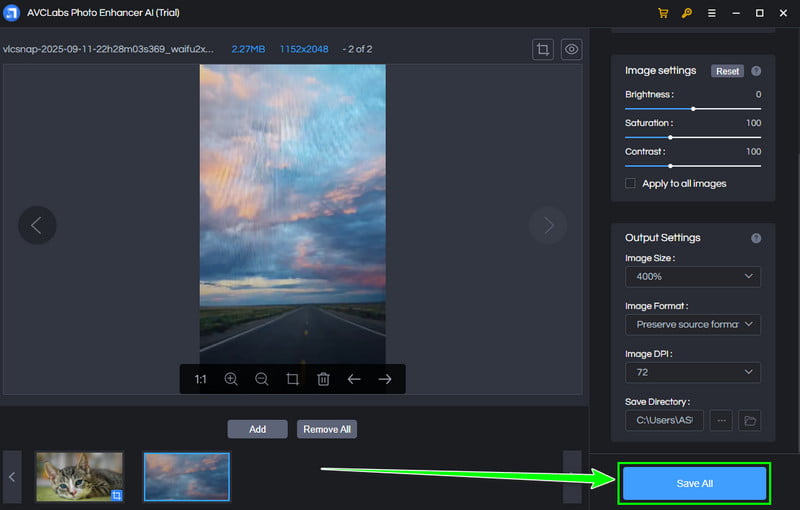
Step 4For the last process, hit the Save All button below. Once done, you can now view the improved image on your device.
Part 5. Best Online Alternative to AVCLabs Photo Enhancer AI
AVCLabs Photo Enhancer is a reliable program that can upscale your images. However, if you have a low-spec computer, you can't access it since it is resource-intensive. With that, if you need a better alternative, access AVAide AI Image Upscaler. It is an online-based tool that can upscale your photos for up to 8× better than the original quality. The best part here is that it is free to use, and you can access the tool for free. It can even ensure that you can obtain the result in just a single click, making it more powerful and remarkable. Lastly, this image upscaler can support batch processing, allowing you to upscale more than one photo and get a high-quality image. Thus, if you prefer using an online tool to upscale your images, it would be best to use AVAide AI Image Upscaler.
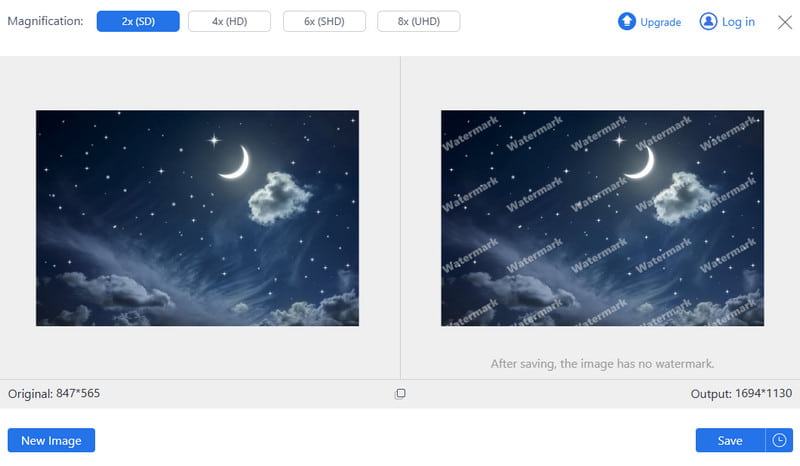
To get more insight into the two image upscalers, check the table below.
| AVAide AI Image Upscaler | vs. | AVCLabs Photo Enhancer AI |
| AI sharpening improves clarity, but is primarily focused on resolution increase. | Image Quality Improvement | Uses advanced AI to sharpen details, reduce noise, and preserve natural textures. |
| Offers 2x, 4x, 6x, and 8x upscaling, up to 4096×4096 pixels. | Upscaling Performance | Upscales up to 400% with Ultra AI Model, maintaining detail. |
| Web-based tool, simple drag-and-drop interface, accessible without installation. | Ease of Use | Desktop software with an intuitive interface, suitable for beginners and professionals. |
| Yes | Support Batch Processing | Yes |
| Quick online upscaling for casual users, social media, and small-scale projects. | Best Use Case | Professional photo restoration, portraits, e-commerce product images, and archival projects. |
Thanks to this detailed AVCLabs Photo Enhancer AI review, you have learned its features, use cases, pricing plans, and more. You even learned how to use this program to upscale your images. Plus, if you are looking for the best alternative to easily upscale images, we suggest using AVAide AI Image Upscaler. It is also easy to access, making it more convenient for all users.

Our AI technology will automatically enhance the quality of your images, remove noise and fix blurry images online.
PROCESS NOW