There’s nothing more frustrating than owning a DVD you can't play on your laptop or tablet. Modern devices weren't built for the complex copy protections and regional locks of the past. To bridge this gap, you need to know how to rip a DVD with copy protection. Below, we break down the best professional tools for navigating these digital barriers safely and efficiently.
Part 1. What Is DVD Copy Protection
DVD copy protection refers to technologies enacted to prevent copying, playback, and distribution of DVDs without authorization. Such measures are taken to protect the copyrights on the said content, say, films, software, or music, from piracy to allow for revenue from the creators and distributors.
Types of DVD Copy Protection
- CSS (Content Scramble System): It is the most common protection found on commercial DVDs. It uses a 40-bit stream cipher to encrypt the video data.
- Region Codes: This is not encryption, but a distribution control mechanism. The world is divided into 8 regions.
- DRM (Digital Rights Management): As decryption software became more advanced, studios introduced structural protections to confuse ripping tools, like Sony ARccOS and Disney X-project.
- Playback Restrictions: APS and UIPs. They can cause restrictions to the video playback if you want to record the video or skip the copyright warnings.
Part 2. Comparison of 3 Ways to Bypass DVD Copy Protection
| Feature | MakeMKV | AVAide DVD Ripper | DVDFab |
| Core Philosophy | Lossless Remuxing | Efficient All-in-One Conversion | High-End Decryption |
| Decryption Power | Strong (CSS, RC, RCE, Some ARccOS) | Strong (CSS, Region Codes, UOPs, APS) | Comprehensive (Exclusive Cloud Decryption) |
| Output Formats | MKV Only (or ISO/Folder) | 300+ Formats (MP4, HEVC, MOV, ProRes, etc.) | 100+ Formats (AV1, 8K, 3D, Prores) |
| Video Quality | 1:1 Bit-Perfect (No Encoding) | Flexible (Lossless or Compressed) | Flexible |
| Hardware Acceleration | None (CPU Only) | Full Support (NVIDIA CUDA, Intel) | Advanced (Multi-GPU Acceleration) |
| Editing Tools | None | Rich (Trim, Crop, Watermark, Filters) | Medium |
| File Size | Large (~4-8 GB per disc) | Optimized (Highly customizable) | Optimized |
| Pricing Model | Free (Beta) / One-time Purchase | Month / Lifetime (Best Value) | Expensive |
| Target Audience | Purists & Plex/Kodi Enthusiasts | Content Editors & Home Users | Media Collectors |
Part 3. 3 Ways to Decrypt Copy Protection on DVD
1. AVAide DVD Ripper
If you want to convert your DVD collections into a digital format that is easier to access and store, you must bypass the DVD protection. AVAide DVD Ripper includes options for region codes, Macrovision, and CSS-encoded DVDs. These can be turned into various formats so that they are versatile and have no loss in quality. The next section will discuss how you can bypass DVD copy protection.
- Compatibility with CSS-protected and region-coded DVDs.
- Ability to convert DVDs to formats like MP4, MKV, AVI, and more.
- Ensures original video and audio quality are retained during conversion.
- It enables ripping multiple DVDs simultaneously.

 Secure Download
Step 1Download and Install
The process begins by downloading AVAideDVD Ripper from its website. Install it by following the instructions available and then open the software.
Step 2Load the Protected DVD
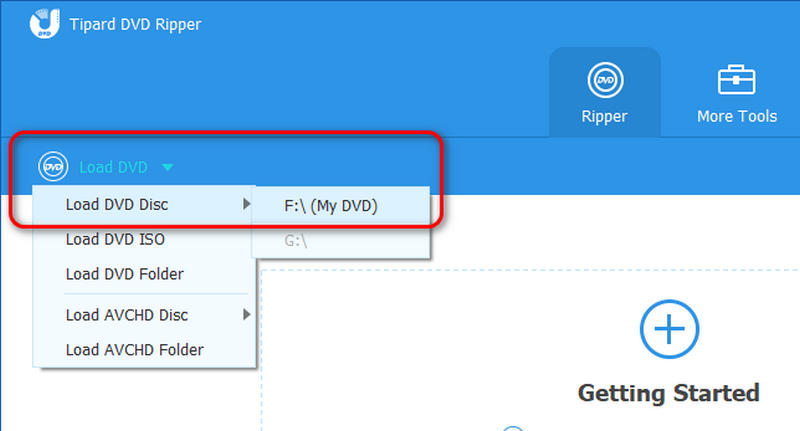
To load the DVD, first place it on the drive of your computer. Once the disc has been loaded, please select it from the dropdown menu via the Load DVD option. When your DVD is loaded, it means this program has bypassed the copy protection on your DVD.
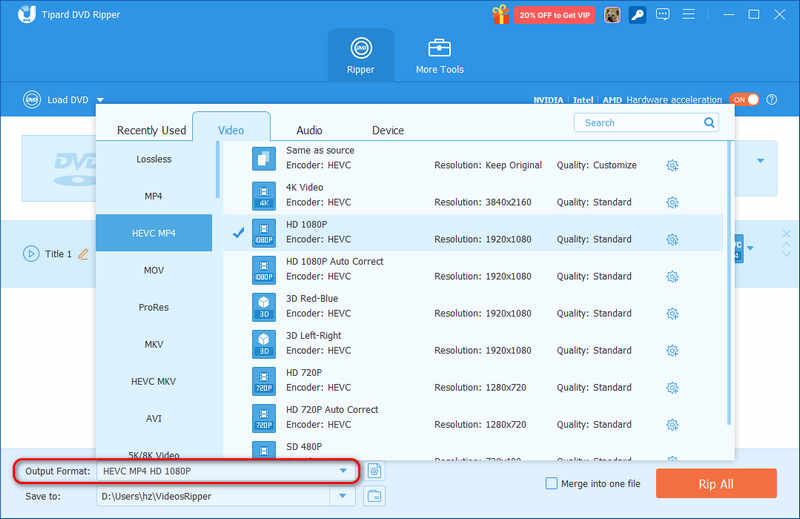
Step 3Choose Output Format
You can access various video formats or device presets in the Output Format section. Select the most suited for your needs and modify the resolution, video bitrate, and other settings.
Step 4Configure Settings
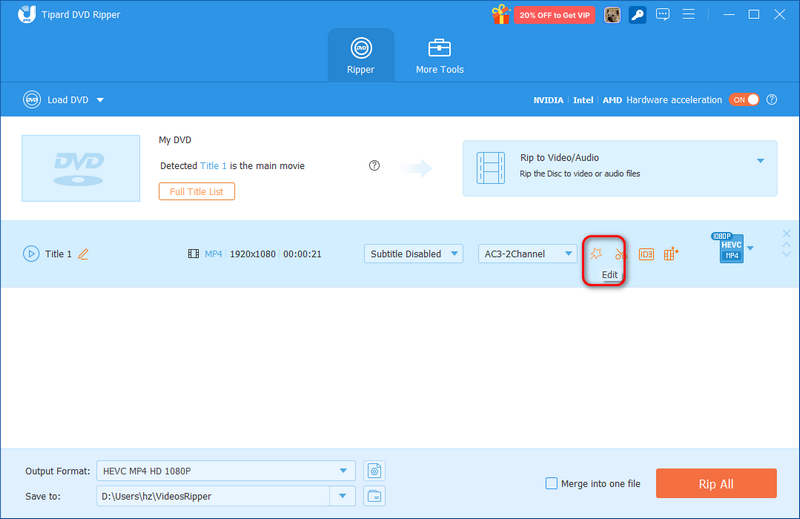
With its tools, trim videos and add subtitles or filters as required by clicking the Edit button. It will also automatically remove features like CSS and region codes from the software.
Step 5Rip DVD
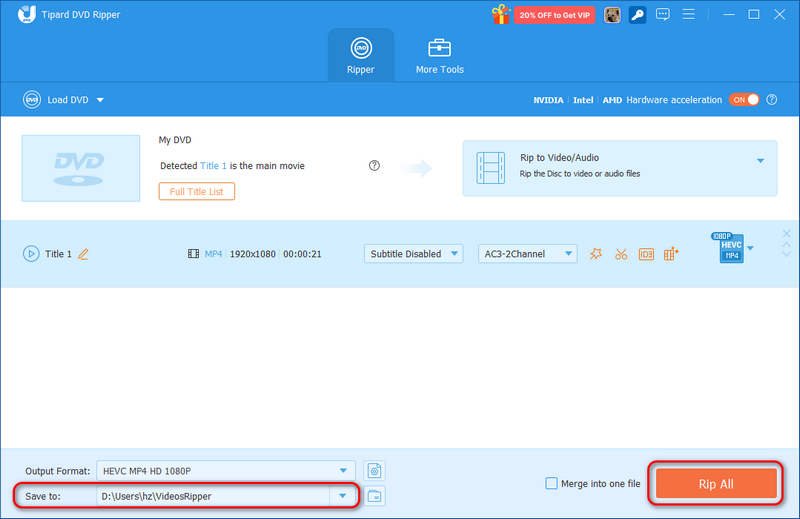
Lastly, press the Rip All option to deactivate the copy protection layer and convert the video format. When it has completed the actions, look in the provided output folder where the digital file is stored.
2. MakeMKV
To rip copy-protected DVDs for free on Windows, macOS, and Linux, MakeMKV is a good choice. It can easily deal with CSS, region codes, DRMs, and analog protections. Its copy protection removal features are native, so that you can directly load your DVD and rip it to lossless MKV format. However, MakeMKV cannot deal with newer DVD encryptions, like 99-Titles and international bad sectors. Also, it can only remux copy-protected DVDs to lossless MKV videos, but DVD parameters are far outdated today. Therefore, you may also need to upscale the MKV videos unless you need to edit the raw DVD videos first.
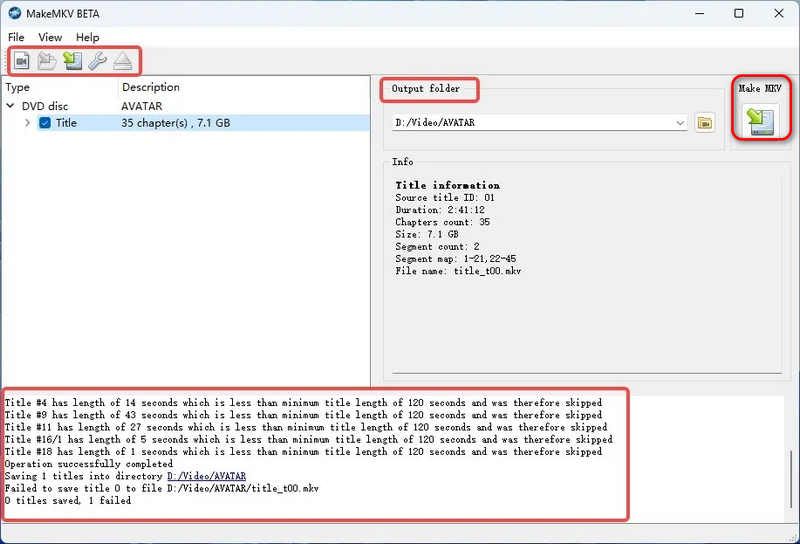
Step 1Launch MakeMKV and click the Open Disc button in the top left side to load your DVD. When you see your DVD content in the program, that means MakeMKV has decrypted the DVD copy protection.
Step 2Then, select your desired titles (videos) in the DVD. You can also select all files. Then, click the Output folder dropdown button to select a destination folder. Finally, click the Make MKV button to rip the copy-protected DVD.
3. DVDFab
DVDFab is a powerful and professional disc management. It can bypass all types of old and new DVD copy protection methods. Its cloud decryption can easily deal with the latest commercial movies. DVDFab also supports GPU acceleration, making DVD ripping very fast. It also supports lossless MKV output if you need to get the raw DVD videos.
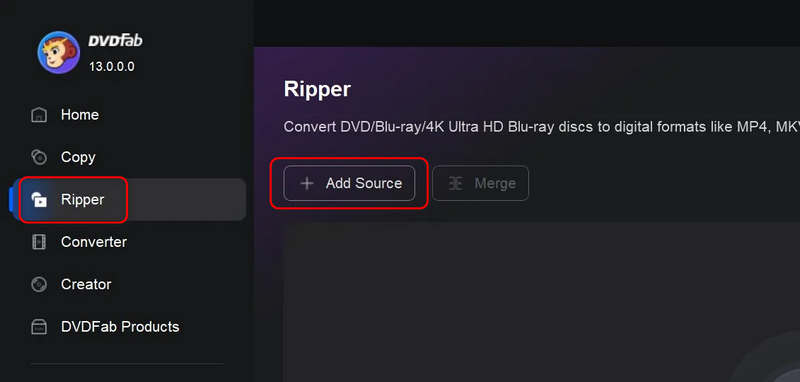
Step 1Launch DVDFab. Select the Ripper feature. Then, click the Add Source button to import your DVD.
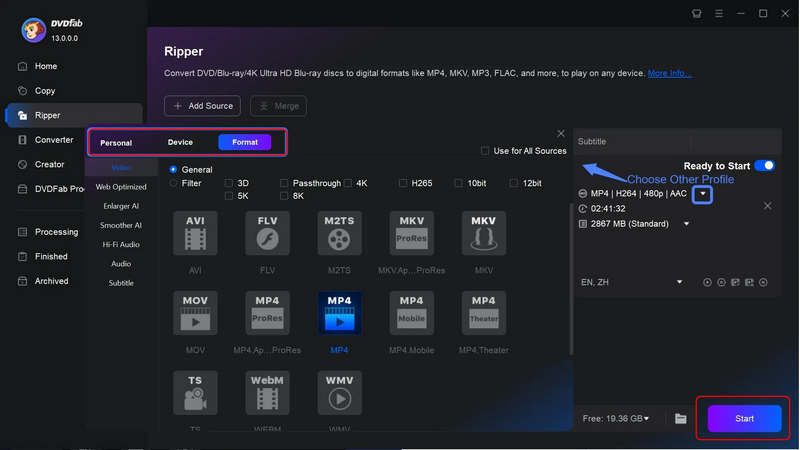
Step 2DVDFab will automatically bypass the copy protection on your DVD. You just need to select a desired output profile. Then, click the Start button to rip your DVD.
DVD copy protection removal allows you to rip your DVDs without any restrictions. With AVAide DVD Ripper, MakeMKV, and DVDFab, you can easily deal with CSS, DRMs, region codes, and more encryption methods automatically. They can natively bypass copy protection without any manual operation, and you can enjoy your DVD movies on different displays and devices.
ABOUT THE AUTHOR

Best tool for ripping and converting DVD Disc/Folder/ISO image file into over various formats.