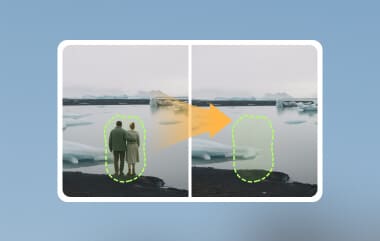
How do I remove watermark from PDF for free? If that is your issue, then you have come to the right place. We will offer 2 ways online and offline to remove the watermark. They are easy, workable, and can be used on multiple devices. Read this article and see the detailed tutorial.
Part 1. Why You Need to Remove Watermark from PDF
Watermarks are those faint or translucent text or designs attached to a document. Adding a watermark serves different purposes. But we occasionally remove them for various reasons as well. Below are some of the reasons why there is a need to remove watermarks from a PDF file.
• Cleaner appearance: Watermarks can be very inconvenient to see the content on a PDF. Removing them may give you a clearer view of what you need to read and view.
• Sharing PDF files: In professional settings, it's crucial to remove unpleasant watermarks if you plan to share your PDF file. It ensures that you will provide a more presentable and refined document.
• Extract clear pages: Sometimes, you want to reuse a page or a picture from a watermarked PDF in your own work. Removing the watermark lets you do this without it showing up in your new document.
• Further editing: It will be easier to change, edit, or add things and notes you want to the PDF file you have.
Part 2. Remove Watermark from PDF Online Using pdfFiller
There are plenty of PDF watermark remover online tools you'll see over the internet. One of these is the pdfFiller. It is an online tool that helps you eliminate watermarks from your documents. Aside from watermark removal, it also offers a range of notable features. With it, you can edit a document, eSign, fill out PDF forms, and more. Given these features, it also comes with downsides. The first one is that it offers limited access for free. Thus, it might not be ideal for users with budget constraints. Another thing is that it might not remove complex and deeply embedded watermarks. Nonetheless, it is still a good option. Now, here's how to use it.
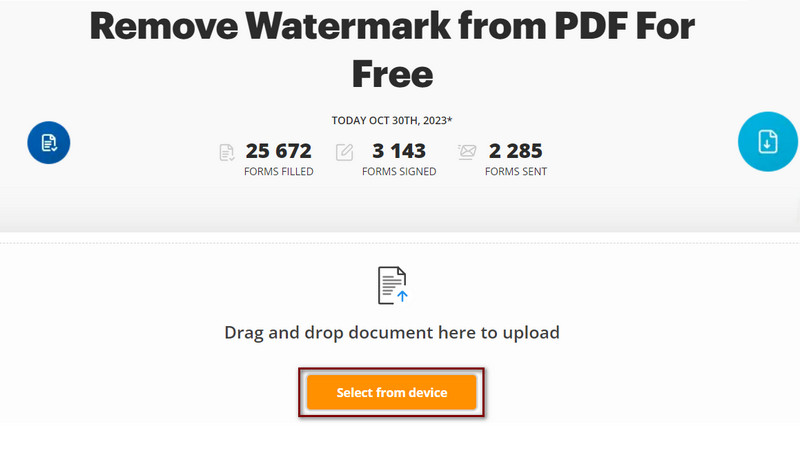
Step 1 First, go to the official page of pdfFiller. Then, import the PDF file with a watermark by clicking the Select from device. Or by dragging and dropping the document to upload it.
Step 2After adding the PDF, you will be directed to the editing section. Click the Edit watermark button on the right part of your current interface.
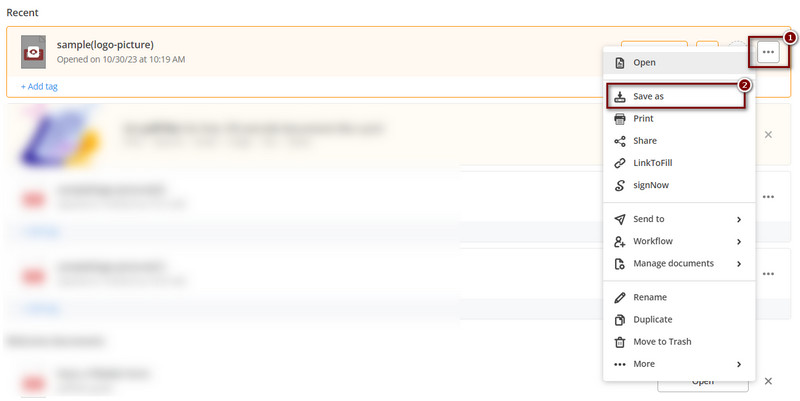
Step 3When a panel appears, uncheck the watermark box to remove it. Then, hit the Close button. Proceed to the next screen and click Done to save changes. Lastly, save the edited PDF file.
Part 3. Remove Watermark from PDF Offline Using Microsoft Word
Microsoft Word also offers another approach for removing watermarks from PDF files. It is a popular and versatile software for writing and editing documents. Although it is not a direct PDF editor, it allows you to turn PDF into a Word document. By doing this, you can modify or remove the watermark. But note that if you're trying to eliminate a text watermark, it may not be that effective. Hence, you need to remove each text, which can lead to a mess. So, we highly suggest being careful in taking this method. Yet, it is still an accessible tool for many users. Thus making it a practical offline watermark remover option.
Step 1Launch the File Explorer on your computer and look for the PDF file you want to remove the watermark.
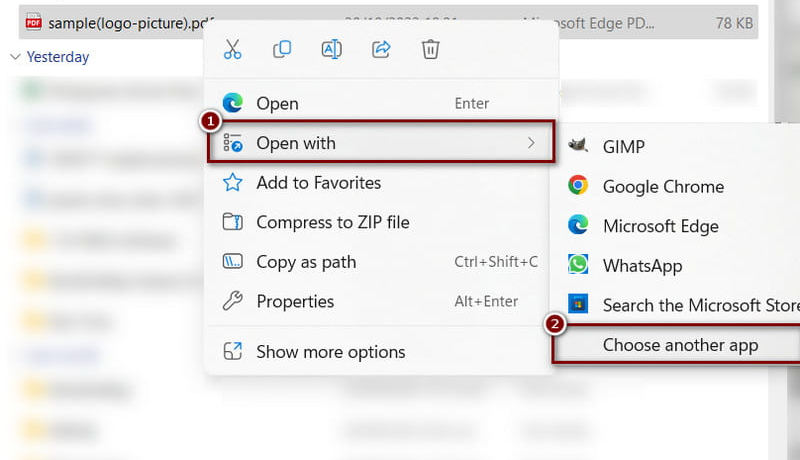
Step 2Right-click the PDF file and select the Open with option. Click the Choose another app and find Microsoft Word.
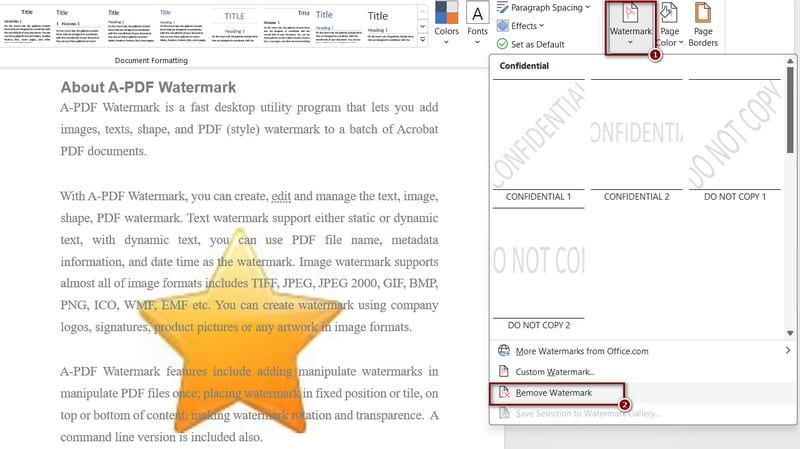
Step 3Then, Microsoft Word will change your PDF to Word format. Now, you can remove the watermark on your PDF file. Delete it manually or go to Design Watermark Remove Watermark.
Part 4. Remove Watermark from PDF Pages for Free
If you want to reuse several pages on the PDF file without a watermark, there is an easier way. You can first export the PDF file as images, and then remove the watermark from the images.
Generally, an image watermark remover performs better and gives you a better quality. You can use AVAide Watermark Remover to remove the watermark from PDF pages.
- Online image watermark remover that can be used without logging in.
- Excellent in watermark removal for portraits, landscapes, and text.
- Work for JPG, PNG, GIF, and more file types.
- Not only watermarks, but you can also remove people and other items.
First, you can export your PDF file pages to images with the Adobe Acrobat online tool. Then, see the steps to remove the watermark with AVAide.
Step 1Open any browser and go to the main page of AVAide Watermark Remover. Next, click the Choose a Photo button to upload your image.

Step 2Select the watermark you want to remove in your image. Once you're done, click the Remove button to execute the process.

Step 3For the final step, you can select Crop & Save or immediately Save the edited photo on your computer.

Part 5. FAQs About Removing Watermark from a PDF
How to remove watermark from PDF using Google Docs?
To remove the watermark from a PDF with Google Docs, first upload the PDF file to Google Drive. Next, open the PDF and click the Open with Google Docs button at the top of the document. Then, select the watermark you want to remove and hit the Backspace key to delete it. Finally, save and download your file as PDF on your computer.
How to remove watermark in PDF with Adobe Reader?
If you're using Adobe Reader to remove a watermark from a PDF, select the Tools option. Then, click Edit PDF and choose Watermark. Lastly, click the Remove button.
How to remove watermark from Flip PDF Professional?
To remove watermarks from Flip PDF Professional, access the source file to create the PDF. Then, edit it there. Watermarks added during the PDF creation process are usually not removable from within the PDF itself. You'll then need to edit that source document to exclude the watermark. Or, you need to recreate the PDF without the watermark.
To remove a watermark from a PDF should not be that challenging. As shown above, many tools can assist you with your needs. Ensure to select what will best fit your preferences. Additionally, if you need a tool to remove watermarks in your photos, consider using AVAide Watermark Remover. It will offer you a convenient way to do it online and for free!
ABOUT THE AUTHOR


Easily get rid of annoying watermarks and unwanted objects from your photos without quality loss.
PROCESS NOW