Master Super Resolution in Photoshop 2026 with our updated guide to AI image upscaling and enhancement. We break down the step-by-step process in Adobe Photoshop to perform Super Resolution with the 2026 new methods. It supports 8x magnification with enhanced image clarity and rich details.
If you consider the Super Resolution in Photoshop is difficult to command, you can also turn to some easy-to-use AI-upscaling tools. Thanks to the improvement of AI models, it's increasingly easier to get 8K clarity with simple workflows.
Part 1. What Is the Photoshop Super Resolution Feature
Adobe's AI-driven upscaling (formerly Super Resolution) has evolved into an intelligent texture reconstruction engine, which is available in Photoshop and Lightroom. By replacing traditional interpolation with advanced deep learning, Photoshop Super Resolution allows users to prepare legacy media for modern high-res displays.
- 4x Pixel Density: Photoshop Super Resolution can automatically doubles the width and height of any image, transforming a 12MP file into a 48MP masterpiece ready for large-format printing.
- Versatile Applications: Pro Printing, Aggressive Cropping, and Legacy Restoration.
- RAW-First Workflow: While it supports JPEG and TIFF, processing RAW files yields the highest dynamic range and the cleanest edge reconstruction.
- Ecosystem Integration: Seamlessly works within the Adobe Firefly environment, allowing for further generative edits and neural filtering after upscaling.
Part 2. How to Use Super Resolution in Photoshop
You need to install the Adobe Camera Raw plugin to use the Photoshop super resolution feature. In other words, this feature is in the plugin, rather than the Photoshop editor. Here is a step-by-step tutorial on how to use this feature:
Step 1First, open Photoshop and import the image you want to upscale. To do so, go to File > Open and pick your image file.
Step 2If it is a RAW image, it will automatically be opened in Adobe Camera Raw; if not, you can still apply ACR by right-clicking on the layer and selecting Convert to Smart Object, then Filter > Camera Raw Filter.
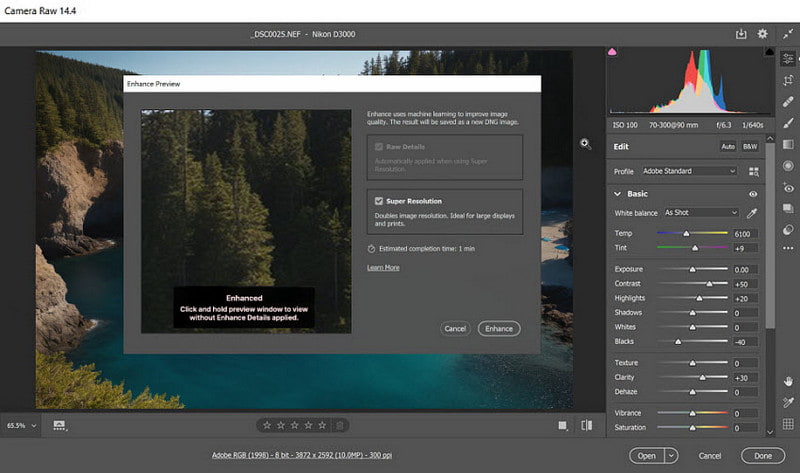
Step 3On the ACR menu, right-click on the image and choose the Enhance command from the drop-down menu. This action will bring up the Enhance Preview dialog box.
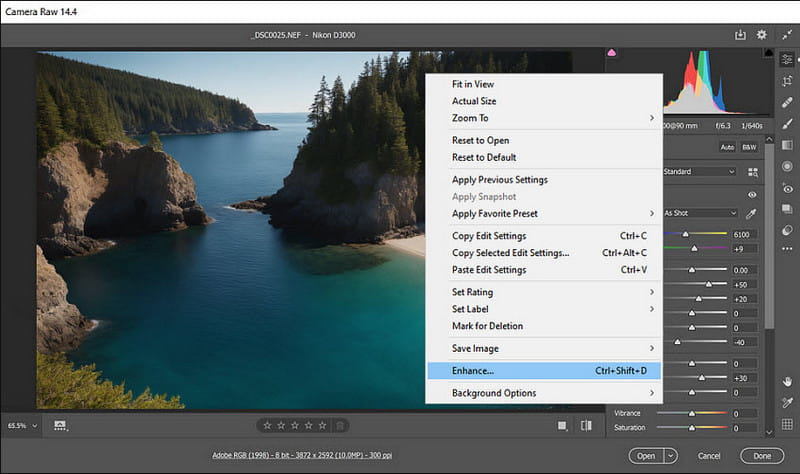
Step 4In the Enhance Preview dialog, check the Super Resolution option. It will present you with an enhanced version of the photo preview anyway. Be sure to mark the Raw Details checkbox whenever possible.
Step 5At last, click on Enhance. Photoshop creates a new file containing enhanced resolution.
- Super Resolution in Photoshop 2026 is not that robust, for Generative Upscale is a more powerful and easy-to-use alternative. Just click Image > Generative Upscale, and then select a desired AI upscaling model, like Adobe Firefly or Topaz Gigapixel.
Part 3. Is Photoshop Super Resolution Still Prevailing?
While Adobe Photoshop remains a titan in professional editing, its AI-driven Super Resolution (now part of the Generative Upscale ecosystem) is often overkill for quick tasks. While it excels at preserving RAW metadata, its high subscription cost and heavy GPU demands can be a barrier for many.
In contrast, AVAide Image Upscaler offers a streamlined, cloud-based alternative that challenges the Adobe standard in three key areas:
Superior Magnification: While Photoshop's native Super Resolution is traditionally optimized for a 2x linear upscale, AVAide Image Upscaler utilizes advanced Deep Learning models to push images up to 8x their original scale with a single click.
Ease of Use & Accessibility: Photoshop requires a complex workflow involving Camera Raw or Generative layers. AVAide is 100% web-based and automated with AI upscaling.
Hardware Efficiency: Photoshop’s AI processing relies heavily on your local VRAM, which can lead to lag on standard laptops. AVAide Image Upscaler is a totally online tool that won't take your CPU or GPU resources.
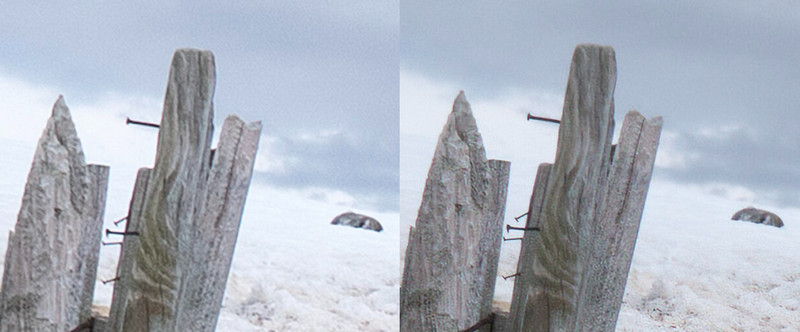
This is the image before and after being processed by Photoshop Super Resolution. The details are perfectly processed, and we can distinguish them easily. However, the algorithm also makes the processed image darker than the original image.
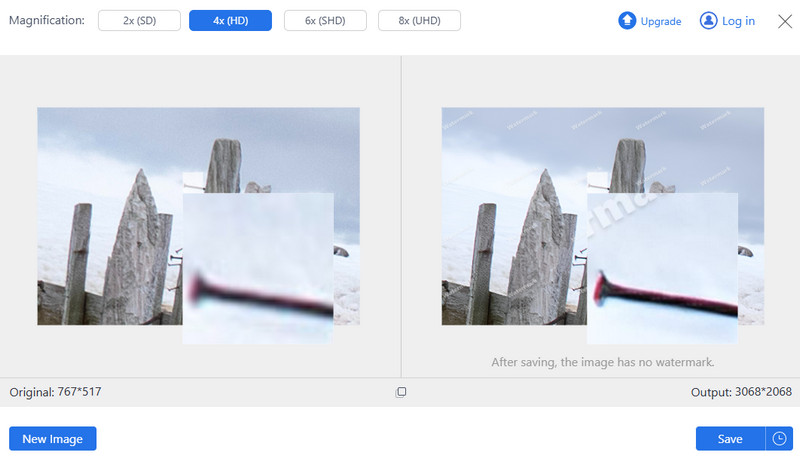
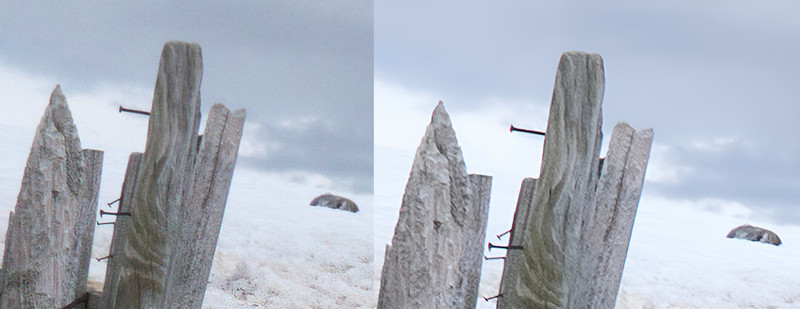
Let's see how AVAide Image Upscaler – 4x performances. You can tell the contours are smoother, the subject is more prominent, and the image does not reduce brightness due to increased resolution. More importantly, what you see is the 4 times upscaling effect, you can also up the image to 8 times if you need.
To sum up, Photoshop Super Resolution focuses more on increasing resolution in overall effect, while AVAide Image Upscaler concentrates on enhancing the subject of the image. And AVAide Image Upscaler is online and easier to use, while the other one is more professional. You can choose them according to your needs.
If you need a resourceful option instead of the Super Resolution feature on Photoshop, consider AVAide Image Upscaler. AI technology is applied in this online tool to enlarge and enhance your images; hence, it requires only a few mouse clicks to enhance the image resolution or clarity. This means that AVAide Image Upscaler can automatically increase your photos' resolution and sharpness, making them ideal for various purposes such as e-commerce, printing or personal use.
- Using advanced AI technology enhances the quality of images by eliminating noise and blur.
- It enables you to zoom into pictures by 2×, 4×, 6× and even up to eight times, thereby revealing more specific details within pixelated or damaged photographs.
- The compatibility is very high for JPGs, JPEGs, and BMPs.
- It is accessible through any web browser without any cost or watermarking. Moreover, its interface has been designed with amateurs in mind who do not have prior photo editing experience.
- The service ensures that your information remains safe from third parties to prevent unauthorized access or usage.
Part 4. FAQs About Photoshop Super Resolution
Can I use Super Resolution for multiple images at once?
Super Resolution can be used to take many pictures simultaneously. Choose several files in Adobe Bridge or Lightroom and apply the Enhance command to all of them together, thus efficiently improving the resolution of all selected photos.
Which file types are compatible with Super Resolution in Photoshop?
Super Resolution in Photoshop supports different categories of file types, such as RAW, JPG, PNG and TIFF. However, while RAW formats that contain more image data provide better results, this function works perfectly across all these formats.
What is the way Super Resolution deals with noise and artifacts?
It uses AI to handle noise and artifacts. The model of AI trained on millions of images, fixes blurry pictures, learns to reduce noise intelligently and avoids/reduces artifacts in the process of enhancing them, making for cleaner, sharper images that are clearer and more detailed.
Can you undo changes made by Super Resolution?
Indeed, the changes made by super-resolution can be undone. It creates a new DNG file of high resolution to save the original image, so you can refer back to it when you need to or keep it untouched.
Does Super Resolution work well with video frames?
It does not work with video frames. This particular version of Photoshop focuses only on still images. To enhance video frames, one would require specialized software for video editing that offers either frame-by-frame enhancement or other features specific to video media.
This article explained Photoshop Super Resolution as one of the most potent tools that uses artificial intelligence (AI) advancements. Adobe's super-resolution feature in Photoshop enhances printability and allows more detail in higher-resolution images.
This article also looked into different alternatives, such as AVAide Image Upscaler, which could be used to improve image quality online. With these types of tools, professionals and novices can attain magnificent outcomes, hence supporting their creative initiatives.
ABOUT THE AUTHOR


Our AI technology will automatically enhance the quality of your images, remove noise and fix blurry images online.
PROCESS NOW