โดยทั่วไปแล้ว ผู้ใช้จำนวนมากมักจะดาวน์โหลดแอปพลิเคชันเพื่อระบุตัวตน ส่วนขยายบันทึกหน้าจอ พวกเขาพบเจอกับโปรแกรมบันทึกวิดีโอ แต่หลังจากบันทึกเสร็จแล้วกลับสงสัยว่า 'ทำไมถึงกระตุก?' หรือ 'ทำไมไฟล์ถึงใหญ่จัง?' การบันทึกวิดีโอที่ดีที่สุดนั้นต้องคำนึงถึงอัตราเฟรม การอนุญาต ตัวแปลงสัญญาณ การรองรับ และการควบคุมที่ใช้งานง่าย เมื่อรู้สิ่งเหล่านี้แล้ว คุณก็ไม่จำเป็นต้องแก้ไขอะไรเพิ่มเติมในภายหลัง ในส่วนที่เราได้เน้นไว้ที่นี่ คุณจะได้เรียนรู้วิธีการประเมินและเลือกเครื่องมือที่ดีที่สุดสำหรับเบราว์เซอร์ของคุณ
- เปรียบเทียบอย่างรวดเร็ว: โปรแกรมบันทึกหน้าจอที่ดีที่สุด
- ส่วนที่ 1. ส่วนขยายบันทึกหน้าจอที่ดีที่สุดสำหรับ Chrome
- ส่วนที่ 2. ส่วนขยายบันทึกหน้าจอที่ดีที่สุดสำหรับ Firefox
- ส่วนที่ 3. ส่วนขยายบันทึกหน้าจอที่ดีที่สุดสำหรับ Safari
- ส่วนที่ 4. ส่วนเสริมบันทึกหน้าจอที่ดีที่สุดสำหรับ Opera
- เคล็ดลับเพิ่มเติม: โปรแกรมบันทึกหน้าจอที่ดีที่สุดสำหรับทุกเบราว์เซอร์
เปรียบเทียบอย่างรวดเร็ว: ส่วนขยายบันทึกหน้าจอที่ดีที่สุดตามเบราว์เซอร์
| เบราว์เซอร์ | ตัวเลือกยอดนิยม | ดีที่สุดสำหรับ |
| โครเมียม | เครื่องทอผ้า | เหมาะอย่างยิ่งสำหรับการสอนแบบรวดเร็ว การสื่อสารภายในทีม และการแชร์วิดีโอแบบทันทีผ่านลิงก์ |
| เอฟเวอร์ | โปรแกรมจับภาพหน้าจอและบันทึกหน้าจอที่ยอดเยี่ยม | เหมาะที่สุดสำหรับการจับภาพหน้าจอพร้อมเครื่องมือใส่คำอธิบายประกอบ และสำหรับการบันทึกอย่างรวดเร็วผ่านเบราว์เซอร์ |
| ซาฟารี | สกรีนแอป | เหมาะที่สุดสำหรับการบันทึกแบบง่ายๆ ผ่านเว็บเบราว์เซอร์ พร้อมฟังก์ชั่นบันทึกทันทีและรองรับเสียงบนเครื่อง Mac |
| โอเปร่า | โปรแกรมบันทึกหน้าจอ Scre.io | เหมาะที่สุดสำหรับการบันทึกหน้าจอแบบเบา ๆ พร้อมเสียงไมโครโฟน สำหรับการสาธิตและการแนะนำวิธีการใช้งานอย่างรวดเร็ว |
ส่วนที่ 1. ส่วนขยายบันทึกหน้าจอที่ดีที่สุดสำหรับ Chrome
เครื่องทอผ้า เป็นส่วนขยาย Chrome ยอดนิยมสำหรับการบันทึกหน้าจอและการแชร์วิดีโออย่างรวดเร็ว คุณสามารถบันทึกแท็บเบราว์เซอร์ หน้าจอทั้งหมด เว็บแคม หรือไมโครโฟนได้ด้วยเครื่องมือนี้ หลังจากบันทึกเสร็จแล้ว มันจะสร้างลิงก์ที่แชร์ได้ ซึ่งช่วยให้การสื่อสาร การแบ่งปันความคิด และการทำงานร่วมกันทำได้อย่างรวดเร็ว โดยทั่วไปแล้วจะใช้ในสถานที่ทำงานและการศึกษา เพราะช่วยลดความจำเป็นในการถ่ายโอนไฟล์วิดีโอขนาดใหญ่ ทำให้เป็นเครื่องมือที่น่าเชื่อถือ โปรแกรมบันทึกหน้าจอ Chromeในฐานะโปรแกรมบันทึกหน้าจอเบราว์เซอร์ Loom ได้รับการยกย่องในด้านความเร็ว ความเรียบง่าย และขั้นตอนการทำงานที่เป็นมิตรต่อทีม

- ข้อดี
- บันทึกวิดีโออย่างรวดเร็วด้วยการคลิกเพียงครั้งเดียวใน Chrome
- บันทึกหน้าจอ เว็บแคม และไมโครโฟนพร้อมกัน
- ลิงก์วิดีโอที่แชร์ได้ทันที
- อินเทอร์เฟซที่สะอาดและใช้งานง่าย
- เหมาะสำหรับการสื่อสารภายในทีมและการสอนใช้งาน
- ข้อเสีย
- แพ็กเกจฟรีมีข้อจำกัดด้านฟีเจอร์
- ต้องใช้อินเทอร์เน็ตในการแชร์และการเข้าถึงระบบคลาวด์
- เครื่องมือแก้ไขขั้นสูงต้องเสียค่าใช้จ่ายเพิ่มเติม
- การจัดเก็บข้อมูลบนคลาวด์อาจไม่เหมาะกับผู้ใช้งานที่ให้ความสำคัญกับความเป็นส่วนตัว
ส่วนที่ 2. ส่วนขยายบันทึกหน้าจอที่ดีที่สุดสำหรับ Firefox
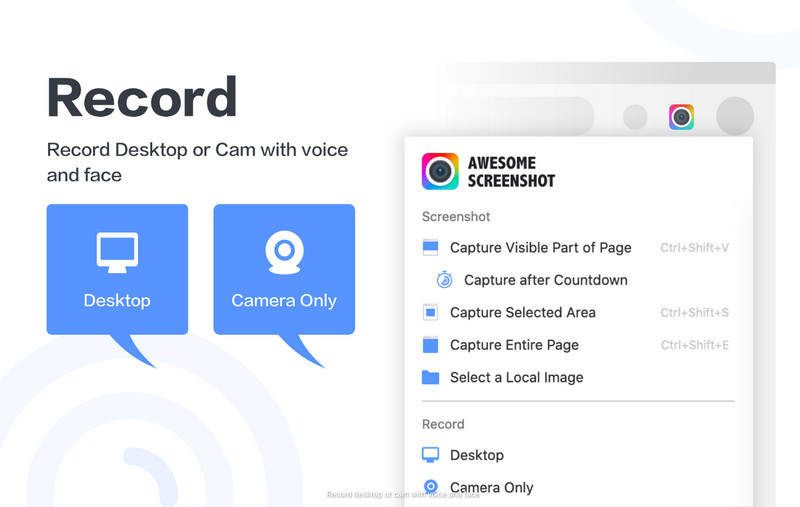
ผู้ใช้ Firefox ที่กำลังมองหาโปรแกรมเสริมตัวเดียวที่สามารถจับภาพหน้าจอและบันทึกวิดีโอได้ ควรพิจารณา Awesome Screenshot & Screen Recorder โปรแกรมนี้สามารถบันทึกแท็บเบราว์เซอร์ เดสก์ท็อป หรือเว็บแคมได้ จึงเหมาะอย่างยิ่งสำหรับการแชร์บทเรียน การอัปเดต โครงการทำงาน การสาธิตผลิตภัณฑ์ และการสนับสนุนลูกค้า นอกจากนี้ยังมีฟังก์ชันการจับภาพหน้าจอและการจดบันทึก ช่วยให้คุณสามารถถ่ายภาพและเพิ่มความคิดเห็นได้โดยไม่ต้องดาวน์โหลดโปรแกรมเสริมเบราว์เซอร์อื่น ในฐานะโปรแกรมบันทึกหน้าจอสำหรับ Firefox โปรแกรมนี้โดดเด่นตรงที่รวมเครื่องมือหลายอย่างเข้าไว้ในขั้นตอนการทำงานที่ง่ายและมีประสิทธิภาพ
- ข้อดี
- แท็บบันทึก, หน้าจอเดสก์ท็อป และเว็บแคม
- รวมถึงเครื่องมือจับภาพหน้าจอและเครื่องมือใส่คำอธิบายประกอบ
- มีตัวเลือกการแชร์ที่ใช้งานง่ายหลังจากบันทึกเสร็จแล้ว
- เหมาะสำหรับบทเรียนและการทำงานทางไกล
- อินเทอร์เฟซที่ใช้งานง่ายสำหรับผู้เริ่มต้น
- ข้อเสีย
- ฟีเจอร์ขั้นสูงบางอย่างต้องใช้แพ็กเกจแบบชำระเงิน
- อาจขอสิทธิ์การเข้าถึงเบราว์เซอร์ในวงกว้าง
- ประสิทธิภาพอาจแตกต่างกันไปในอุปกรณ์รุ่นเก่า
- การจัดเก็บข้อมูลบนคลาวด์อาจไม่เหมาะกับผู้ใช้งานที่ให้ความสำคัญกับความเป็นส่วนตัว
ส่วนที่ 3. ส่วนขยายบันทึกหน้าจอที่ดีที่สุดสำหรับ Safari
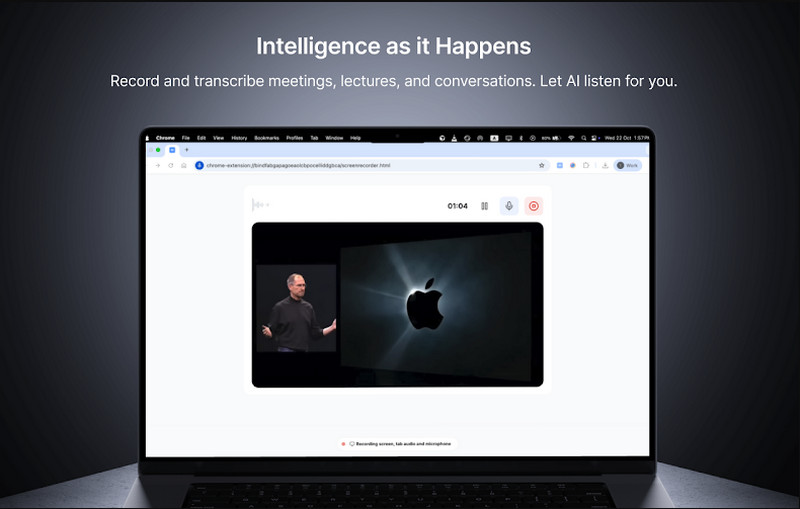
สกรีนแอป เป็นแอปพลิเคชันบนเว็บเบราว์เซอร์ที่ทำงานร่วมกับ Safari และไม่จำเป็นต้องติดตั้ง ผู้ใช้สามารถบันทึกแท็บเบราว์เซอร์ หน้าต่าง และเสียงระบบได้ในอินเทอร์เฟซเดียว ทำให้เหมาะสำหรับการสร้างบทช่วยสอน บทเรียนออนไลน์ และเอกสารประกอบกระบวนการต่างๆ แอปนี้ใช้เบราว์เซอร์ในการทำงานของเครื่องมือบันทึก พร้อมตัวเลือกในการดาวน์โหลดทันทีเพื่อแชร์หรือแชร์ไปยังโซเชียลมีเดีย ในฐานะโปรแกรมบันทึกหน้าจอ Safari แอปนี้ออกแบบมาสำหรับผู้ใช้ที่ต้องการบันทึกอย่างรวดเร็วโดยไม่ต้องพึ่งพาซอฟต์แวร์บนเดสก์ท็อปเพิ่มเติม
- ข้อดี
- ใช้งานได้โดยตรงใน Safari โดยไม่ต้องติดตั้งแบบเต็ม
- บันทึกแท็บเบราว์เซอร์และเสียงระบบ
- ขั้นตอนการบันทึกที่ง่ายดายเพียงคลิกเดียว
- รองรับการดาวน์โหลดไฟล์ MP4 ทันที
- เหมาะสำหรับบทเรียนและการเรียนรู้ออนไลน์
- ข้อเสีย
- คุณสมบัติการแก้ไขขั้นสูงที่จำกัด
- จำเป็นต้องใช้อินเทอร์เน็ตที่เสถียรเพื่อประสิทธิภาพที่ดีที่สุด
- แพ็กเกจฟรีอาจมีข้อจำกัดในการใช้งาน
- มีความยืดหยุ่นน้อยกว่าโปรแกรมบันทึกหน้าจอแบบเต็มรูปแบบ
ส่วนที่ 4. ส่วนเสริมบันทึกหน้าจอที่ดีที่สุดสำหรับ Opera
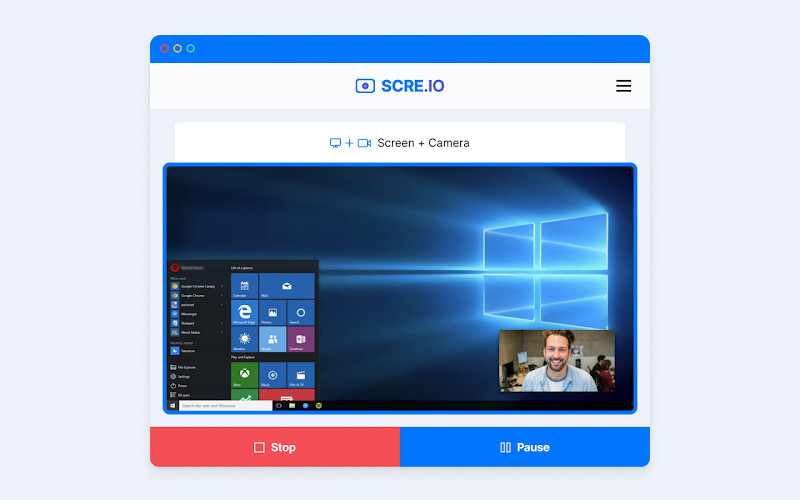
โปรแกรมบันทึกหน้าจอสำหรับ Opera หรือ สครี.ไอโอ เป็นส่วนเสริมที่ช่วยให้คุณบันทึกหน้าจอใน Opera ได้อย่างรวดเร็ว ผู้ใช้สามารถบันทึกแท็บ Opera เดสก์ท็อปทั้งหมด หรือแม้แต่ภาพจากเว็บแคมได้โดยไม่ต้องตั้งค่าพิเศษใดๆ ซอฟต์แวร์นี้มักใช้ในการสร้างบทเรียน งานนำเสนอ และการสาธิตผลิตภัณฑ์ เนื่องจากใช้งานง่ายและรวดเร็ว ในฐานะที่เป็นส่วนเสริมบันทึกหน้าจอพร้อมเสียง มันรองรับการป้อนข้อมูลจากไมโครโฟน ทำให้ผู้ใช้สามารถเพิ่มคำบรรยายเสียงที่ชัดเจนขณะบันทึกการกระทำบนหน้าจอได้
- ข้อดี
- การบันทึกเสียงแบบง่ายๆ เพียงคลิกเดียวใน Opera
- บันทึกหน้าจอ แท็บ และเว็บแคม
- รองรับการบันทึกเสียงไมโครโฟน
- ไม่ต้องติดตั้งหรือตั้งค่าให้ยุ่งยาก
- เหมาะสำหรับใช้เป็นบทช่วยสอนและคำแนะนำอย่างรวดเร็ว
- ข้อเสีย
- คุณสมบัติการแก้ไขขั้นสูงที่จำกัด
- ต้องได้รับอนุญาตจากเบราว์เซอร์ก่อนจึงจะใช้งานได้
- เวอร์ชันฟรีอาจมีข้อจำกัดบางประการ
- ประสิทธิภาพอาจแตกต่างกันไปในอุปกรณ์ระดับล่าง
เคล็ดลับเพิ่มเติม: โปรแกรมบันทึกหน้าจอที่ดีที่สุดสำหรับทุกเบราว์เซอร์
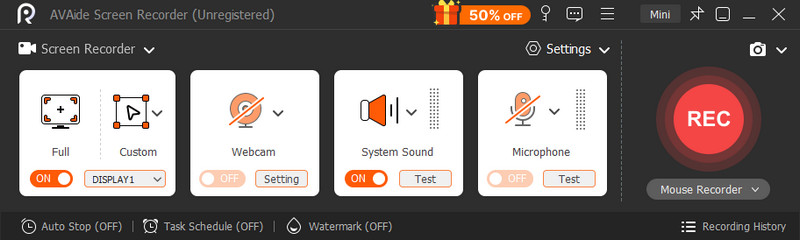
โปรแกรมบันทึกหน้าจอ AVAide เป็นแอปพลิเคชันเดสก์ท็อปแบบสแตนด์อโลนที่รองรับเว็บเบราว์เซอร์หลักๆ ทุกตัว เช่น Chrome, Firefox, Opera และ Safari สามารถบันทึกเสียงและวิดีโอจากคอมพิวเตอร์ของคุณได้โดยไม่ต้องใช้ส่วนขยายของเบราว์เซอร์หรือขอสิทธิ์ใดๆ ทำให้มีความน่าเชื่อถือ ใช้งานได้หลากหลาย และมีความสามารถในการบันทึกวิดีโอสอนการใช้งาน การประชุม การเล่นเกม และการนำเสนอต่างๆ ได้อย่างยาวนานหรือซับซ้อน

ดาวน์โหลดฟรี สำหรับ Windows 7 หรือใหม่กว่า
 ดาวน์โหลดอย่างปลอดภัย
ดาวน์โหลดฟรี สำหรับ Mac OS X 10.13 หรือใหม่กว่า
ดาวน์โหลดอย่างปลอดภัยการขยายขีดความสามารถของเบราว์เซอร์นั้นยอดเยี่ยม แต่ก็มีข้อเสีย เช่น ข้อจำกัดด้านเวลาในการบันทึก คุณภาพที่ลดลง หรือเบราว์เซอร์ที่ช้าลง เครื่องมือประเภทนี้ เทียบได้กับ ScreenRecเป็นแอปพลิเคชันแบบสแตนด์อโลนที่ช่วยหลีกเลี่ยงปัญหาเหล่านี้ ช่วยให้สามารถบันทึกแบบเต็มหน้าจอ แบบหน้าต่าง แบบเฉพาะพื้นที่ พร้อมเสียงระบบ ไมโครโฟน และเว็บแคมได้พร้อมกัน นอกจากนี้ยังให้การปรับแต่งรูปแบบและคุณภาพของวิดีโอได้มากขึ้น ซึ่งจำเป็นอย่างยิ่งสำหรับวัตถุประสงค์ทางการค้า
- ข้อดี
- ใช้งานได้กับทุกเบราว์เซอร์โดยไม่ต้องใช้ส่วนเสริมเพิ่มเติม
- ไม่มีข้อจำกัดของเบราว์เซอร์หรือปัญหาเรื่องการอนุญาต
- มีความเสถียรมากขึ้นสำหรับการบันทึกระยะยาวและความละเอียดสูง
- บันทึกเสียงระบบ ไมโครโฟน และเว็บแคมพร้อมกัน
- ตัวเลือกการควบคุมประสิทธิภาพและคุณภาพผลลัพธ์ที่ดีกว่า
- เหมาะสำหรับใช้ในการสอนแบบมืออาชีพ การประชุม และการสร้างเนื้อหา
- ข้อเสีย
- ต้องติดตั้งลงในอุปกรณ์ของคุณ
- หนักกว่าเครื่องมือเบราว์เซอร์แบบคลิกเดียวเล็กน้อย
- อาจต้องใช้เวลาในการตั้งค่าเริ่มต้นนานขึ้น
มีเหตุผลมากมายในการบันทึกวิดีโอ และโดยทั่วไปแล้วมักเลือกใช้เครื่องมือบันทึกวิดีโอในเบราว์เซอร์ เนื่องจากสะดวกและมีประสิทธิภาพเมื่อบันทึกวิดีโอสอนใช้งาน การสาธิต หรือคู่มือแบบง่ายๆ โปรแกรมบันทึกหน้าจอเบราว์เซอร์ สะดวกสำหรับการใช้งานง่ายๆ เนื่องจากเข้าถึงได้ง่ายโดยไม่ต้องติดตั้งซอฟต์แวร์ แต่ก็อาจมีข้อจำกัดในด้านประสิทธิภาพ ระยะเวลา หรือฟังก์ชันการทำงาน
แต่หากต้องการความเสถียร คุณภาพ และการควบคุมที่มากขึ้นในการบันทึกทางเทคนิคที่ยาวขึ้น โปรแกรมบันทึกหน้าจอแบบสแตนด์อโลน เช่น โปรแกรมบันทึกหน้าจอ AVAide ให้ทางเลือกที่มีประสิทธิภาพมากกว่า ในท้ายที่สุดแล้ว ขึ้นอยู่กับว่าคุณต้องการบันทึกในเบราว์เซอร์เพื่อใช้งานในทันที หรือต้องการเครื่องมือและคุณสมบัติการบันทึกขั้นสูง
เกี่ยวกับผู้เขียน

จับภาพกิจกรรมบนหน้าจอด้วยเสียง การประชุมออนไลน์ วิดีโอการเล่นเกม เพลง เว็บแคม ฯลฯ