Maybe you're trying to make an ID photo out of a selfie, or you're putting someone in front of a funny background to make a meme and send to a friend. But can you do this directly on your Android phone? The answer is yes.
How to remove backgrounds from pictures on Android? You've got many options:
- Pre-installed photo editor on Samsung
- Online AI removers available on mobile browsers
- PhotoRoom, a dedicated app for wiping backgrounds clean
They're all very easy to use. Now let's take a closer look.
Part 1. How to Choose the Best Background Remover on Android
Comparison of the 4 Background Erasers for Android
| Tool | Platform | Free Usage | Output | Best For |
| Samsung Gallery | Built-in feature of Samsung Galaxy | Completely free | Saved image cutout | Samsung users |
| AVAide Background Eraser | Online tool on mobile browser | 10 free uses per day with no sign-up | Transparent PNG | Casual users |
| Adobe Firefly | Online tool and Adobe apps | Free background removal with a free Adobe account | Transparent PNG | AI-generated backgrounds for replacement |
| PhotoRoom | Dedicated Android app in Google Play | 250 free exports per month | Transparent PNG | Frequent product photography |
Which Tool Should You Choose?
- Samsung Gallery: Best for Samsung users to do quick, free background removal without installing another app.
- AVAide Background Eraser: Best for occasional background removal and GIFs.
- Adobe Firefly: Best for replacing the background with an AI-generated picture.
- PhotoRoom: Best for frequent editing of product photos, and ready-made templates.
Part 2. Built-in Way to Remove Photo Background on Android
Samsung Gallery
If you're using a Samsung Galaxy running Android 13 with One UI 5.1 or higher, you don't need an extra app. It has Image Clipper, a built-in free background remover app for Android users.
Step 1Touch and hold the subject
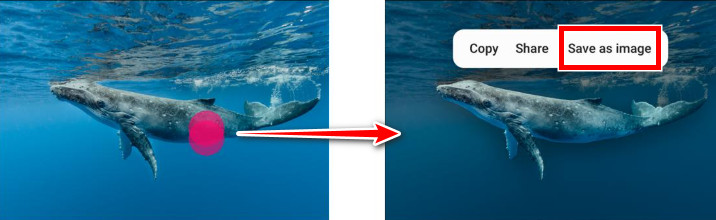
After you open the picture in Gallery, touch and hold on the person or stuff you want to keep, which Samsung will then highlight for you, and you'll see a little menu pop up next to it.
Step 2Choose what to do with the cutout
In the menu, select Save as Image. Then the subject will be isolated from the background and saved as a new photo.
Can Google Photos Remove Background from Images?
No, Google Photos doesn't have a one-tap background eraser like in Samsung Gallery. So if you're using a non-Samsung phone, you need to turn to an online background remover or a third-party app.
Part 3. Best Online Tools to Remove Image Background
AVAide Background Eraser
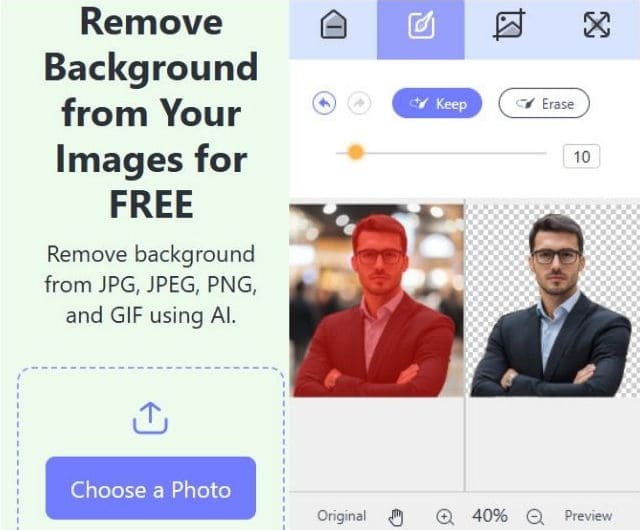
AVAide Background Eraser offers up to 10 free uses each day with no sign-up before you decide to buy credits. The AI strips the background from your photo in a few seconds. What's better? It lets you add a solid color or a new image as the replacement right on the same page. And it supports not only still images in JPG and PNG, but also animated GIFs.
Step 1Tap the button in the center or drag and drop your photo.
Step 2Wait a few seconds for the AI to erase the background.
Step 3Use the brush tools to clean up the edges in the left-side preview, if needed.
Step 4Tap Download.
Adobe Firefly
Adobe put its free background remover inside Firefly. It handles fine detail like hair and fabric very well. The mobile web and Adobe apps both support the flow, so it works well on Android phones and tablets.
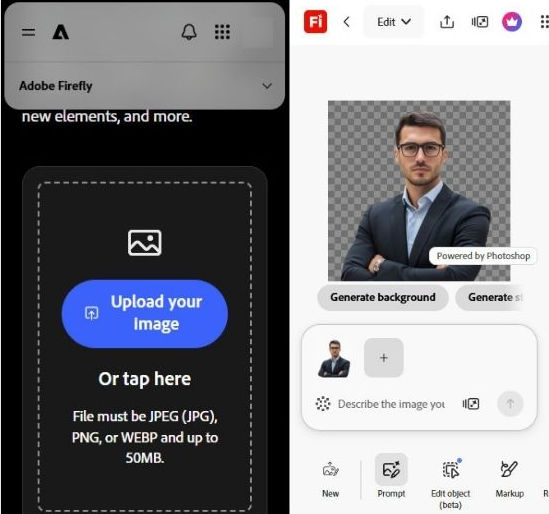
Step 1Sign in with a free Adobe account.
Step 2Upload an image (JPEG, PNG, or WEBP).
Step 3Choose Remove Background. You'll get a transparent PNG.
Step 4From there you can add a new background with an AI prompt or keep editing.
Part 4. Best Background Eraser App for Android on Google Play
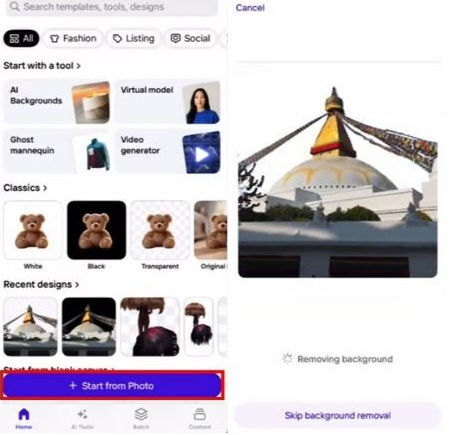
PhotoRoom
PhotoRoom is one of the best dedicated background eraser apps on Android. It's best for product or portrait cutouts, especially if you do this often. Upload or snap a photo and the AI removes the background almost immediately. You can then place the subject on a solid color, a template, or an AI-generated picture, and the shadows and lighting adjustments help the result look natural. The free plan lets you try the core remover and export 250 images each month.
Step 1Tap Start from Photo, then select the image from your camera roll.
Step 2PhotoRoom auto-detects the subject and removes the background in seconds.
Step 3When it's done, tap Share or Export and save as PNG.
What is the best way to remove backgrounds on Android? Start with what you already have: on a recent Samsung Galaxy, try the long-press in Gallery first. It costs nothing and works well for clear subjects. If that is missing or the edges look rough, try AVAide Background Eraser or Firefly in the browser for a free high-quality PNG. For regular product or social work, PhotoRoom is worth considering.
ABOUT THE AUTHOR


Uses AI and automated background removal technology to capture complex backgrounds from JPG, JPEG, PNG, and GIF.
PROCESS NOW