When I first opened a batch of travel photos, they looked dull compared to the moments I remembered. Editing felt like a job for a professional until I tried PhotoDirector. Its AI tools, precise controls, and smooth interface turned hours of tedious tweaks into minutes of creative flow. In this article, we explore Photodirector’s most valuable features, system requirements, pricing, and our full review. By the end, you’ll understand how this software can breathe life into your images and make every shot feel intentional, polished, and ready to impress.
Part 1: Key Features of Cyberlink PhotoDirector
Cyberlink PhotoDirector is a versatile photo editing software that makes it easy to create professional-looking images. Whether you are new to editing or a seasoned photographer, this platform provides powerful tools to enhance your photos efficiently.
1. AI-Powered Editing Tools
The PhotoDirector app simplifies complex photo edits with AI. You can quickly adjust colors, sharpen images, and reduce noise, making it easier to get professional results without a steep learning curve.
2. Batch and Portrait Editing
The PhotoDirector photo editor app offers batch editing and AI-assisted portrait retouching. Adjust skin, facial features, or body shape across multiple photos in minutes, saving time and maintaining consistency.
3. Object Removal and Cleanup
With the PhotoDirector watermark remover, you can remove unwanted objects, watermarks, or distractions from your photos seamlessly, creating cleaner, more polished images.
4. Creative AI Tools
The PhotoDirector AI photo editor lets you apply AI effects, swap faces, change hairstyles, or add artistic filters. You can also animate photos or blend multiple images for unique creative results.
5. Professional Editing Controls
This PhotoDirector photo editor supports RAW files, layers, masks, HDR, and gradient tools. You get precise control over color, tone, and lighting for professional-quality edits.
6. Subscription and Extra Features
The PhotoDirector 365 subscription gives access to additional templates, effects, AI tools, and cloud features for extended creativity and flexibility.
7. Workflow and Sharing
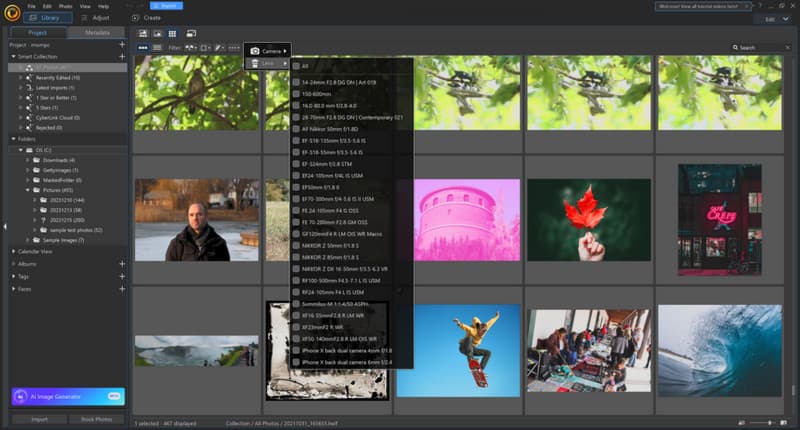
The PhotoDirector app helps organize your photo library efficiently. Tag faces, filter images, and export your creations optimized for social media, print, or online sharing.
Part 2: System Requirements of PhotoDirector
Photo editing with Cyberlink PhotoDirector works best when your device meets the software’s system requirements. Whether you use a photodirector for pc, a Mac, or a mobile device, meeting these specs ensures smooth performance, faster AI processing, and stable editing workflows. Here’s what you need to know for each platform.
1. Windows (PC)
To run photodirector for pc, your system should meet these minimum requirements:
- Operating System: Windows 11 or Windows 10 (64‑bit)
- Processor: Intel Core i-series (6th gen or newer) or AMD Ryzen series
- Memory: 4 GB RAM minimum; 8 GB or more recommended for AI features
- Storage: At least 10 GB free space
- Graphics: Minimum 128 MB VRAM; discrete GPU recommended
- Screen Resolution: 1024 × 768 or higher
- Internet Connection: Required for activation and cloud features
2. macOS (Apple Computers)
PhotoDirector for Mac also runs on modern macOS devices. Recommended specifications include:
- Operating System: macOS 10.14 or later
- Processor: Apple M1 or newer, or Intel-based Macs
- Memory: 4 GB RAM or higher
- Storage: 10 GB free space
- Graphics: Integrated or discrete GPU
- Internet: Required for activation and cloud-based features
3. For iOS:
- iOS 16.6 or later on iPhone or iPad
- Compatible with Apple Silicon Macs running the mobile version
4. For Android:
- Modern Android devices running Android 10 or newer
- Performance may vary depending on device hardware
Part 3: Plans & Pricing of Cyberlink PhotoDirector
Many users ask Is Photodirector free? The answer is partially. Cyberlink offers a free trial and a basic Essential edition, which allows you to explore core editing tools at no cost. This is perfect for beginners who want to test the software before deciding on a full subscription or purchase.
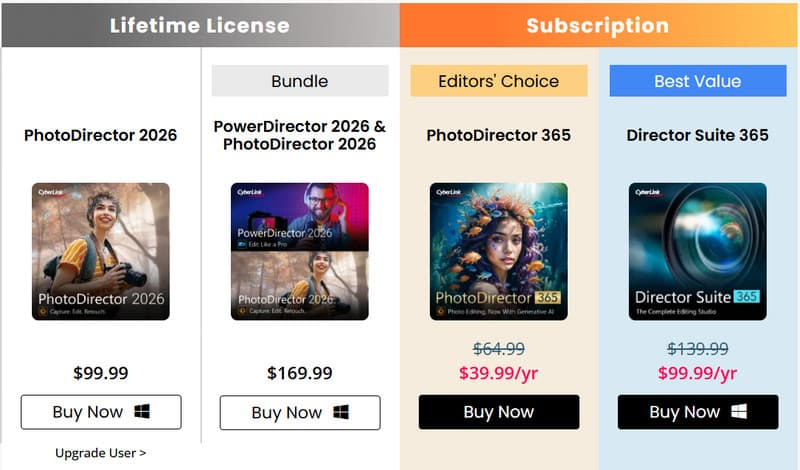
PhotoDirector 365 - Subscription Plans
For full access to the best movie maker, advanced editing tools, AI features, premium effects, and cloud storage, PhotoDirector is available through subscription:
- Monthly Subscription: Around $19.99 per month, providing continuous access to all tools, AI features, and creative packs.
- Annual Subscription: Around $39.99 per year, offering the same full access at a lower yearly cost, including all feature updates and premium content.
Subscriptions are ideal for users who want regular updates and the latest AI enhancements without buying a new version every year.
One-Time Purchase - Perpetual License
If you prefer not to subscribe, Cyberlink offers a perpetual license, such as PhotoDirector Ultra or PhotoDirector 2026, for a single upfront cost of approximately $99.99. This gives full access to the current version’s editing tools and effects, but does not include future updates or subscription-only content.
Mobile App Pricing
The PhotoDirector app for iOS and Android provides basic editing for free, with optional in-app purchases or subscriptions to unlock premium tools, AI effects, and filters. Pricing varies by device and region.
Part 4: Our Tested PhotoDirector Review
In this PhotoDirector review, we put Cyberlink’s tools to the test to see how well it performs for everyday photo editing and professional workflows. Whether you are a hobbyist or a professional photographer, understanding its strengths and limitations helps you decide if this software is right for your creative projects.
1. Interface and Usability
Photodirector photo editing software offers a clean, intuitive interface. The layout is simple, with clearly labeled tools and menus that make navigation easy even for beginners. AI-powered suggestions, quick edits, and drag-and-drop functionality speed up the workflow. For those who prefer editing without installing software, Photodirector online also provides a browser-based version with most core tools accessible instantly.
2. Editing Features
We tested the full range of AI tools, filters, and effects. The AI Object Removal and AI-powered enhancements worked accurately, saving time on complex edits. Portrait retouching, HDR adjustments, and color grading are precise and effective. Batch editing is reliable, making it ideal for photographers managing large libraries and for those who want to edit OBS videos. Creative tools like AI Art, face swapping, and background replacement offer flexibility for experimental projects.
3. Performance
During testing, the software ran smoothly on modern PCs and Macs, with minimal lag for standard edits. Some AI features, like image upscaling or complex background replacements, require a more powerful GPU for optimal speed. Overall, Photodirector photo editing software handles most tasks efficiently without crashing or slowing down.
4. Output and Sharing
Export options are versatile, supporting multiple file formats and social media templates. The software also allows creating slideshows, GIFs, and motion stills directly from your photos. Image quality remains high, and exports retain all adjustments and effects applied.
5. User Feedback
Looking at various PhotoDirector reviews, most users praise the AI tools and ease of use. Beginners especially appreciate the guided edits, while advanced users benefit from layers, masks, and batch editing. Some users note that advanced AI features perform better on high-end hardware, but overall satisfaction is high across platforms.
Part 5: Best Online Alternative to Cyberlink PhotoDirector
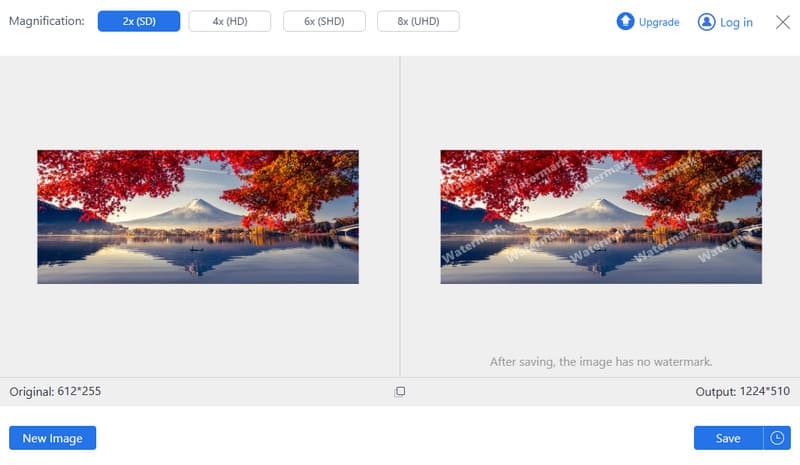
If you want online photo enhancement without downloads or registrations, AVAide Image Upscaler is a standout alternative. This browser-based tool lets you enhance images quickly with AI-powered detail prediction and reconstruction, improving sharpness and clarity in seconds. It can upscale images up to 4K, restoring fine details and textures automatically. Unlike traditional editors, AVAide focuses purely on improving image quality, making it ideal for users who want fast, high-quality results online without installing software or managing subscriptions.
Comparison Chart: PhotoDirector vs. AVAide Image Upscaler
| Features | CyberLink PhotoDirector | AVAide Image Upscaler |
| Platform | Desktop and mobile apps | Fully online, works in any browser |
| Installation Need | Requires download and setup | No download or installation required |
| Free Use | Limited trial; subscription or one-time purchase required | Completely free; no registration needed |
| Watermark | Adds a watermark on the final output for the free version | No watermark added to the exported video |
| Upscale Image Resolution | Limited by desktop hardware; not primarily focused on upscaling | Up to 4K output with automatic detail reconstruction |
Why AVAide Image Upscaler Is a Better Online Choice?
AVAide Image Upscaler is ideal for users who want quick, reliable results without installing software. Its AI predicts missing details and rebuilds images to higher resolutions, up to 4K, while improving clarity and sharpness. There is no download, no registration, and no subscription required. Just upload your image, enhance it, and download the improved version. For fast online image enhancement, AVAide offers a simpler and more convenient solution than traditional desktop tools like Cyberlink PhotoDirector.
The PhotoDirector photo editor delivers a solid mix of AI tools, creative features, and professional controls in one platform. It works well for beginners and advanced users alike. With flexible plans and cross-device support, it remains a reliable choice for modern photo editing.
ABOUT THE AUTHOR


Our AI technology will automatically enhance the quality of your images, remove noise and fix blurry images online.
PROCESS NOW