Photos are unique in assisting websites to be memorable, yet large files may slow things down and be detrimental to SEO. Learning to optimize an image for the web will enable you to maintain quality while enhancing speed. The process will make your files smaller, maintain your images and make your site load faster. In this guide, we explain the basics of image optimization, why it is important for performance and search rankings, and show simple ways to compress and format images effectively for every website.
Part 1: What Is Image Optimization
To optimize images for the web means to adjust them so that they load quickly without losing visual quality. Each picture is full of information, and huge files or uncompressed files may slow down a site, annoy people as well and even affect search results. Image optimization involves striking a balance between the size and quality of files, making sure that visuals are maintained without having to slow down the pages.
Beyond performance, the image optimizer for the web also includes improving accessibility and searchability. This may include the inclusion of descriptive filenames, alt text or structured formats that enable the search engines and users to apprehend the content. With the combination of speed, quality, and accessibility, web optimization makes the site appear professional, work properly, and offer the best experience to every person visiting it.
Part 2: Why Need to Optimize an Image for the Web
1. Faster Page Loading
Big pictures slow down and require more time to load. Understanding how to optimize images on the web can make them smaller while retaining their quality, enabling the pages to load fast, and ensuring that the visitors do not get bored.
2. Better User Experience
Clear, fast-loading images make websites easier to navigate. When you optimize images for the web, visitors enjoy smoother browsing and a more visually appealing experience.
3. Higher Search Engine Rankings
Speed matters for SEO. Proper image optimization for web signals to search engines that your site performs well, which can improve rankings and visibility.
4. Reduced Bandwidth Usage
Smaller images consume less data, which benefits both website owners and users. Tools that allow you to optimize images for the web online make it simple to shrink file sizes without losing clarity or lowering image quality.
5. Improved Accessibility and Searchability
Adding descriptive filenames and alt text ensures that images are readable by search engines and accessible to all users. This demonstrates how do you optimize images for the web effectively.
6. Professional Appearance Across Devices
Optimized images look crisp on desktops, tablets, and smartphones. Comprehending how to optimize images for the web ensures your website always appears polished and reliable.
Part 3: How to Optimize Images for the Web Without Losing Quality
AVAide Image Compressor is an online tool that optimizes images for the web and has been found to reduce the file size without any visible quality being lost. It favors lots of formats, such as JPEG, PNG, and WebP, which makes it appropriate for photographs, graphics, and logos. This tool will load pages faster, enhance SEO, save bandwidth, and make sure that the visuals look sharp and professional on all devices, which is why it is an effective tool that all people who need to preserve the quality but improve the work of the websites should consider.
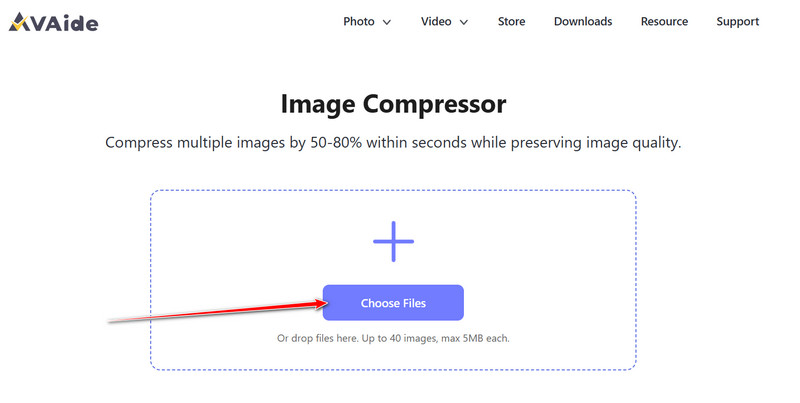
Step 1Visit the official webpage of the AVAide Image Compressor with the help of your favorite web browser.
Step 2Once you are in here, click Choose Files, and upload the image you want to be optimized in size. If you have multiple images you want to compress, then upload them all at once.
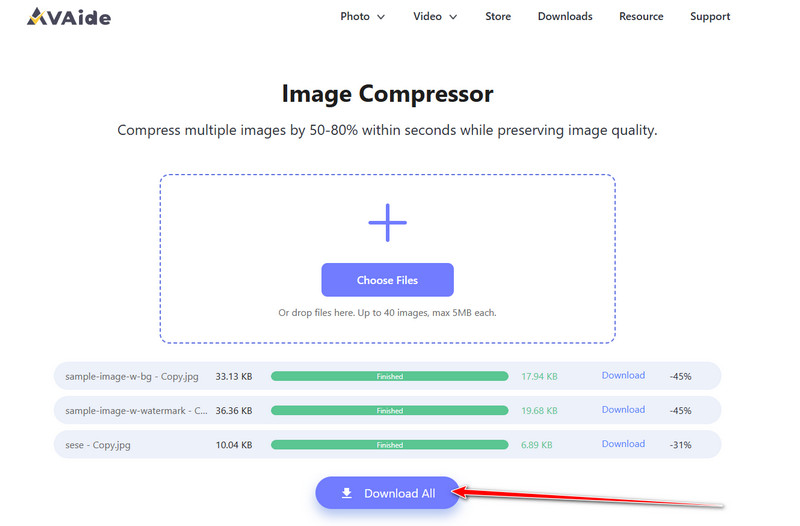
Step 3After uploading the image, the app will automatically process it with the help of AI. Once done, you will get the final result after you click the Download or Download All button.
Part 4: Tips When Optimizing Images for the Web
Web image optimization is critical to faster-loading pages, enhanced search engine optimization and a professional appearance of the website. There are several main principles to follow in order to make your pictures clear and efficient, and file sizes low enough. These are some of the tips in practice to enhance performance and quality:
1. Choose the Right File Format
JPEG is most useful with photographs, PNG is useful with transparent graphics, and WebP is useful with high-quality and smaller file sizes. Selecting the right format ensures your images load quickly without losing clarity, making it easier to optimize images for the web effectively.
2. Resize Images to Fit the Page
Uploading images larger than their display size increases file size unnecessarily. Resizing images to match their intended use reduces load time while keeping them clear and professional. This is a simple but essential step when optimizing images for the web.
3. Use an Image Optimizer for Web
Online tools allow you to optimize images for the web online quickly, compressing files while maintaining visual quality. The tools are particularly handy when a site has numerous pictures, and they save time and enhance the performance of the page.
4. Compress Without Losing Quality
Compression will also minimize file size, but sometimes will compromise clarity. Image optimization for the web is guaranteed with the use of trustworthy techniques that allow retaining detail to keep visuals clear and speed up your webpage.
5. Add Descriptive Filenames and Alt Text
Relevant filenames and alt text enhance access to everyone and search engine comprehensiveness of what you say. Incorporating this practice is a key part of how to optimize images for the web without losing quality, benefiting both visitors and SEO.
6. Test Across Devices
Images may appear differently on desktops, tablets, and mobile devices. Ensuring they look crisp and consistent everywhere is crucial, as properly optimized images for the web maintain a professional appearance and enhance user experience.
7. Maintain Consistent Quality
Compression should not be done repeatedly on the same picture, as it may worsen the picture over time. Regular optimization also means that your site remains attractive and fast loading, a great way to back up your professional image.
To maintain a fast, professional, and user-friendly website, it is fundamental to optimize images for the web. Compressing images and formatting them properly makes them smaller in size and leaves pictures clear and attractive. Also, the use of descriptive filenames and alt text will enhance accessibility and allow search engines to comprehend your content. With regular application of these best practices, you can make your pages faster, more SEO-friendly, and provide a better, more enjoyable experience to every single visitor.

Reduce the file size of an image online within seconds while preserving the quality. We support JPG, PNG, WEBP, GIF, and more.
PROCESS NOW