Nero AI Image Upscaler has become one of the most reliable and effective image upscaling tools available online. With its smooth process, you can ensure that you achieve the result you want, making it ideal for users. If you are interested in exploring more about this photo upscaler, you must read this comprehensive review. We are here to provide everything, including its features, pricing, performance, and more. After that, you will also learn the best alternative to the tool. Read on to learn more about the image upscaler.
Part 1. A Simple Introduction to Nero AI Image Upscaler
Nero AI Image Upscaler is an AI-powered tool designed by Nero Software. Its primary purpose is to enhance and enlarge photos with just a single click. It can even upscale photos by up to 400%, reaching resolutions of up to 16K while retaining detail and clarity. The good part here is that the upscaler uses artificial intelligence to reduce image noise, restore blurry or old photos, and remove compression artifacts, making them look sharper. Thus, the image upscaler provides a straightforward way to enhance the photo quality without requiring advanced editing skills.
If you want to explore its helpful features, read the information below.
Upscale Images
The core feature of the tool is to upscale the image to 16 times the original resolution. With this feature, you can ensure that achieving a larger, better outcome is possible. What we like here is that the upscaling process is fast, so you get results in a few seconds. In addition, you can upscale any type of image, including real photos, cartoons, anime, and black-and-white photographs.
Offer Stock Photos
What we like about the tool is that it lets you access a wide range of stock photos. It is ideal if you want to check the overall capabilities as an exceptional photo upscaler.
Cross-Platform
Do you want to download Nero AI Image Upscaler? The good thing about the tool is that you can access it across various platforms. You can access it on your desktop to upscale images offline. You can also use it in your browser for a fast, convenient upload.
Batch Processing
If you want to handle multiple images to save time, the tool is ideal, as it offers batch processing. You can upscale up to five images at once, making it a powerful tool for all users.
Supports Various Image Formats
When it comes to compatibility, you won't encounter any issues, as Nero AI Image Upscaler supports a wide range of input image formats. It includes JPG, PNG, ICO, AVIF, JIF, and more. With that, you can upscale your images smoothly, regardless of format.
Pricing
The tool offers a free version that lets you upscale 10 images. If you want to upscale more photos, the tool's starting price is $24.99.
Part 2. Detailed Reviews of Nero AI Image Upscaler
Besides the tool's features, you can also learn more about the tool. Check this section and get more insights about Nero AI Image Upscaler.
Simple User Interface
Another good thing about the image upscaler is its simple user interface. With its simplicity, you can access all the functions you need without any difficulties. With that, even if you are a non-professional user, you can operate the tool without professional assistance.
Performance and Quality
The tool ensures a sharp, crisp, and clean result after photo enlargement. It can even upscale images by up to 16× while maintaining detail. Plus, this photo enlarger can even reduce noise and compression artifacts, making the blurry photos look refreshed.
Speed and Usability
During the upscaling process, the tool delivers results instantly, unlike other AI upscalers.
Strengths of Nero AI Image Upscaler
- The good thing about the tool is that it can provide a smooth, effective enhancement process.
- It includes various AI models that handle different image types.
- The tool is accessible across various web browsers, including Google Chrome, Edge, Firefox, Safari, and more.
Limitations of Nero AI Image Upscaler
- The free credit from the tool is limited. You can use up to 10 credits to upscale up to 5 images.
- A fast/stable internet connection is necessary to ensure smooth performance when using the web-based version.
- The desktop version of the image upscaler is resource-intensive.
User's Feedback
Based on other people's feedback, Nero AI Image Upscaler is an excellent tool that offers a smooth, simple photo upscaling process. This image resolution upscaler can deliver better performance, enabling you to achieve your preferred output. However, using the paid version is ideal, as the free version has several restrictions.
Do you want to learn how to use the tool to upscale your images? Then use the simple instructions below.
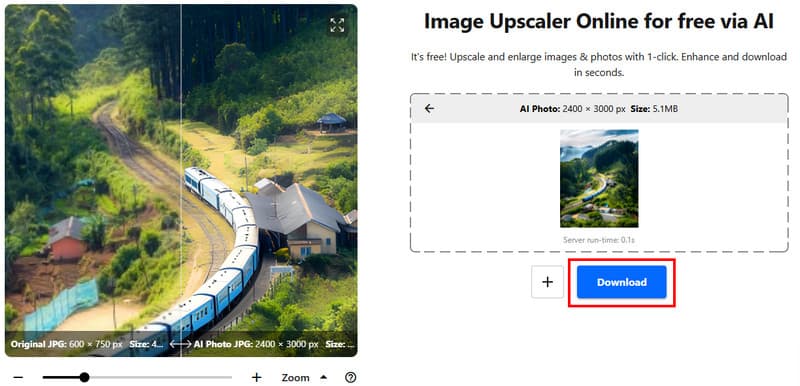
Step 1To use the online version of Nero AI Image Upscaler, visit its main website.
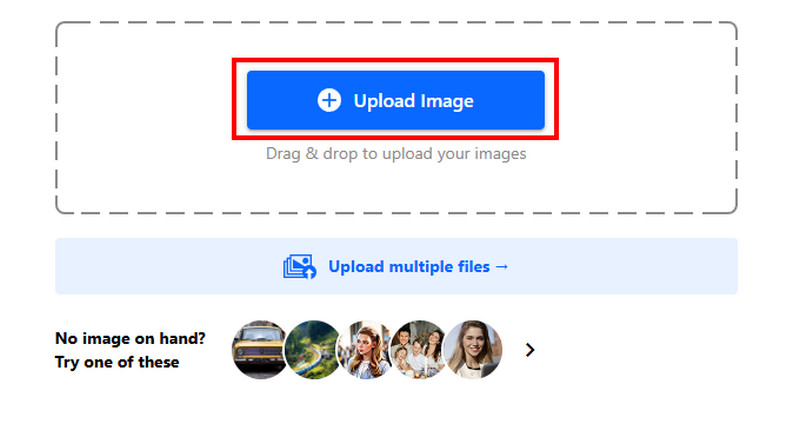
Step 2After that, click Upload Image to start uploading the image. You can also use the stock photos if you want to. The tool will then automatically upscale the image.
Step 3Once the image upscaling is complete, click the Download button to keep/save the image to your device.
Part 3. Best Alternative to Nero AI Image Upscaler
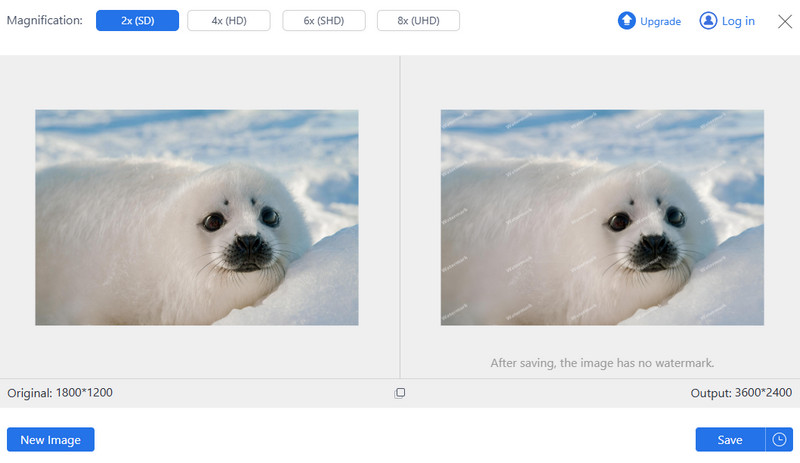
Nero AI Image Upscaler is an ideal tool for all users, especially for upscaling photos. However, since the free version has various limitations, it would be better to use another image upscaler. In that case, we suggest using AVAide AI Image Upscaler.
This tool is perfect if you want to enlarge and enhance your images without any limitations. The best part here is that you can upscale your photos up to 8 times better. You can even ensure getting a 4K resolution, resulting in a satisfying viewing experience. Additionally, since the tool uses artificial intelligence, you can ensure that images are enhanced with accurate details. What's more, the image upscaler can support various image formats. It includes PNG, JPG, BMP, WebP, and more. Thus, if you want a better alternative to Nero AI Image Upscaler, AVAide AI Image Upscaler is the best choice.
For more insights into the two image upscalers, check the simple comparison table below.
| AVAide AI Image Upscaler | vs. | Nero AI Image Upscaler |
| Upscale images up to 8× | Upscaling Quality | Upscale images up to 16× |
| Simple | Ease of Use | Simple |
| Accessible to almost all web platforms. | Platform Availability | Accessible on various web platforms, Windows, and Mac |
| •Free •Subscription-based. | Pricing Model | Credit and subscription-based. |
| Yes, without limitations. | Offer Batch Processing | Yes, but with limitations. |
In this detailed review of Nero AI Image Upscaler, you have explored everything, including its definition, core features, pricing, strengths, limitations, and more. You even learned how to use it for an effective upscaling process. However, you might encounter various restrictions when using the free version. Thus, if you need an exceptional alternative, we suggest using AVAide AI Image Upscaler. This tool can let you upscale images without any restrictions, making it the best replacement for Nero.
ABOUT THE AUTHOR


Our AI technology will automatically enhance the quality of your images, remove noise and fix blurry images online.
PROCESS NOW