Is CapCut Image Upscaler worth using? Well, CapCut Image Upscaler is among the most excellent features you can find on CapCut. This lets you upscale and enhance your images by increasing the resolution while giving the best quality. It can even sharpen the edges, reduce the image noise, and restore fine textures. So, do you want to learn more about the tool? Then, read this honest review as we offer all the information you need about the image upscaler.
- Part 1. What is the CapCut Image Upscaler
- Part 2. Key Features of CapCut Image Upscaler
- Part 3. Where to Use CapCut Image Upscaler
- Part 4. Pricing of CapCut Image Upscaler
- Part 5. How to Use CapCut Image Upscaler
- Part 6. Performance of CapCut Image Upscaler
- Part 7. Pros and Cons of CapCut Image Upscaler
- Part 8. Alternative to CapCut Image Upscaler
Part 1. What is the CapCut Image Upscaler
CapCut AI Image Upscaler is an AI-powered feature that enhances the quality of images. The core technology it uses is Nano Banana Pro and Dreamina Seedream 5.0. It works by enhancing images, restoring fine textures, and reducing image noise, making photographs look more professional and clearer. The best part here is that the upscaler is helpful for social media posts, creative projects, and marketing materials.
Part 2. Key Features of CapCut Image Upscaler
Want to learn more about the capabilities of this image upscaler? Then, read all the key features below.
AI-Powered Upscaling
The tool uses advanced models, such as Nano Banana Pro and Dreamina Seedream 5.0. These models can help users upscale photos up to 4K and even 16K without losing natural texture.
400% Enlargement Without Quality Loss
The upscaler can also enlarge images up to 400% while retaining them sharp and clear, avoiding pixelation or blurriness.
Old Photo Restoration
CapCut can also help you deal with your old photos. It can help you unblur images, make old photos new, and increase the resolution. This feature ensures that you can get brand-new images after the restoration.
Image Denoiser
Another helpful feature you can encounter is the tool's image denoiser. During the image upscaling process, the tool can automatically denoise images to make the image sharper and cleaner.
Part 3. Where to Use CapCut Image Upscaler
Do you want to know where you can access CapCut? Well, you can access the tool on various platforms. You can access it on:
CapCut Mobile
CapCut is downloadable on both Android and iOS. It means that you can upscale your images on your mobile devices. The good thing here is that it has a simple user interface and lets you improve your images based on your preferred resolution.
CapCut Online
You can also use the online version of CapCut Image Upscaler. With this version, you don't need to install any tools for improving your images. All you need is to access the tool in your browser.
CapCut Desktop
You can also download CapCut on your desktop. This is perfect if you want to upscale images offline. Plus, the UI of the online and offline versions is the same, making it more ideal and easier to utilize during the upscaling process.
Part 4. Pricing of CapCut Image Upscaler
Is CapCut Image Upscaler free? Well, the tool can offer its free version with various restrictions. If you want to access the overall features of the tool, you must get its paid version. Check the table below and learn more about the pricing plans of CapCut.
| Plan | Monthly Price | Annual Price | Export Quality | Storage |
| Free | $0 | $0 | 1080p | Minimal |
| Standard | $9.99 | $89.99 | 4K | 100 GB |
| Pro | $19.99 | $179.99 | 4K | 1 TB |
Part 5. How to Use CapCut Image Upscaler
Want to upscale the image on CapCut? You can follow the simple steps below using your mobile device.
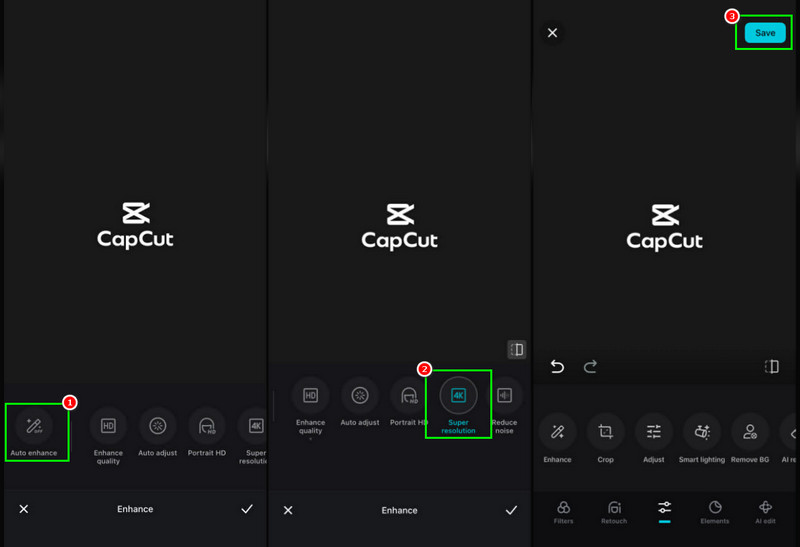
Step 1Download and run the CapCut app on your mobile device. After that, start adding the image you want to enhance.
Step 2From the options below, you can choose the Auto Enhance feature. Then start upscaling the image.
Step 3You can tap the Super Resolution option to increase image resolution up to 4K resolution. After that, press the Check button.
Step 4Then, hit Save to keep the enhanced image on your device.
Part 6. Performance of CapCut Image Upscaler
Does CapCut actually work well? Well, we can say that the tool is working well as an excellent AI image upscaler. To learn more about its performance, you can check the details in this section.
- Upscaling Quality - The tool can deliver a sharp, high-quality result, especially when enlarging photos up to 400%.
- Denoising Ability - CapCut ensures to reduce the grain from the images to make them cleaner and sharper. It can even restore clarity in old or scanned pictures.
- Speed - The photo-upscaling process is fast and efficient. In just a few moments, users can instantly get the result.
- Ease of Use - CapCut is user-friendly. With its intuitive user interface, users, especially beginners, can access all the functions without any trouble.
- File Support - The tool can support both PNG and JPG formats. With that, no matter what image you use, you can access the tool for an instant upscaling process.
Part 7. Pros and Cons of CapCut Image Upscaler
Are you interested in learning more about the advantages and drawbacks of CapCut Image Upscaler? Then, you can read all the information in this section.
Good Things about CapCut Image Upscaler
- The tool's free version allows you to access all the necessary features, such as upscaler, filter, transitions, trimmer, background remover, and more.
- The main UI of the editor is simple to operate.
- The tool can offer AI-powered features. Allowing you to get the result you need with high accuracy.
Drawbacks of CapCut Image Upscaler
- When using the tool's free version, you will encounter CapCut's watermark.
- Some of the advanced features are available on the Pro version.
- Other users report that the customer service is slow to respond.
Part 8. Alternative to CapCut Image Upscaler
CapCut is an excellent image upscaler that can upscale your images. However, if you need to get a better version of your file, you must access the tool's Pro version, which is a little bit pricey. So, if you want the best alternative, you can check the tools below.
1. AVAide Image Upscaler
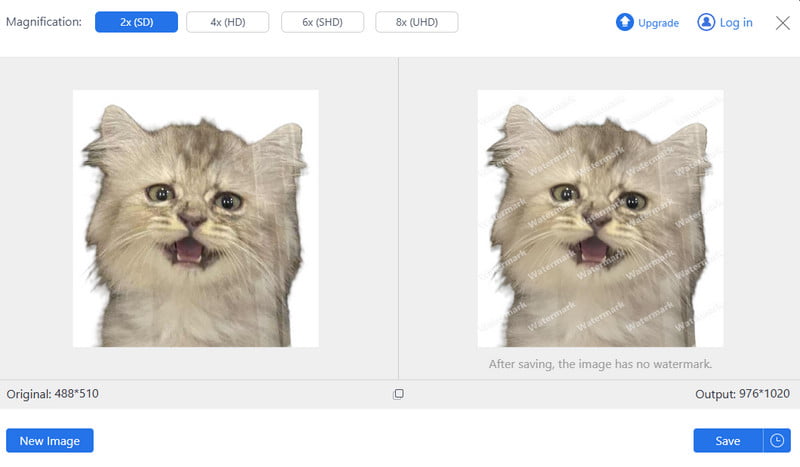
If you need the best replacement for CapCut, you can try using AVAide Image Upscaler. This tool is ideal if you want to upscale your images up to 8× better than the original image. What makes it powerful is that it can offer a faster upscaling process, a comprehensive layout, and better output quality, making it superior to CapCut. Plus, the free version ensures that you can save the photo without any disturbing watermark. You can even deal with other images, such as anime photos, old images, blurry pictures, and more. So, if you want an ideal image upscaler, you can access AVAide anytime and anywhere.
2. ImgUpscaler
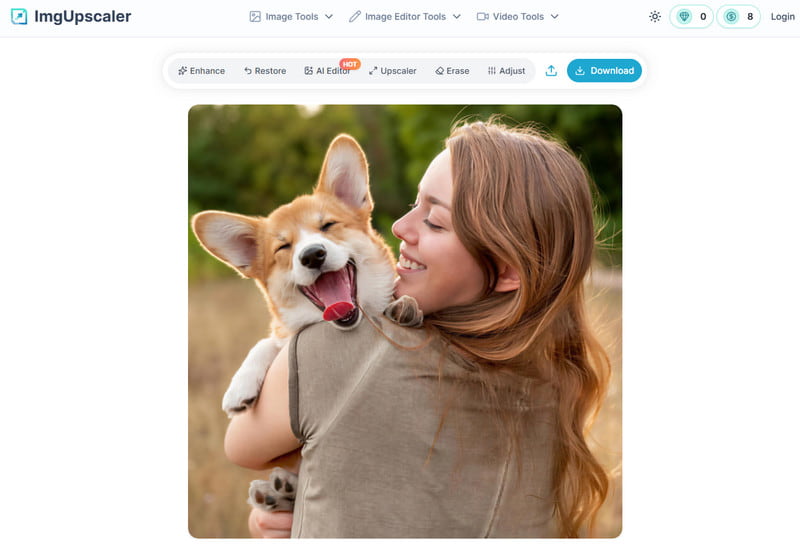
Another alternative you can use to upscale an image is ImgUpscaler. When it comes to simplicity, there is no doubt that this tool is ideal. With its clean interface, you can ensure to use all the necessary functions to upscale your photos. Plus, you can even use its stock photos to check whether the tool is effective.
To get more insights about the best image upscalers, you can check the table below.
| CapCut Image Upscaler | AVAide Image Upscaler | ImgUpscaler | |
| Upscaling Quality | AI-powered, up to 400% enlargement, sharp edges | Advanced AI, up to 8K resolution, superior detail | Good clarity, up to 4x enlargement |
| Denoising Ability | Removes grain, restores fine textures | Strong denoising + texture recovery, professional use | Basic denoising may leave artifacts |
| Speed | Fast online processing | Optimized engine, faster batch processing | Moderate speed, slower on large files |
| File Support | JPG and PNG | Wide support: JPG, PNG, BMP, TIFF, RAW | JPG and PNG |
CapCut Image Enhancer is one of the best tools that can help users enhance and upscale images to the best resolution. However, since the tool's free version has various restrictions, you might need another tool that can deal with your photos for free without any limitations. If that's the case, we suggest using AVAide Image Upscaler. This image upscaler can upscale your images up to 2×, 4×, and even 8× better. You can even save the image without any watermark, making it the best replacement for CapCut.
ABOUT THE AUTHOR


Our AI technology will automatically enhance the quality of your images, remove noise and fix blurry images online.
PROCESS NOW