Å jobbe med lange videoer byr ofte på et frustrerende dilemma: hvordan opprettholder du perfekt videokvalitet uten å bruke opp all lagringsplassen? Det er her standarder for videokomprimering kommer inn i bildet. Hvis du vil balansere videostørrelse, kvalitet og enhetskompatibilitet, vil du uunngåelig stå overfor valget mellom H.264 (AVC) og H.265 (HEVC).
I denne omfattende veiledningen skal vi gå gjennom de viktigste forskjellene mellom H.264 og HEVC, hjelpe deg med å bestemme hvilken som passer til arbeidsflyten din, og vise deg hvordan du konverterer sømløst mellom dem uten å miste kvalitet.
Del 1. HEVC vs H264: Hva er de?
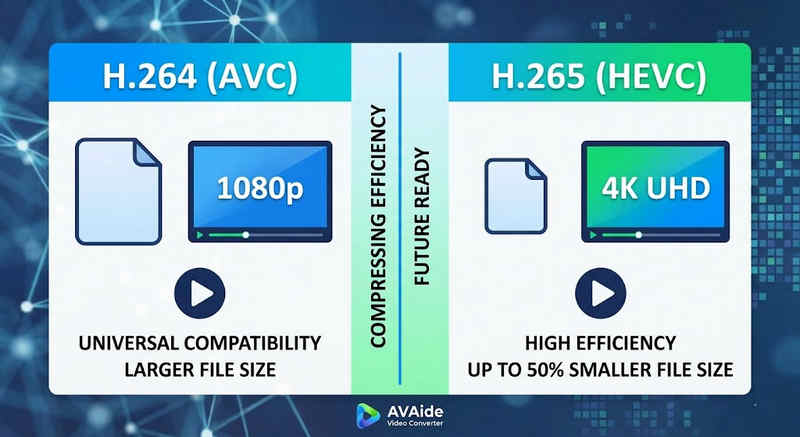
Det korte svaret: H.264 (AVC) tilbyr universell kompatibilitet og fungerer på nesten alle enheter, men lager større filer. H.265 (HEVC) gir overlegen komprimering, og reduserer filstørrelser med opptil 50% med identisk visuell kvalitet, men krever høyere prosessorkraft og har begrenset støtte på eldre maskinvare.
1. Hva er H.264-kodeken (AVC)?
H.264, introdusert som Advanced Video Coding (AVC), er den regjerende kongen av videokompatibilitet. Det er bransjestandarden for online strømming, mobilopptak og daglig videoavspilling. Fordi det krever svært lite prosessorkraft å dekode, spilles H.264-videoer av jevnt på nesten alle digitale enheter man kan tenke seg, fra gamle smarttelefoner til moderne smart-TV-er.
2. Hva er H.265-kodeken (HEVC)?
High Efficiency Video Coding (HEVC), eller H.265, er den direkte etterfølgeren til H.264. Den ble spesielt utviklet for å håndtere de massive datakravene til 4K-, 8K- og VR-innhold. HEVC bruker mer avanserte algoritmer for å komprimere videodata mye mer effektivt enn forgjengeren, og leverer skarpe bilder med høy oppløsning med opptil 50% mindre filstørrelser. Denne effektiviteten kommer imidlertid med en kostnad: den krever moderne maskinvare for å behandle uten forsinkelser.
H.265 vs. H.264: Rask sammenligningstabell
| Funksjoner | H.264 (AVC) | H.265 (HEVC) |
| Støttede formater | m2ts, evo, 3gp, f4v, mkv, mp4, qtff, asf, avi, mxf, ps, ts | mxf, ps, ts, 3gp, mkv, mp4, qtff, asf, avi |
| Kompresjonseffektivitet | Moderat (større filstørrelser) | Superior (25-50% mindre filer) |
| Video kvalitet | Utmerket for 1080p | Optimalisert for 4K, 8K og HDR |
| Enhetskompatibilitet | Universell (99% av enheter) | Begrenset (Eldre PC-er støttes kanskje ikke) |
| Prosessorkraft | Lav (rask gjengivelse/avspilling) | Høy (krever nyere CPUer/GPUer) |
| Ideelle brukstilfeller | Nettstrømming, sosiale medier, eldre enheter | 4K-droneopptak, iPhone-filmvideo, plassbesparende arkivering |
Del 2. Når du skal velge HEVC vs. H.264
Valg av riktig kodek avhenger helt av dine spesifikke mål. Her er grunnen til at du kanskje trenger den ene fremfor den andre:
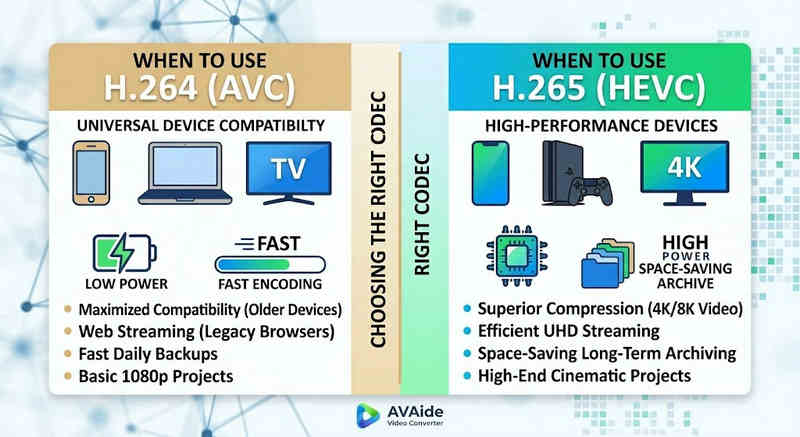
Hvorfor du trenger HEVC (H.265):
- Maksimal lagringsbesparelse: Hvis du sikkerhetskopierer lange videoer eller massive 4K-biblioteker, fungerer HEVC som en naturlig videostørrelsesreduserer, og frigjør halvparten av harddiskplassen din.
- Båndbreddeoptimalisering: HEVC krever mye mindre båndbredde for strømming, noe som gjør den ideell for jevn 4K-avspilling selv på tregere internettforbindelser uten bufring.
- Fremtidssikring: Etter hvert som bransjen går over til ultrahøy definisjon (UHD) og VR-innhold, sørger HEVC for at videoene dine forblir av høy kvalitet og kompatible med neste generasjons plattformer.
Hvorfor du trenger H.264 (AVC):
- Feilfri avspilling og redigering: Hvis videoredigeringsprogramvaren din har dårlig tid, eller mediespilleren din sender en kodek som ikke støttes
- Kompatibilitet og bekymringsfri deling: H.264 er den mest kompatible videokodeken. Enten du vil dele videoene dine med venner, NAS, medieservere som Plex eller Kodi, kan H.264 sikre sømløs deling og avspilling.
Del 3. Slik konverterer du enkelt mellom HEVC og H.264
Ved overføring av videoer fra og til formatene HEVC(H.265) og H.264, AVAide Video Converter gjør det bedre enn resten. Det gir et effektivt og brukervennlig grensesnitt som ikke går på akkord med kvaliteten på konverteringen og støtter ulike formater. Uansett årsak, kan det være for den større effektiviteten til HEVC eller den bredere bruken av H264, AVAide lar deg bytte frem og tilbake mellom de to uten problemer.
Detaljert prosedyre:
Trinn 1Skaff deg AVAide Video Converter
Last ned, installer og start AVAide Video Converter på Windows- eller Mac-datamaskinen din.

GRATIS NEDLASTING For Windows 7 eller nyere
 Sikker nedlasting
GRATIS NEDLASTING For Mac OS X 10.13 eller nyere
Sikker nedlastingSteg 2Legg til videoene dine i AVAide Video Converter
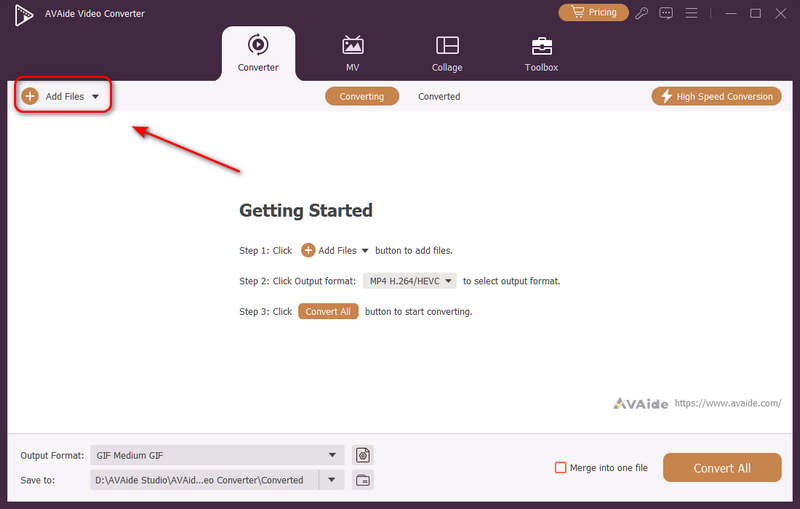
Du kan legge til flere videofiler og gjøre en batchkonvertering. Klikk på Legg til filer knappen øverst til venstre for å importere videofilene dine.
Trinn 3Velg H.264- eller H.265-kodek
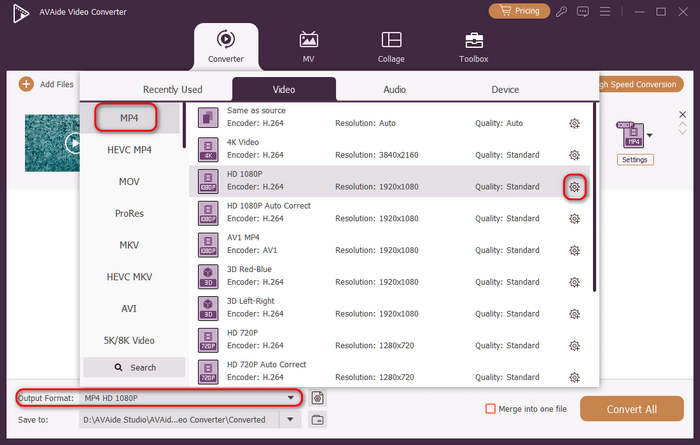
Klikk på Utgående format rullegardinmenyknappen nederst til venstre. Deretter kan du først velge ønsket videoformat. Klikk deretter på Egendefinert profil -knappen (med et tannhjulikon) i forhåndsinnstillingslinjen for video.
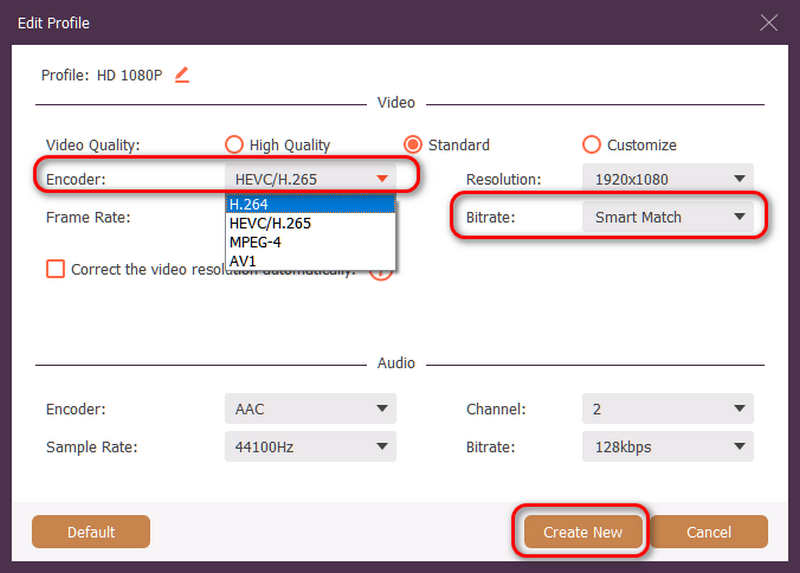
Deretter kan du i dette panelet klikke på Enkoder rullegardinmenyknapp for å velge H.264 eller HEVC/H.265 kodeken. Hvis du vil endre videokvaliteten, kan du justere BithastighetMen vi anbefaler Smart Match for å sikre kompatibilitet. Klikk på Lag ny knappen for å lagre konfigurasjonen.
Trinn 4Start omkoding av video
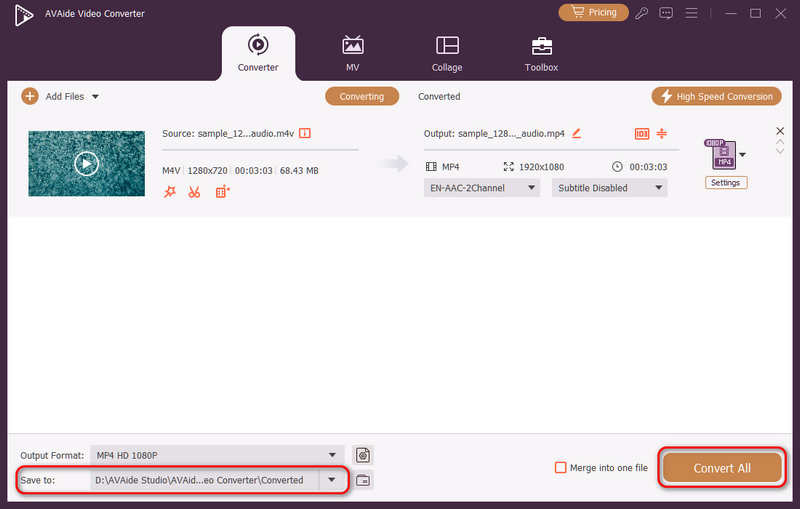
Til slutt kan du klikke på Lagre til rullegardinknappen for å velge ønsket utdatamappe og klikk på Konverter alle -knappen for å endre videokodeken til H.264 eller H.265.
Del 4. Vanlige spørsmål om H.265 og H.264
Hva er hovedforskjellen mellom NVENC H.264 og NVENC HEVC?
Hovedforskjellen ligger i komprimeringseffektivitet og optimalisering av maskinvaregenerering. NVENC HEVC (H.265) leverer opptil 50% bedre komprimering enn NVENC H.264 (AVC). Dette betyr at den kan produsere nøyaktig samme visuelle kvalitet med halvparten av bithastigheten (og halvparten av filstørrelsen), noe som gjør den til det overlegne valget for arkivering av 4K-videoer eller strømming over begrenset båndbredde.
Hva er en modulær flerkanals HEVC/H.264-koder?
En modulær flerkanals HEVC/H.264-koder er en maskinvareenhet i bedriftsklassen som er designet for å komprimere og strømme flere videofeeder samtidig. I motsetning til programvarekodere for forbrukere har den en modulær (bladlignende) design, som lar brukere bytte ut maskinvarekodingskort under drift eller oppgradere dem basert på prosjektskalaen. Den støtter både H.264 og HEVC/H.265.
Hva er H.265+?
H.265+ (også kjent som Smart H.265+) er en avansert, proprietær videokomprimeringsteknologi utviklet av Hikvision, spesielt optimalisert for sikkerhets- og overvåkingsovervåking.
Man kan nå bruke denne omfattende analysen av HEVC og H.264 for å finne ut hvilken kodek som best passer dine videokrav. Enten du vil ha H.264 og fokusere på kompatibilitet eller ønsker HEVC og sikte på bedre komprimering, har begge kodekene fordeler. AVAide Video Converter gir en elegant og effektiv løsning for å håndtere dette problemet, og gir utmerket kvalitet samtidig som den er rask. AVAide gjør oppgaven med videokomprimering og konvertering enkel med sine enkle grensesnitt og avanserte funksjoner.
OM FORFATTEREN

Din komplette videoverktøykasse som støtter 350+ formater for konvertering i tapsfri kvalitet.