Etsitkö parasta ilmaista ääninauhuria, joka toimii suoraan selaimessasi? Olet oikeassa paikassa.
Tämä opas paljastaa parhaiten arvioidut verkossa toimivat ääninauhurit saatavilla vuonna 2026. Auttaaksemme sinua löytämään täydellisen työkalun, testasimme kymmeniä alustoja viiden kriittisen tekijän perusteella: käyttäjäystävällinen suunnittelu, terävä äänenlaatu, sisäänrakennetut muokkausominaisuudet, laitteiden välinen yhteensopivuus ja tietoturva.
Tarvitsetpa sitten nopean äänimuistiinpanon, podcastin tai verkkokokouksen tallentamista, nämä seitsemän verkkopohjaista äänitallenninta hoitavat homman välittömästi. Mikä parasta, ne eivät vaadi ohjelmistoasennuksia, ovat täysin ilmaisia ja toimivat täydellisesti millä tahansa laitteella, jossa on internetyhteys.
Osa 1: Mitä etsiä online-äänitallentimesta
Oikean verkkoäänitysohjelman valinta riippuu täysin tarpeistasi. Olitpa sitten tallentamassa nopeaa liiketapaamista, podcastia tai luentoa, tässä on viisi tärkeää tekijää, jotka sinun on otettava huomioon ennen tallennuspainikkeen napsauttamista:
Korkea äänenlaatu: Tukee selkeitä formaatteja, kuten MP3 (pieni tiedostokoko) ja WAV (häviötön laatu) korkeilla bittinopeuksilla.
100% Tietosuoja ja turvallisuus: Käsittelee ääntä paikallisesti selaimessasi, joten yksityiset äänitietosi eivät koskaan lataudu pilvipalvelimelle.
Ei asennuksia: Toimii välittömästi kaikissa selaimissa (Chrome, Safari, Edge) ja laitteissa (PC, Mac, iPhone, Android) ilman latauksia.
Sisäänrakennetut muokkaustyökalut: Sisältää yksinkertaisia, ilmaisia ominaisuuksia hiljaisuuden leikkaamiseen, äänenvoimakkuuden säätämiseen tai taustamelun poistamiseen yhdellä napsautuksella.
Ei piilotettuja rajoituksia: Tarjoaa rajoittamattoman tallennusajan ja ilmaiset lataukset ilman ärsyttävien vesileimojen tai äänitunnisteiden lisäämistä.
Osa 2: 7 parasta online-äänitallenninta yhdellä silmäyksellä
Voit vilkaista lyhyesti tietoja seitsemästä erinomaisesta verkkoäänitallentimesta, joita olemme testanneet. Voit valita haluamasi täältä.
| Tallennin | Puhdas käyttöliittymä | Korkea äänenlaatu | Sisäänrakennettu muokkaus | Täysi yhteensopivuus | Keskeinen kohokohta |
| Rev Online Voice Recorder | Joo | Joo | Ei | Joo | Ensiluokkainen puheesta tekstiksi -transkription esikatselu. |
| Vocaroo | Joo | Perus | Ei | Joo | Välitön jakaminen suoran linkin tai QR-koodin kautta. |
| Apowersoftin online-äänitallennin | Joo | Joo | Ei | Joo | Tallentaa sekä mikrofonin että järjestelmän äänen. |
| Karhuennätys | Ei | Joo | Joo | Joo | Äänen leikkaus ja editointi paikan päällä ennen tallennusta. |
| Veed.io | Joo | Joo | Joo | Joo | Edistynyt tekoälyeditointi ja transkriptio (maksulliset ominaisuudet). |
| SpeakPipe | Joo | Joo | Ei | Joo | Yhden napsautuksen linkkipohjainen jakaminen widgeteille. |
| HappyScribe | Joo | Joo | Ei | Joo | Nopea, monikielinen automaattinen transkriptio. |
Osa 3: Yksityiskohtainen katsaus 7 parhaaseen online-äänitallenntimeen
Sukelletaanpa nyt seitsemän erinomaisen online-äänitallentimen perusteelliseen arvosteluun.
Top 1: Rev Online -äänitallennin
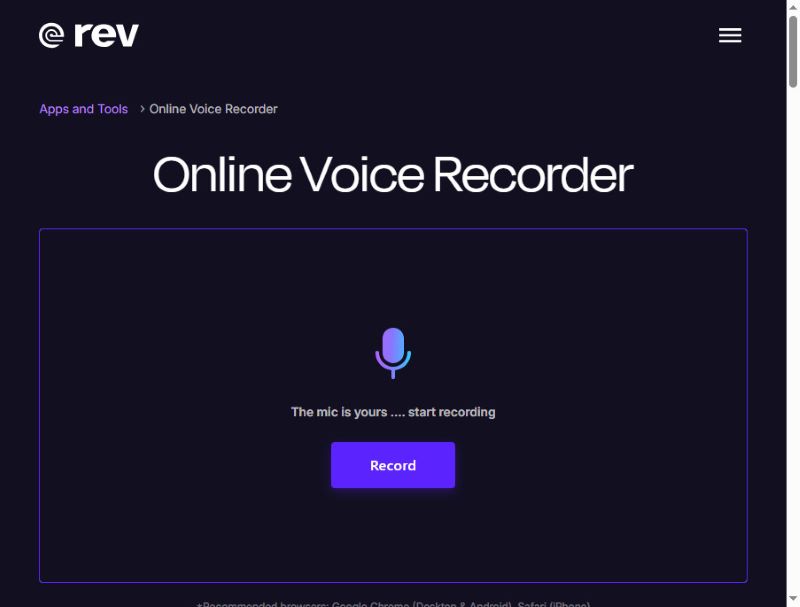
Rev Online Voice Recorder on erittäin tyylikäs verkkopohjainen äänitallennin, jossa on moderni mustan ja violetin sävyinen käyttöliittymä. Se tallentaa ääntä korkealaatuisena ja tallentaa sen WAV-tiedostona. Lisäksi tallenne pysyy paikallisena eikä sitä ladata palvelimelle.
Mikä on ainutlaatuista: Rev Online Voice Recorder voi litteroida äänesi tekstityksiin tallennuksen aikana – tosin maksullinen palvelu. Siitä huolimatta tämä selainäänitallennin on edelleen pätevä ilmainen äänitallennin.
- Plussat
- Revillä on selkeä käyttöliittymä ja yksinkertainen työnkulku.
- Voit esikatsella äänitallenteitasi.
- Tämä online-äänitallennin ei vaadi kirjautumista tallennuksen aloittamiseksi.
- Haittoja
- Äänenmuokkausominaisuudet ovat melko rajalliset.
- Transkriptio ei ole ilmainen.
Top 2: Vocaroo
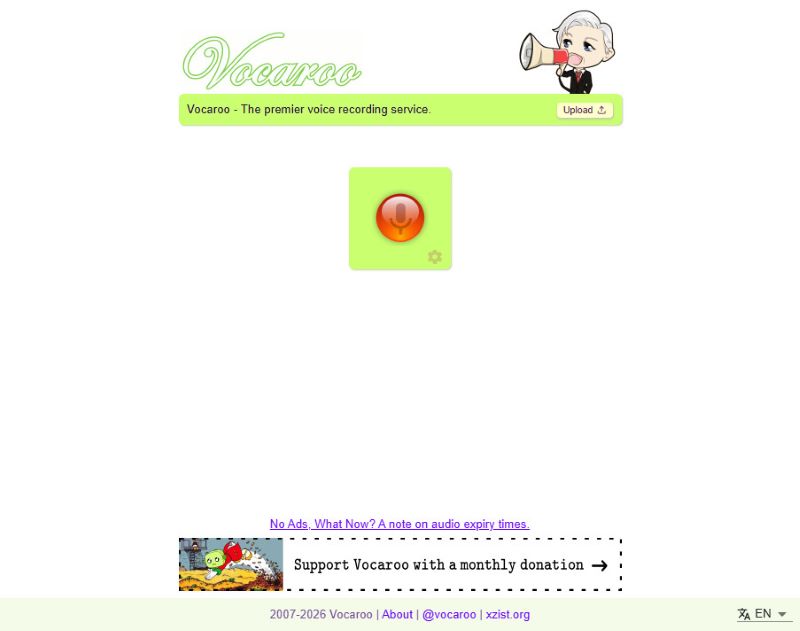
Vocaroo on ilmainen online-äänitallennin, joka tunnetaan yksinkertaisuudestaan. Aloita tallennus napsauttamalla keskellä olevaa punaista painiketta ja lopeta napsauttamalla uudelleen. Ja toki, yksinkertaisuudessa voi olla haittapuolia, kuten esimerkiksi se, ettei sivustolla voi tehdä mitään editointia.
Mikä on ainutlaatuista: Tallennuksen jälkeen voit jakaa äänen suoraan sosiaaliseen mediaan joko suoraan tai luotujen linkkien ja QR-koodien kautta.
- Plussat
- Tämä selainäänitallennin on erittäin helppokäyttöinen.
- Se toimii sujuvasti useimmissa selaimissa.
- Voit jakaa äänitallenteitasi suoraan.
- Se tukee monikielistä transkriptiota.
- Haittoja
- Tässä online-mikrofoninauhurissa ei ole muokkaustoimintoa.
Kolme parasta: Apowersoft Online-äänitallennin
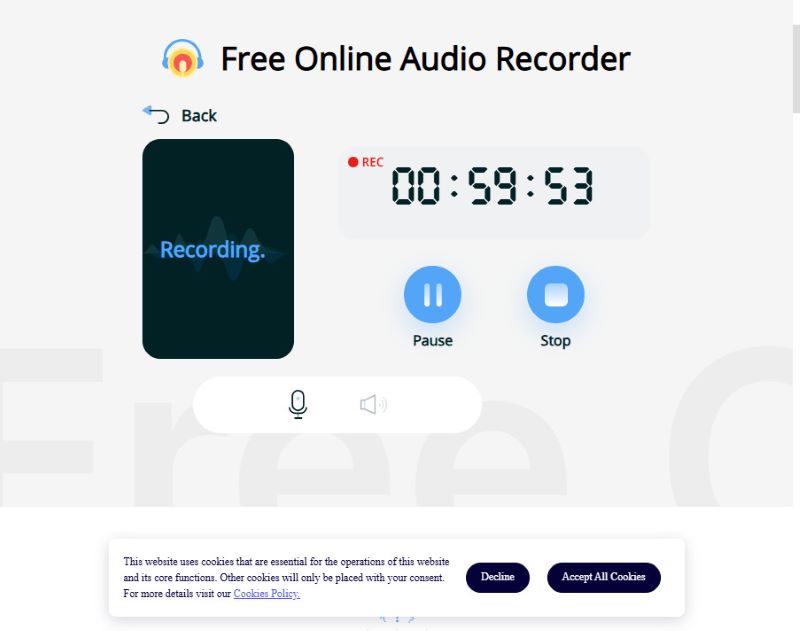
Apowersoft pystyy tallentamaan sekä äänesi että järjestelmän äänen samanaikaisesti, mikä sopii striimien tai kerronnan tallentamiseen. Monet tämän online-äänitallentimen edistyneistä ominaisuuksista ovat kuitenkin käytettävissä vain rekisteröitymällä tai sovelluksessa. Vaikka ilmainen online-versio voi tallentaa vain alle tunnin, se riittää useimmille käyttäjille.
Jos rajallinen tallennusaika ei ole ongelma, koska tarvitset vain kertaluonteisen nopean tallennuksen, Apowersoft on sinua varten.
Mikä on ainutlaatuista: Apowersoft Online Audio Recorder tukee sekä mikrofonin että järjestelmän äänen tallennusta.
- Plussat
- Tämä online-äänitallennin voi tallentaa mikrofonin ja järjestelmän äänet
- Äänitallenteiden ääni on erittäin korkealaatuinen.
- Ilmaisessa verkkoversiossa on erittäin kohtuullinen aikaraja.
- Haittoja
- Sinun on rekisteröidyttävä tilille ja kirjauduttava sisään jakaaksesi tallenteitasi.
Neljä parasta: BearRecord
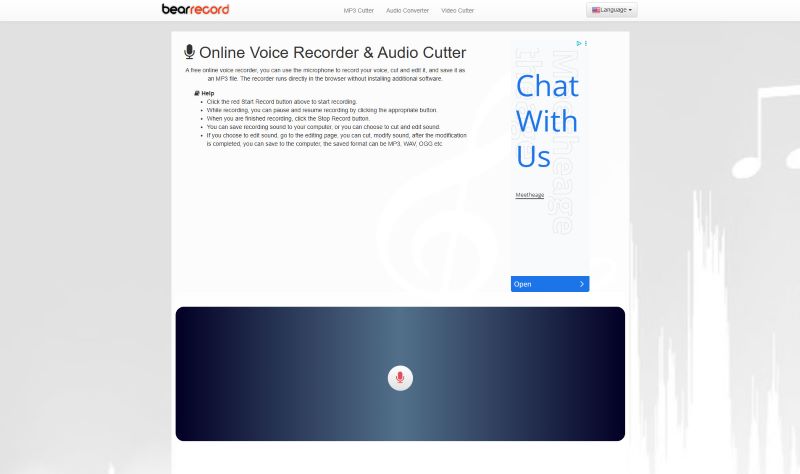
BearRecord on ilmainen verkkopohjainen äänitallennin, jonka selainpohjaisten työkalujen avulla voit tehdä yksinkertaisia muokkauksia ennen tallentamista. Siinä on erittäin yksinkertainen käyttöliittymä, jonka avulla voit nopeasti aloittaa ja lopettaa äänitallennuksen. Tässä verkkopohjaisessa äänitallennimessa on kuitenkin ilmeinen haittapuoli: kiinteät verkkosivun mainokset.
Mikä on ainutlaatuista: Voit säätää äänenvoimakkuutta ja sävelkorkeutta, käyttää häivytys- ja häivytystehosteita tai muuttaa tallennusmuotoa verkkosivustolla asentamatta mitään.
- Plussat
- Tämä online-äänitallennin tarjoaa perusmuokkaustyökalut.
- Se voi tarjota korkean äänenlaadun ilmaisena ääninauhurina.
- Se ei vaadi kirjautumista.
- Haittoja
- Verkkosivulla on mainosponnahdusikkunoita.
Top 5: Veed.io
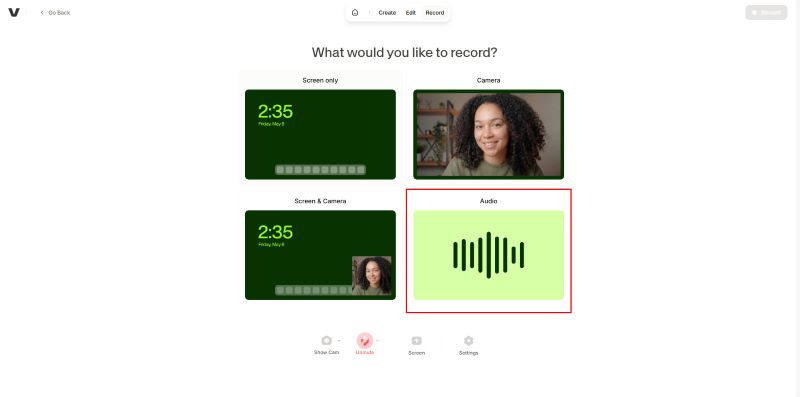
Veed on ilmainen verkkoäänitallennin, jossa on useita muokkaustyökaluja selaimessa. Se sopii sekä satunnaiseen että ammattimaiseen käyttöön. Voit tallentaa äänitteitä useita kertoja ilman aikarajoitusta. Voit tallentaa vain ääntä (järjestelmän ääntä tai mikrofonin ääntä) tai työpöydän näytön kanssa. Äänitys on erittäin saumatonta ja viiveetöntä. Tämä verkkoäänitallennin ei kuitenkaan anna sinun viedä äänitallennettasi äänimuotoihin, kuten MP3 tai WAV. Voit saada videon, jossa on tallennettu ääni ja musta näyttö.
Mikä on ainutlaatuista: Veedin ilmainen verkkoäänitallennin tarjoaa ilmaisen kokeilujakson tekoälyllä tehtävästä transkriptiosta ja tekoälyeditoinnista. Mutta edistyneempien ominaisuuksien käyttämiseen tarvitaan tilaus.
- Plussat
- Tässä online-äänitallentimessa on käyttäjäystävällinen käyttöliittymä
- Se tarjoaa monia sisäänrakennettuja muokkaustyökaluja.
- Voit kokeilla sen tekoälyllä toimivaa transkriptiotoimintoa.
- Haittoja
- Vaikka voit tallentaa vain ääntä, se pakottaa sinut viemään videon mustalla näytöllä.
- Jotkin muokkaustoiminnot vaativat kirjautumisen.
Kuusi parasta: SpeakPipe
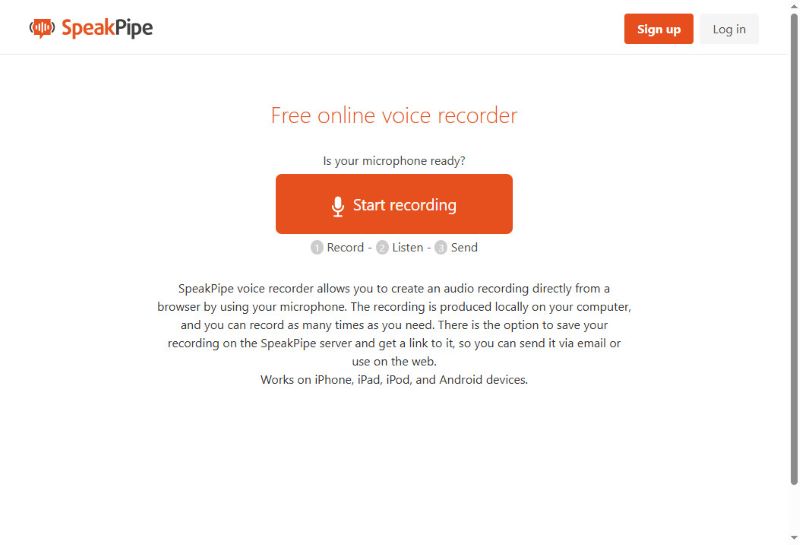
SpeakPipe on selainpohjainen äänitallennin, joka on suunniteltu nopeaan ääniviestien lähettämiseen ilman rajoituksia. Tämä verkkopohjainen äänitallennin on myös erittäin hyvä kitkattomasti äänen tallentamiseen ja välittömään jakamiseen. Voit tallentaa äänitallenteesi sen pilvitallennustilaan tai jakaa ne suoraan sosiaaliseen mediaan. Voit jopa luoda henkilökohtaisen itsenäisen aloitussivun, joka toimii julkisena vastaajapostilaatikkona, johon asiakkaat, opiskelijat tai kuuntelijat voivat jättää ääniviestejä.
Mikä on ainutlaatuista: Kun olet tallentanut äänitiedoston tällä verkkopohjaisella ääninauhurilla, voit tallentaa sen palvelimelle ja lähettää sen vaivattomasti luodun linkin kautta. Se on hyvä valinta niille, jotka haluavat tehdä lyhyitä äänitteitä jaettavaksi muiden kanssa.
- Plussat
- Voit jakaa äänitallenteitasi helposti.
- Tämä online-äänitallennin toimii kaikilla laitteilla ja selaimilla.
- Välitön äänitys ei vaadi sisäänkirjautumista.
- Haittoja
- Siinä on vain hyvin rajalliset muokkausominaisuudet.
Top 7: HappyScribe
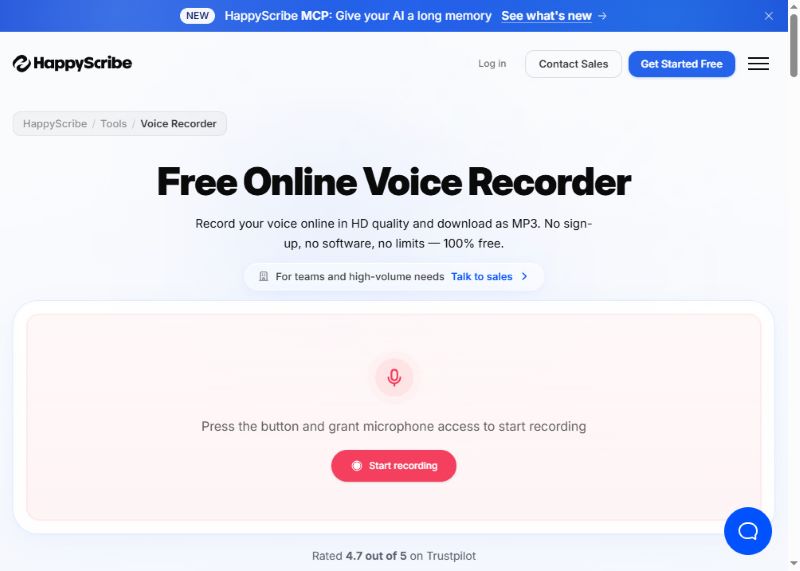
HappyScribe on helppokäyttöinen äänen tallentamiseen verkossa korkealaatuisena ja MP3-tiedostona. Se tarjoaa myös automaattisen litteroinnin useille kielille. Minuun tekee vaikutuksen sen muistiinpanotoiminto. Jos tallennat kokoustasi, tämä online-äänitallennin auttaa sinua automaattisesti tekemään muistiinpanoja. Sen jälkeen voit viedä äänitiedostosi yhdessä asiakirjatiedoston kanssa.
Mikä on ainutlaatuista: Äänesi tallennetaan HD-laadulla ja salamannopeasti. Se voi myös litteroida äänitallenteesi tekstiksi; se on hyödyllinen muistiinpanojen tekemiseen tai nopeiden ajatusten kirjaamiseen.
- Plussat
- Siinä on yksinkertainen käyttöliittymä, mutta siinä on monia tehokkaita edistyneitä ominaisuuksia.
- Tekoälyn transkriptio-ominaisuus on erittäin tehokas ja voi viedä asiakirjatiedostoja.
- Se toimii enemmän kuin tekoälyn äänitysavustaja.
- Haittoja
- Monet ominaisuudet vaativat kirjautumisen.
Osa 4: Parhaat offline-äänitallentimet
Vaikka verkkotallentimet ovat nopeita ja käteviä, niissä on yleensä rajoitetut muokkaustyökalut ja mahdollisia yksityisyysongelmia, koska ne saattavat tallentaa äänitiedostosi palvelimelleen. Turvallisempiin tallentimiin, joissa on enemmän toimintoja, suositellaan offline-tallentimia. Tässä on joitakin hyviä offline-tallentimia eri laitteille.
1. AVAide-näytöntallennin (Windows ja Mac)
Äänen tallennustila AVAide Screen Recorder on monipuolinen ja helppokäyttöinen. Tallennin tukee sekä järjestelmän äänen että mikrofonin tuloa ja tallentaa paljon laadukkaammin kuin verkkotyökalut.
Vaihe 1Lataa ja asenna ohjelmisto.

ILMAINEN LATAAUS Windows 7 tai uudempi
 Suojattu lataus
ILMAINEN LATAAUS Mac OS X 10.13 tai uudempi
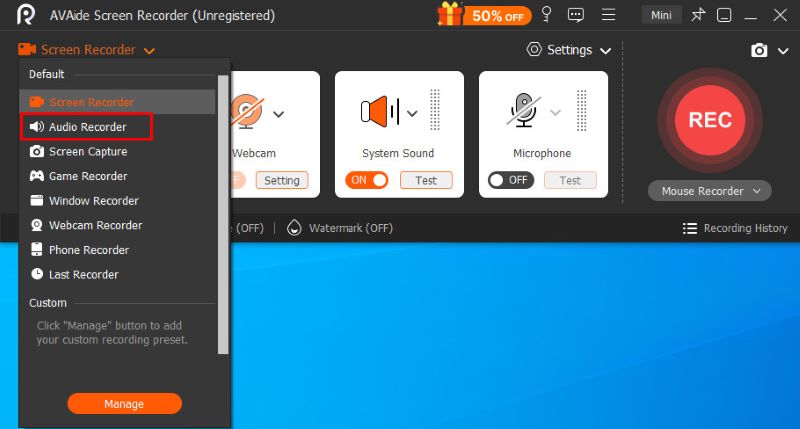
Suojattu latausVoit käyttää tätä tilaa napsauttamalla Näytön tallennin -painiketta vasemmassa yläkulmassa ja valitse Äänen tallennin valikossa.
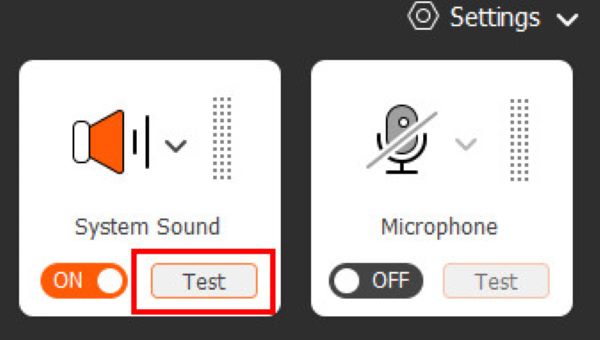
Vaihe 2Ennen varsinaisen tallennuksen aloittamista voit napsauttaa kahta painiketta Järjestelmän ääni ja Mikrofoni oikealla puolella muuttaaksesi ääniasetuksia ja nähdäksesi visualisoidun äänenvoimakkuuden vasemmalla puolella varmistaaksesi, että kaikki toimii oikein.
Vaihe 3Klikkaa REC -painiketta aloittaaksesi tallennuksen. Tallennuksen aikana voit keskeyttää sen milloin tahansa tai asettaa ajoitetun automaattisen tallennuksen kelluvan ohjauspalkin avulla. Kun olet valmis, napsauta punainen neliö lopettaaksesi sen ja avataksesi esikatseluikkunan.
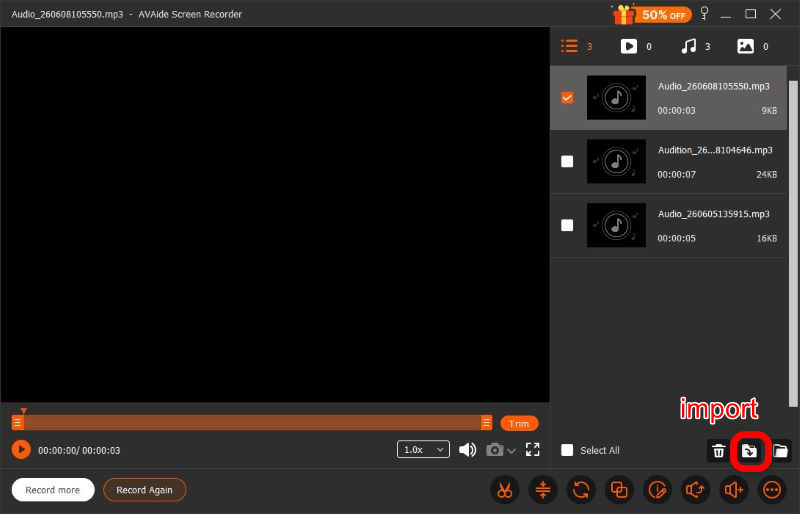
Vaihe 4Tallennuksen päätyttyä voit tehdä esikatseluikkunassa useita säätöjä, kuten rajata, pakata, yhdistää ja äänitallenteen muokkaaminenennen napsauttamista Tuonti oikeassa alakulmassa ja lataa se haluamassasi muodossa. AVAide Screen Recorder on suunniteltu tyydyttämään kaikki tarpeesi. Se on kokeilemisen arvoinen.
- Plussat
- Yksinkertainen ja selkeä käyttöliittymä
- Huippuluokan äänenlaatu
- Yksityinen ja turvallinen
- Tehokkaat muokkausominaisuudet
- Järjestelmä ja mikrofoni tuettu
- Haittoja
- Edistynyt muokkaus vaatii tilauksen
2. Audacity (Linux)
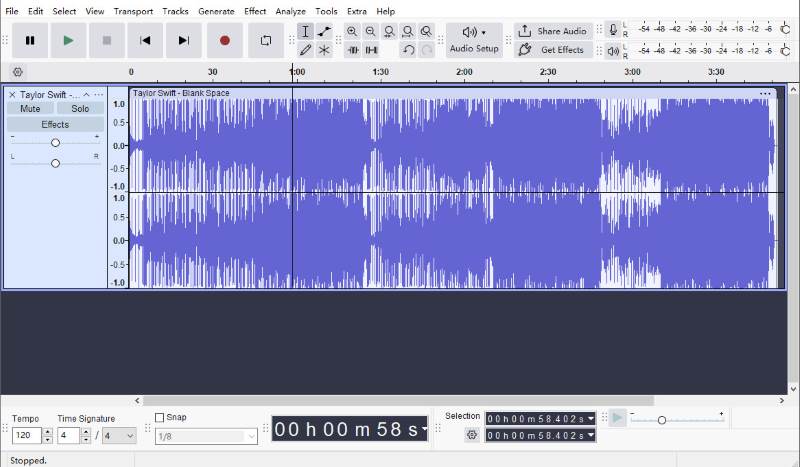
Audacity on yksi suosituimmista Linuxille saatavilla olevista avoimen lähdekoodin äänitys- ja editoriohjelmista. Se tarjoaa paljon enemmän äänitys- ja editointiominaisuuksia kuin useimmat verkkotyökalut ja on silti täysin ilmainen.
Voit leikata tallenteita, poista taustamelu, lisätä äänitehosteita ja tallentaa tiedostoja eri muodoissa. Koska kaikki tämä tapahtuu paikallisesti, tallenteet pysyvät yksityisinä ja hallinnassasi. Uusimman version avulla voit jakaa ääntä nopeasti linkkien kautta.
Silti niin monista ominaisuuksista huolimatta Audacityn käyttöliittymä on hieman monimutkaisempi kuin muiden, mikä tarkoittaa, että siihen tottuminen vie todennäköisesti jonkin aikaa.
- Plussat
- Tehokkaat muokkausominaisuudet
- Täysin ilmainen
- Yksityinen ja turvallinen
- Helppo jakaa
- Haittoja
- Monimutkainen käyttöliittymä
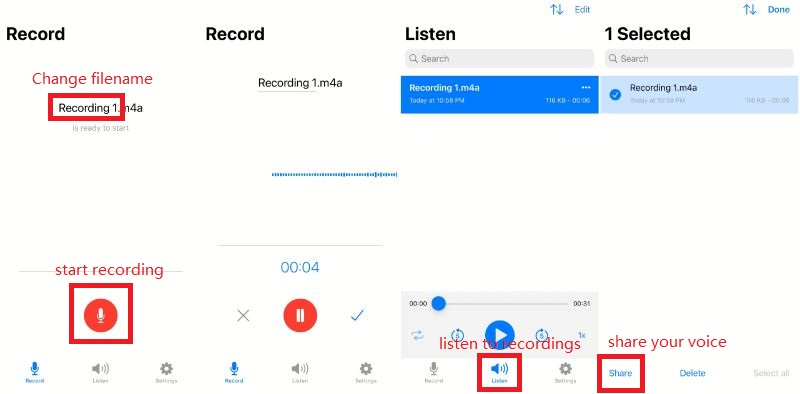
3. Helppokäyttöinen ääninauhuri (mobiililaitteet)
Kuten nimestä voi päätellä, Easy Voice Recorder on helppokäyttöinen äänitallennin, joka on suunniteltu tallentamaan kokouksia, henkilökohtaisia muistiinpanoja ja oppitunteja selkeästi ja ilman aikarajoituksia AAC-, PCM- ja AMR-muodoissa äänenlaadun ja tiedostokoon tasapainottamiseksi. Se on saatavilla sekä iOS- että Android-laitteille.
- Plussat
- Yksinkertainen ja nopea käyttöliittymä
- Korkea laatu
- Helppo jakaa
- Yksityinen ja turvallinen
- Haittoja
- Lisäominaisuuksiin vaaditaan maksullinen liittymä
7:n joukossa verkossa toimivat ääninauhurit, sekä kolme offline-työkalua, oikean löytäminen riippuu prioriteeteistasi: helppokäyttöisyys, äänenlaatu, editointi ja selainyhteensopivuus. Yllä tarkastellut työkalut ovat parhaiden vaihtoehtojen joukossa vuonna 2026, joiden avulla voit tallentaa ääntä nopeasti ja vaivattomasti.
TIETOA KIRJOITTAJASTA

Tallenna näyttö, ääni, web-kamera, pelattavuus, online-kokoukset sekä iPhone/Android-näyttö tietokoneellesi.