Πώς να εγγράψετε μουσική σε ένα iPhoneΗ ηχογράφηση της αγαπημένης σας μουσικής είναι μια απλή εργασία, χάρη στην προ-ενσωματωμένη λειτουργία του τηλεφώνου και τις αξιόπιστες εφαρμογές. Είτε ηχογραφείτε ένα σύντομο τραγούδι, είτε ασχολείστε με ορχηστρικά κομμάτια είτε καταγράφετε κλήσεις, το iPhone σας μπορεί να προσφέρει ευέλικτες επιλογές που μπορούν να βοηθήσουν αρχάριους και επαγγελματίες. Έτσι, αν θέλετε διάφορες μεθόδους για να ηχογραφήσετε αποτελεσματικά τη μουσική σας, θα ήταν καλύτερο να ξεκινήσετε να διαβάζετε όλα όσα υπάρχουν σε αυτό το σεμινάριο.
- Μέρος 1. Εγγραφή μουσικής στο iPhone χρησιμοποιώντας την ενσωματωμένη εφαρμογή φωνητικών μηνυμάτων
- Μέρος 2. Καταγραφή μουσικής χρησιμοποιώντας το GarageBand
- Μέρος 3. Εγγραφή πολλαπλών κομματιών με εφαρμογές τρίτων
- Μέρος 4. Εγγραφή σε μορφή MP3
- Μέρος 5. Πώς να εγγράψετε μουσική από το YouTube στο iPhone
- Μέρος 6. Συμβουλές από επαγγελματίες για καλύτερη ποιότητα ήχου
Μέρος 1. Εγγραφή μουσικής στο iPhone χρησιμοποιώντας την ενσωματωμένη εφαρμογή φωνητικών μηνυμάτων
Μία από τις εφαρμογές εγγραφής MP3 για iPhone που μπορείτε να χρησιμοποιήσετε για να ηχογραφήσετε τη μουσική σας είναι η εφαρμογή Voice Memos. Είναι μια ενσωματωμένη εφαρμογή στην οποία μπορείτε να αποκτήσετε πρόσβαση στη συσκευή iPhone σας. Αυτή η συσκευή εγγραφής μουσικής σάς επιτρέπει να ηχογραφείτε και να καταγράφετε οποιοδήποτε ηχητικό περιεχόμενο καθαρά και άμεσα. Είναι ιδανική για να σημειώνετε ιδέες για τραγούδια, μελωδίες και πλήρεις προπονήσεις. Το καλύτερο μέρος εδώ είναι ότι η εφαρμογή διαθέτει ένα εύχρηστο περιβάλλον χρήστη. Μπορείτε να περικόψετε ομαλά το ηχογραφημένο περιεχόμενό σας, να το οργανώσετε και να το μοιραστείτε χωρίς να αντιμετωπίσετε δυσκολίες. Επίσης, για μουσικούς που θέλουν να εγγραφή ήχου σε iPhone, δεν μπορούμε να πούμε με σιγουριά ότι η εφαρμογή Μαγνητόφωνο μπορεί να είναι το ιδανικό εργαλείο.
Για να μάθετε πώς να εγγράφετε ένα MP3 σε ένα iPhone, μπορείτε να ακολουθήσετε τα λεπτομερή βήματα παρακάτω.
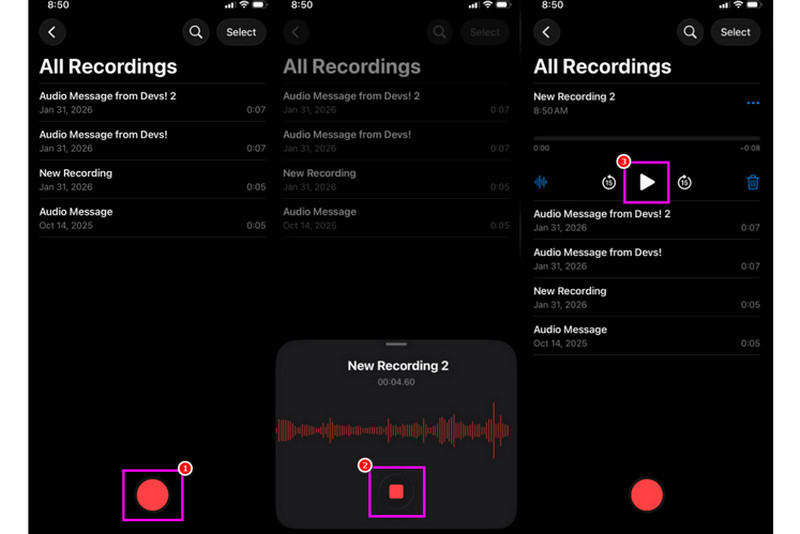
Βήμα 1Στο iPhone σας, προχωρήστε στο Βοηθητικά προγράμματα ενότητα και πατήστε το Φωνητικά σημειώματα εφαρμογή. Στη συνέχεια, βεβαιωθείτε ότι η μουσική που θέλετε να ηχογραφήσετε είναι ήδη έτοιμη.
Βήμα 2Στη συνέχεια, προχωρήστε στην κάτω διεπαφή και πατήστε το Ρεκόρ κουμπί. Μόλις τελειώσετε, μπορείτε πλέον να αναπαράγετε τη μουσική στο iPhone σας ή σε άλλη συσκευή.
Βήμα 3Μόλις ολοκληρωθεί η εγγραφή, πατήστε το Να σταματήσει κουμπί. Με αυτό, μπορείτε πλέον να έχετε την ηχογραφημένη μουσική σας. Μπορείτε ακόμη και να επεξεργαστείτε ή να μοιραστείτε το αρχείο, αν θέλετε.
Μέρος 2. Καταγραφή μουσικής χρησιμοποιώντας το GarageBand
Θέλετε να δημιουργήσετε τη δική σας μουσική και να την ηχογραφήσετε για να την αποθηκεύσετε στη συσκευή σας; Σε αυτήν την περίπτωση, μπορείτε να αποκτήσετε πρόσβαση Μπάντα του γκαράζΠρόκειται για μια δωρεάν εφαρμογή που σας εξασφαλίζει ότι μπορείτε να ηχογραφείτε μουσική στο iPhone σας. Με τη λειτουργία εγγραφής, δεν υπάρχει αμφιβολία ότι η ηχογράφηση της μουσικής σας είναι μια απλή εργασία. Μπορείτε ακόμη και να αποκτήσετε πρόσβαση σε διάφορα όργανα που μπορείτε να χρησιμοποιήσετε εάν θέλετε να δημιουργήσετε τη δική σας μουσική. Επομένως, εάν χρειάζεστε μια ολοκληρωμένη λύση ηχογράφησης, σκεφτείτε να χρησιμοποιήσετε αυτήν την εφαρμογή.
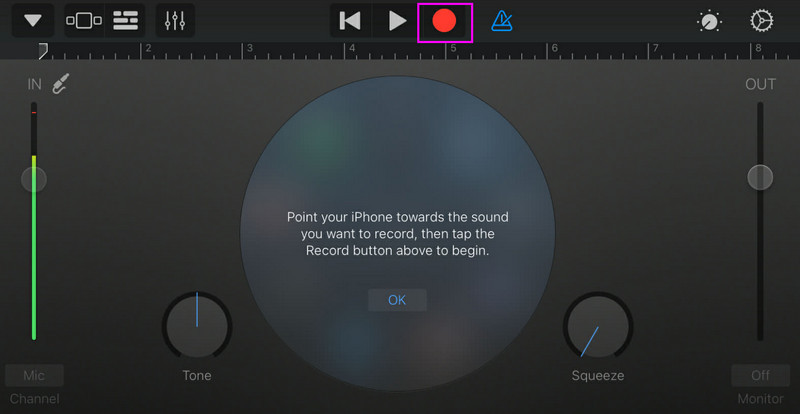
Βήμα 1μεταβείτε στο Apple Store και ξεκινήστε τη λήψη Μπάντα του γκαράζΜετά την εγκατάσταση, εκτελέστε το στη συσκευή σας.
Βήμα 2Από τη διεπαφή, πρέπει να επιλέξετε και να πατήσετε το Συσκευή εγγραφής ήχουΣτη συνέχεια, η κύρια διεπαφή θα εμφανιστεί στην οθόνη σας.
Βήμα 3Ξεκινήστε την ηχογράφηση της μουσικής σας πατώντας το Ρεκόρ κουμπί παραπάνω. Στη συνέχεια, πατήστε Να σταματήσει για να ολοκληρώσετε την ηχογράφηση.
Μέρος 3. Εγγραφή πολλαπλών κομματιών με εφαρμογές τρίτων
Το GarageBand είναι χρήσιμο για την ηχογράφηση μουσικής. Ωστόσο, υπάρχουν περισσότερες εφαρμογές στις οποίες μπορείτε να αποκτήσετε πρόσβαση, οι οποίες μπορούν να καλύψουν συγκεκριμένα διάφορα στυλ σύνθεσης τραγουδιών, παρακολούθησης και συνεργασίας μεταξύ πλατφορμών. Μερικές από τις εφαρμογές είναι:
- BandLab - Αυτό το εργαλείο είναι ιδανικό για συνεργασία μέσω cloud. Είναι ιδανικό για μουσικούς, καθώς διαθέτει καλύτερες δυνατότητες, όπως αλγόριθμους mastering, μια εκτεταμένη βιβλιοθήκη loop και πολλαπλές ηχογραφήσεις.
- FL Studio για κινητά - Αυτό είναι ένα εργαλείο που βασίζεται σε συνδρομή. Το προτιμούν οι παραγωγοί χιπ χοπ, ηλεκτρονικής και ποπ μουσικής.
- Κούβασις 3 - Είναι μια επαγγελματική επιλογή στούντιο που μεταφέρεται από το Cubase για υπολογιστές. Το εργαλείο μπορεί να προσφέρει κορυφαία επεξεργασία MIDI, απεριόριστα κομμάτια ήχου και ηχογράφηση πολλαπλών κομματιών, καθιστώντας το ιδανικό εργαλείο για τους χρήστες.
Αποτελεσματικός τρόπος για να ηχογραφήσετε μουσική σε έναν υπολογιστή γραφείου
Ψάχνετε για μια επιτραπέζια συσκευή εγγραφής που μπορεί να σας βοηθήσει να ηχογραφήσετε τη μουσική σας; Σε αυτήν την περίπτωση, μπορείτε να έχετε πρόσβαση Εγγραφή οθόνης AVAideΑυτό το πρόγραμμα μπορεί να προσφέρει την εφαρμογή εγγραφής τηλεφώνου για την εγγραφή μουσικής από το iPhone σας. Αυτό το λογισμικό είναι ιδανικό αν θέλετε να αποθηκεύσετε την εγγραφή σας απευθείας στον υπολογιστή σας. Αυτό που μας αρέσει εδώ είναι ότι αυτή η συσκευή εγγραφής μπορεί να σας προσφέρει μια ομαλή και απλή διαδικασία εγγραφής, χάρη στο εύχρηστο περιβάλλον χρήστη της. Αυτό το πρόγραμμα διασφαλίζει επίσης ότι μπορείτε να αποθηκεύσετε τον ήχο με την καλύτερη ποιότητα, έως και 320 kbps, οδηγώντας σε καλύτερη αναπαραγωγή ήχου. Μπορείτε ακόμη και να επεξεργαστείτε τον ήχο σας με βάση τις προτιμήσεις σας, καθιστώντας τη συσκευή εγγραφής ήχου ιδανική για όλους τους χρήστες.
Βήμα 1Κατεβάστε Εγγραφή οθόνης AVAide στην επιφάνεια εργασίας σας. Στη συνέχεια, εκκινήστε το για να ξεκινήσει η διαδικασία.

ΔΩΡΕΑΝ ΛΗΨΗ Για Windows 7 ή νεότερη έκδοση
 Ασφαλής λήψη
ΔΩΡΕΑΝ ΛΗΨΗ Για Mac OS X 10.13 ή νεότερη έκδοση
Ασφαλής λήψηΒήμα 2Από τη διεπαφή, μεταβείτε στο αναπτυσσόμενη λίστα κουμπί και επιλέξτε το Συσκευή εγγραφής τηλεφώνου λειτουργία. Στη συνέχεια, πατήστε iOS και συνδέστε το τηλέφωνό σας.
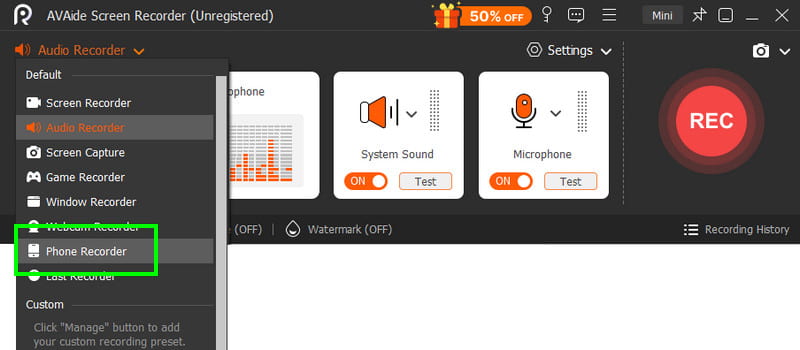
Βήμα 3Μετά από αυτό, προχωρήστε στο Περιεχόμενο εγγραφής ενότητα για να καταργήσετε την επιλογή του Οθόνη επιλογή και επιλέξτε το Ηχείο τηλεφώνου επιλογή. Μόλις τελειώσετε, πατήστε Ρεκόρ για να ξεκινήσει η διαδικασία εγγραφής.
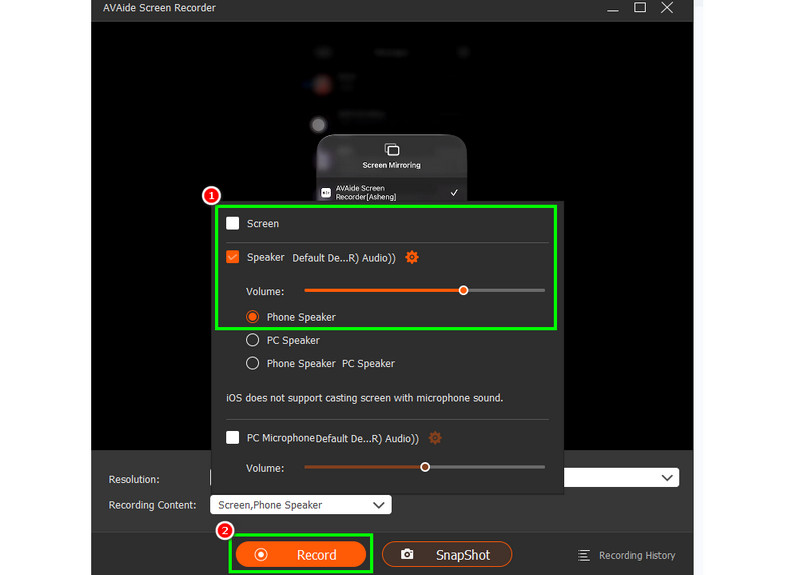
Παρακέντηση Να σταματήσει για να ολοκληρώσετε την ηχογράφηση.
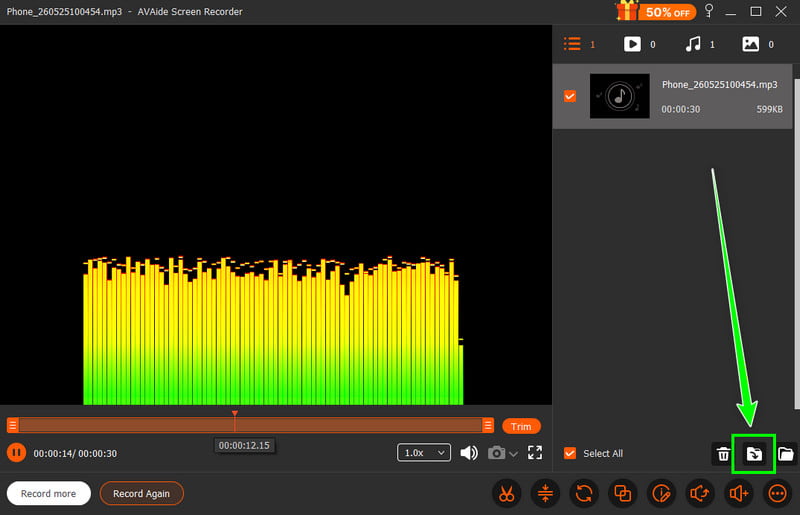
Βήμα 4Όταν εμφανιστεί η Προεπισκόπηση, κάντε κλικ στο Εξαγωγή για να ξεκινήσετε την αποθήκευση του ηχογραφημένου ήχου.
Μέρος 4. Εγγραφή σε μορφή MP3
Από προεπιλογή, το οικοσύστημα της Apple αποθηκεύει μουσική ως WAV ή AAC. Ωστόσο, μπορούμε να πούμε ότι το MP3 είναι από τις πιο φορητές μορφές ήχου που υπάρχουν. Επομένως, η μετατροπή των ηχογραφήσεών σας σε MP3 είναι η καλύτερη επιλογή. Για να μετατρέψετε την ηχογράφηση σας, μπορείτε να χρησιμοποιήσετε την εφαρμογή Audio Recorder. Με αυτήν την εφαρμογή, μπορείτε να μετατρέψετε τις ηχογραφήσεις σας από φωνητικά μηνύματα σε MP3 για καλύτερη συμβατότητα. Μπορείτε να μετατρέψετε AAC σε MP3, WAV σε MP4, FLAC σε WAV και πολλά άλλα.
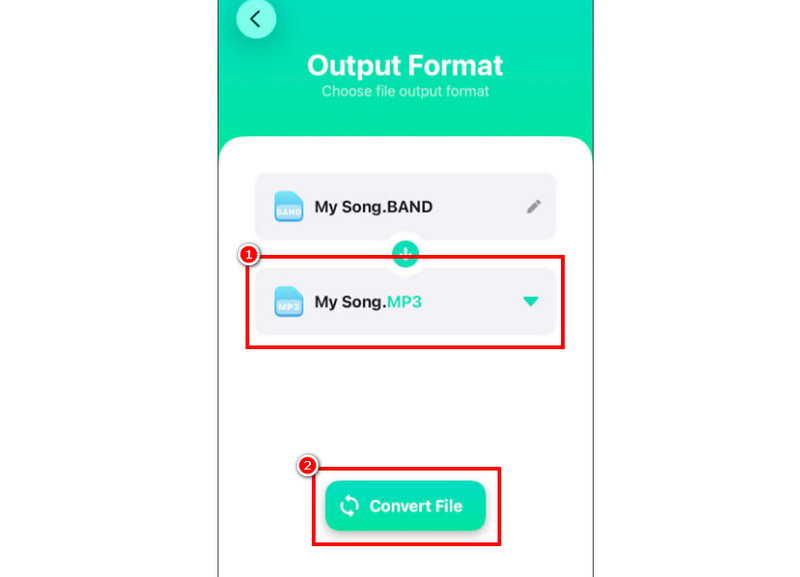
Βήμα 1Πήγαινε στο δικό σου Apple Store και κατεβάστε το Μετατροπέας ήχου εφαρμογή. Στη συνέχεια, εκκινήστε τον μετατροπέα και ξεκινήστε την προσθήκη της εγγραφής.
Βήμα 2Από το Μορφή ενότητα, ξεκινήστε να επιλέγετε το MP3 μορφή. Στη συνέχεια, πατήστε το Μετατρέπω κουμπί.
Βήμα 3Μετά τη διαδικασία μετατροπής, μπορείτε πλέον να αναπαράγετε το αρχείο MP3.
Μέρος 5. Πώς να εγγράψετε μουσική από το YouTube στο iPhone
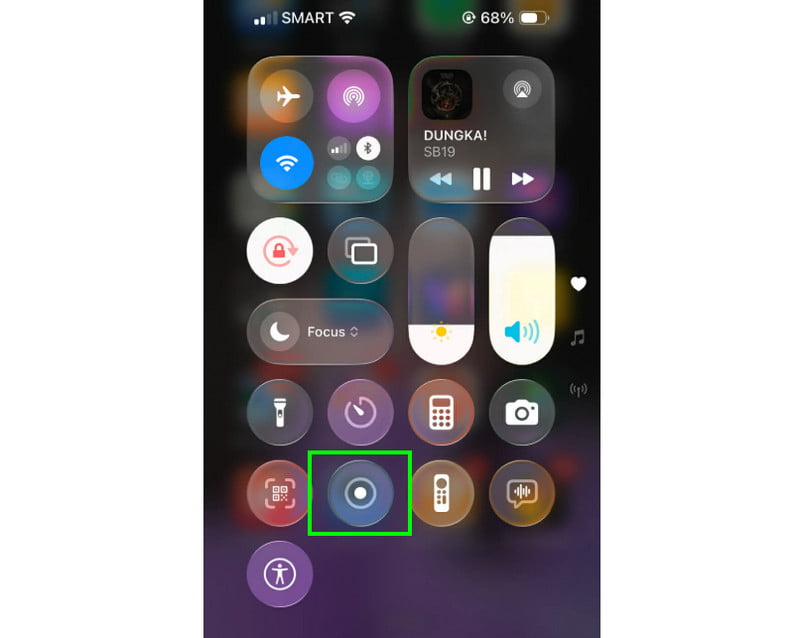
Θέλετε να ηχογραφήσετε μουσική από το YouTube στο iPhone σας; Σε αυτήν την περίπτωση, το μόνο που χρειάζεστε είναι να χρησιμοποιήσετε τη λειτουργία Εγγραφής στη συσκευή σας. Με αυτήν τη λειτουργία, μπορείτε να ηχογραφήσετε οποιαδήποτε μουσική από το YouTube. Για να ξεκινήσετε τη λειτουργία εγγραφής, το μόνο που χρειάζεται να κάνετε είναι να πατήσετε Υποβοηθητική αφή και προχωρήστε στην ενότητα Κέντρο ελέγχου. Πατήστε τη λειτουργία Εγγραφής. Η διαδικασία θα ξεκινήσει μετά την αντίστροφη μέτρηση 3 δευτερολέπτων. Με αυτό, μπορείτε να ξεκινήσετε την αναπαραγωγή μουσικής από το YouTube. Πατήστε στο stop για να ολοκληρώσετε την εγγραφή. Μόλις τελειώσετε, μπορείτε πλέον να χρησιμοποιήσετε οποιονδήποτε μετατροπέα βίντεο σε MP3 για να μετατρέψετε το βίντεό σας σε αρχείο ήχου.
Μέρος 6. Συμβουλές από επαγγελματίες για καλύτερη ποιότητα ήχου
Δείτε αυτήν την ενότητα και λάβετε περισσότερες πληροφορίες σχετικά με το πώς να αποκτήσετε καλύτερη ποιότητα ήχου.
- Πάντα να κάνετε εγγραφή σε ένα ήσυχο μέρος για να ελαχιστοποιήσετε τον θόρυβο του περιβάλλοντος.
- Όταν χρησιμοποιείτε μια εφαρμογή όπως το GarageBand, πρέπει να διατηρείτε ισορροπημένο το κέρδος εισόδου. Αποφεύγετε πάντα την αποκοπή παραμένοντας κάτω από την κόκκινη ζώνη.
- Για καλύτερη ποιότητα, ηχογραφήστε πάντα σε AIFF ή WAV.
- Παρακολουθήστε την εγγραφή με ακουστικά. Μπορείτε να χρησιμοποιήσετε ενσύρματα ακουστικά για να αντιμετωπίσετε προβλήματα σε πραγματικό χρόνο.
Προς το ηχογράφηση τραγουδιού σε iPhone, χρησιμοποιήστε όλες τις μεθόδους που παρέχονται σε αυτό το σεμινάριο. Με αυτό, μπορείτε να έχετε το αποτέλεσμα που θέλετε μετά τη διαδικασία. Επίσης, αν θέλετε να ηχογραφήσετε μουσική από το τηλέφωνό σας χρησιμοποιώντας την επιφάνεια εργασίας σας, μπορείτε να έχετε πρόσβαση Εγγραφή οθόνης AVAideΜε τη λειτουργία Εγγραφής Τηλεφώνου αυτού του προγράμματος, μπορείτε να συνδέσετε το iPhone σας και να ηχογραφήσετε οποιαδήποτε μουσική και να την αποθηκεύσετε με την καλύτερη ποιότητα, καθιστώντας το την καλύτερη συσκευή εγγραφής στην οποία μπορείτε να βασιστείτε.
ΣΧΕΤΙΚΑ ΜΕ ΤΟΝ ΣΥΓΓΡΑΦΕΑ

Καταγράψτε δραστηριότητες οθόνης με ήχο, διαδικτυακές συσκέψεις, βίντεο παιχνιδιού, μουσική, κάμερα web κ.λπ.