"Hello, does anyone here know if there's a valuable tool that can help me upscale multiple images simultaneously? I plan to deal with 100 to 200 images simultaneously and hope to upscale them to 2×, 4×, and 8× better than the original. I hope you can help me. Thank you"
The demand for high-resolution photos is more significant in this modern world. It can help you have a better viewing experience. So, if you want to upscale bulk images using a fantastic tool at once, we are here to help you. In this article, we will talk about the best bulk image upscaler and how to choose one. Without anything else, read this post and discover the best bulk image upscaler to utilize.
Part 1. All You Need to Know About Image Upscaler
The principle of AI batch upscalers involves feeding multiple low-resolution images into a pre-trained neural network model in batches. By learning patterns of texture, edges, and structure from extensive "low-resolution to high-resolution" samples, the model predicts and reconstructs missing high-frequency details during inference. In batch processing, this inference process is automatically and uniformly applied to each image, achieving enlargement, detail enhancement, and noise suppression through parallel or queued computations.
Good Points of AI Image Upscaler
• It can produce sharper and more detailed photos compared to the original one.
• With its AI-powered technology, upscaling the image will be quick and straightforward.
• If the tool can support batch processing, it can save more time.
• Almost all AI image upscalers are simple to utilize.
• The tool can automatically restore old photos.
Drawbacks of AI Image Upscaler
• It requires a strong internet connection to perform well.
• Some tools are subscription-based.
• It will produce a result with a higher file size, so sometimes you have to resize the image.
• Sometimes, the tool can over-upscale the image, leading to an unrealistic result.
• There are some AI tools that have a steep learning curve, which is unsuitable for some users.
Part 2. How to Choose a Bulk Image Upscaler
With so many bulk AI image upscaler online, it might be challenging to select one. In that case, read this section as we give tips on choosing the best tool for upscaling images.
Simple to Operate Tool
One of the best tools is the one with an understandable layout. If you are a non-professional user, selecting an image upscaler allows you to navigate all its functions. With that, you can get your desired result without having a hard time.
Free-to-Use Tool
If your main focus is to upscale images only, then there are various tools you can operate online for free. Using a free tool is perfect, especially if you don't want to spend a single penny to improve your images.
Saving Process
Since you are dealing with bulk images, it is still better to consider the tool's saving process. If the tool can give you an ultra-fast procedure, then you are using the right tool since it doesn't let you consume more time.
Supported Format
When selecting the best AI image upscaler, always ensure that it can support various input and output formats. With that, you don't have to encounter any compatibility issues.
Offer More Features
Another thing to consider is the other capabilities of the tool. It would be better if the image editor could remove a watermark from the photo, crop, add effects, and more.
Now, if you are searching for the best tool to upscale your photos, always consider the factors we have provided above. You must learn these pointers to get your preferred result after the image-upscaling procedure.
Part 3. Best Online Bulk Image Upscaler
If you're seeking a free yet powerful online batch image enlargement tool, AVAide AI Image Upscaler Online is undoubtedly your best choice. This tool supports batch processing, enabling simultaneous enlargement of multiple images. When users upload multiple images in batches, the platform feeds these images into the AI model for parallel processing. The server-side inference process simultaneously or sequentially applies a trained super-resolution network to enhance and reconstruct each image, enabling batch output. It can enlarge photos to 2x, 4x, 6x, or even 8x their original size. More importantly, its AI technology significantly enhances image clarity and sharpness, delivering a superior viewing experience.
Furthermore, the tool can handle various image input formats. You can upload JPG, PNG, BMP, and more. Lastly, you can access the tool on various web platforms. You can use it on Google, Firefox, Edge, Safari, etc. So, if you want the most potent tool to upscale an image by batch, consider using AVAide AI Image Upscaler.
Enjoyable Features
• The tool can upscale photos up to 2×, 4×, 6×, and 8×.
• It can offer an ultra-fast photo-upscaling procedure.
• It offers a preview section to show possible image output.
• The tool can provide a user-friendly interface.
• It can deal with various image input formats.
Part 4. How to Upscale Bulk Images
As we have told you, one of the most reliable tools you can access to upscale bulk images is AVAide AI Image Upscler Online. So, if you want to learn how to enhance your photos using this batch image upscaler, follow the simple tutorial below.
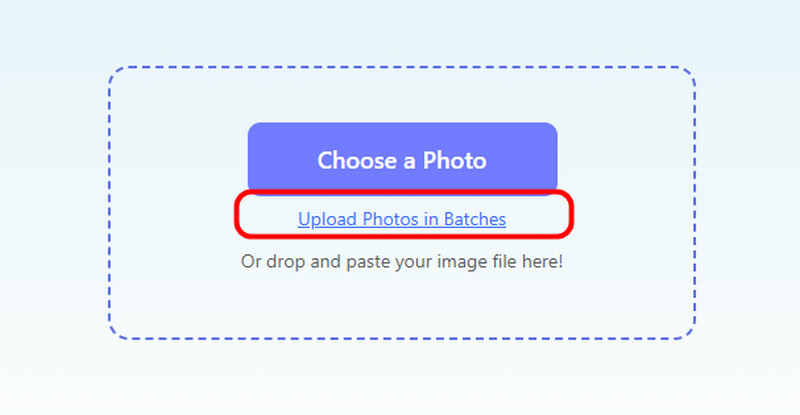
Step 1For the first step, visit the main website of AVAide AI Image Upscler Online. After that, hit the Upload Photos in Batches button. Then, you can start inserting all the pictures you want to upscale.
Step 2Afterward, you can go to the top interface to start upscaling the images. You can upscale them up to 2×, 4×, 6×, and 8× better. After selecting the preferred option, the tool will start upscaling it.
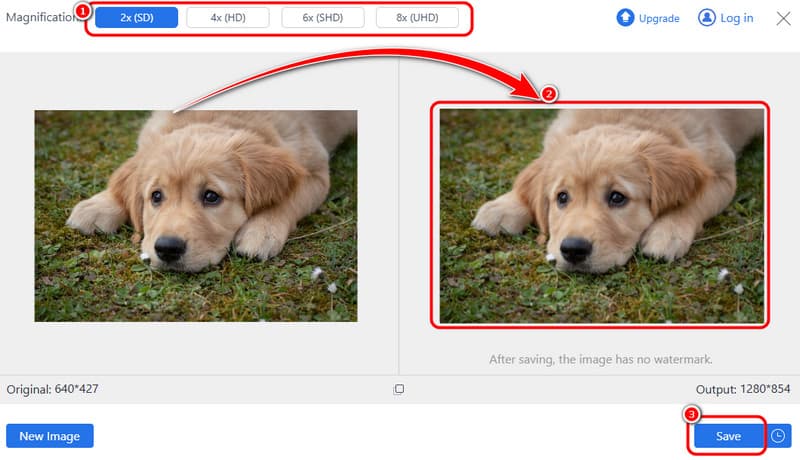
Once you are done, you can start hitting the Save button below the interface. If you have already downloaded the upscaled images, you can check them and see them on your computer.
Part 5. FAQs of Bulk Image Upscaler
Which bulk image upscaler supports RAW file formats?
Most online batch AI enhancement tools only support standard bitmap formats like JPG, PNG, TIFF, etc., and do not directly support camera RAW files. However, professional desktop AI software such as Topaz supports direct import and processing of RAW files.
Does AI bulk upscaling save time compared to Photoshop actions?
Yes, AI batch upscaling typically saves more time than Photoshop actions; this is primarily due to its higher level of workflow automation. The entire task is parallelized and supports automatic image enhancement and detail reconstruction, reducing manual intervention and repetitive operations.
How to upscale bulk PNGs with transparent backgrounds?
1. Select AI upscaling software/tools capable of preserving alpha channels, then upload the entire batch of PNG files. 2. Select PNG or another format supporting alpha channels as the output format.
Using an excellent free bulk image upscaler online, there is no doubt that you can enhance and upscale your photos successfully. Thanks to this post, you have given an idea about an AI image upscaler and the best factors to consider when choosing the best photo upscaler. In addition, if you are searching for an excellent tool that can upscale multiple photos in a single go, we recommend AVAide AI Image Upscaler Online. With this online tool, you can improve your images. It can even provide a straightforward layout, making it ideal for both skilled and non-professional users.

Image Upscaler
Our AI technology will automatically enhance the quality of your images, remove noise and fix blurry images online.
PROCESS NOW