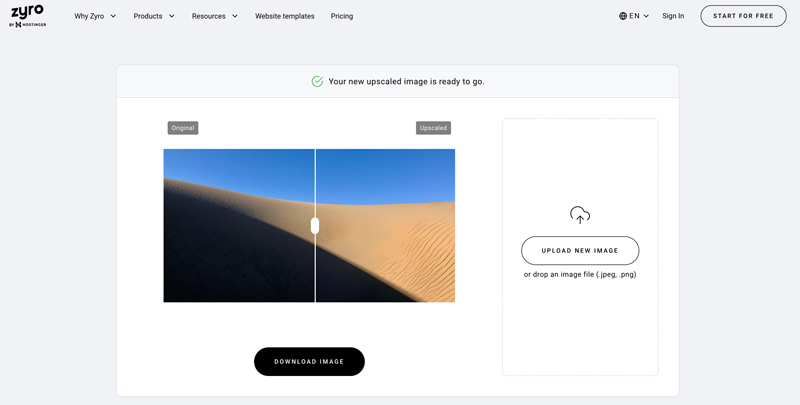
Introducing Zyro Image Upscaler, an advanced technology that improves images quickly. It doesn't matter if you are a professional photographer or hobbyist; this instrument will boost the quality of your pictures. The thing is that Zyro Image Upscaler has a simple design and a wide range of functions, so any user can edit photos without any problems. Forget about fuzzy shots and make them sharp and bright in a few clicks only! Let's see what else we need to know about this program. We also need to understand how much it can change our perception.
Part 1. Why Is Zyro Upscaler Beneficial to You
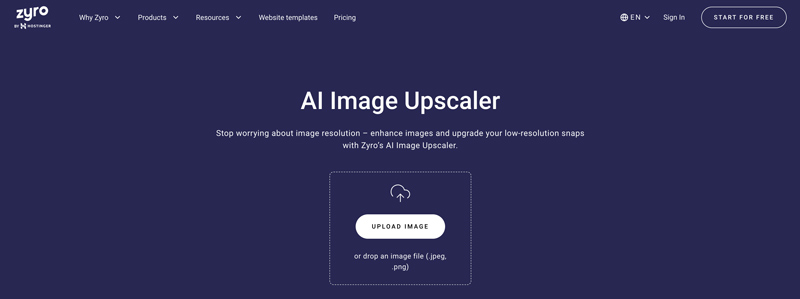
Zyro Upscaler can be beneficial for individuals and businesses alike for several reasons, and here are some of them:
- Integrated with a comprehensive website building tool, offering end-to-end design and development services for your website.
- Zyro Upscaler can automatically edit images, saving you time on repetitive manual adjustments.
- This tool was developed with user-friendliness in mind, making it accessible even to those without specialized technical knowledge.
Part 2. Detail Review of Zyro Image Upscaler
Pricing:
| Key Evaluation Item | Test Result | Professional Assessment |
| Maximum Upscale Factor | 2× | Fixed scaling ratios only; no custom resolution control |
| Image Sharpness Improvement | Moderate to Good | Noticeable clarity improvement on portraits; less effective on complex textures |
| Detail Reconstruction | Moderate | AI-generated details are acceptable but not professional-grade |
| Noise Reduction Performance | Good | Smooths grain effectively, with slight loss of fine details |
| Text Enlargement Quality | Moderate | Small fonts may appear slightly blurred after scaling |
| Processing Speed (Single Image) | ~4–8 seconds | Cloud-based processing; speed depends on server load |
| Batch Processing Support | × | Only single-image uploads allowed |
| File Size Limit | Not officially specified (stable under ~5MB) | Larger files may fail or process inconsistently |
| Supported Formats | JPG / PNG | No RAW, TIFF, or advanced format support |
| Cost | $1.85/Mon | Following its merger with Hostinger, it charges according to Hostinger’s pricing. |
| Manual Adjustment Controls | × | Fully automated processing; no sharpness or detail sliders |
- Pros
- The upscaling process significantly increases the image's resolution.
- No watermarks are added to the processed images.
- Highly optimized for extremely fast image quality enhancement.
- Cons
- Only fixed magnification ratios are supported; custom dimensions are not available.
- Its capability for detailed restoration is limited to images smaller than 5MB.
- You must purchase a package for the merged website to use it.
Main Features:
- Upscaling Powered by AI: Zyro Upscaler uses AI algorithms to enhance image quality while preserving essential details.
- Supports Various File Formats: Zyro Upscaler supports a wide range of image file formats, including JPEG, PNG, etc., so it can work with any type of picture file imaginable.
- Presets & Templates: Users can use pre-configured presets and templates for everyday tasks associated with enhancing images, thus making editing faster while ensuring uniform results.
- Integrated Functions: After migration, the host, website-building tools, domain name, and various utilities are all centralized within a single control panel.
Part 3. The Best Alternative to Zyro for Upscale Images
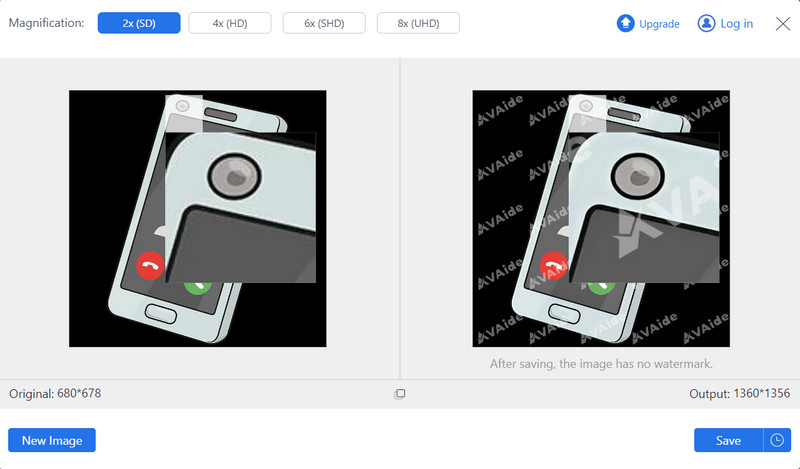
Don't want to pay for this new plan, but need to upscale images? Try AVAide Image Upscaler! It's not only a perfect replacement for Zyro but also more practical. It provides the most effective way to improve image quality, increase resolution, and fix blurry images. This online tool can be accessed for free using any web browser. Supports batch upscaling and can amplify up to 8×.
Key Features:
- AI Enhancement: Enhances image quality automatically by removing noise and sharpening blurry photos.
- Multiple Enlargement Options: You can enlarge an image 8× without losing clarity or details.
- Safe and Secure: Your data is completely safe since the platform does not have access to or use it.
- File Size Compatibility: The size of uploaded files can range from 20 to 50 MB.
- User-Friendly Interface: A simple tool requiring no prior experience editing pictures.
- Pros
- It is free of charge without any hidden costs attached.
- Safe and secure with confidentiality of user data being observed.
- Compatible with various image formats.
- Adequate for both beginners and professionals due to its friendly interface design.
- Cons
- Limited functionalities on advanced editing as it mainly focuses on scaling up images through enhancing them.
- Requires internet connection for operation.
| Evaluation Dimension | Zyro AI Image Upscaler | AVAide Image Upscaler |
| Maximum Upscale Factor | 2× (Fixed) | 2×, 4×, 6×, 8× (Selectable) |
| Maximum Input File Size | 5 MB | 20-50 MB |
| Maximum Output Resolution | Relatively limited (typically constrained by 2× scaling) | Support up to 4K / 8K level output |
| AI Model Accuracy | Basic level (general noise reduction) | Advanced level (optimized for portraits and sharpening) |
| Processing Speed | Fast (lighter algorithm) | Moderate (deep neural network processing) |
| Batch Processing | Not supported (single image only) | Not supported (single image only) |
Part 4. FAQs About Zyro Upscaler
Does the Zyro Image Upscaler work with RAW image formats?
Currently, Zyro Image Upscaler does not support RAW image formats. It can process common types like TIFF, JPEG or PNG. Nevertheless, you can convert your unsupported file into one supported before uploading it for enhancement and upscaling.
Can the Zyro Image Upscaler do batch processing on large amounts of images at once?
Yes, the Zyro Image Upscaler supports batch processing of large quantities of images simultaneously. This saves time and effort, as users do not have to upload each file separately. In other words, it means that many pictures can be improved together at once, which will help people who have a lot of them.
Is it possible for Zyro Image Upscaler to handle transparent background images?
No, Zyro Image Upscaler cannot currently handle transparent background images. The tool was designed to enhance image quality by increasing resolution and fixing blurry photos, so it doesn't include features specifically meant for dealing with transparency in images.
Does Zyro Image Upscaler offer a mobile app for on-the-go editing?
Zyro Image Upscaler does not offer a dedicated mobile app for on-the-go editing. It is primarily accessed through web browsers on desktop or mobile devices, allowing users to access the platform from various devices.
What file size limit does Zyro Image Upscaler support for uploads?
Zyro Image Upscaler does not impose a specific file size limit for uploads. However, users should consider factors such as upload speed and processing time when uploading large files. Optimal performance is typically achieved with files of reasonable size for efficient processing.
Zyro AI Image Upscaler was once a decent online image enlargement tool. After reading this article, I hope you'll gain a deeper understanding of its current capabilities. If you need a more feature-rich Zyro alternative with fewer limitations, consider trying the alternatives AVAide Image Upscaler introduced in this article. Not only are they more powerful, but they also offer greater convenience.

Our AI technology will automatically enhance the quality of your images, remove noise and fix blurry images online.
PROCESS NOW