iPhone'da müzik nasıl kaydedilir?Telefonunuzun önceden yüklenmiş özelliği ve güvenilir uygulamaları sayesinde en sevdiğiniz müzikleri kaydetmek oldukça basit bir işlem. İster kısa bir şarkı kaydediyor olun, ister enstrümantal parçalarla uğraşıyor olun, isterse de aramaları kaydediyor olun, iPhone'unuz hem yeni başlayanlara hem de profesyonellere yardımcı olabilecek esnek seçenekler sunar. Bu nedenle, müziğinizi etkili bir şekilde kaydetmek için çeşitli yöntemler istiyorsanız, bu kılavuzdaki her şeyi okumaya başlamanız daha iyi olacaktır.
- Bölüm 1. iPhone'da Dahili Sesli Notlar Uygulamasını Kullanarak Müzik Kaydetme
- Bölüm 2. GarageBand Kullanarak Müzik Kaydetme
- Bölüm 3. Üçüncü Parti Uygulamalarla Çok Kanallı Kayıt
- Bölüm 4. MP3 Formatında Kayıt
- Bölüm 5. iPhone'da YouTube'dan Müzik Kaydetme
- Bölüm 6. Daha İyi Ses Kalitesi İçin Profesyonel İpuçları
Bölüm 1. iPhone'da Dahili Sesli Notlar Uygulamasını Kullanarak Müzik Kaydetme
iPhone'unuzda müzik kaydetmek için kullanabileceğiniz MP3 kayıt uygulamalarından biri de Sesli Notlar uygulamasıdır. iPhone cihazınızda yerleşik olarak bulunan bu müzik kaydedici, herhangi bir ses içeriğini net ve anında kaydetmenizi sağlar. Şarkı fikirlerini, melodileri ve tüm prova seanslarını not almak için idealdir. En iyi yanı ise uygulamanın sezgisel bir kullanıcı arayüzüne sahip olmasıdır. Kaydedilen içeriğinizi sorunsuz bir şekilde kırpabilir, düzenleyebilir ve herhangi bir zorluk yaşamadan paylaşabilirsiniz. Ayrıca, müzisyenler için de idealdir. iPhone'da ses kaydetmeDolayısıyla, Sesli Notlar uygulamasının ideal bir araç olabileceğini söyleyemeyiz.
iPhone'da MP3 kaydetmeyi öğrenmek için aşağıdaki ayrıntılı adımları takip edebilirsiniz.
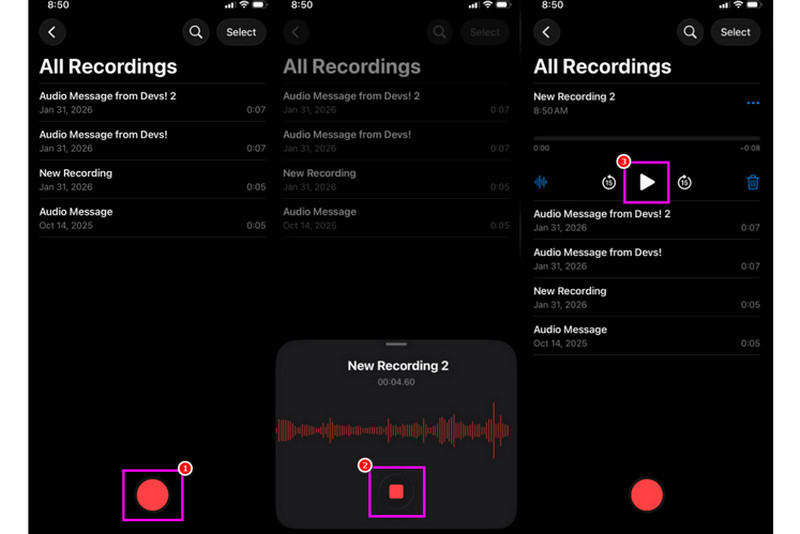
Aşama 1iPhone'unuzda aşağıdaki adımları izleyin: Araçlar bölümüne gidin ve dokunun Sesli Notlar Ardından, kaydetmek istediğiniz müziğin önceden hazırlanmış olduğundan emin olun.
Adım 2Ardından, en alt arayüze gidin ve tıklayın. Kayıt Düğmeye tıklayın. İşlem tamamlandıktan sonra, müziği iPhone'unuzda veya başka bir cihazda çalabilirsiniz.
Aşama 3Kayıt işlemi bittiğinde, tuşuna basın. Durmak Bu düğmeye tıklayın. Böylece artık kaydettiğiniz müziğe sahip olabilirsiniz. Dilerseniz dosyayı düzenleyebilir veya paylaşabilirsiniz.
Bölüm 2. GarageBand Kullanarak Müzik Kaydetme
Kendi müziğinizi oluşturmak ve cihazınıza kaydetmek mi istiyorsunuz? O halde, erişim sağlayabilirsiniz. Garaj BandıBu, iPhone'unuzda müzik kaydetmenizi sağlayan ücretsiz bir uygulamadır. Kaydedici özelliği sayesinde, müzik kaydetmek şüphesiz çok kolay bir iş. Hatta kendi müziğinizi oluşturmak isterseniz kullanabileceğiniz çeşitli enstrümanlara da erişebilirsiniz. Bu nedenle, her şeyi bir arada sunan bir kayıt çözümüne ihtiyacınız varsa, bu uygulamayı kullanmayı düşünebilirsiniz.
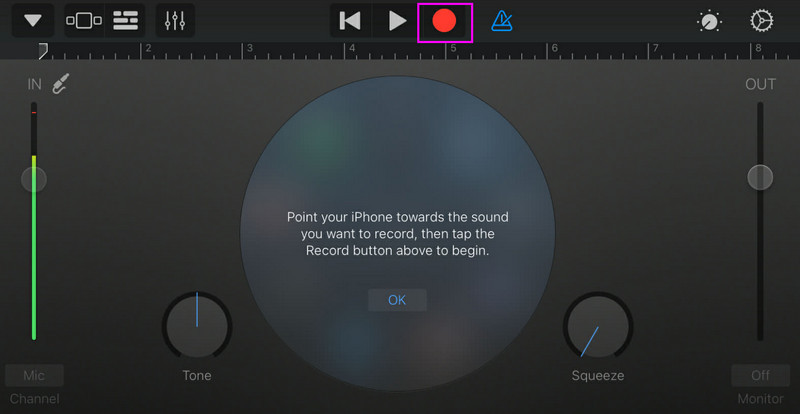
Aşama 1şuraya git Apple Store ve indirmeye başlayın Garaj BandıKurulum tamamlandıktan sonra, cihazınızda çalıştırın.
Adım 2Arayüzden seçip basmanız gerekiyor. Ses kaydediciArdından, ana arayüz ekranınızda görünecektir.
Aşama 3Müziğinizi kaydetmeye başlamak için üzerine dokunun. Kayıt Yukarıdaki düğmeye dokunun. Ardından, dokunun. Durmak Kaydı bitirmek için.
Bölüm 3. Üçüncü Parti Uygulamalarla Çok Kanallı Kayıt
GarageBand müzik kaydetmek için kullanışlıdır. Ancak, çeşitli şarkı yazma, kayıt ve platformlar arası iş birliği stillerine özel olarak hitap edebilecek daha birçok uygulama mevcuttur. Bu uygulamalardan bazıları şunlardır:
- BandLab - Bu araç, bulut tabanlı iş birliği için idealdir. Mastering algoritmaları, kapsamlı bir loop kütüphanesi ve çoklu kayıt gibi daha iyi özelliklere sahip olduğu için müzisyenler için mükemmeldir.
- FL Studio Mobil - Bu, abonelik tabanlı bir araçtır. Hip-hop, elektronik ve pop müzik prodüktörleri tarafından tercih edilmektedir.
- Cubasis 3 - Bu, masaüstü Cubase'den uyarlanmış profesyonel bir stüdyo seçeneğidir. Araç, üst düzey MIDI düzenleme, sınırsız ses parçası ve çok parçalı kayıt imkanı sunarak kullanıcılar için ideal bir araç haline geliyor.
Masaüstü Bilgisayarda Müzik Kaydetmenin Etkili Bir Yolu
Müziğinizi kaydetmenize yardımcı olabilecek masaüstü bir kayıt cihazı mı arıyorsunuz? O halde, erişebilirsiniz. AVAide Ekran KaydediciBu program, iPhone'unuzdan müzik kaydetmek için Telefon Kaydedici özelliğini sunuyor. Kayıtlarınızı doğrudan bilgisayarınıza kaydetmek istiyorsanız bu yazılım idealdir. Burada beğendiğimiz şey, sezgisel kullanıcı arayüzü sayesinde sorunsuz ve basit bir kayıt süreci sunmasıdır. Bu program ayrıca, 320 kbps'ye kadar en iyi kalitede ses kaydı yapmanızı sağlayarak daha iyi ses oynatımı sunar. Hatta sesinizi tercihlerinize göre düzenleyebilirsiniz, bu da ses kaydediciyi tüm kullanıcılar için ideal hale getirir.
Aşama 1İndirmek AVAide Ekran Kaydedici Masaüstünüzde açın. Ardından, işlemi başlatmak için çalıştırın.

ÜCRETSİZ İNDİR Windows 7 veya üzeri için
 Güvenli indirme
ÜCRETSİZ İNDİR Mac OS X 10.13 veya üzeri için
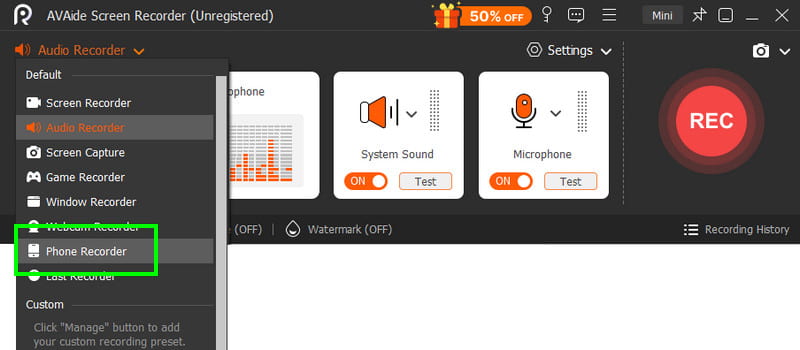
Güvenli indirmeAdım 2Arayüzden şuraya gidin: yıkılmak düğmesini seçin ve Telefon Kaydedici Özelliği seçin. Ardından iOS'a dokunun ve telefonunuzu bağlayın.
Aşama 3Daha sonra şuraya geçin: İçeriği Kaydetme işaretini kaldırmak için bölüm Ekran seçeneğini seçin ve Telefon Hoparlörü Seçenek. İşlem tamamlandıktan sonra dokunun. Kayıt Kayıt işlemine başlamak için.
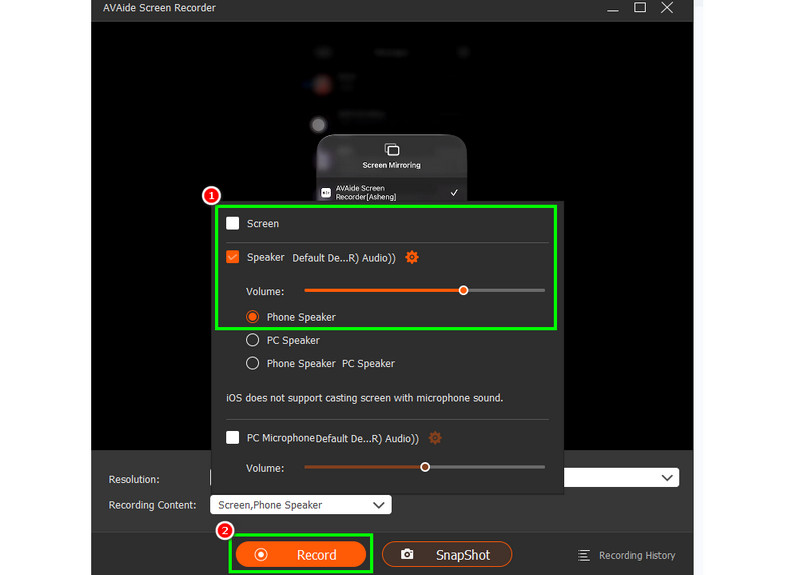
Musluk Durmak Kaydı bitirmek için.
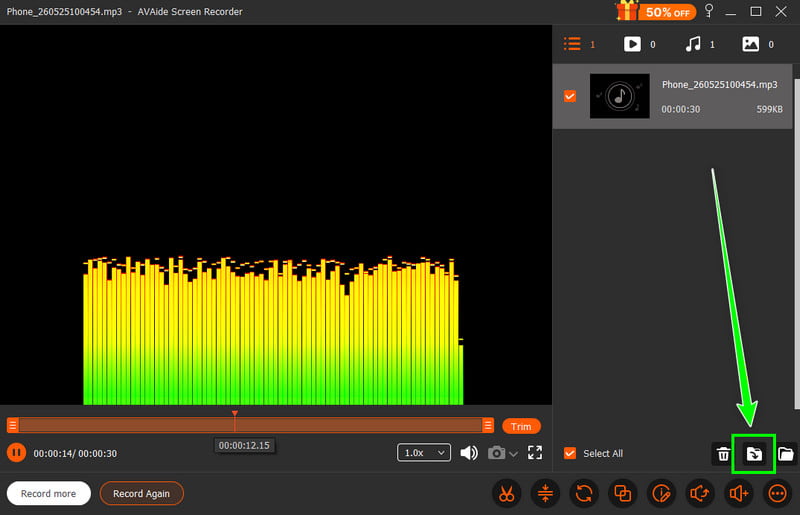
4. AdımÖnizleme göründüğünde tıklayın. İhracat Kaydedilen sesi kaydetmeye başlamak için.
Bölüm 4. MP3 Formatında Kayıt
Varsayılan olarak, Apple ekosistemi müziği WAV veya AAC olarak kaydeder. Ancak, MP3'ün en taşınabilir ses formatlarından biri olduğunu söyleyebiliriz. Bu nedenle, kayıtlarınızı MP3'e dönüştürmek en iyi seçenektir. Kayıtlarınızı dönüştürmek için Ses Kaydedici uygulamasını kullanabilirsiniz. Bu uygulama ile, daha iyi uyumluluk için Sesli Notlar'daki kayıtlarınızı MP3'e dönüştürebilirsiniz. AAC'den MP3'e dönüştürücüWAV'dan MP4'e, FLAC'tan WAV'a ve daha fazlası.
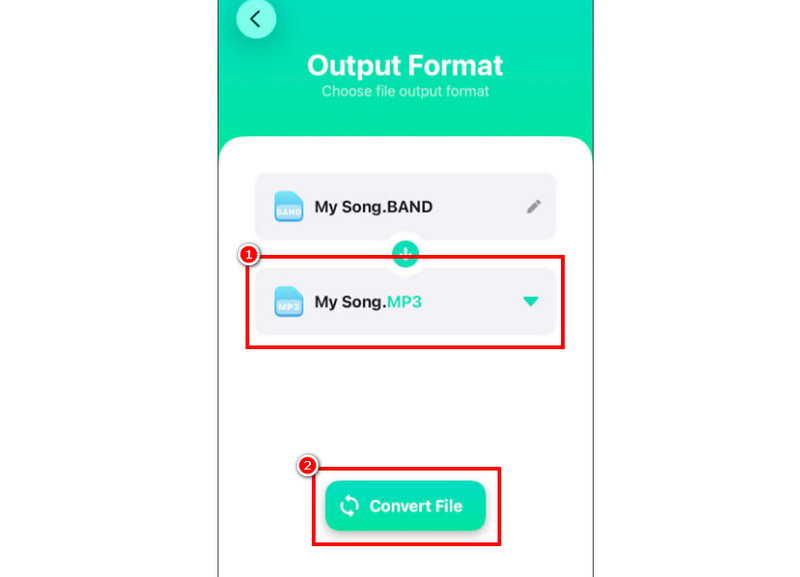
Aşama 1senin yanına git Apple Store ve indirin Ses Dönüştürücü Ardından, dönüştürücüyü başlatın ve kaydı eklemeye başlayın.
Adım 2itibaren Biçim bölüm, seçime başlayın MP3 biçimlendirin. Ardından, dokunun Dönüştürmek buton.
Aşama 3Dönüştürme işlemi tamamlandıktan sonra, artık MP3 dosyanızı oynatabilirsiniz.
Bölüm 5. iPhone'da YouTube'dan Müzik Kaydetme
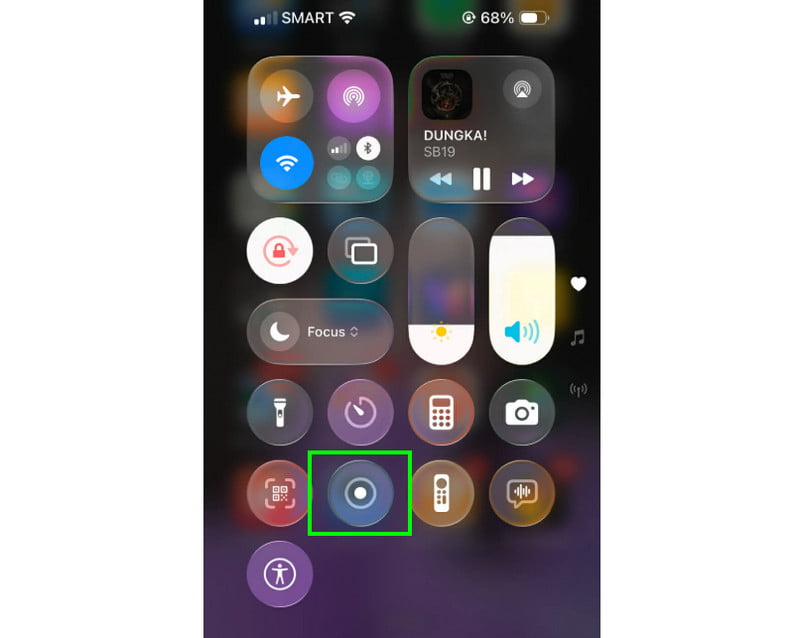
iPhone'unuzda YouTube'dan müzik kaydetmek mi istiyorsunuz? O halde, tek yapmanız gereken cihazınızdaki Kaydedici özelliğini kullanmak. Bu özellik sayesinde YouTube'dan dilediğiniz müziği kaydedebilirsiniz. Kayıt özelliğini başlatmak için tek yapmanız gereken dokunmak. Yardımcı Dokunma Kontrol Merkezi bölümüne gidin. Orada Kaydedici özelliğine tıklayın. İşlem 3 saniyelik geri sayımın ardından başlayacaktır. Bununla birlikte, YouTube'dan müzik çalmaya başlayabilirsiniz. Kaydı bitirmek için Durdur'a dokunun. İşlem tamamlandıktan sonra, videonuzu ses dosyasına dönüştürmek için herhangi bir video-MP3 dönüştürücü kullanabilirsiniz.
Bölüm 6. Daha İyi Ses Kalitesi İçin Profesyonel İpuçları
Bu bölümü inceleyerek daha iyi ses kalitesi elde etme konusunda daha fazla bilgi edinebilirsiniz.
- Arka plan gürültüsünü en aza indirmek için her zaman sessiz bir yerde kayıt yapın.
- GarageBand gibi bir uygulama kullanırken, giriş kazancını dengede tutmalısınız. Kırmızı bölgenin altında kalarak kırpılmayı her zaman önleyin.
- Daha iyi kalite için her zaman AIFF veya WAV formatında kayıt yapın.
- Kayıt işlemini kulaklıkla takip edin. Sorunları gerçek zamanlı olarak gidermek için kablolu kulaklık kullanabilirsiniz.
İle iPhone'da şarkı kaydetmekBu eğitimde verilen tüm yöntemleri kullanın. Böylece, işlemden sonra istediğiniz sonucu elde edebilirsiniz. Ayrıca, masaüstü bilgisayarınızı kullanarak telefonunuzdan müzik kaydetmek istiyorsanız, erişim sağlayabilirsiniz. AVAide Ekran KaydediciBu programın Telefon Kaydedici özelliği sayesinde iPhone'unuzu bağlayabilir, dilediğiniz müziği kaydedebilir ve en iyi kalitede saklayabilirsiniz; bu da onu güvenebileceğiniz en iyi kayıt cihazı yapar.
YAZAR HAKKINDA

Ses, çevrimiçi toplantılar, oyun videoları, müzik, web kamerası vb. ile ekran etkinliklerini yakalayın.