Tänk dig att överföra en enorm mängd foton eller dokument till din dator, bara för att upptäcka att fälten "Skapningsdatum" eller "Ändringsdatum" är helt förvrängda. Oavsett om det är ett säkerhetskopifel eller en tidszonsmatchning, kan felaktiga tidsstämplar för filer förstöra din digitala arkivering och ställa ditt arbetsflöde i kaos.
Som tur är slipper du leva med röran. En dedikerad ändring av fildatum ger dig absolut kontroll över dina metadata, så att du kan batchredigera filtidsstämplar med bara några få klick. I den här guiden har vi sammanställt de 5 bästa fildatumändringarna för Windows och Mac för att hjälpa dig att återfå kontrollen över din digitala organisation. Nu kör vi!
Del 1. Masterrecension av de 5 bästa fildatumsändrarna
Det här avsnittet presenterar den bästa fildatumsväxlaren du kan lita på. Fortsätt läsa för att ta reda på hur dessa verktyg kan hjälpa dig att uppnå din uppgift!
1. AVAide Video Converter
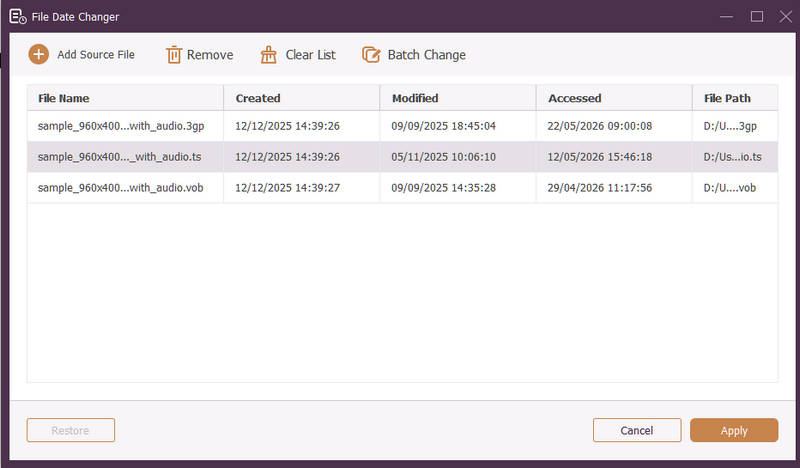
Tillgänglig för både Windows och Mac, AVAide Video Converter är en mångsidig plattform utrustad med en kraftfull, inbyggd fildatumsväxlare. Denna intuitiva funktion låter dig enkelt ändra omfattande tidsstämpeldetaljer, inklusive skapande, ändring och senast besökta datum.
- Hantera sömlöst många medieformat för video, ljud och bilder.
- Importera och uppdatera flera filer samtidigt för att spara tid och effektivisera ditt arbetsflöde.
- Har ett rent, användarvänligt gränssnitt så att du snabbt kan ändra fildatum.
- Håll din fil sömlös efter datumändringar.
2. File Date Changer
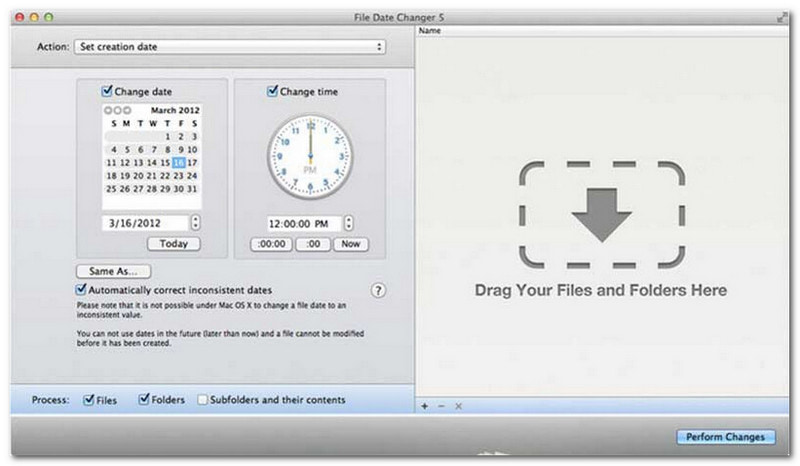
File Date Changer lever upp till sitt namn genom att erbjuda en dedikerad lösning för att ändra filskapningsdatum. Den har en enkel design, vilket gör den tillgänglig för användare på alla nivåer. Den stöder modifiering av både skapande- och ändringsdatum. Oavsett om du behöver ändra datum för enskilda filer eller hela mappar, förenklar denna fildatumväxlare på Mac processen med sin effektiva funktionalitet.
Även om File Date Changer är ett betalt verktyg beror dess värde på dina specifika behov gällande kostnad och funktionalitet. Vissa användare kan tycka att dess funktioner är något enkla i förhållande till priset. Men för de som prioriterar effektivitet och ett smidigt arbetsflöde är det fortfarande en mycket pålitlig och värdefull investering för en fildatumväxlare.
Viktiga funktioner i fildatumväxlaren:
- Ändra datum och tider för skapande, ändring och senast åtkomst för flera filer.
- Stöd för att lägga till eller subtrahera specifika dagar, timmar, minuter eller sekunder.
- Ändra filegenskaper som Skrivskyddad eller Dold och uppdatera EXIF-metadata.
- Fildatumväxlaren körs direkt och erbjuder ett tydligt gränssnitt.
3. ExifTool
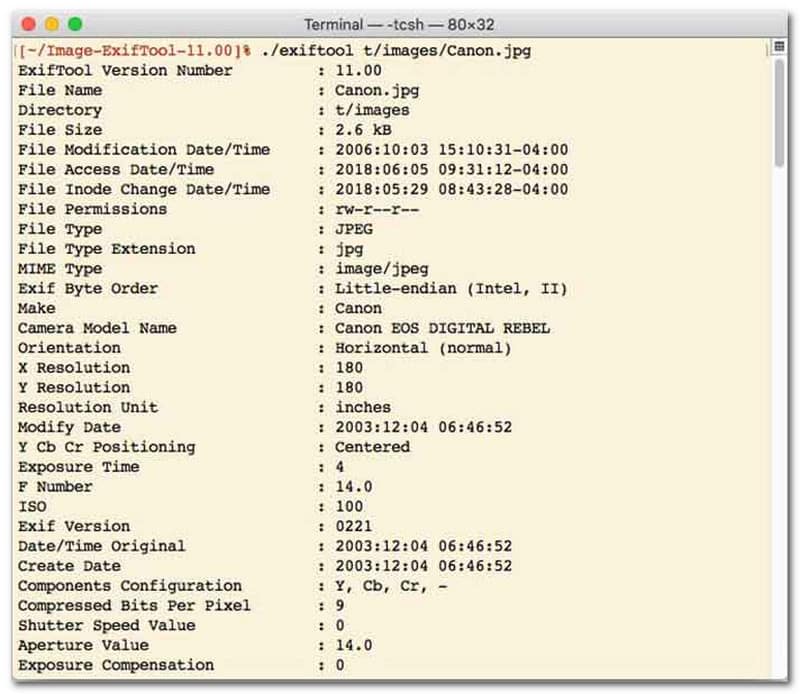
För användare som föredrar en fildatumväxlare med kommandoradsgränssnitt (CLI) är ExifTool guldstandarden för ultraprecis filhantering. Detta exceptionellt mångsidiga fildatumväxlarverktyg stöder en mängd olika filtyper, inklusive foton, videor, dokument och ljud. Utöver att bara redigera skapande- och ändringsdatum låter ExifTool dig sömlöst kopiera tidsstämpelmetadata från en fil till en annan, vilket säkerställer att hela ditt mediebibliotek förblir perfekt synkroniserat utan problem.
Viktiga funktioner i ExifTool:
- Läs och modifiera filsystemets tidsstämplar sömlöst.
- Kopiera datum mellan helt olika lager av metadata.
- Stöd för avancerad datum- och tidsberäkning som hjälper dig att ändra fildatum i omgångar.
- Extrahera datum- och medieinformation från alla typer av filer.
4. BulkFileChanger
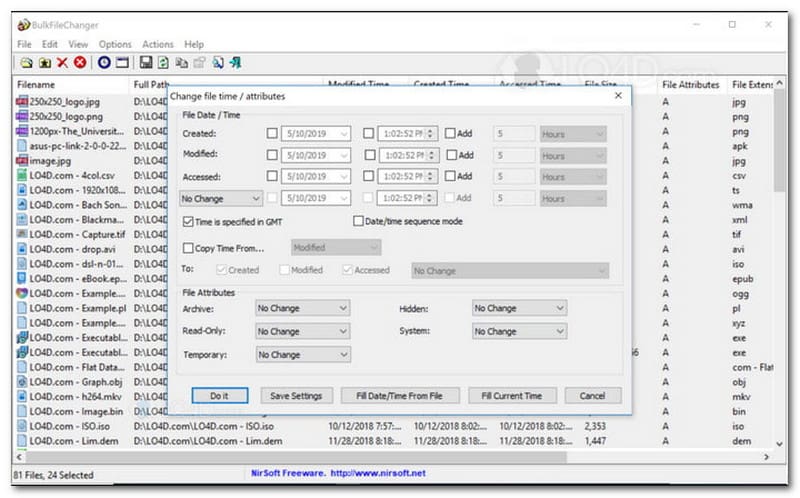
BulkFileChanger är ett lätt och högpresterande verktyg för datumändring av filer, utformat för enkel hantering av tidsstämplar för filer i Windows. Det låter användare snabbt ändra olika datum- och tidsattribut, inklusive skapande, ändring och senast åtkomna tider, för praktiskt taget alla filtyper, från dokument och bilder till videor. Medan dess mångsidighet och hastighet i flera format gör det till en utmärkt datumändringsverktyg för att organisera digitala arkiv, är dess tillgänglighet strikt begränsad till Windows-operativsystemet, vilket innebär att macOS- och Linux-användare måste leta någon annanstans.
Viktiga funktioner i BulkFileChanger:
- Ändra datum för skapande, ändring och senaste åtkomst till filer.
- Hanterar sömlöst nästan alla filtyper, inklusive dokument, bilder och videor.
- Har en lätt design som möjliggör ultrasnabb massuppdatering av metadata.
- Lägg till eller extrahera specifika dagar, timmar, minuter och sekunder.
5. AttributeMagic
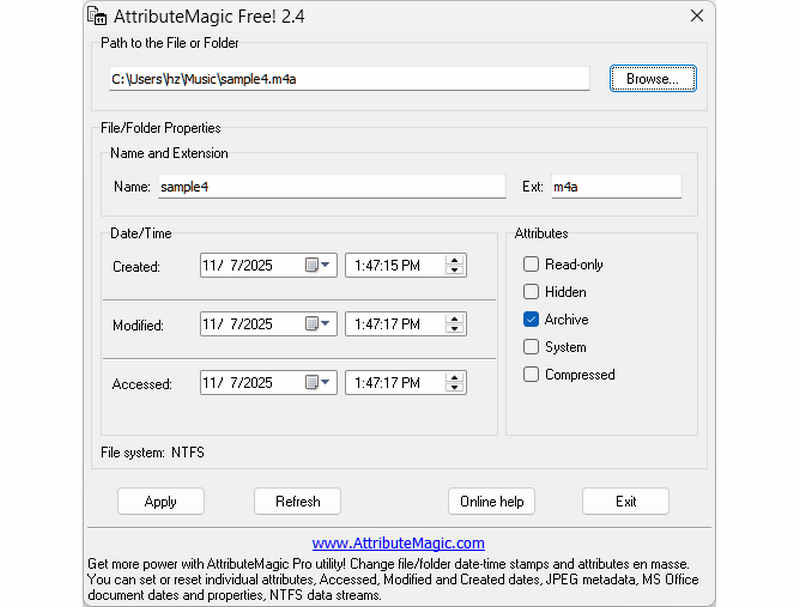
AttributeMagic går långt utöver en enkel fildatumredigerare genom att erbjuda en avancerad lösning för att hantera både mapp- och filattribut. Detta omfattande verktyg möjliggör precisionsmodifiering av tidsstämplar, vilket gör att användare enkelt kan skriva om skapande-, modifierings- och senast åtkomna datum. Utöver sina funktioner som en dedikerad fildatumredigerare erbjuder AttributeMagic djupgående anpassningsmöjligheter över filsystemegenskaper för att passa dina specifika arkiveringsbehov. Medan gratisversionen levererar viktiga tidsstämpelredigeringsfunktioner, låser upp uppgradering till premiumutgåvan avancerad metadatakontroll och kraftfulla automatiseringsfunktioner.
Viktiga funktioner i AttributeMagic:
- Ändra eller maskera tidsstämplar för skapande, modifiering och senast använda tidsstämplar.
- Ändra fildatum för både en enskild fil eller en hel filmapp.
- Öka, minska eller flytta enkelt filtidsstämplar framåt eller bakåt.
- ange, återställa eller invertera kärnattribut för filsystemet, såsom Skrivskyddad, Dold och System.
Del 2. Jämförelse av de 5 fildatumsändrarna
| Produkt | Plattformar som stöds | Användargränssnitt | Batchredigering | Extra funktioner |
| AVAide Video Converter | Windows och macOS | Modern, ren och flytande | Ja (Ultra-snabb) | Komplett svit: 8K-videokonvertering, DVD-rippning, metadataredigering, skapande av MV/bildspel |
| Fildatumändring (NirSoft) | Endast Mac | Föråldrad (Äldre webb/gränssnitt) | Begränsad | Ingen (Enbart ändamål) |
| ExifTool | Windows, macOS, Linux | Endast kommandorad (inget grafiskt gränssnitt) | Ja (Kräver komplexa skript) | Endast läsning/skrivning av metadata |
| BulkFileChanger | Endast Windows | Klassiskt Windows-verktyg | Ja | Grundläggande justering av Windows-filattribut |
| AttributMagi | Endast Windows | Stel / Komplex | Ja | Endast hantering av filsystemflaggor |
Del 3. Hur man ändrar fildata i AVAide Video Converter
Har du någonsin behövt ändra skapandet av en fil för att organisera dina digitala filer bättre? Du kan göra det med hjälp av AVAide Video Converter! Fortsätt läsa för att lära dig hur du ändrar datumet som skapas på en fil för att hjälpa dig hantera din fil.
Steg 1Ladda ner och installera AVAide Video Converter från den officiella webbplatsen för fullständig åtkomst.

GRATIS NEDLADDNING För Windows 7 eller senare
 Säker nedladdning
GRATIS NEDLADDNING För Mac OS X 10.13 eller senare
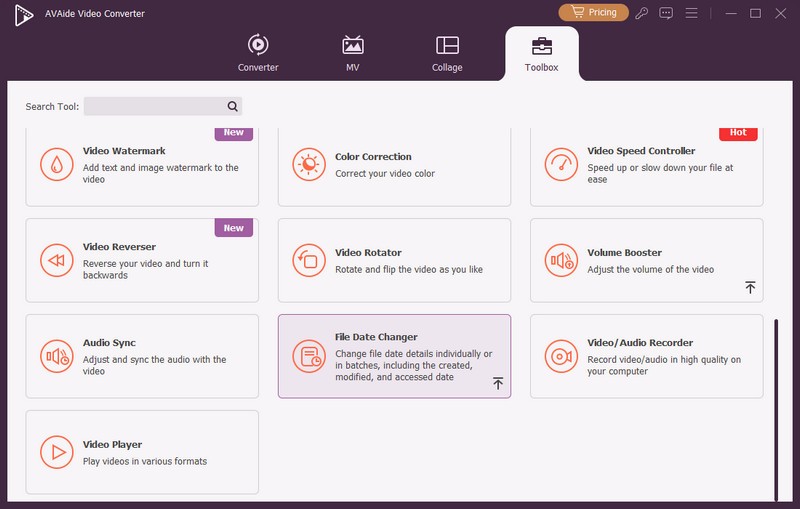
Säker nedladdningSteg 1Öppna programmet på din dator för att komma igång. Gå till Verktygslåda fliken för att komma åt flera funktioner. Scrolla ner med musen, leta efter File Date Changer bland alternativen och klicka på den. Det är den funktion du kommer att använda för att ändra fildatumdetaljerna.
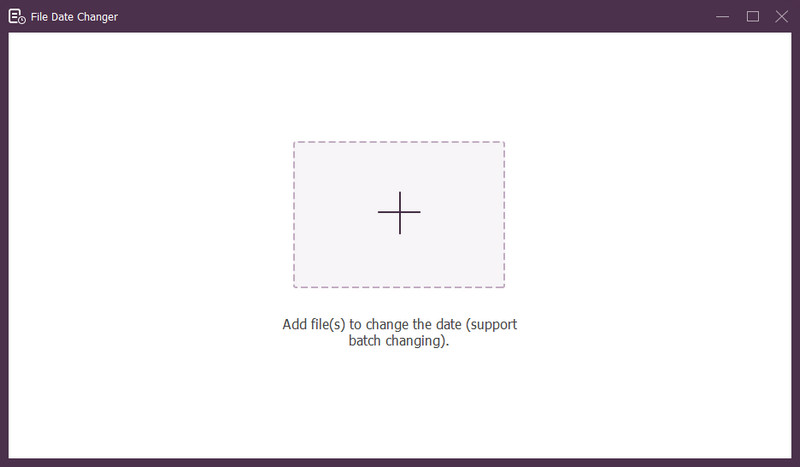
Steg 3Tryck på (+) för att importera filer. Detta kan vara ljud-, bild- och ljudfiler. Du kan importera mer än en fil för att ändra filinformationen.
Steg 4Du kan börja ändra deras datum när alla filer har importerats. Du kan ändra de skapade, ändrade och åtkomstdatumen i enlighet med detta. För att göra det, klicka på objektet tills Pil visas, vilket indikerar för redigering.
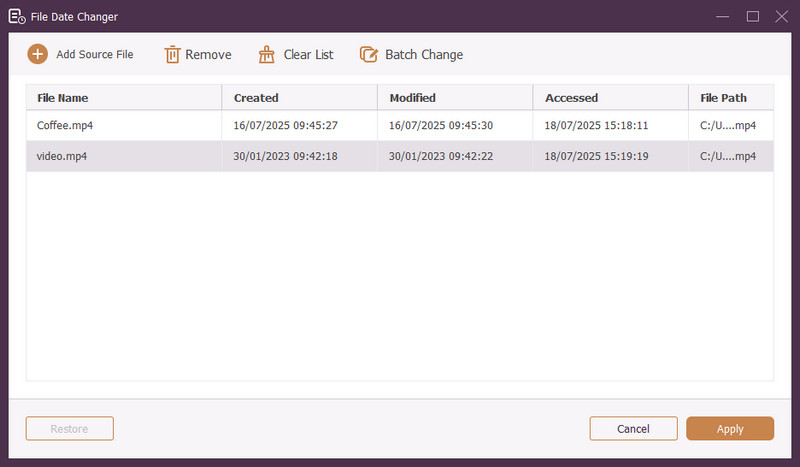
Steg 5När du har redigerat alla fildatum klickar du på Tillämpa för att bekräfta ändringarna. När ändringarna har tillämpats, granska de uppdaterade fildatadetaljerna för att säkerställa noggrannheten.
Del 4. Vanliga frågor om bästa fildatumväxlare
Hur kan jag se datuminformationen för en fil?
Om du vill kontrollera när en fil skapades eller senast ändrades kan du göra det direkt på din dator. Leta reda på filen, högerklicka på den och välj Egenskaper. Sedan kan du se alla detaljer om filen. Dessa inkluderar datum för skapande och ändring.
Kommer någon att veta när jag ändrar filens datum?
Nej! Att ändra en fils datum lämnar inga spår. Så ingen kommer att veta när du gjorde ändringen.
Vad är anledningen till att datum och tider försvinner från filen?
Det finns några anledningar till att datum och tider kan försvinna från filer. Det kan hända när du laddar ner en fil och förlorar viss information på grund av en dålig internetanslutning. Ibland beror det på webbplatsen där du laddade ner filen.
Kan jag hämta det ändrade skapandedatumet för filen?
Ja! Du kan återställa det ursprungliga datumet genom att manuellt ställa tillbaka det till dess ursprungliga värde. Det är det enda sättet att hämta skapelsedatumet för filen.
Påverkar ändring av fildatum och tid filens integritet eller innehåll?
Nej! Att ändra en fils datum och tider skulle inte påverka innehållet eller integriteten. Det ändrar bara metadata, som skapande och modifieringsdatum. Det lämnar den faktiska filen oförändrad.
Där har du det! Du har lärt dig hur man ändrar datumet skapat på en fil, vilket kan vara till hjälp av olika anledningar. För en mer strömlinjeformad och nybörjarvänlig upplevelse, överväg att använda AVAide Video Converter som din bästa fildatumväxlare. Det är det bästa valet för att hantera dina digitala filer. Testa och dela dina tankar nedan!
OM FÖRFATTAREN

Den mest omfattande mediekonverteraren för att konvertera video och ljud utan kvalitetsförlust.
Redigera video