Facebook Messenger behandlar röstdata på ett sätt som förhindrar direkt åtkomst; det är därför de flesta individer försöker ladda ner ljud från Facebook Messenger utan framgång. Filerna är integrerade och i de flesta fall kräver de specifika procedurer för att extrahera och använda. Kunskap om denna organisation förhindrar misstag och tidsslöseri. I den här artikeln får du veta varför du bör ha dessa begränsningar, hur du lagrar ljud på olika enheter och vad du ska göra när filer inte fungerar korrekt.
Del 1. Varför kan du inte ladda ner ljud från Facebook Messenger
Ljud från Facebook Messenger är inte lätt att ladda ner eftersom det inte är utformat som en fildelningsplattform utan snarare som en uppspelningstjänst i appen. Messenger lagrar röstmeddelandena på sina servrar och sänder dem när du trycker på uppspelning. Det innebär att ljudet inte levereras som en enkel nedladdningsbar fil i MP3- eller WAV-format.
En annan viktig fråga är filformat och struktur. Röstmeddelanden sparas ofta i komprimerade format som AAC i en MP4-behållare. Dessa filer är dolda bakom Messengers gränssnitt, så du ser ingen direkt "spara"- eller "ladda ner"-knapp. Sandboxing tillämpas också på mobila enheter, där appen hindrar användaren från att komma åt interna filkataloger där ljud tillfälligt lagras.
Tillägget av säkerhets- och sekretesskontroller ger ett extra lager. På datorer laddas ljud via webbskript, vilket gör det svårare att hitta originalfilen utan utvecklarverktyg. Android och iOS tillåter inte appar att enkelt extrahera lagrad media på sina mobila enheter, vilket förhindrar enkel extrahering i båda systemen.
Webbläsarens och appens beteende spelar också roll. På datorer laddas ljud via webbskript, vilket gör det svårare att hitta originalfilen utan att använda utvecklarverktyg. På mobila enheter begränsar både Android och iOS hur appar delar lagrad media med användaren, vilket blockerar enkel extrahering.
Kort sagt, svårigheten beror på tre huvudfaktorer: streamingbaserad leverans, dolda filformat och begränsningar på systemnivå. Att förstå dessa begränsningar är nyckeln innan man går vidare till de metoder som faktiskt låter dig spara ljudet, och det gäller laddar även ner Facebook-videor.
Del 2. Ladda ner ljud från Facebook Messenger på PC och Mac
Om du vill veta hur man laddar ner Facebook Messenger-ljud på PC och Mac är en bekväm lösning en skärminspelare som AVAide-skärminspelareEftersom Messenger inte tillåter direkta nedladdningar låter det här verktyget dig spela in ljud medan det spelas upp i hög kvalitet, utan lagg. Det är lätt att bära med sig, användarvänligt och stöder en mängd olika format, inklusive MP3, M4A och FLAC, som enkelt kan spelas upp. Du kan också hantera och organisera dina inspelade filer i programvaran, vilket gör det till ett pålitligt alternativ för att spara Messenger-ljud utan att behöva hantera dolda filsystem eller begränsningar.
Steg 1Ladda ner skärminspelaren för din valda enhet genom att klicka på lämplig knapp här. Följ sedan installationsanvisningarna omedelbart och starta verktyget.

GRATIS NEDLADDNING För Windows 7 eller senare
 Säker nedladdning
GRATIS NEDLADDNING För Mac OS X 10.13 eller senare
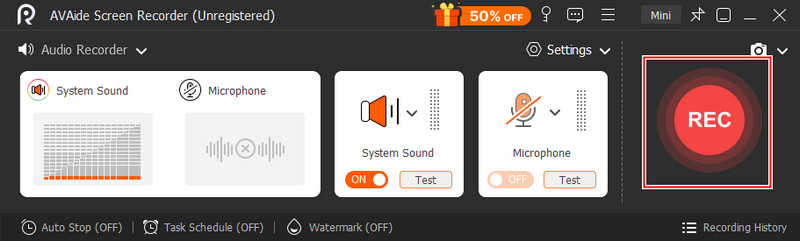
Säker nedladdningSteg 2Ställ sedan in Ljudinspelare och aktivera Systeminspelning så att du kan spela in ljud på din dator. Öppna Facebook Messenger, gå till Chattar och hitta den ljudinspelning du vill spara.
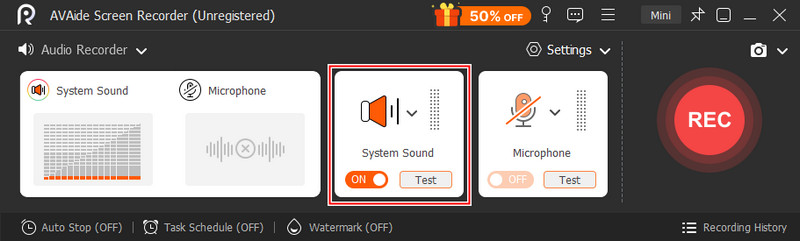
Steg 3Klicka sedan på REC för att starta inspelningen och spela sedan upp ljudklippet i Messenger. När du är klar med inspelningen klickar du på sluta knapp.
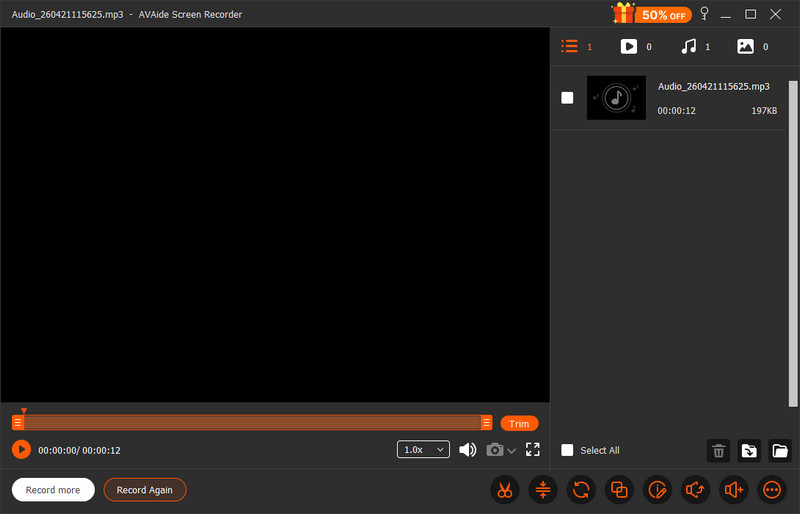
Steg 4Förhandsgranska inspelningen du har gjort snabbt genom att klicka på spela -knappen, och nu har du ljudinspelningen från Messenger sparad på din dator.
Del 3. Ladda ner ljud från Facebook Messenger på Android och iOS
Om du behöver en pålitlig nedladdningsfunktion för ljud från Facebook Messenger på mobilen är det en genial lösning att använda den vanliga versionen av webbläsaren på Facebook. Messenger krypterar ljudfiler i appen, men den här metoden visar dem som vanliga .mp4-filer, vilket möjliggör nedladdningar utan ytterligare applikationer. Det är särskilt praktiskt när du behöver en snabb lösning utan installation. Även om det innebär att du använder mobildata och några manuella steg, ger det dig direktåtkomst till filen i ett format som enkelt kan sparas, hittas och spelas upp på din enhet.
Steg 1Stäng av Wi-Fi och växla till mobildata, öppna sedan din mobila webbläsare och gå till gratis.facebook.comLogga in på ditt konto.
Steg 2Tryck på Meddelanden fliken under sökfältet och öppna konversationen med ljudklippet.
Steg 3Leta reda på ljudmeddelandet, som visas som en länk som slutar på .mp4, och tryck sedan på länken.
Steg 4Välj nedladdningsalternativet, vänta tills det är klart och kontrollera webbläsarens nedladdningshanterare för att komma åt och spela upp filen.
Del 4. Varför nedladdade Messenger-ljudfiler inte kan spelas upp
Vissa filer kanske inte går att spela upp på grund av format- eller kompatibilitetsproblem, även efter att man vet hur man laddar ner ljud från Facebook Messenger. Messenger-ljud kan lagras i en MP4-behållare, vilket många standardspelare inte kan läsa helt. Ljudet är AAC, och utdata kommer troligtvis att säga "Den här filen stöds inte av QuickTime"om du är en Mac-användare, särskilt när filen extraherades eller spelades in felaktigt. Saknade codecs eller fel filändelser kan också orsaka uppspelningsfel i vissa fall."
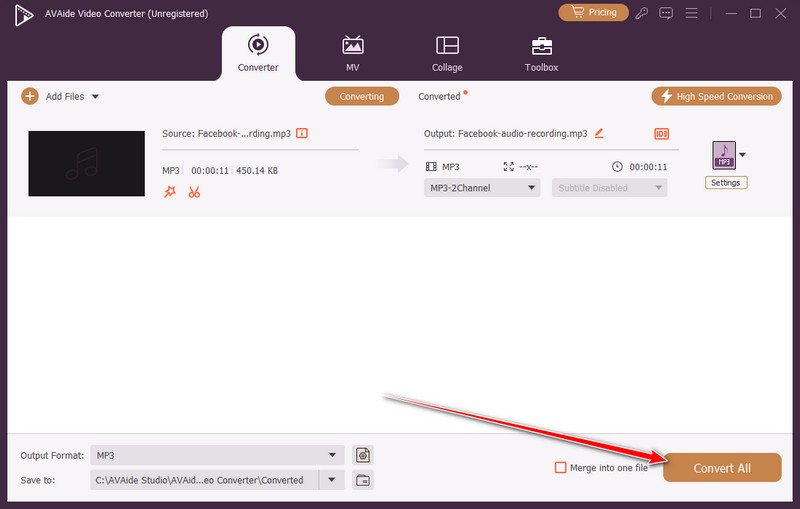
Det enklaste sättet är att konvertera filen med AVAide Video Converter, vilket gör allt snabbt och säkert. Den kan även hantera format som MP3 och WAV, vilka är kompatibla med en bredare mängd enheter utan att kompromissa med ljudkvaliteten, så att ditt nedladdade Messenger-ljud enkelt kan spelas upp och hanteras.
Steg 1Ladda ner multimediakonverteraren till din dator genom att klicka på nedladdningsknappen här och följ sedan installationsprocessen innan du kan öppna den.
GRATIS NEDLADDNING För Windows 7 eller senare
Säker nedladdningGRATIS NEDLADDNING För Mac OS X 10.13 eller senare
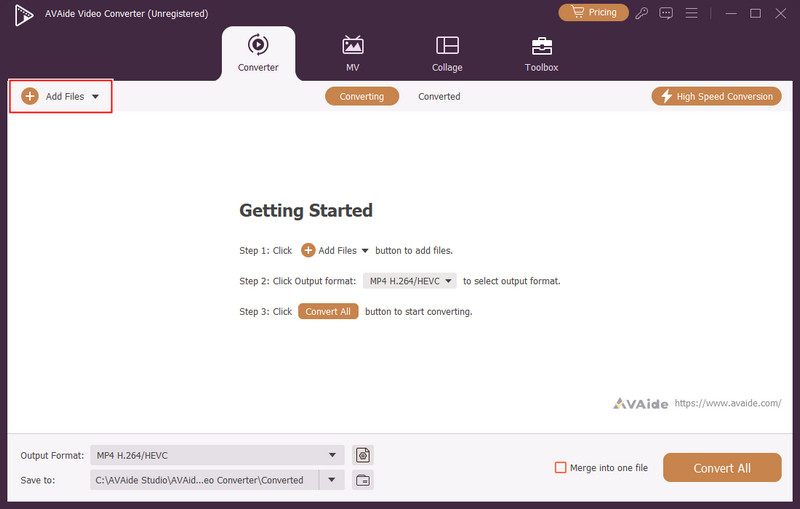
Säker nedladdningSteg 2Efter det klickar du på + -knappen och ladda upp den nedladdade ljudfilen från Messenger till appen.
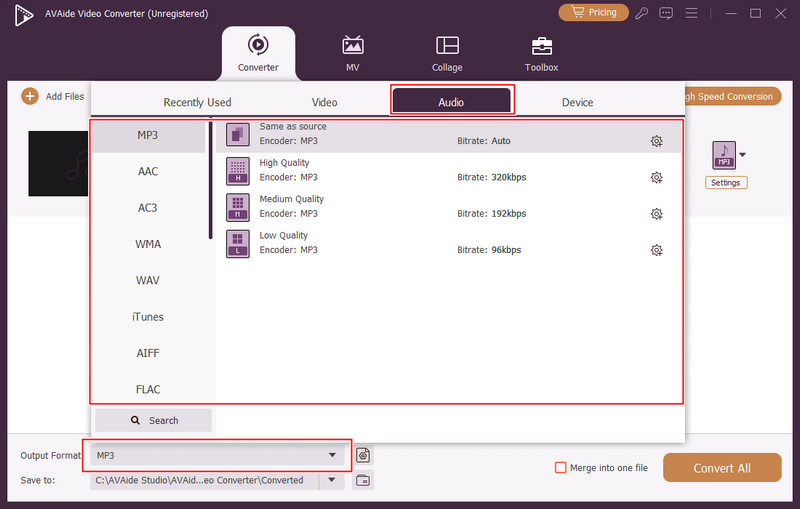
Steg 3Klicka sedan på falla ner och välj Audio format från alternativen. Välj sedan från det stora biblioteket med ljudformat som finns här för att göra ditt ljud kompatibelt, till exempel MP3.
Steg 4Klicka slutligen på Konvertera alla knappen för att starta konverteringsprocessen.
Det kan verka som att nedladdning av röstmeddelanden inte är så enkelt, men när du väl lärt dig hur man laddar ner ljud i Facebook Messenger, blir det mycket enklare att hantera det här problemet. Oavsett om det är en skrivbordsinspelare, en lösning för webbläsaren på en mobil enhet eller en konverterare för att korrigera uppspelningsproblem, åtgärdar de alla en specifik brist hos plattformen. Tricket är att välja den metod som passar din gadget och dina krav. Du kan enkelt spara, komma åt och spela upp Messenger-ljud utan problem, med rätt verktyg och steg.
OM FÖRFATTAREN

Spela in skärm, ljud, webbkamera, gameplay, onlinemöten, samt iPhone/Android-skärm på din dator.