Editing photos can be overwhelming without the right tools. InPixio offers a suite of features designed for both beginners and professionals, simplifying tasks from background removal to precise retouching. Understanding its capabilities can save time and improve results. This article explores what InPixio Photo Studio offers, highlights key features, and compares it to other options on the market.
Part 1: What Is InPixio Photo Studio
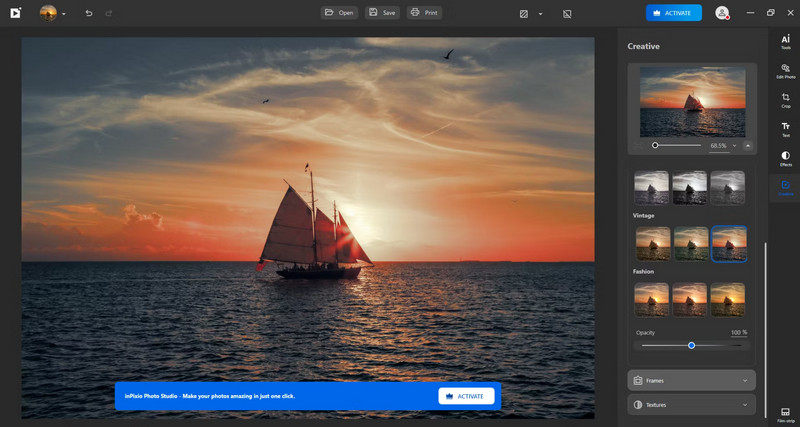
InPixio Photo Editor is a practical tool that makes photo editing easier and more precise. From removing unwanted backgrounds to adjusting colors and enhancing details, it provides features that both beginners and experienced editors can rely on. Knowing the system requirements helps you avoid slow performance and get the most out of its capabilities.
For Windows:
InPixio Photo Studio 12 works on Windows 10 or 11 and requires an Intel Core i3 processor or higher, 8 GB of RAM, 2 GB of free disk space, and an internet connection for updates. Older versions, such as Studio 11 and 10, are compatible with Windows 7 or later and require slightly less memory and storage.
For Mac:
On Mac, InPixio Photo Studio 10 runs on macOS 10.14 Mojave through 13 Ventura. It needs a 2.0 GHz processor, at least 2 GB of RAM, a basic graphics card with 256 MB of memory, and an internet connection. Meeting these specifications ensures smooth editing and a responsive workflow.
Part 2: Key Features of InPixio Photo Studio
1. Basic Photo Editing Tools
You can adjust Exposure, Contrast, Saturation, Shadows, Highlights, Vibrance, and Clarity with precise sliders. Cropping, Rotating, and flipping are simple, and optional Noise Reduction is available in higher-tier versions. These core controls make InPixio photo editing straightforward for beginners and advanced users alike.
2. AI Auto-Correction and Creative Filters
Automatic adjustments improve lighting and color balance in a single click. Filters, Black-and-White styles, Vignetting, Film Grain, and Graduated Blur let you add artistic effects. Many users highlight these AI features in positive InPixio reviews, noting that they save time while producing professional results.
3. Photomontage and Layout Tools
Drag and drop images, text, or templates like Magazine Covers, Greeting Cards, or Memes. With InPixio Photo Maximizer Pro, you can enlarge photos without losing detail, create sharp compositions, and enhance focal points effortlessly.
4. Advanced Editing Suite
Non-destructive editing, LUT-based effects, and Customizable Filters give you complete control over your photos. Using InPixio Photo Studio 12, all tools are accessible from a single interface, streamlining the workflow and ensuring precise results.
5. Ultimate Package Features
InPixio Photo Studio Ultimate includes every basic and advanced tool, from Photomontage to creative enhancements. This all-in-one suite ensures users get the complete set of features in a single package.
6. Focus and Sharpening Tools
Highlight specific areas and improve clarity with InPixio Photo Focus Pro. It is ideal for Portraits, Macro Shots, or slightly blurred images that need crisp, professional detail.
7. Background Removal
Remove unwanted backgrounds quickly with InPixio Remove Background. The tool efficiently isolates subjects, while manual edge adjustments let you refine selections for a clean, polished result.
Part 3: Detailed Review of InPixio Photo Studio
InPixio Photo Studio offers a balance of simplicity and advanced features, making it accessible for beginners while still useful for hobbyist photographers.
Pros:
- Intuitive interface with AI-powered tools
- Easy background removal and photomontage features
- Variety of creative filters and LUT-based effects
- Non-destructive editing and multiple export options
- Suitable for both web and print projects
Cons:
- AI auto-correction can over-or underexpose images
- Noise reduction is limited in lower-tier versions
- LUT imports and advanced edge detection are not supported
- Performance may slow on large files or older hardware
Pricing:
There are three annual subscription options for InPixio Photo Studio:
- InPixio Photo Studio 12 - $49.99/year
- InPixio Photo Studio 12 Professional - $79.99/year
- InPixio Photo Studio 12 Ultimate - $99.99/year
Supported Formats:
The software supports popular image formats, including JPEG, PNG, TIFF, and RAW files, and offers multiple export resolutions.
Restrictions:
Some advanced tools, like noise reduction and photomontage overlays, are only available in higher-tier editions. Certain features, such as LUT imports, are limited compared to competitors like Photoshop.
User Feedback and Ratings:
PCMag and other users highlight ease of use, creative flexibility, and consistent performance. The InPixio Online Photo Editor offers a browser-based alternative, although it lacks the full desktop capabilities.
Safety:
Many users ask, Is InPixio safe? Is InPixio safe to download? When obtained from official sources, the software is verified and generally safe to install.
Part 4: Top Alternatives to InPixio Photo Studio
For those who want sharper, more detailed images without the hassle, AVAide Image Upscaler is a standout alternative to InPixio Photo Studio. Lightweight and intuitive, it transforms low-resolution photos into high-quality pictures without watermarks. You can upscale a single image up to 800% or process entire batches at once, saving time while enhancing every detail.
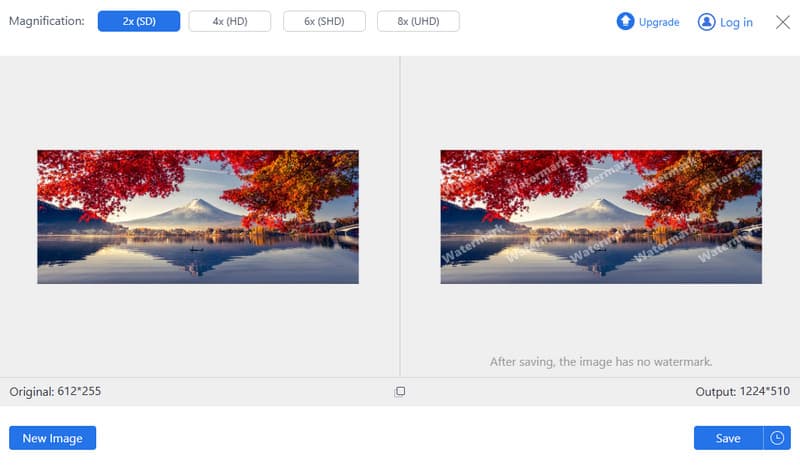
Its simplicity makes it perfect for photographers, designers, or anyone working with digital visuals. Paired with an InPixio online photo editor, AVAide lets you combine creative editing with professional-grade image enhancement, making your workflow faster, smoother, and far more effective.
Part 5: FAQs of InPixio Photo Studio
Is inPixio any good?
Yes, InPixio Photo Studio is suitable for beginners and hobbyists. It offers easy-to-use tools for basic edits, background removal, photomontage, and creative effects. While it may not replace professional software for advanced edits, it is reliable and efficient for most everyday photo editing needs.
Which free photo editor is best?
There are several of the best free photo editors, but the best depends on your needs. Tools like GIMP, Paint.NET, or online editors offer powerful features without cost. InPixio also provides limited online options for simple edits, making it accessible for quick adjustments.
Is inPixio better than Photoshop?
For casual users, InPixio is simpler and faster, with less of a learning curve. Photoshop offers far more advanced features, layers, and professional-grade tools. If you need heavy editing, compositing, or professional workflows, the Photoshop photo editor is better; for straightforward, creative edits, InPixio is a convenient choice.
InPixio Photo Studio strikes a balance between simplicity and power, giving users the tools to edit, enhance, and transform photos without steep learning curves. From AI-assisted corrections to creative photomontages, it makes professional-looking edits accessible to everyone. While it may not replace high-end software for advanced projects, its intuitive interface and comprehensive features make it a top choice for casual photographers and content creators alike. Getting started is easy; after your InPixio login, you can explore the full range of tools and quickly bring your images to life.
ABOUT THE AUTHOR


Our AI technology will automatically enhance the quality of your images, remove noise and fix blurry images online.
PROCESS NOW