Tenk deg at du overfører en enorm mengde bilder eller dokumenter til datamaskinen din, bare for å oppdage at feltene «Opprettet dato» eller «Endret dato» er fullstendig forvrengt. Enten det er en sikkerhetskopieringsfeil eller en tidssoneavvik, kan feil tidsstempler for filer ødelegge den digitale arkiveringen din og sette arbeidsflyten din i kaos.
Heldigvis slipper du å leve med rotet. En dedikert fildatoskifter gir deg absolutt kontroll over metadataene dine, slik at du kan redigere tidsstempler for filer i batch med bare noen få klikk. I denne veiledningen har vi samlet de 5 beste fildatoendrerne for Windows og Mac for å hjelpe deg med å gjenvinne kontrollen over din digitale organisasjon. La oss sette i gang!
Del 1. Hovedanmeldelse av de 5 beste fildatoendrerne
Denne delen presenterer den beste fildatoendreren du kan stole på. Fortsett å lese for å finne ut hvordan disse verktøyene kan hjelpe deg med å oppnå oppgaven din!
1. AVAide Video Converter
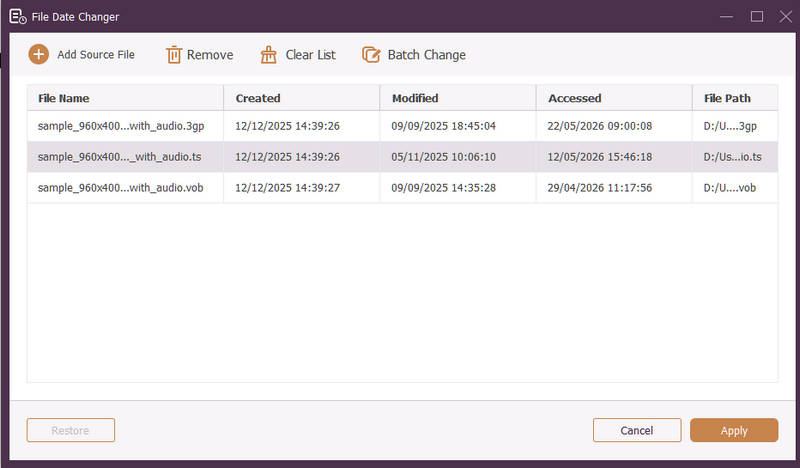
Tilgjengelig for både Windows og Mac, AVAide Video Converter er en allsidig plattform utstyrt med en kraftig, innebygd fildatoendringsfunksjon. Denne intuitive funksjonen lar deg enkelt endre omfattende tidsstempeldetaljer, inkludert opprettelses-, endrings- og sist åpnede datoer.
- Håndter sømløst mange medieformater på tvers av video, lyd og bilder.
- Importer og oppdater flere filer samtidig for å spare tid og effektivisere arbeidsflyten.
- Har et rent og brukervennlig grensesnitt slik at du raskt kan endre fildato.
- Hold filen din sømløs etter datoendringer.
2. Fildatoskifter
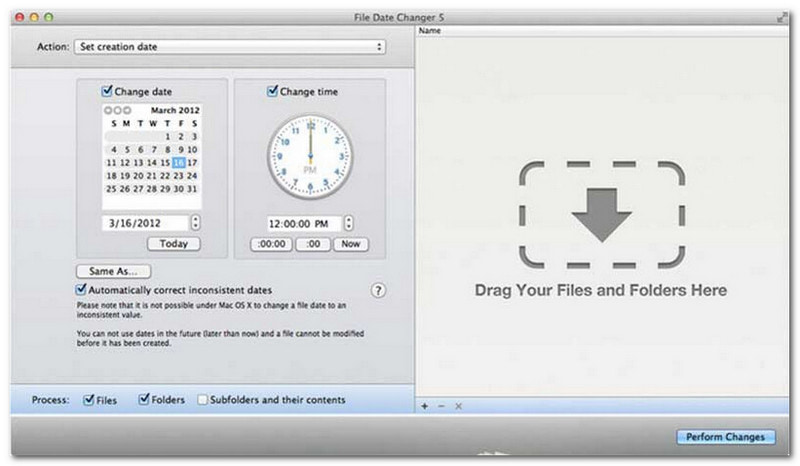
File Date Changer lever opp til navnet sitt ved å tilby en dedikert løsning for å endre filopprettingsdatoer. Den har et enkelt design som gjør den tilgjengelig for brukere på alle nivåer. Den støtter modifisering for både opprettelses- og modifiseringsdatoer. Enten du trenger å endre datoer for individuelle filer eller hele mapper, forenkler denne fildatoendreren på Mac prosessen med sin effektive funksjonalitet.
Selv om File Date Changer er et betalt verktøy, avhenger verdien av dine spesifikke behov angående kostnad og funksjonalitet. Noen brukere kan synes funksjonssettet er noe grunnleggende i forhold til prisen. For de som prioriterer effektivitet og en sømløs arbeidsflyt, er det imidlertid fortsatt en svært pålitelig og verdt investering for en fildatoendringstjeneste.
Viktige funksjoner i fildatoendring:
- Endre opprettelses-, endrings- og sist åpnede datoer og klokkeslett for flere filer.
- Støtter å legge til eller trekke fra bestemte dager, timer, minutter eller sekunder.
- Endre filegenskaper som skrivebeskyttet eller skjult, og oppdater EXIF-metadata.
- Fildatoendringen kjører umiddelbart og tilbyr et tydelig grensesnitt.
3. ExifTool
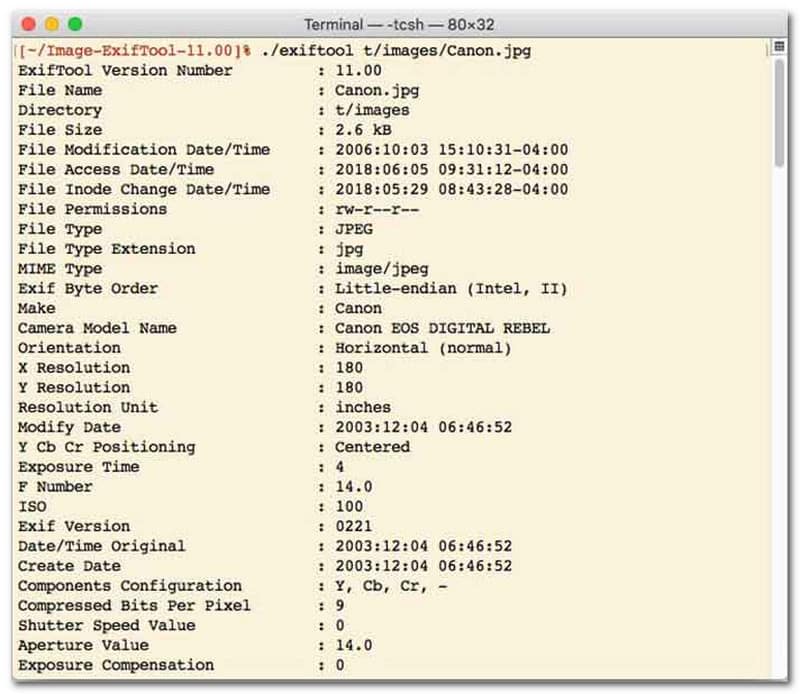
For brukere som foretrekker en fildatoendringsverktøy med kommandolinjegrensesnitt (CLI), er ExifTool gullstandarden for ultra-presis filbehandling. Dette eksepsjonelt allsidige fildatoendringsverktøyet støtter et bredt spekter av filtyper, inkludert bilder, videoer, dokumenter og lyd. Utover å bare redigere opprettelses- og endringsdatoer, lar ExifTool deg sømløst kopiere tidsstempelmetadata fra én fil til en annen, slik at hele mediebiblioteket ditt forblir perfekt synkronisert uten problemer.
Viktige funksjoner i ExifTool:
- Les og endre tidsstempler for filsystemer sømløst.
- Kopier datoer mellom helt forskjellige lag med metadata.
- Støtt avansert dato- og tidsmatematikk for å hjelpe deg med å endre fildatoer i grupper.
- Hent ut dato- og medieinformasjon fra alle typer filer.
4. BulkFileChanger
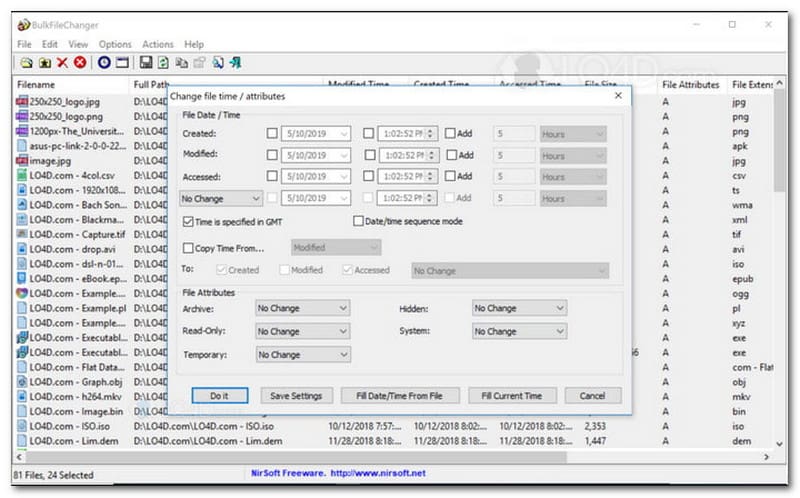
BulkFileChanger er et lett og kraftig verktøy for fildatoendring, designet for enkel administrasjon av tidsstempel for filer på Windows. Det lar brukere raskt endre ulike dato- og klokkeslettattributter, inkludert opprettelses-, endrings- og sist åpnede tidspunkter, på tvers av praktisk talt alle filtyper, fra dokumenter og bilder til videoer. Selv om allsidigheten og hastigheten på tvers av formater gjør det til et utmerket fildatoendringsprogram for organisering av digitale arkiver, er tilgjengeligheten strengt begrenset til Windows-operativsystemet, noe som betyr at macOS- og Linux-brukere må se andre steder.
Viktige funksjoner i BulkFileChanger:
- Endre datoer for opprettelse, endring og siste tilgang til filer.
- Håndterer sømløst nesten alle filtyper, inkludert dokumenter, bilder og videoer.
- Har en lett design som muliggjør ultrarask masseoppdatering av metadata.
- Legg til eller trekk ut bestemte dager, timer, minutter og sekunder.
5. AttributeMagic
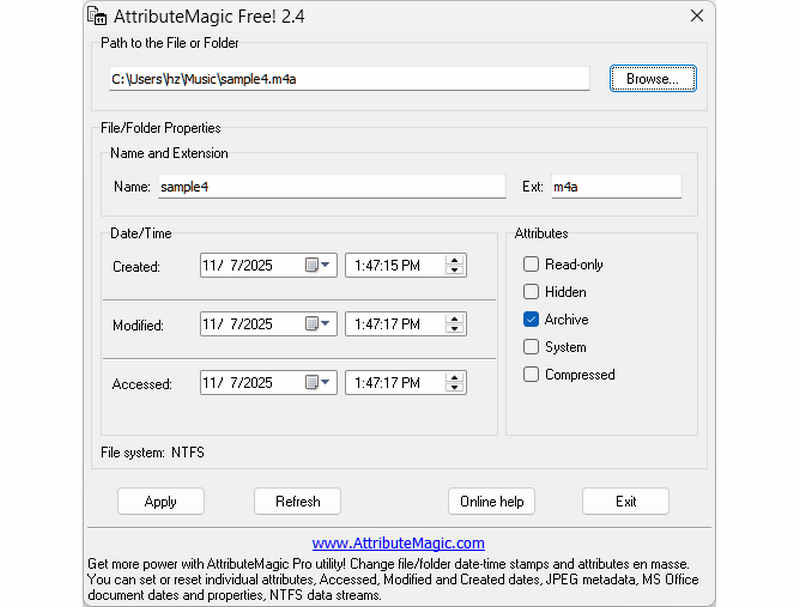
AttributeMagic går langt utover en enkel fildatoendring ved å tilby en avansert løsning for å administrere både mappe- og filattributter. Dette omfattende verktøyet muliggjør presis tidsstemplingsmodifisering, slik at brukere enkelt kan omskrive opprettelses-, modifikasjons- og sist åpnede datoer. Utover mulighetene som en dedikert fildatoendring, tilbyr AttributeMagic dyp tilpasning av filsystemegenskaper for å passe dine spesifikke arkiveringsbehov. Mens gratisversjonen leverer viktig funksjonalitet for tidsstemplingsredigering, låser opp oppgradering til premiumutgaven opp avansert metadatakontroll og kraftige automatiseringsfunksjoner.
Viktige funksjoner i AttributeMagic:
- Endre eller masker oppretting, modifisering og sist brukte tidsstempler.
- Endre fildato for både enkeltfiler eller en hel filmappe.
- Øk, reduser eller forskyv enkelt tidsstempler for filer fremover eller bakover.
- angi, tilbakestill eller inverter kjerneattributter for filsystemet, for eksempel skrivebeskyttet, skjult og system.
Del 2. Sammenligning av de 5 fildatoendringerne
| Produkt | Støttede plattformer | Brukergrensesnitt | Grupperedigering | Ekstra funksjoner |
| AVAide Video Converter | Windows og macOS | Moderne, rent og flytende | Ja (ultraskt) | Komplett pakke: 8K-videokonvertering, DVD-ripping, metadataredigering, MV-/lysbildefremvisningsproduksjon |
| Fildatoendring (NirSoft) | Bare Mac | Utdatert (eldre web/grensesnitt) | Begrenset | Ingen (enkeltformål) |
| ExifTool | Windows, macOS, Linux | Kun kommandolinje (ingen grafisk brukergrensesnitt) | Ja (krever komplekse skript) | Kun lesing/skriving av metadata |
| BulkFileChanger | Kun Windows | Klassisk Windows-verktøy | Ja | Grunnleggende justering av Windows-filattributter |
| AttributtMagi | Kun Windows | Stiv / Kompleks | Ja | Kun håndtering av filsystemflagg |
Del 3. Slik endrer du fildata i AVAide Video Converter
Har du noen gang hatt behov for å endre opprettelsesdatoen for en fil for å organisere de digitale filene dine bedre? Du kan gjøre det ved å bruke AVAide Video Converter! Fortsett å lese for å lære hvordan du endrer datoen opprettet på en fil for å hjelpe deg med å administrere filen.
Trinn 1Last ned og installer AVAide Video Converter fra den offisielle nettsiden for full tilgang.

GRATIS NEDLASTING For Windows 7 eller nyere
 Sikker nedlasting
GRATIS NEDLASTING For Mac OS X 10.13 eller nyere
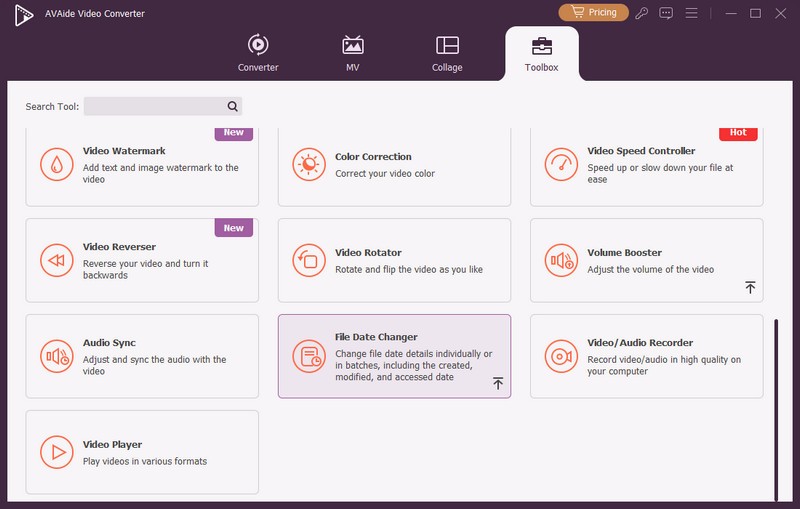
Sikker nedlastingTrinn 1Åpne programmet på datamaskinen for å komme i gang. Gå til Verktøykasse fanen for å få tilgang til flere funksjoner. Rull ned med musen, se etter Fildatoskifter blant alternativene, og klikk på den. Det er funksjonen du vil bruke til å endre fildatodetaljene.
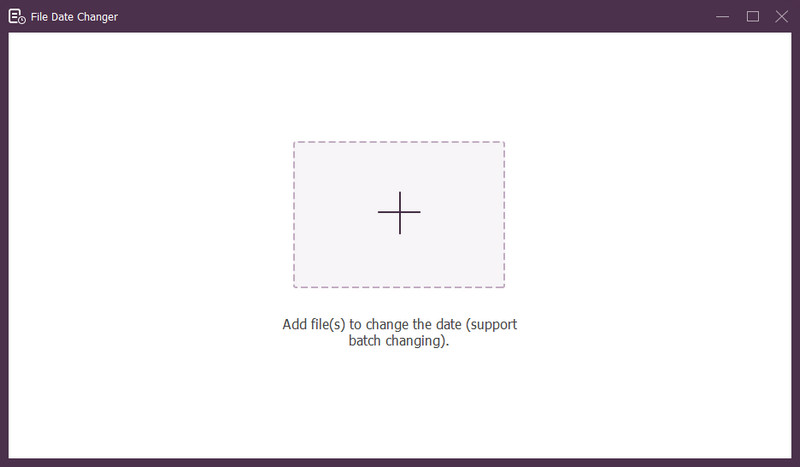
Trinn 3Trykk (+)-knappen for å importere filer. Dette kan være lyd-, bilde- og lydfiler. Du kan importere mer enn én fil for å endre fildetaljene.
Trinn 4Du kan begynne å endre datoene deres når alle filene er importert. Du kan endre opprettede, endrede og åpnede datoene tilsvarende. For å gjøre det, klikk på elementet til Pil vises, som indikerer for redigering.
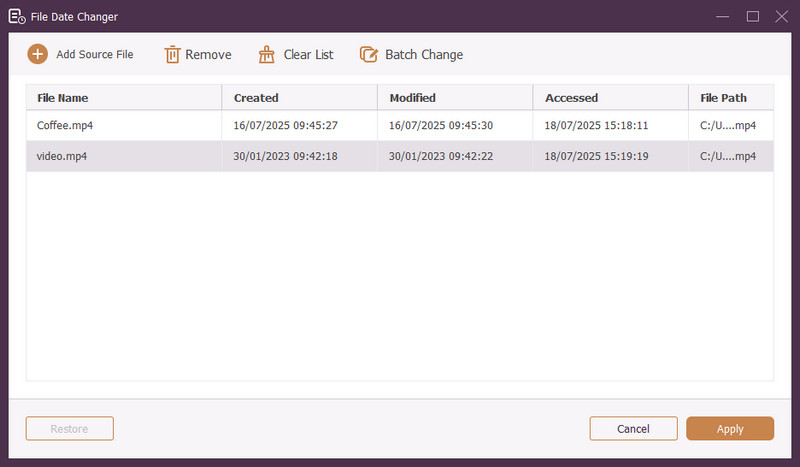
Trinn 5Etter å ha redigert alle fildatoene, klikk på Søke om for å bekrefte endringene. Etter at endringene er tatt i bruk, se gjennom de oppdaterte fildatadetaljene for å sikre nøyaktigheten.
Del 4. Vanlige spørsmål om den beste fildatoendringsfunksjonen
Hvordan kan jeg se datoinformasjonen til en fil?
Hvis du vil sjekke når en fil ble opprettet eller sist endret, kan du gjøre det direkte på datamaskinen. Finn filen, høyreklikk på den og velg Egenskaper. Deretter kan du se alle detaljene om filen. Disse inkluderer datoene for opprettelse og endring.
Vil noen vite når jeg endrer filens dato?
Nei! Å endre en fils dato ville ikke etterlate noen spor. Så ingen vil vite når du gjorde endringen.
Hva er grunnen til at datoer og klokkeslett forsvinner fra filen?
Det er noen få grunner til at datoer og klokkeslett kan forsvinne fra filene. Det kan skje når du laster ned en fil og mister noe informasjon på grunn av dårlig internettforbindelse. Noen ganger er det på grunn av nettstedet der du lastet ned filen.
Kan jeg hente den endrede opprettelsesdatoen for filen?
Ja! Du kan gjenopprette den opprinnelige datoen ved å manuelt sette den tilbake til den opprinnelige verdien. Det er den eneste måten å finne opprettelsesdatoen for filen.
Påvirker endring av fildato og klokkeslett filens integritet eller innhold?
Nei! Endring av en fils datoer og klokkeslett vil ikke påvirke innholdet eller integriteten. Det endrer bare metadataene, som opprettelses- og endringsdatoer. Den forlater den faktiske filen uendret.
Der har du det! Du har lært hvordan endre datoen opprettet på en fil, som kan være nyttig av ulike årsaker. For en mer strømlinjeformet og nybegynnervennlig opplevelse, vurder å bruke AVAide Video Converter som din foretrukne fildatoveksler. Det er det beste valget for å administrere dine digitale filer. Prøv det og del tankene dine nedenfor!
OM FORFATTEREN

Den mest omfattende mediekonvertereren for å konvertere video og lyd uten kvalitetstap.