דמיינו שאתם מעבירים קבוצה עצומה של תמונות או מסמכים למחשב שלכם, רק כדי לגלות שהשדות "תאריך יצירה" או "תאריך שינוי" שלהם מעוותים לחלוטין. בין אם מדובר בתקלה בגיבוי או באי התאמה באזור הזמן, חותמות זמן שגויות של קבצים עלולות להרוס את הארכיון הדיגיטלי שלכם ולגרום לזרימת העבודה שלכם לכאוס.
למרבה המזל, אינך צריך לחיות עם הבלגן. אדם מסור מחליף תאריך קובץ נותן לך שליטה מוחלטת על המטא-דאטה שלך, ומאפשר לך לערוך חותמות זמן של קבצים במספר לחיצות בלבד. במדריך זה, ריכזנו עבורך את 5 כלי שינוי תאריכי הקבצים הטובים ביותר עבור Windows ו-Mac כדי לעזור לך להחזיר לעצמך שליטה על הארגון הדיגיטלי שלך. בואו נתחיל!
חלק 1. סקירה ראשית של 5 כלי שינוי תאריכי הקבצים הטובים ביותר
סעיף זה יציג את כלי שינוי תאריכי הקבצים הטוב ביותר שתוכלו לסמוך עליו. המשיכו לקרוא כדי לגלות כיצד כלים אלה יכולים לעזור לכם להשיג את המשימה שלכם!
1. ממיר וידאו AVAide
זמין גם עבור Windows וגם עבור Mac, ממיר וידאו AVAide היא פלטפורמה רב-תכליתית המצוידת במשנה תאריכי קבצים מובנה וחזק. תכונה אינטואיטיבית זו מאפשרת לך לשנות בקלות פרטי חותמות זמן מקיפים, כולל תאריכי יצירה, שינוי ותאריכי גישה אחרונים.
- טפל בצורה חלקה בפורמטי מדיה רבים, כולל וידאו, אודיו ותמונות.
- ייבא ועדכן קבצים מרובים בו זמנית כדי לחסוך זמן ולייעל את זרימת העבודה שלך.
- כולל ממשק נקי וידידותי למשתמש המאפשר לך לשנות את תאריך הקובץ במהירות.
- שמור על הקובץ שלך חלק לאחר שינויי תאריך.

 הורדה מאובטחת
2. מחליף תאריך קובץ
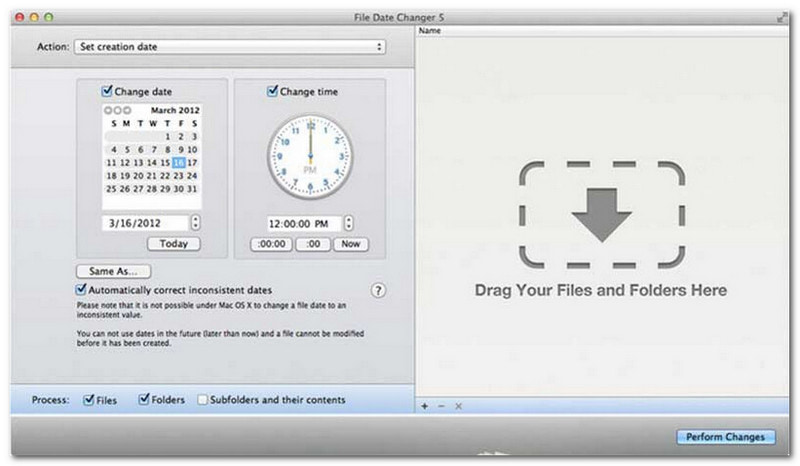
File Date Changer עומד בשמו בכך שהוא מציע פתרון ייעודי לשינוי תאריכי יצירת קבצים. הוא מספק עיצוב פשוט, מה שהופך אותו לנגיש למשתמשים בכל הרמות. הוא תומך בשינוי תאריכי יצירה ושינוי כאחד. בין אם אתם צריכים לשנות תאריכים עבור קבצים בודדים או תיקיות שלמות, משנה תאריכי קבצים זה ב-Mac מפשט את התהליך עם הפונקציונליות היעילה שלו.
בעוד ש-File Date Changer הוא כלי בתשלום, ערכו תלוי בצרכים הספציפיים שלכם בנוגע לעלות ולפונקציונליות. חלק מהמשתמשים עשויים למצוא את מערך התכונות שלו בסיסי יחסית למחיר. עם זאת, עבור אלו המעדיפים יעילות ותהליך עבודה חלק, הוא נותר השקעה אמינה וכדאית ביותר עבור כלי לשינוי תאריכי קבצים.
תכונות עיקריות של מחליף תאריך קבצים:
- שנה את תאריכי ושעות היצירה, השינוי והגישה האחרונה עבור קבצים מרובים.
- תמיכה בהוספה או חיסור של ימים, שעות, דקות או שניות ספציפיים.
- שנה מאפייני קובץ כמו לקריאה בלבד או מוסתר, ועדכן מטא-דאטה של EXIF.
- מחליף תאריכי הקבצים פועל באופן מיידי ומציע ממשק ברור.
3. ExifTool
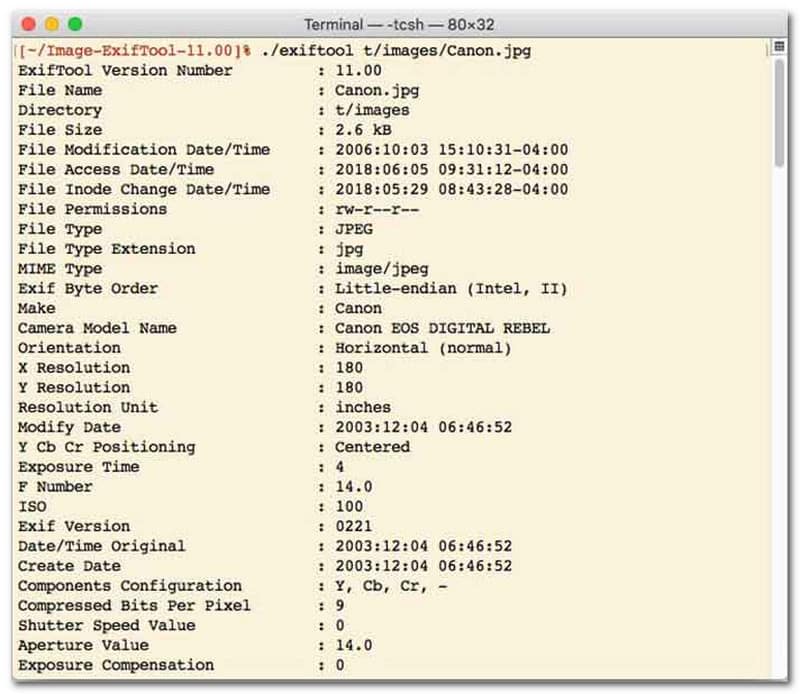
עבור משתמשים המעדיפים כלי לשינוי תאריכי קבצים עם ממשק שורת פקודה (CLI), ExifTool הוא הסטנדרט המתאים לניהול קבצים מדויק במיוחד. כלי שינוי תאריכי קבצים רב-תכליתי זה תומך במגוון רחב של סוגי קבצים, כולל תמונות, סרטונים, מסמכים ושמע. מעבר לעריכה פשוטה של תאריכי יצירה ושינוי, ExifTool מאפשר לך להעתיק בצורה חלקה מטא-נתונים של חותמות זמן מקובץ אחד למשנהו, מה שמבטיח שכל ספריית המדיה שלך תישאר מסונכרנת בצורה מושלמת וללא טרחה.
תכונות עיקריות של ExifTool:
- קריאה ושינוי חלקים של חותמות זמן של מערכת קבצים.
- העתק תאריכים בין שכבות מטא-דאטה שונות לחלוטין.
- תמיכה במתמטיקה מתקדמת של תאריך ושעה כדי לעזור לך לשנות תאריכי קבצים בקבוצות.
- חלץ מידע על תאריך ומדיה מכל סוגי הקבצים.
4. BulkFileChanger
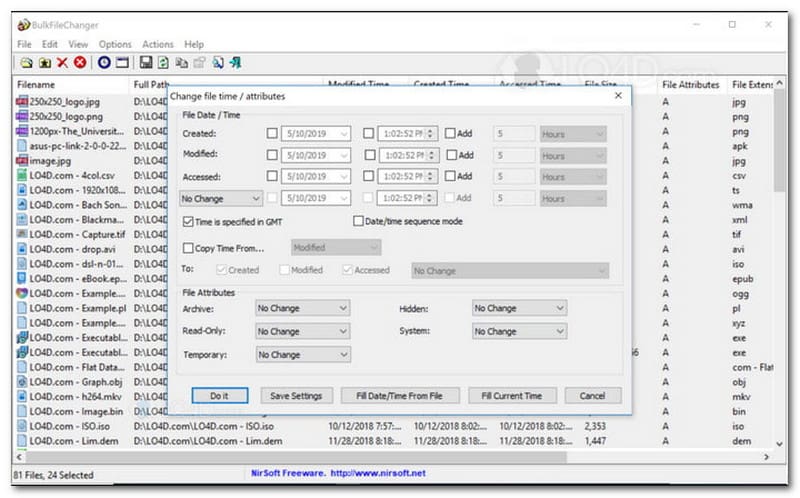
BulkFileChanger הוא כלי קל משקל ובעל ביצועים גבוהים לשינוי תאריכי קבצים, שנועד לניהול חותמות זמן של קבצים בקלות במערכת ההפעלה Windows. הוא מאפשר למשתמשים לשנות במהירות מאפייני תאריך ושעה שונים, כולל זמני יצירה, שינוי ושעות גישה אחרונות, כמעט בכל סוג קובץ, החל ממסמכים ותמונות ועד סרטונים. בעוד שגמישותו ומהירותו בפורמטים שונים הופכות אותו למשנה תאריכי קבצים מצוין לארגון ארכיונים דיגיטליים, זמינותו מוגבלת אך ורק למערכת ההפעלה Windows, כלומר משתמשי macOS ו-Linux יצטרכו לחפש במקום אחר.
תכונות עיקריות של BulkFileChanger:
- שינוי תאריכי יצירת קבצים, שינוים ותאריכי גישה אחרונים.
- מטפל בצורה חלקה כמעט בכל סוגי הקבצים, כולל מסמכים, תמונות וסרטונים.
- כולל עיצוב קל משקל המאפשר עדכון מטא-נתונים מהיר במיוחד ובכמות גדולה.
- הוסף או חילץ ימים, שעות, דקות ושניות ספציפיים.
5. AttributeMagic
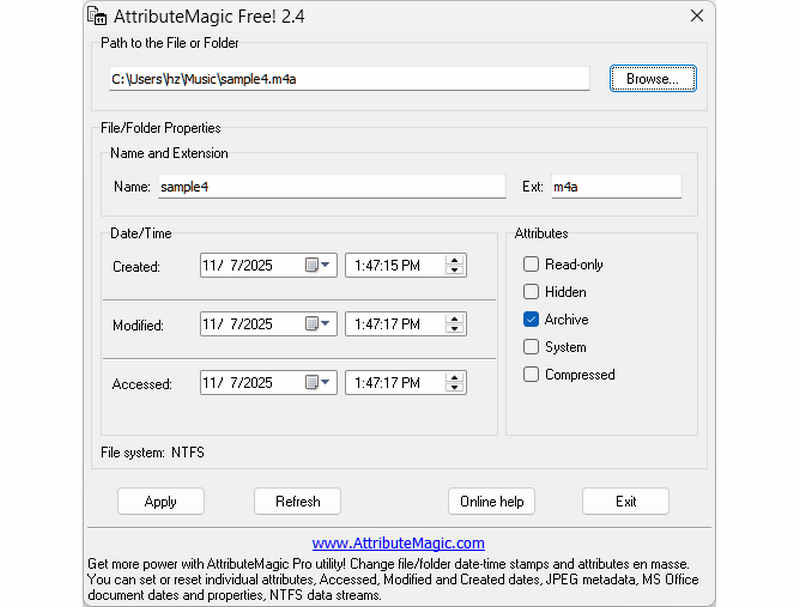
AttributeMagic הולך הרבה מעבר לשינוי תאריכי קבצים פשוט על ידי הצעת פתרון מתקדם לניהול תכונות תיקיות וקבצים כאחד. כלי מקיף זה מאפשר שינוי מדויק של חותמות זמן, ומאפשר למשתמשים לשכתב בקלות תאריכי יצירה, שינוי ותאריכי גישה אחרונים. מעבר ליכולותיו כמשנה תאריכי קבצים ייעודי, AttributeMagic מספק התאמה אישית עמוקה של מאפייני מערכת הקבצים כדי להתאים לצורכי הארכוב הספציפיים שלכם. בעוד שהגרסה החינמית מספקת פונקציונליות חיונית של עריכת חותמות זמן, שדרוג למהדורת הפרימיום פותח שליטה מתקדמת במטא-דאטה ותכונות אוטומציה עוצמתיות.
תכונות עיקריות של AttributeMagic:
- שינוי או הסתרה של חותמות זמן של יצירה, שינוי וגישה אחרונה.
- שינוי תאריך הקובץ עבור קובץ בודד או עבור תיקיית קבצים שלמה.
- הגדלה, הקטנה או הזזה קלה של חותמות זמן של קבצים קדימה או אחורה.
- הגדרה, איפוס או שינוי מאפייני מערכת קבצים מרכזיים כגון 'קריאה בלבד', 'נסתר' ו'מערכת'.
חלק 2. השוואה בין 5 אמצעי שינוי תאריכי הקבצים
| מוצר | פלטפורמות נתמכות | ממשק משתמש | עריכה אצווה | יכולות נוספות |
| ממיר וידאו AVAide | חלונות ו-macOS | מודרני, נקי וזורם | כן (מהיר במיוחד) | חבילה מלאה: המרת וידאו 8K, קריעת DVD, עריכת מטא-נתונים, יצירת MV/מצגות |
| מחליף תאריך קבצים (NirSoft) | רק מק | מיושן (אינטרנט/ממשק משתמש מדור קודם) | מוגבל | אף אחד (למטרה אחת) |
| כלי אקסיף | חלונות, macOS, לינוקס | שורת פקודה בלבד (ללא ממשק משתמש גרפי) | כן (דורש סקריפטים מורכבים) | קריאה/כתיבה של מטא-נתונים בלבד |
| BulkFileChanger | חלונות בלבד | כלי השירות הקלאסי של Windows | כן | כוונון בסיסי של מאפייני קובץ Windows |
| קסם תכונה | חלונות בלבד | נוקשה / מורכב | כן | ניהול דגלי מערכת קבצים בלבד |
חלק 3. כיצד לשנות נתוני קובץ ב-AVAide Video Converter
האם אי פעם היית צריך לשנות את תאריך היצירה של קובץ כדי לארגן את הקבצים הדיגיטליים שלך טוב יותר? אתה יכול לעשות את זה באמצעות ממיר וידאו AVAide! המשך לקרוא כדי ללמוד כיצד לשנות את התאריך שנוצר בקובץ כדי לעזור לך לנהל את הקובץ שלך.
שלב 1הורד והתקן את AVAide Video Converter מהאתר הרשמי לגישה מלאה.
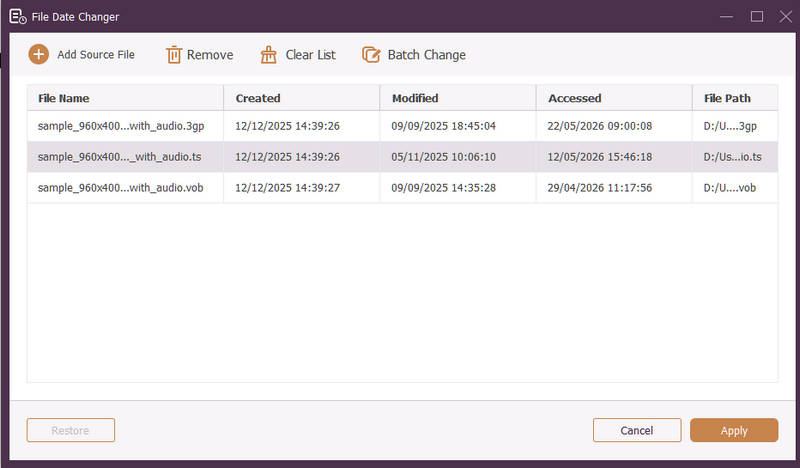
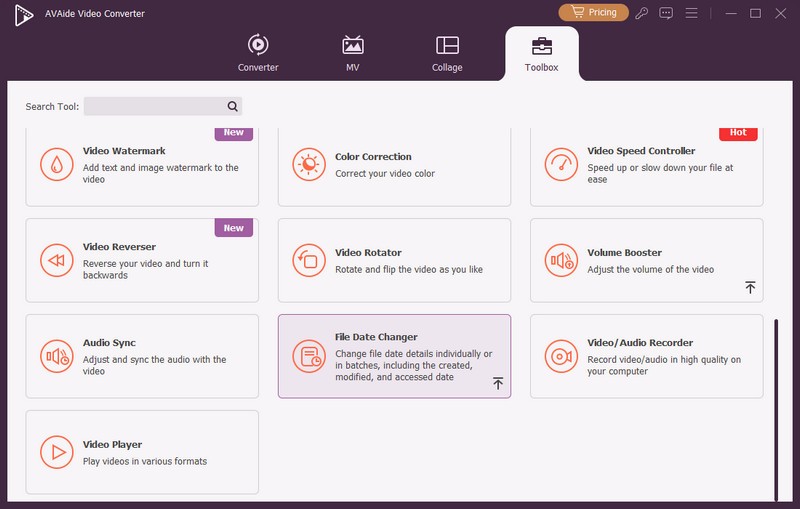
שלב 1פתח את התוכנית במחשב שלך כדי להתחיל. פנה אל ה ארגז כלים לשונית כדי לגשת למספר תכונות. גלול מטה בעכבר, חפש מחליף תאריך קובץ בין האפשרויות, ולחץ עליו. זוהי התכונה שבה תשתמש כדי לשנות את פרטי תאריך הקובץ.
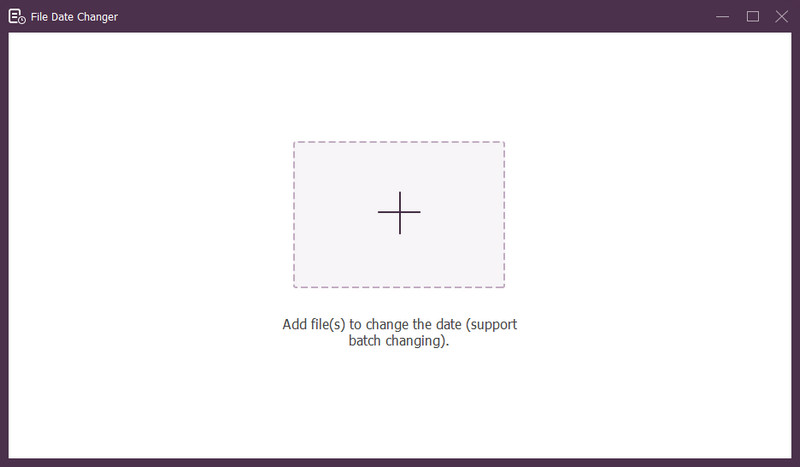
שלב 3לחץ על (+) כדי לייבא קבצים. זה יכול להיות קבצי אודיו, תמונה ושמע. ניתן לייבא יותר מקובץ אחד כדי לשנות את פרטי הקובץ.
שלב 4אתה יכול להתחיל לשנות את התאריכים שלהם ברגע שכל הקבצים ייבואו. אתה יכול לשנות את התאריכים שנוצרו, השתנו ותאריכי הגישה אליהם בהתאם. כדי לעשות זאת, לחץ על הפריט עד ל- חֵץ מופיע, מציין לעריכה.
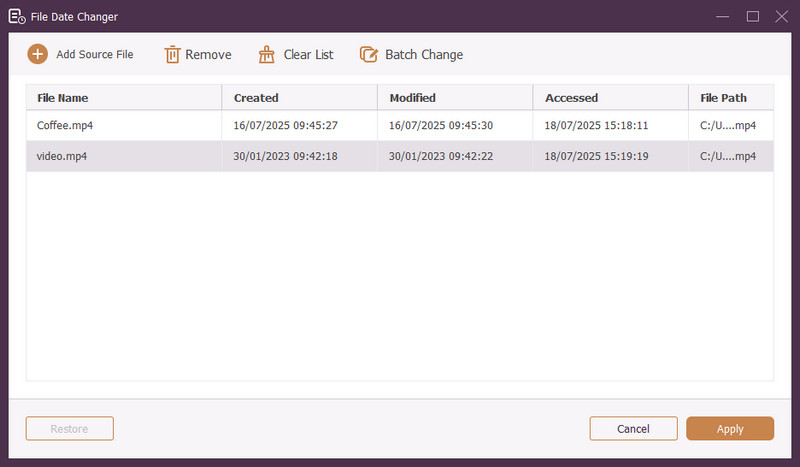
שלב 5לאחר עריכת כל תאריכי הקובץ, לחץ על להגיש מועמדות לחצן כדי לאשר את השינויים. לאחר החלת השינויים, עיין בפרטי נתוני הקובץ המעודכנים כדי להבטיח דיוק.
חלק 4. שאלות נפוצות על מחליף תאריכי הקבצים הטוב ביותר
כיצד אוכל לראות את פרטי התאריך של קובץ?
אם אתה רוצה לבדוק מתי קובץ נוצר או שונה לאחרונה, אתה יכול לעשות זאת ישירות במחשב שלך. מצא את הקובץ, לחץ עליו באמצעות לחצן העכבר הימני ובחר מאפיינים. לאחר מכן, תוכל לראות את כל הפרטים על הקובץ. אלה כוללים את תאריכי היצירה והשינוי.
מישהו יודע מתי אני משנה את התאריך של הקובץ?
לא! שינוי התאריך של קובץ לא ישאיר זכר. אז אף אחד לא יידע מתי ביצעת את השינוי.
מה הסיבה לכך שתאריכים ושעות נעלמים מהקובץ?
ישנן כמה סיבות לכך שתאריכים ושעות עשויים להיעלם מהקבצים. זה יכול לקרות כאשר אתה מוריד קובץ ומאבד מידע מסוים עקב חיבור אינטרנט לקוי. לפעמים, זה בגלל האתר שבו הורדת את הקובץ.
האם אני יכול לאחזר את תאריך היצירה שהשתנה של הקובץ?
כן! ניתן לשחזר את התאריך המקורי על ידי החזרה ידנית לערך ההתחלתי שלו. זוהי הדרך היחידה לאחזר את תאריך יצירת הקובץ.
האם שינוי תאריך ושעה של הקובץ משפיע על שלמות הקובץ או התוכן?
לא! שינוי התאריכים והשעות של קובץ לא ישפיע על התוכן או השלמות. זה רק משנה את המטא נתונים, כמו תאריכי יצירה ושינוי. זה משאיר את הקובץ בפועל ללא שינוי.
הנה לך! אתה למדת כיצד לשנות את התאריך שנוצר בקובץ, שיכול להועיל מסיבות שונות. לחוויה יעילה יותר וידידותית יותר למתחילים, שקול להשתמש בממיר הווידאו של AVAide כמחליף תאריכי הקבצים שלך. זוהי הבחירה הטובה ביותר לניהול הקבצים הדיגיטליים שלך. נסה את זה ושתף את המחשבות שלך למטה!
אודות המחבר

ממיר המדיה המקיף ביותר להמרת וידאו ואודיו ללא אובדן איכות.