עבודה עם סרטונים ארוכים מציגה לעתים קרובות דילמה מתסכלת: כיצד שומרים על איכות וידאו ללא פשרות מבלי לבזבז את כל שטח האחסון שלכם? כאן נכנסים לתמונה סטנדרטים של דחיסת וידאו. אם אתם רוצים לאזן בין גודל וידאו, איכות ותאימות מכשירים, תעמדו בהכרח בפני הבחירה בין H.264 (AVC) ו-H.265 (HEVC).
במדריך מקיף זה, נפרט את ההבדלים המרכזיים בין H.264 ל-HEVC, נעזור לכם להחליט איזה מהם מתאים לתהליך העבודה שלכם, ונראה לכם כיצד להמיר ביניהם בצורה חלקה מבלי לאבד איכות.
חלק 1. HEVC לעומת H264: מה הם?
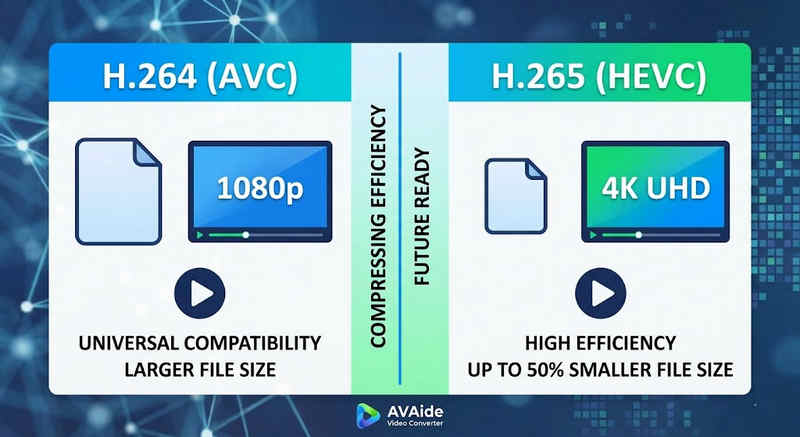
התשובה הקצרה: H.264 (AVC) מציע תאימות אוניברסלית ועובד כמעט על כל מכשיר, אך יוצר קבצים גדולים יותר. H.265 (HEVC) מספק דחיסה מעולה, מקצר את גודל הקבצים עד 50% עם איכות ויזואלית זהה, אך דורש כוח עיבוד גבוה יותר ויש לו תמיכה מוגבלת בחומרה ישנה יותר.
1. מהו קודק H.264 (AVC)?
H.264, שהוצג כ-Advanced Video Coding (AVC), הוא המלך השולט בתאימות וידאו. זהו הסטנדרט בתעשייה לסטרימינג מקוון, הקלטה ניידת והפעלת וידאו יומיומית. מכיוון שהוא דורש מעט מאוד כוח עיבוד לפענוח, סרטוני H.264 מופעלים בצורה חלקה כמעט בכל מכשיר דיגיטלי שניתן להעלות על הדעת, החל מסמארטפונים ישנים ועד טלוויזיות חכמות מודרניות.
2. מהו קודק H.265 (HEVC)?
קידוד וידאו יעיל במיוחד (HEVC), או H.265, הוא היורש הישיר של H.264. הוא תוכנן במיוחד כדי להתמודד עם דרישות הנתונים העצומות של תוכן 4K, 8K ו-VR. HEVC משתמש באלגוריתמים מתקדמים יותר כדי לדחוס נתוני וידאו בצורה יעילה בהרבה מקודמו, ומספק מצגים חכמים ברזולוציה גבוהה בגדלים קטנים יותר של קבצים עד 50%. עם זאת, יעילות זו גובה מחיר: היא דורשת חומרה מודרנית כדי לעבד אותה ללא השהיה.
H.265 לעומת H.264: טבלת השוואה מהירה
| תכונות | H.264 (AVC) | H.265 (HEVC) |
| פורמטים נתמכים | m2ts, evo, 3gp, f4v, mkv, mp4, qtff, asf, avi, mxf, ps, ts | mxf, ps, ts, 3gp, mkv, mp4, qtff, asf, avi |
| יעילות דחיסה | בינוני (קבצים גדולים יותר) | מעולה (קבצים קטנים יותר 25-50%) |
| איכות וידאו | מצוין עבור 1080p | אופטימלי עבור 4K, 8K ו-HDR |
| תאימות מכשיר | אוניברסלי (99% של מכשירים) | מוגבל (ייתכן שמחשבים מדור קודם לא יתמכו) |
| כוח עיבוד | נמוך (רינדור/הפעלה מהירה) | גבוה (דורש מעבדים/כרטיסי מסך חדשים יותר) |
| מקרי שימוש אידיאליים | סטרימינג באינטרנט, מדיה חברתית, מכשירים מדור קודם | צילום רחפן 4K, וידאו קולנועי מאייפון, אחסון חוסך מקום |
חלק 2. מתי לבחור HEVC לעומת H.264
בחירת הקודק הנכון תלויה לחלוטין במטרות הספציפיות שלך. הנה הסיבה שייתכן שתצטרך אחד על פני השני:
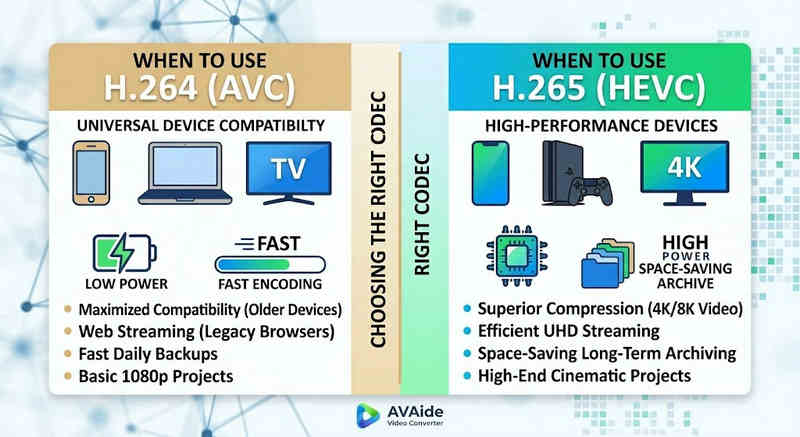
למה אתם צריכים HEVC (H.265):
- חיסכון מקסימלי באחסון: אם אתם מגבים סרטונים ארוכים או ספריות 4K ענקיות, HEVC פועל כמפחית גודל וידאו טבעי, ומפנה מחצית משטח הכונן הקשיח שלכם.
- אופטימיזציה של רוחב פס: HEVC דורש הרבה פחות רוחב פס כדי להזרים, מה שהופך אותו לאידיאלי להפעלה חלקה של 4K אפילו בחיבורי אינטרנט איטיים יותר ללא אחסון במאגר.
- הבטחת עתיד: ככל שהתעשייה עוברת לתכני UHD (אולטרה-ברזולוציה גבוהה) ותוכן VR, HEVC מבטיח שהסרטונים שלכם יישארו באיכות גבוהה ותואמים לפלטפורמות הדור הבא.
למה אתה צריך H.264 (AVC):
- ניגון ועריכה ללא רבב: אם תוכנת עריכת הווידאו שלך משהיית או נגן המדיה שלך מציג קודקוד לא נתמך
- תאימות ושיתוף ללא דאגות: H.264 הוא קודק הווידאו התואם ביותר. בין אם אתם רוצים לשתף את הסרטונים שלכם עם חברים, NAS, שרתי מדיה כמו Plex או Kodi, H.264 יכול להבטיח שיתוף והשמעה חלקים.
חלק 3. כיצד להמיר בקלות בין HEVC ל-H.264
במקרה של העברת סרטונים מהפורמטים HEVC(H.265) ו-H.264 ואל, ממיר וידאו AVAide עושה את זה טוב יותר מהשאר. הוא נותן ממשק יעיל וקל לשימוש שאינו מתפשר על איכות ההמרה ותומך בפורמטים שונים. לא משנה מה הסיבה, זה יכול להיות בגלל היעילות הרבה יותר של HEVC או האימוץ הרחב יותר של H264, AVAide מאפשר לך לעבור הלוך ושוב בין השניים ללא טרחה.
נוהל מפורט:
שלב 1קבל AVAide Video Converter
הורדה, התקנה והפעלה ממיר וידאו AVAide במחשב Windows או Mac שלך.

 הורדה מאובטחת
שלב 2הוסף את הסרטונים שלך ל-AVAide Video Converter
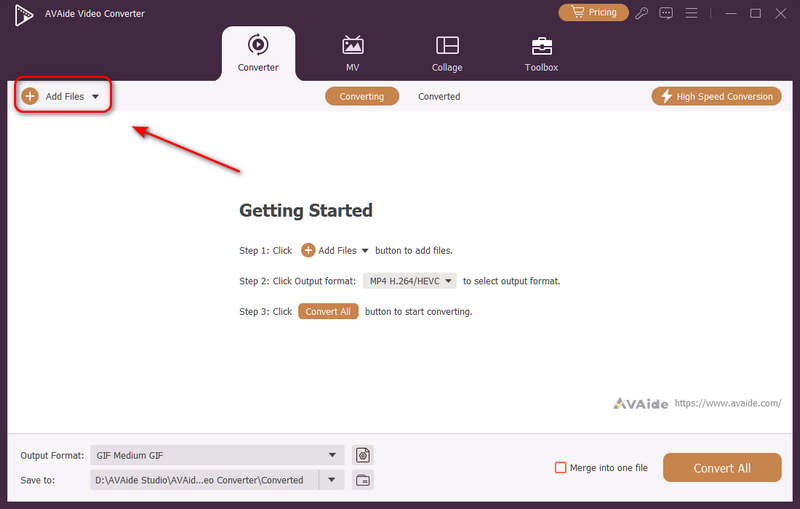
ניתן להוסיף מספר קבצי וידאו ולבצע המרה קבוצתית. לחצו על הוסף קבצים כפתור בצד שמאל למעלה כדי לייבא את קבצי הווידאו שלך.
שלב 3בחר קודק H.264 או H.265
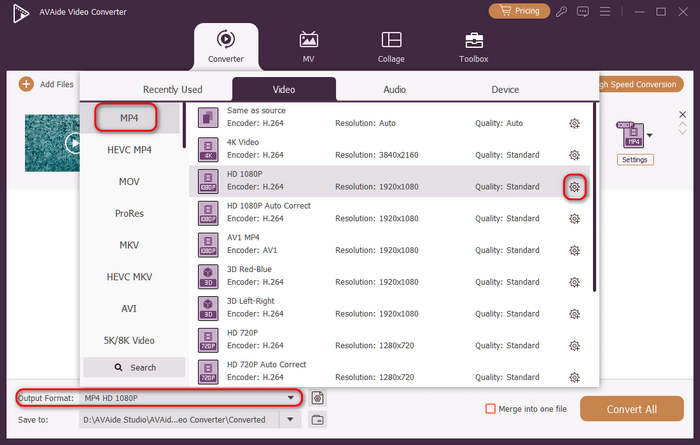
לחץ על פורמט פלט כפתור התפריט הנפתח בצד שמאל למטה. לאחר מכן, תוכלו לבחור תחילה את פורמט הווידאו הרצוי. לאחר מכן, לחצו על פרופיל מותאם אישית כפתור (עם סמל גלגל שיניים) בסרגל הגדרות הווידאו הקבועות מראש.
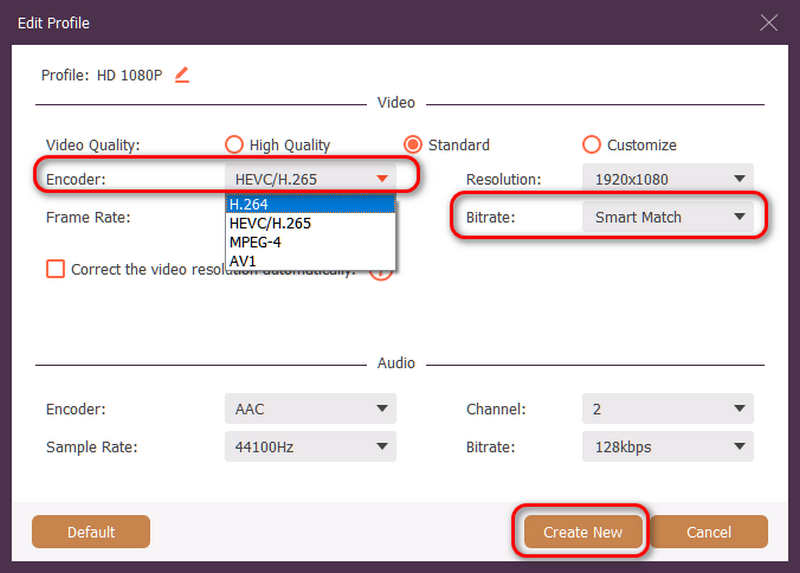
לאחר מכן, בחלונית זו, תוכלו ללחוץ על הלחצן קוֹדַאִי כפתור נפתח לבחירה H.264 אוֹ HEVC/H.265 קודק. אם ברצונך לשנות את איכות הווידאו, תוכל לכוונן את קצב סיביותאבל אנחנו ממליצים התאמה חכמה כדי להבטיח תאימות. לחץ על צור חדש כפתור כדי לשמור את התצורה שלך.
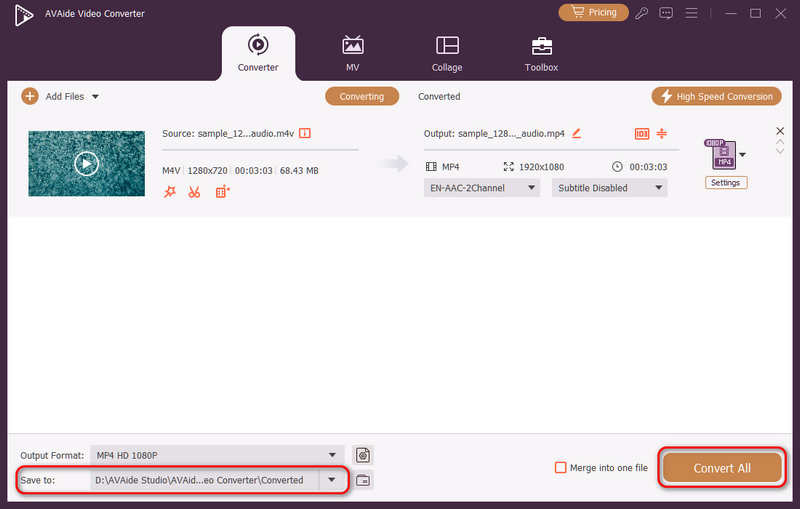
שלב 4התחל קידוד מחדש של וידאו
לבסוף, אתה יכול ללחוץ על לשמור ל כפתור התפריט הנפתח כדי לבחור את תיקיית הפלט הרצויה וללחוץ על המר הכל כדי לשנות את קודקוד הווידאו שלך ל-H.264 או H.265.
חלק 4. שאלות נפוצות על H.265 ו-H.264
מה ההבדל העיקרי בין NVENC H.264 ל-NVENC HEVC?
ההבדל העיקרי טמון ביעילות הדחיסה ובאופטימיזציה של יצירת החומרה. NVENC HEVC (H.265) מספק דחיסה טובה יותר עד 50% מאשר NVENC H.264 (AVC). משמעות הדבר היא שהוא יכול לייצר את אותה איכות חזותית בדיוק בחצי מקצב הסיביות (וחצי מגודל הקובץ), מה שהופך אותו לבחירה הטובה ביותר לארכיון סרטוני 4K או סטרימינג על פני רוחב פס מוגבל.
מהו מקודד HEVC/H.264 מודולרי רב-ערוצי?
מקודד HEVC/H.264 רב-ערוצי מודולרי הוא התקן חומרה ברמה ארגונית שנועד לדחוס ולהזרים מספר הזנות וידאו בו זמנית. בניגוד למקודדי תוכנה לצרכנים, הוא כולל עיצוב מודולרי (בסגנון להב), המאפשר למשתמשים להחליף במהירות או לשדרג כרטיסי קידוד חומרה בהתבסס על קנה המידה של הפרויקט שלהם. הוא תומך הן ב-H.264 והן ב-HEVC/H.265.
מה זה H.265+?
H.265+ (הידוע גם בשם Smart H.265+) היא טכנולוגיית דחיסת וידאו מתקדמת וקניינית שפותחה על ידי Hikvision, המותאמת במיוחד לניטור אבטחה ומעקב.
עכשיו אפשר להשתמש בניתוח מקיף זה של HEVC ו-H.264 כדי לקבוע איזה codec מתאים ביותר לדרישות הווידאו שלך. בין אם אתה רוצה H.264 ומתמקד בתאימות או רוצה HEVC ומכוון לדחיסה טובה יותר, לשני הקודקים יש יתרונות. AVAide Video Converter נותן פתרון אלגנטי ויעיל להתמודדות עם אותה בעיה, ומספק פלט באיכות מעולה תוך כדי מהירות. AVAide הופכת את משימת דחיסת הווידאו וההמרה שלו לקלה עם הממשקים הפשוטים והפונקציות המתקדמות שלה.
אודות המחבר

ארגז כלי הווידאו המלא שלך התומך ב-350+ פורמטים להמרה באיכות ללא אובדן.