Alamy is a platform offering a vast collection of stunning images and videos. However, some content features watermarks. To remove Alamy watermarks, its built-in removal tool may technically assist you in processing marks within images. This article introduces several common watermark removal tools and their features, enabling you to remove Alamy watermarks more conveniently and efficiently. Please note that removing watermarks from images may involve copyright and licensing issues.
Part 1. Top Alamy Watermark Remover Tools
This section will present top-notch Alamy watermark remover tools you can rely on. Keep reading to discover what these Alamy watermark remover tools can do to your images and videos!
1. AVAide Watermark Remover
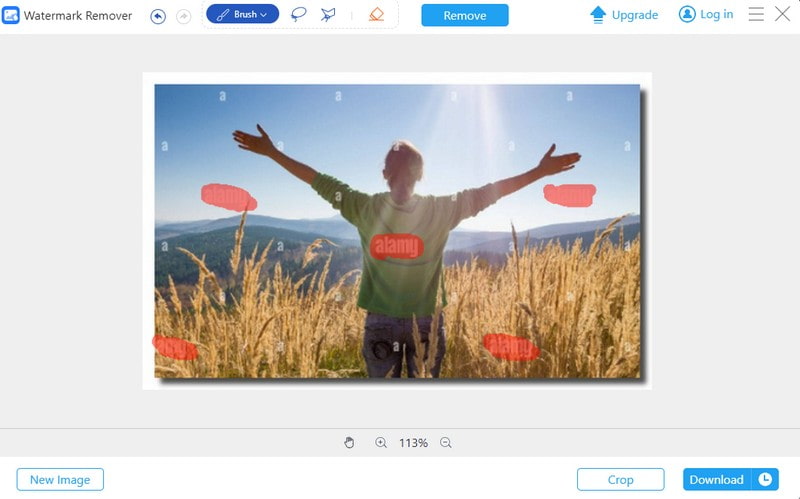
AVAide Watermark Remover is an outstanding online platform for removing watermarks from Alamy photos. You can get professional results without the need for extensive photo editing knowledge.
Powered by AI technology and hardware acceleration, AVAide Watermark Remover ensures a speedy process. It provides various ways to remove watermarks. These include the brush, lasso, and polygonal options. These options enable users to choose the method that suits them best. The impressive part? You can remove not just one watermark in your photos but more than that.
AVAide Watermark Remover prioritizes your security with a 256-bit SSL certificate. It guarantees a virus-free, ad-free, and risk-free experience. Your photos remain protected while you remove watermarks. Without a doubt, AVAide Watermark Remover is a reliable Alamy watermark remover. It allows anyone to enhance their images by removing watermarks.
- Pros
- Support multiple watermark removal modes, flexibly adapting to different watermark shapes.
- Effectively preserves texture continuity on moderately complex backgrounds.
- Feature a clean interface with a low learning curve.
- Cons
- Does not include AI models specifically designed for transparent or semi-transparent watermarks.
2. Inpaint

A handy platform that can help you remove watermarks from your images is Inpaint. It can assist you in removing unwanted elements like logos, phrases, and objects. It offers various removal options to select and remove the watermark.
The impressive thing about Inpaint is that it can restore old images. It can help you bring them back to their original cleanliness and clarity. It uses content-aware technology. The nearby pixels are used to reconstruct the edited area. It will look natural, with no trace of watermark removal. However, it does not support many edits to many photos at once. Also, there is a limit on the file size you can work with.
- Pros
- Best for small watermarks or single-color backgrounds.
- Extremely simple operation—just paint over or select the area.
- Cons
- Residual artifacts frequently appear in complex high-frequency textures.
- Auto-complete tends to blur details, resulting in noticeable loss of fine features.
3. WatermarkRemover.io

WatermarkRemover.io is a top-notch web-based platform that can help you remove Alamy watermark. It holds a broad range of image formats. It ensures you can upload your images without worrying about the compatibility issues. It offers an option to drop or paste a link for watermark removal.
WatermarkRemover.io impresses with its high-resolution capabilities. It supports images up to 5,000 x 5,000 pixels. Besides that, it supports batch watermark removal processing. You do not need to remove watermarks from your image files one by one. It not only saves time but also streamlines the entire image enhancement process. However, it has limitations on the number of images you can process or the resolution of the images.
- Pros
- AI-powered automatic watermark detection and removal.
- Support high-resolution image input.
- High-contrast watermarks yield superior removal results.
- Cons
- Free version has usage/size limitations.
4. Photoshop
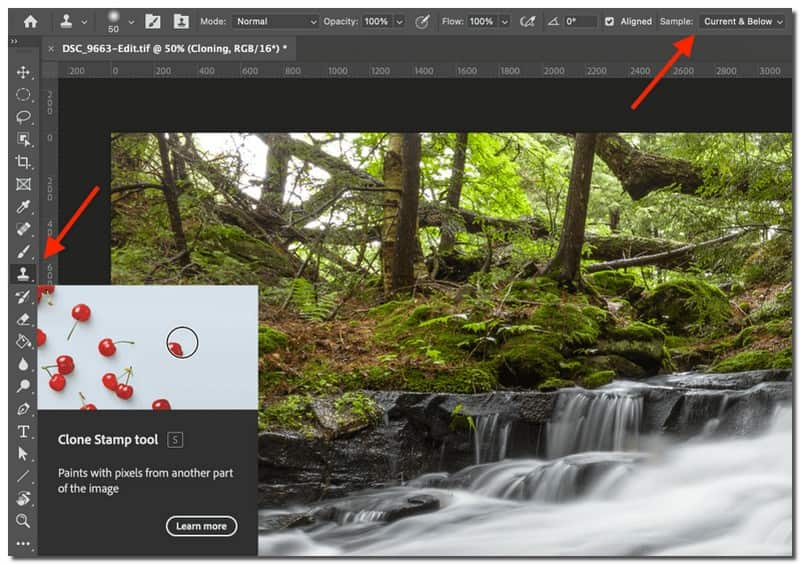
One of the leading Alamy watermark watermark removers that is accessible offline is Photoshop. This program offers various methods to remove watermarks from images. These include using the clone stamp, healing brush, content-aware fill, and more. Therefore, you have complete control during the watermark removal process.
Beyond watermark removal, Photoshop offers many editing features. You can change the colors, enhance details, apply filters, and more. However, it might be challenging for users to start to use it. Also, getting used to all the different features and how they work together takes some time.
- Pros
- Manual + Content-Aware Fill combination for precise refinement of complex textures.
- Supports layer masks, cloning, patching, and other tools.
- Cons
- Relatively steep learning curve.
- No automatic one-click watermark removal feature.
5. DaVinci Resolve
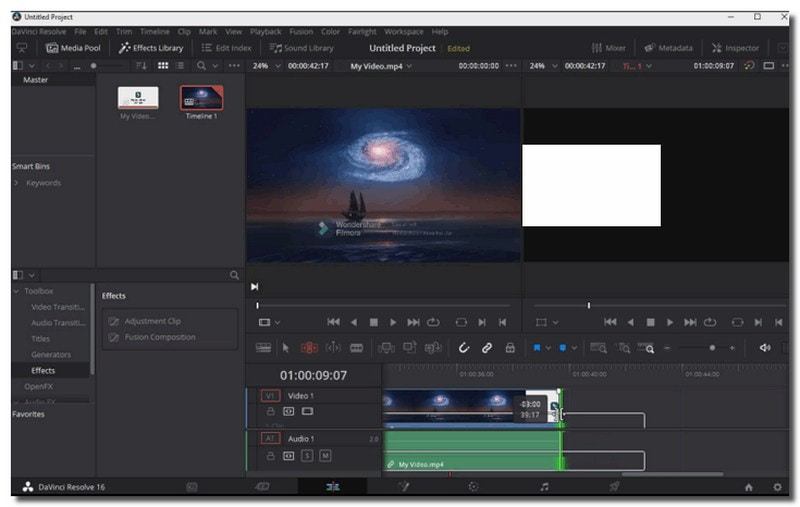
DaVinci Resolve, known for its excellence in multimedia editing, is an impressive Alamy watermark remover platform. It has a unique feature called the clone tool to remove watermarks. You can copy parts of your image or video and cover the watermark. It will make it look like it was never there.
It does not stop at removing watermarks. It lets you edit your pictures like a pro. You can cut, trim, and enhance your images with precision. However, learning all the features might take a bit of time. Also, your computer must have enough space for the platform to work well.
- Pros
- Node-based repair/tracking systems can be applied to moving video.
- Integrated video color and visual effects tools.
- Supports frame-by-frame video patching.
- Cons
- Manual adjustments are cumbersome.
- Processing results for static images are mediocre.
- Repair artifacts are noticeable on high-frequency detail backgrounds.
6. HitPaw Watermark Remover
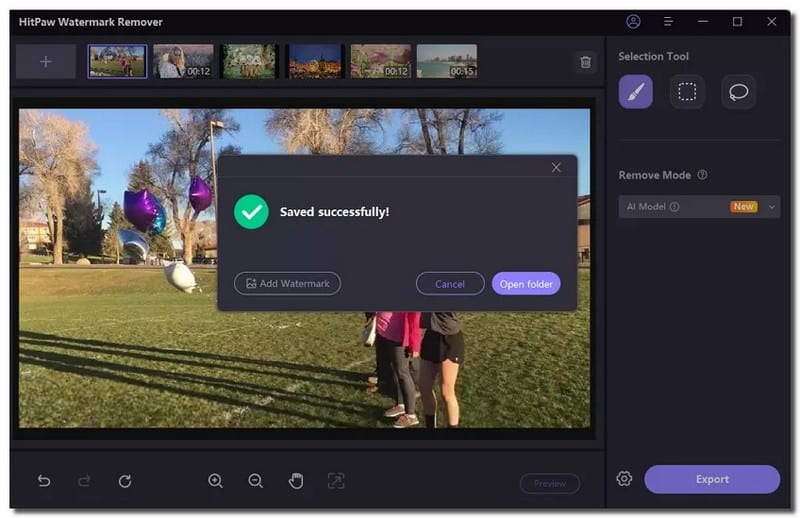
A platform that proves to be reliable for removing watermarks from images, including those from Alamy, is Hitpaw Watermark Remover. It uses advanced algorithms to analyze and drop watermarks. It will also preserve the image quality during the watermark process.
The bulk watermark removal feature is a real-time-saver. You can process many photos. It streamlines your workflow and saves you time. Besides that, it offers a preview feature. It enables users to preview the results before finalizing the watermark removal process. It ensures you can make necessary changes before you can get your Alamy images without a watermark.
- Pros
- Offer multiple modes for flexible selection based on watermark type.
- Support batch processing and preview.
- Deliver strong automatic removal results for simple and moderately complex backgrounds.
- Cons
- Residual effects may occur with complex transparent watermarks and overlapping texture details.
- AI mode shows inconsistent recognition for non-standard watermarks.
- Free trial version has limited export functionality.
Part 2. Tips for You to Choose a Watermark Remover
Check this table to know the summary of their features.
| Tool | Removal Technology | Supported Media | Ease of Use | Key Features |
| AVAide Watermark Remover | AI region selection | JPG, PNG, BMP, MP4, MOV, AVI | Easy | Batch processing, multiple selection tools, web-based |
| Inpaint | Content-aware fill | JPG, PNG | Easy | Desktop software (Windows/macOS), simple drag-and-mark workflow |
| WatermarkRemover.io | Fully automatic AI detection + inpainting | JPG, PNG, WEBP | Easy | No installation, automatic detection, browser-based |
| Adobe Photoshop | Content-Aware Fill, Clone Stamp, Healing Brush | PSD, JPG, PNG, TIFF, etc. | Advanced | Layer-based editing, precise manual control, professional retouching tools |
| DaVinci Resolve | Power Window masking + tracking + clone/clean plate | MP4, MOV, AVI | Intermediate to Advanced | Node-based editing, motion tracking, frame-by-frame video cleanup |
| HitPaw Watermark Remover | AI automatic removal + multiple fill algorithms | JPG, PNG, MP4, MOV | Easy | Preview before export, multiple removal modes, desktop software |
Among the options provided, AVAide Watermark Remover stands out as a reliable choice for removing watermarks from images or videos. Here are some simple reasons why it is considered the better option:
• User-Friendly Interface
AVAide Watermark Remover is designed with an easy-to-use interface. It makes it accessible for users with varying levels of expertise. The straightforward layout ensures a hassle-free experience.
• Efficiency
AVAide Watermark Remover employs advanced algorithms to remove watermarks from images or videos. The impressive part is that it will not compromise the quality. It strives to deliver satisfying results.
• Versatility
AVAide Watermark Remover is versatile and can handle various types of watermarks. It provides a comprehensive solution for users dealing with watermarked content.
AVAide Watermark Remover balances ease of use, efficiency, versatility, and more. It makes it a recommended choice for watermark removal tasks.
Part 3. FAQs about Alamy Watermark Remover
Is it illegal to use stock photos such as Alamy?
Using stock photos from Alamy for commercial purposes is legal. You can use these photos in various projects with a profit motive. These can be used for marketing and advertising.
Why are Royalty-Free Licenses expensive on Alamy?
Royalty-free licenses on Alamy allow you to use purchased images for many projects without extra licenses. They offer comprehensive support and flexibility for your projects.
Why is there a watermark on the image you download on Alamy?
Alamy adds watermarks to images to protect them since they are not patent-free. To avoid that, you need to buy from the official website.
Is it legal to use Alamy images if I remove the watermark with AI?
No. Removing a watermark from images on Alamy using AI does not grant you legal rights to use the content. The images are protected by copyright, and using them without purchasing a proper license may constitute copyright infringement and violate applicable laws and platform terms. Always obtain a valid license before using copyrighted images.
What is the most effective tool for Alamy grid watermarks?
For the most convenient and effective solution, use the AVAide Watermark Removal Tool. Import your image into the tool, select the watermark area, and start removing it. It also preserves image quality to the greatest extent possible.
There you have it! You have discovered the various tools to remove Alamy watermarks. Note that despite their features, they share a standard function - watermark removal. If you are looking for a reliable solution, consider using AVAide Watermark Remover. It is a versatile tool for removing watermarks from your images. Trust AVAide for a hassle-free watermark removal experience!

Easily get rid of annoying watermarks and unwanted objects from your photos without quality loss.
PROCESS NOW