What is a watermark and why is it important? Watermarks are essential for protecting digital content, indicating ownership, and preventing unauthorized use. From images and videos to documents, learning how to add and remove watermarks ensures your work stays secure, properly attributed, and professionally branded across all platforms.
Part 1. What Is a Watermark?
A watermark is a marking, visible or not, that is placed on digital media, such as images, videos, documents, and graphics, to show ownership, safeguard against intellectual property theft, and avoid unauthorized use. It can be a logo, text, a pattern, or digital information that is embedded to keep your work representative to you and deter anyone from abusing it.
The word watermark originates from the practice of paper-making, where traces were embedded or pressed into moist sheets. They were still visible when light was shone on them. Today, digital watermarking has become an essential means of digital asset protection. However, there are different types of digital watermarks, which offer different levels of visibility, protection, and tracking for your work.
1. Visible Watermarks
This is a clear overlay with an entity logo, a signature, and text. These show ownership and discourage unauthorized copying, since such documents become a hassle to remove.
2. Invisible Watermarks
These are embedded in the file and are tracked or verified through specialized systems to establish copyright.
3. Forensic Watermarks
This is embedded information that is very difficult to remove, for copyright enforcement or legal deterrents.
4. Digital Watermarks
These are used in digital images, clips, audios, and documents and contain information like the details of the author or a timestamp, and are resilient to any form of resizing or compression in the source document.

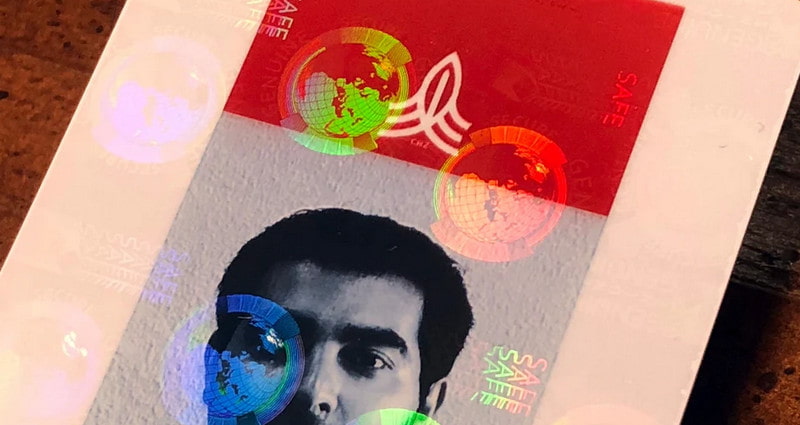
5. Holographic Watermarks
Items such as banknotes, passports, and certificates have 3D holograms. They prevent forgery while providing visual confirmation of authenticity.
6. Robust Watermarks
Robust watermarks are meant to survive cropping, compression, resizing, or application of various filters. Such watermarks are most appropriate for internet images and videos, especially those that remain unedited.
Part 2. When and Where to Use a Watermark
Watermarking has its optimal scenarios and channels of use, including:
• Images and Photos
Online photo and design watermarks serve the dual purpose of demonstrating ownership, as well as providing deterrence for unauthorized use. This practice is a common phenomenon for photographers, artists, and providers of stock images.
• Videos
Watermarked videos meant for YouTube, TikTok, and Instagram use, as well as instructional videos, serve the purpose of maintaining the video branding and attribution in the event of the re-post.
• Documents and PDFs
Watermarks in contracts, reports, certificates, invoices, educational materials, and other documents serve the purpose of indicating ownership and use of the materials, as well as confidentiality, version status, or authenticity.
• Social Media Posts
Watermarking Social Media Posts is a means of visibility for your brand, as well as a way of attaching your name or logo to the content in all cases where the content is shared.
• Web Content and Blog Graphics
Watermarking content, such as banners, thumbnails, and graphics, provides branding in a way that is not visible to the casual viewer, while also preventing unauthorized use of the content and using Alamy watermark remover to enhance their online identity.
• High-Value Physical Documents
Embossed watermarks, holographic watermarks, and similar security-protection devices are common in certificates, Identification Documents, and other official documents for authenticity and security.
Part 3. How to Add a Watermark to an Image and Video
Watermarking keeps your content secure and your brand in the public eye. Watermarking images is easy; watermarking videos, though, is more complex. Watermarking, editing, enhancing, and converting videos quickly and in high quality is something AVAide Video Converter can do. Branding, making tutorials, and professional content creation become a lot easier using this.
- Add text or logo watermarks and customize opacity, position, size, and style.
- Maintains sharp detail so your watermarked video stays crisp and professional.
- Renders videos and applies edits up to 120× faster.
- Add the same watermark to multiple videos in one go for consistent branding.
- Crop, trim, adjust colors, enhance resolution, and denoise before or after watermarking.

 Secure Download
Step 1Download and Install
To download and install the program from the AVAide website, follow the instructions provided on the website and install the program with onscreen instructions.
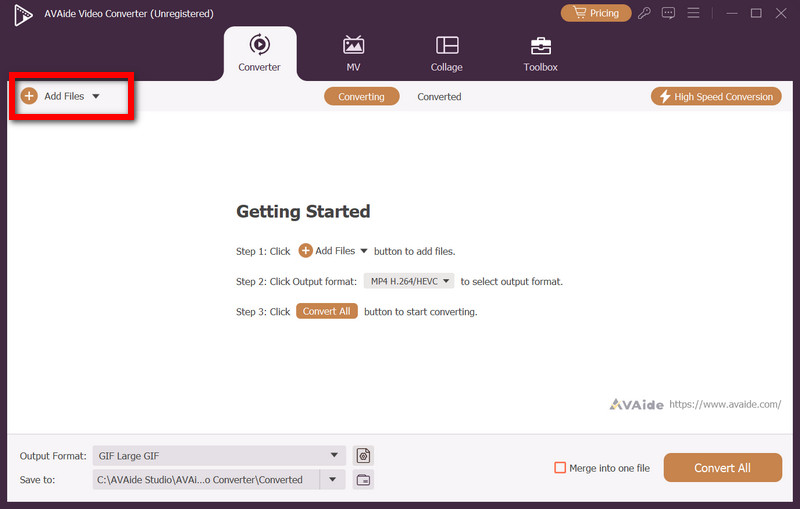
Step 2Upload Your Video
Go to the Add Files button and choose the video you need to watermark in the converter.
Step 3Access the Watermark Tool
To access the Watermark Tool, after the video is loaded, select the Edit button.
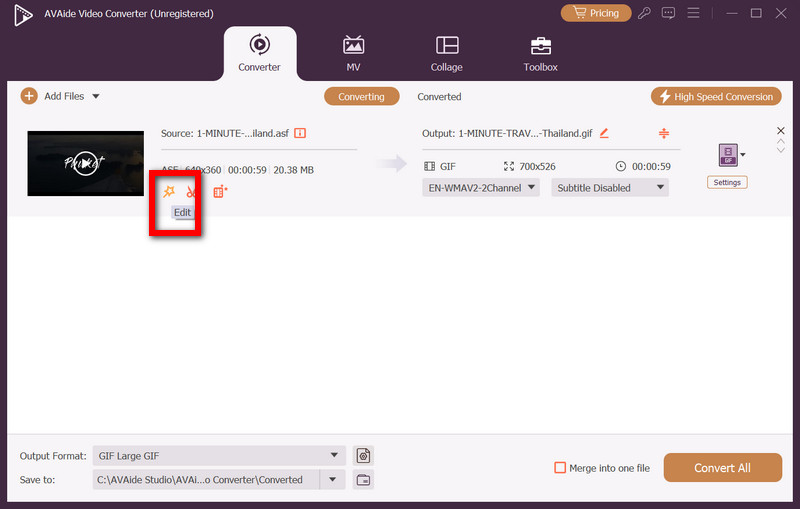
Step 4Add Your Text or Logo
Select a Text or Image Watermark.
• Text Watermark: Watermark text can be customized with a selection of fonts, colors, styles, and transparencies.
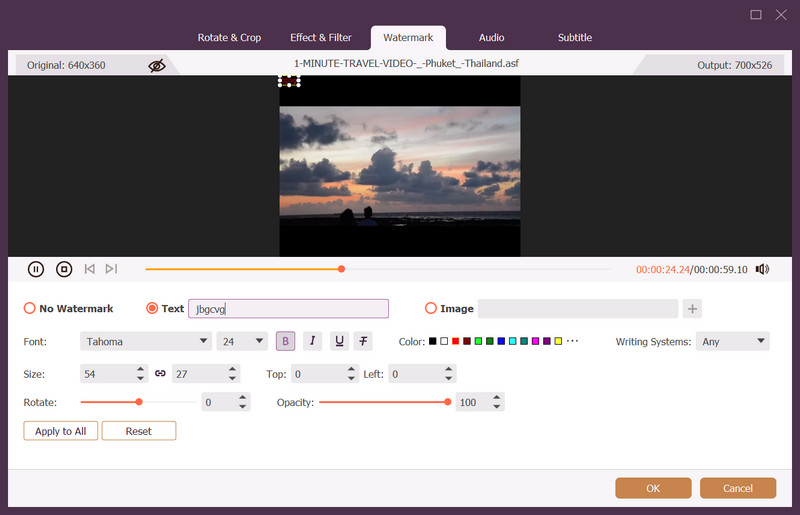
• Image Watermark: Upload your logo in PNG or JPEG, then resize or reposition it anywhere in the frame.
Step 5Adjust Position and Opacity
Pick a vertical or horizontal edge above or to indicate a logo, and set the watermark clear but not too obvious with the contrast. Then, click the Ok button to apply.
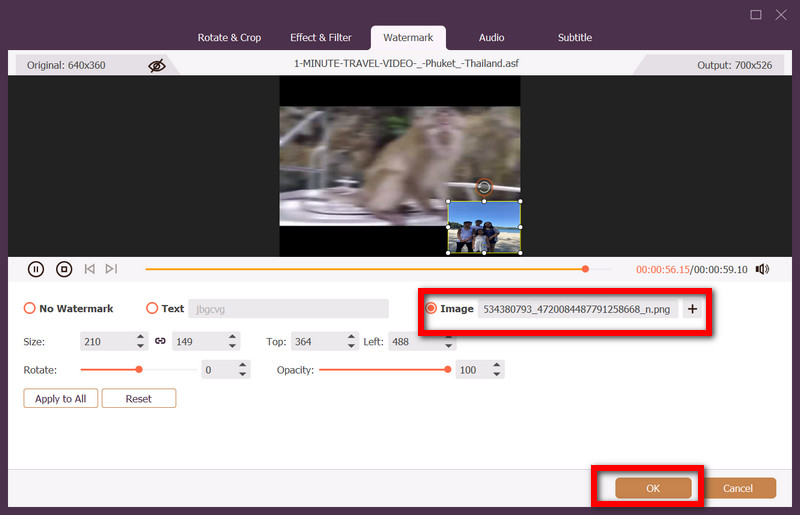
Step 6Choose Output Format
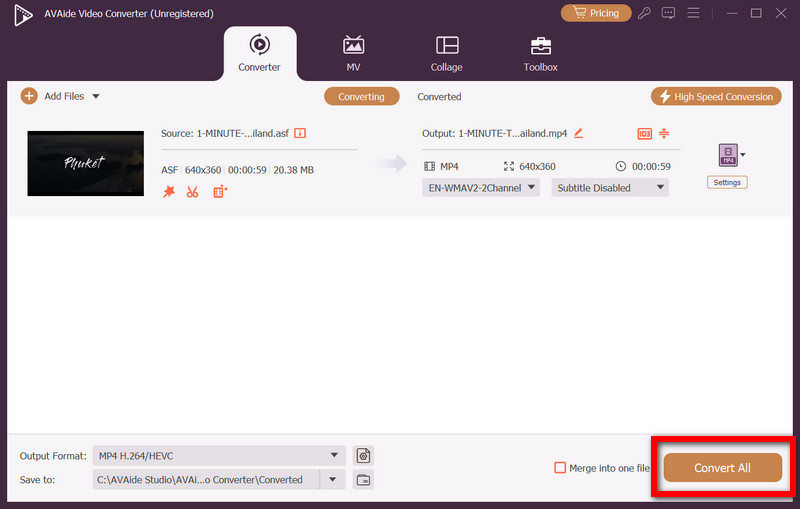
Close the editing panel, then click Output Format. Select your preferred format (e.g., MP4, MOV, MKV) from the list of 300+ options.
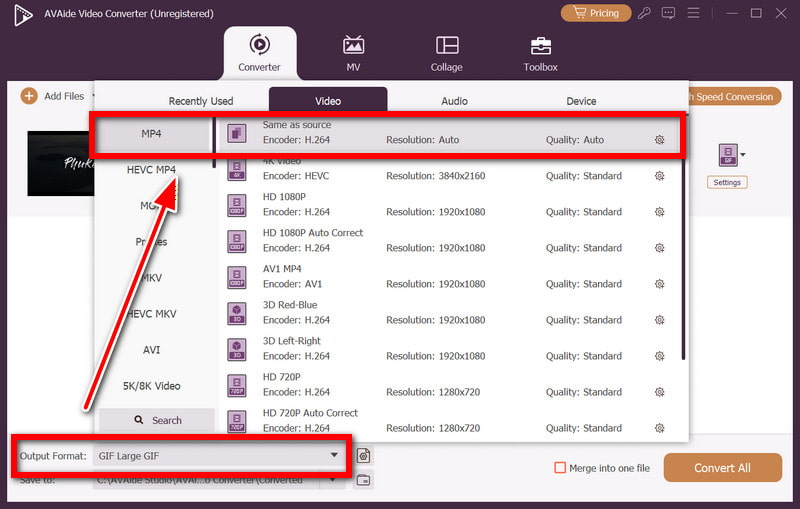
Step 7Export the Video
Click Convert All to begin processing.
Part 4. How to Remove Watermark on Image and Video
Using AVAide Watermark Remover
AVAide Watermark Remover is a tool available online that uses AI technology to remove text, instrument logos, paragraphs, and other things from photos. The tool is suited to all levels since it uses automated technology that repairs and blends colors and textures for a seamless result. And because it is automated, speedy, and clean, it is also suited to professionals.
Step 1Go to the Watermark Remover
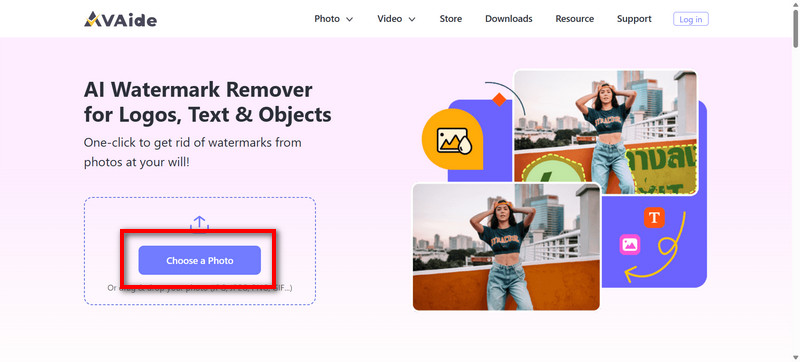
Go to the Watermark Remover website and press the button that says Choose a Photo to upload the photo you want to edit.
Step 2Select the Text
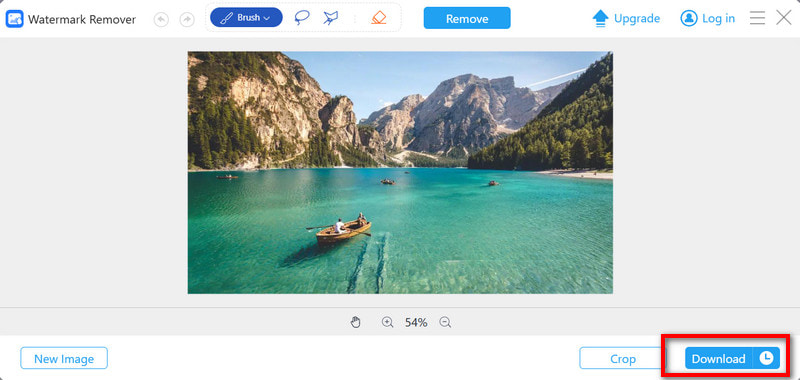
Select the area you want to edit by using the Brush tool and mark that area.
Step 3Remove the Mark
Press the Remove button to allow the program to edit the background of the photo.
Step 4Save the Photo
If the program finishes and you want to see the result, you can press the Download button to download the photo that you just edited.
Using AVAide Video Converter
Step 1Install the Software
Go to the official website, download AVAide Video Converter, and install the program on your computer.
Step 2Go to the Watermark Remover
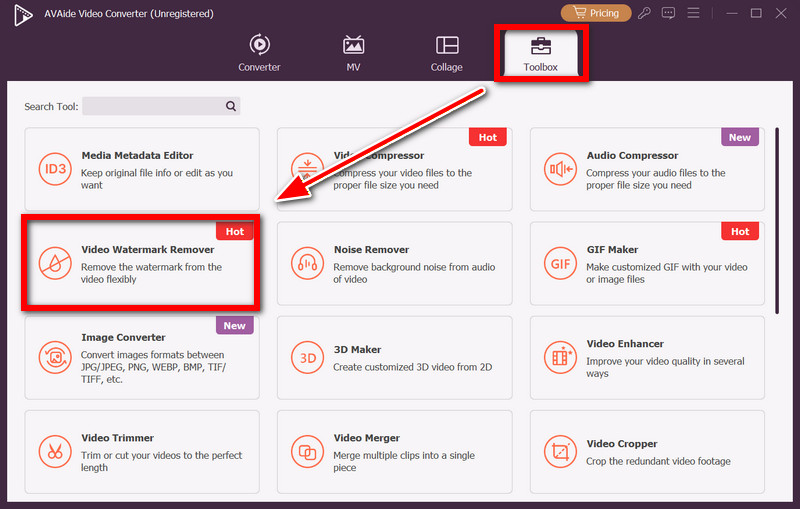
Open the program, and select Toolbox, which is on a row at the top. From the Toolbox, select Video Watermark Remover.
Step 3Select Your Video
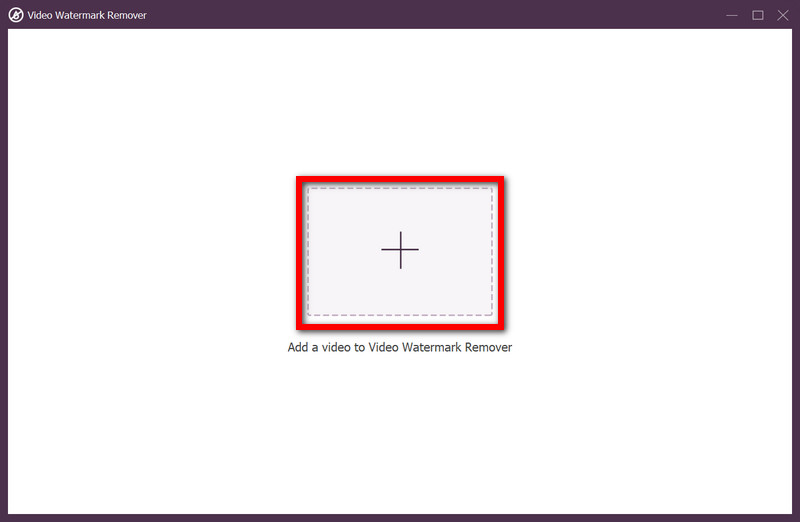
You should see a button that is a plus symbol (+). Click it, and upload the video you want to edit.
Step 4Add Watermark Removing Area
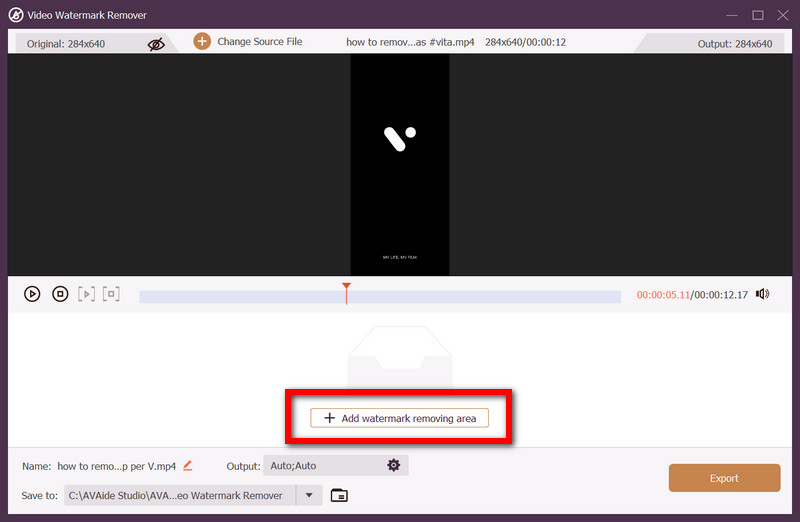
In the interface, click + Add watermark removing area and position the selection box over the watermark.
Step 5Export the Clean Video
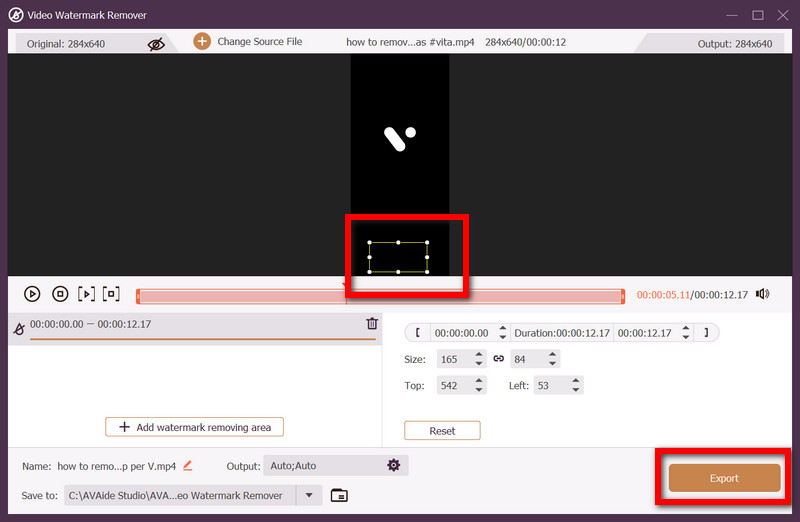
Once satisfied with the selection, click Export to apply the modification and save your watermark-free video, perfect for removing TikTok watermark or others.
What is digital watermarking? It is a powerful tool to secure and track your digital content. Using watermarking strategically on images, videos, and documents helps protect ownership, prevent misuse, and maintain your brand’s credibility across online and offline platforms.
Your complete video toolbox that supports 350+ formats for conversion in lossless quality.