Làm việc với các video dài thường đặt ra một vấn đề nan giải: làm thế nào để duy trì chất lượng video hoàn hảo mà không chiếm hết dung lượng lưu trữ? Đây là lúc các tiêu chuẩn nén video phát huy tác dụng. Nếu bạn muốn cân bằng giữa kích thước video, chất lượng và khả năng tương thích với thiết bị, bạn chắc chắn sẽ phải đối mặt với sự lựa chọn giữa... H.264 (AVC) và H.265 (HEVC).
Trong hướng dẫn toàn diện này, chúng tôi sẽ phân tích những điểm khác biệt cốt lõi giữa H.264 và HEVC, giúp bạn quyết định loại nào phù hợp với quy trình làm việc của mình và hướng dẫn cách chuyển đổi giữa chúng một cách liền mạch mà không làm giảm chất lượng.
Phần 1. HEVC so với H264: Chúng là gì?
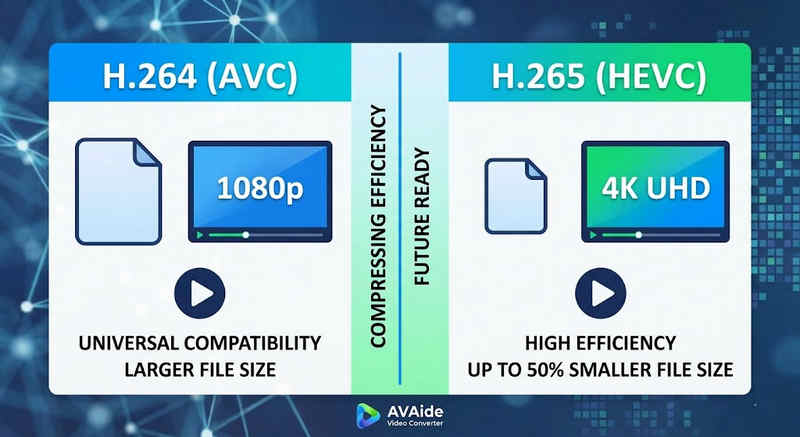
Câu trả lời ngắn gọn: H.264 (AVC) có khả năng tương thích phổ quát và hoạt động trên hầu hết mọi thiết bị, nhưng tạo ra các tệp có kích thước lớn hơn. H.265 (HEVC) cung cấp khả năng nén vượt trội, giảm kích thước tệp lên đến 50% với chất lượng hình ảnh tương đương, nhưng yêu cầu sức mạnh xử lý cao hơn và hỗ trợ hạn chế trên phần cứng cũ hơn.
1. Codec H.264 (AVC) là gì?
Được giới thiệu với tên gọi Mã hóa Video Nâng cao (AVC), H.264 hiện là chuẩn mực hàng đầu về khả năng tương thích video. Đây là tiêu chuẩn công nghiệp cho phát trực tuyến, ghi hình trên thiết bị di động và phát lại video hàng ngày. Vì yêu cầu rất ít sức mạnh xử lý để giải mã, video H.264 phát mượt mà trên hầu hết mọi thiết bị kỹ thuật số, từ điện thoại thông minh cũ đến TV thông minh hiện đại.
2. Codec H.265 (HEVC) là gì?
Mã hóa video hiệu quả cao (HEVC), hay H.265, là phiên bản kế nhiệm trực tiếp của H.264. Nó được thiết kế đặc biệt để xử lý nhu cầu dữ liệu khổng lồ của nội dung 4K, 8K và VR. HEVC sử dụng các thuật toán tiên tiến hơn để nén dữ liệu video hiệu quả hơn nhiều so với phiên bản tiền nhiệm, mang lại hình ảnh sắc nét, độ phân giải cao với kích thước tệp nhỏ hơn tới 50%. Tuy nhiên, hiệu quả này đi kèm với một cái giá: nó yêu cầu phần cứng hiện đại để xử lý mà không bị giật lag.
H.265 so với H.264: Bảng so sánh nhanh
| Đặc trưng | H.264 (AVC) | H.265 (HEVC) |
| Các định dạng được hỗ trợ | m2ts, evo, 3gp, f4v, mkv, mp4, qtff, asf, avi, mxf, ps, ts | mxf, ps, ts, 3gp, mkv, mp4, qtff, asf, avi |
| Hiệu suất nén | Mức độ khó: Trung bình (Kích thước tệp lớn) | Ưu việt (tệp nhỏ hơn 25-50%) |
| Chất lượng video | Tuyệt vời cho độ phân giải 1080p | Tối ưu hóa cho độ phân giải 4K, 8K và HDR |
| Khả năng tương thích của thiết bị | Đa năng (99% thiết bị) | Hỗ trợ hạn chế (Máy tính đời cũ có thể không hỗ trợ) |
| Sức mạnh xử lý | Thấp (Tốc độ hiển thị/phát lại nhanh) | Cao (Yêu cầu CPU/GPU đời mới hơn) |
| Các trường hợp sử dụng lý tưởng | Phát trực tuyến trên web, mạng xã hội, thiết bị cũ | Quay phim bằng flycam độ phân giải 4K, video điện ảnh bằng iPhone, lưu trữ tiết kiệm dung lượng. |
Phần 2. Khi nào nên chọn HEVC so với H.264
Việc lựa chọn codec phù hợp hoàn toàn phụ thuộc vào mục tiêu cụ thể của bạn. Dưới đây là lý do tại sao bạn có thể cần codec này thay vì codec khác:
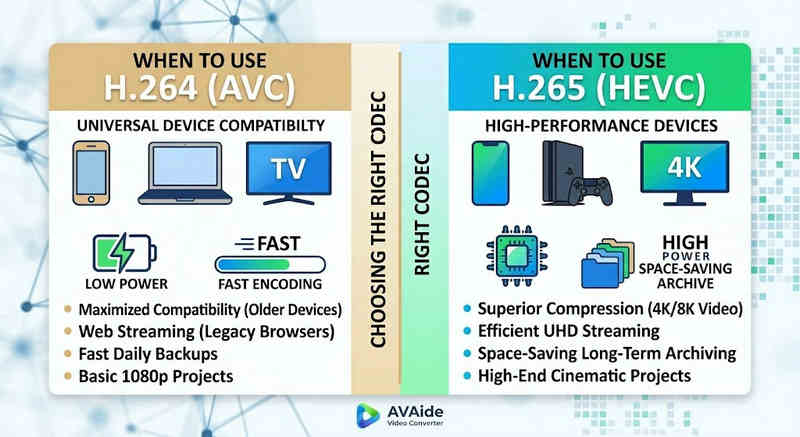
Tại sao bạn cần HEVC (H.265):
- Tối ưu hóa khả năng tiết kiệm không gian lưu trữ: Nếu bạn sao lưu các video dài hoặc thư viện video 4K khổng lồ, HEVC sẽ hoạt động như một công cụ giảm kích thước video tự nhiên, giải phóng một nửa dung lượng ổ cứng của bạn.
- Tối ưu hóa băng thông: HEVC yêu cầu băng thông ít hơn nhiều để truyền phát, lý tưởng cho việc phát lại video 4K mượt mà ngay cả trên các kết nối internet chậm mà không bị gián đoạn.
- Chuẩn bị cho tương lai: Khi ngành công nghiệp chuyển đổi sang nội dung độ phân giải cực cao (UHD) và thực tế ảo (VR), HEVC đảm bảo video của bạn vẫn giữ được chất lượng cao và tương thích với các nền tảng thế hệ tiếp theo.
Tại sao bạn cần H.264 (AVC):
- Phát lại và chỉnh sửa hoàn hảo: Nếu phần mềm chỉnh sửa video của bạn bị giật lag hoặc trình phát đa phương tiện hiển thị thông báo "Codec Not Supported" (Codec không được hỗ trợ)
- Tương thích và chia sẻ không lo lắng: H.264 là codec video có khả năng tương thích rộng rãi nhất. Cho dù bạn muốn chia sẻ video của mình với bạn bè, NAS, máy chủ đa phương tiện như Plex hay Kodi, H.264 đều đảm bảo việc chia sẻ và phát lại liền mạch.
Phần 3. Cách chuyển đổi dễ dàng giữa HEVC và H.264
Trong trường hợp chuyển video từ và sang định dạng HEVC(H.265) và H.264, AVAide Video Converter làm tốt hơn phần còn lại. Nó cung cấp giao diện hiệu quả và dễ sử dụng, không ảnh hưởng đến chất lượng chuyển đổi và hỗ trợ nhiều định dạng khác nhau. Dù lý do là gì, có thể là do hiệu quả cao hơn của HEVC hoặc việc áp dụng rộng rãi hơn H264, AVAide cho phép bạn chuyển đổi qua lại giữa hai định dạng mà không gặp rắc rối.
Thủ tục chi tiết:
Bước 1Nhận phần mềm chuyển đổi video AVAide
Tải xuống, cài đặt và khởi chạy AVAide Video Converter trên máy tính Windows hoặc Mac của bạn.

TẢI VỀ MIỄN PHÍ Đối với Windows 7 trở lên
 An toàn tải
TẢI VỀ MIỄN PHÍ Dành cho Mac OS X 10.13 trở lên
An toàn tảiBước 2Thêm video của bạn vào AVAide Video Converter
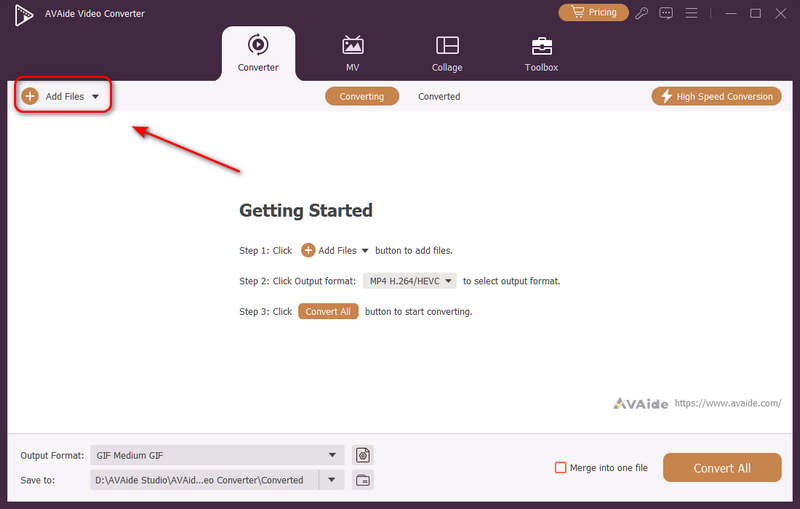
Bạn có thể thêm nhiều tệp video và thực hiện chuyển đổi hàng loạt. Nhấp vào Thêm các tập tin Nhấn nút ở góc trên bên trái để nhập các tệp video của bạn.
Bước 3Chọn codec H.264 hoặc H.265.
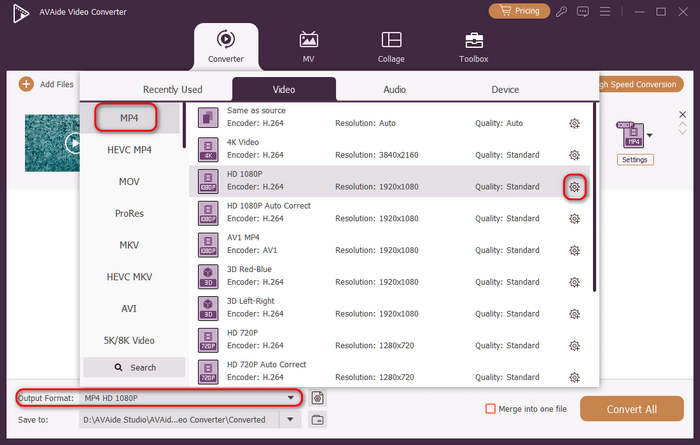
Nhấn vào Định dạng đầu ra Nhấp vào nút menu thả xuống ở phía dưới bên trái. Sau đó, bạn có thể chọn định dạng video mong muốn trước. Tiếp theo, nhấp vào Hồ sơ tùy chỉnh nút (có biểu tượng bánh răng) trong thanh cài đặt sẵn video.
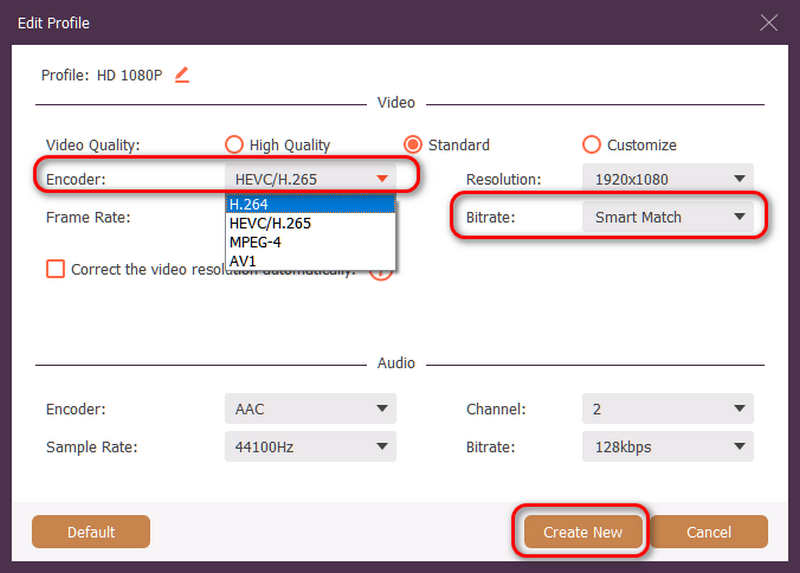
Sau đó, trong bảng điều khiển này, bạn có thể nhấp vào Mã hoá nút thả xuống để chọn H.264 hoặc là HEVC/H.265 codec. Nếu bạn muốn thay đổi chất lượng video, bạn có thể điều chỉnh Tốc độ bitNhưng chúng tôi khuyên bạn nên... Ghép nối thông minh Để đảm bảo tính tương thích. Nhấp vào Tạo mới Nút này dùng để lưu cấu hình của bạn.
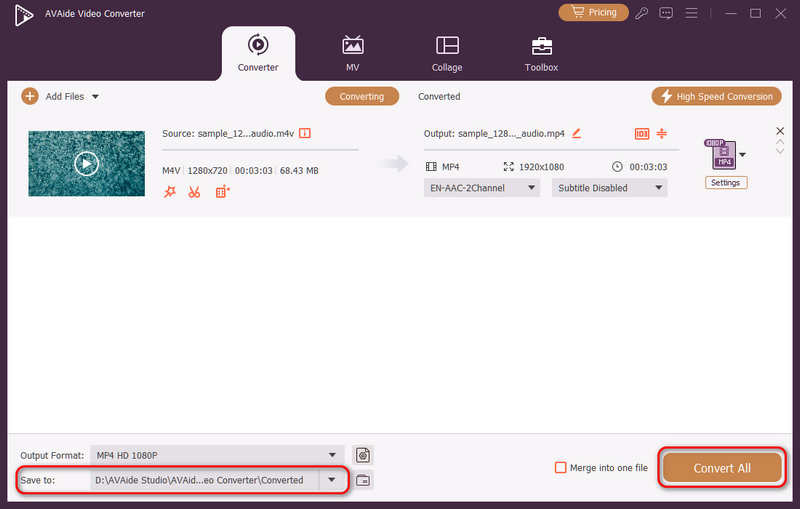
Bước 4Bắt đầu mã hóa lại video
Cuối cùng, bạn có thể nhấp vào Lưu vào Nhấn vào nút thả xuống để chọn thư mục đầu ra mong muốn và nhấp vào đó. Chuyển đổi tất cả Nút này cho phép bạn thay đổi codec video sang H.264 hoặc H.265.
Phần 4. Câu hỏi thường gặp về H.265 và H.264
Điểm khác biệt chính giữa NVENC H.264 và NVENC HEVC là gì?
Sự khác biệt chính nằm ở hiệu quả nén và tối ưu hóa thế hệ phần cứng. NVENC HEVC (H.265) cung cấp khả năng nén tốt hơn tới 50% so với NVENC H.264 (AVC). Điều này có nghĩa là nó có thể tạo ra chất lượng hình ảnh tương đương với tốc độ bit chỉ bằng một nửa (và kích thước tệp chỉ bằng một nửa), khiến nó trở thành lựa chọn ưu việt hơn để lưu trữ video 4K hoặc phát trực tuyến qua băng thông hạn chế.
Bộ mã hóa HEVC/H.264 đa kênh dạng mô-đun là gì?
Bộ mã hóa đa kênh HEVC/H.264 dạng mô-đun là thiết bị phần cứng cấp doanh nghiệp được thiết kế để nén và truyền phát nhiều luồng video cùng lúc. Không giống như các bộ mã hóa phần mềm dành cho người tiêu dùng, nó có thiết kế dạng mô-đun (kiểu lưỡi dao), cho phép người dùng thay thế nóng hoặc nâng cấp các thẻ mã hóa phần cứng dựa trên quy mô dự án của họ. Nó hỗ trợ cả H.264 và HEVC/H.265.
H.265+ là gì?
H.265+ (còn được gọi là Smart H.265+) là công nghệ nén video tiên tiến, độc quyền được phát triển bởi Hikvision, được tối ưu hóa đặc biệt cho mục đích giám sát an ninh và an ninh.
Bây giờ người ta có thể sử dụng phân tích toàn diện này HEVC và H.264 để xác định codec nào phù hợp nhất với yêu cầu video của bạn. Cho dù bạn muốn H.264 và tập trung vào khả năng tương thích hay mong muốn HEVC và hướng đến khả năng nén tốt hơn, thì cả hai codec đều có những ưu điểm. AVAide Video Converter cung cấp giải pháp thanh lịch và hiệu quả để giải quyết vấn đề đó, cung cấp đầu ra chất lượng tuyệt vời trong khi vẫn nhanh chóng. AVAide giúp nhiệm vụ nén video và chuyển đổi trở nên dễ dàng với giao diện đơn giản và các chức năng tiên tiến.
GIỚI THIỆU VỀ TÁC GIẢ

Hộp công cụ video hoàn chỉnh của bạn hỗ trợ hơn 350 định dạng để chuyển đổi với chất lượng không mất dữ liệu.