ลองนึกภาพว่าคุณกำลังถ่ายโอนรูปภาพหรือเอกสารจำนวนมากไปยังคอมพิวเตอร์ของคุณ แล้วพบว่าช่อง "วันที่สร้าง" หรือ "วันที่แก้ไข" ของไฟล์เหล่านั้นผิดเพี้ยนไปหมด ไม่ว่าจะเป็นความผิดพลาดในการสำรองข้อมูลหรือความไม่ตรงกันของเขตเวลา การประทับเวลาของไฟล์ที่ไม่ถูกต้องอาจทำลายการจัดเก็บข้อมูลดิจิทัลของคุณและทำให้ขั้นตอนการทำงานของคุณวุ่นวายได้
โชคดีที่คุณไม่ต้องทนอยู่กับความยุ่งเหยิงนั้น มีผู้เชี่ยวชาญที่ทุ่มเทคอยดูแลอยู่ โปรแกรมเปลี่ยนวันที่ของไฟล์ โปรแกรมนี้ช่วยให้คุณควบคุมเมตาเดตาได้อย่างสมบูรณ์แบบ ช่วยให้คุณแก้ไขเวลาประทับของไฟล์จำนวนมากได้ด้วยการคลิกเพียงไม่กี่ครั้ง ในคู่มือนี้ เราได้รวบรวมโปรแกรมเปลี่ยนวันที่ไฟล์ที่ดีที่สุด 5 โปรแกรมสำหรับ Windows และ Mac เพื่อช่วยให้คุณควบคุมการจัดระเบียบข้อมูลดิจิทัลของคุณได้อย่างเต็มที่ มาเริ่มกันเลย!
ส่วนที่ 1. บทวิจารณ์โดยรวมของโปรแกรมเปลี่ยนวันที่ไฟล์ที่ดีที่สุด 5 โปรแกรม
ในส่วนนี้จะนำเสนอโปรแกรมเปลี่ยนวันที่ไฟล์ที่ดีที่สุดที่คุณสามารถไว้วางใจได้ โปรดอ่านต่อเพื่อดูว่าเครื่องมือเหล่านี้จะช่วยให้คุณบรรลุเป้าหมายได้อย่างไร!
1. ตัวแปลงวิดีโอ AVAide
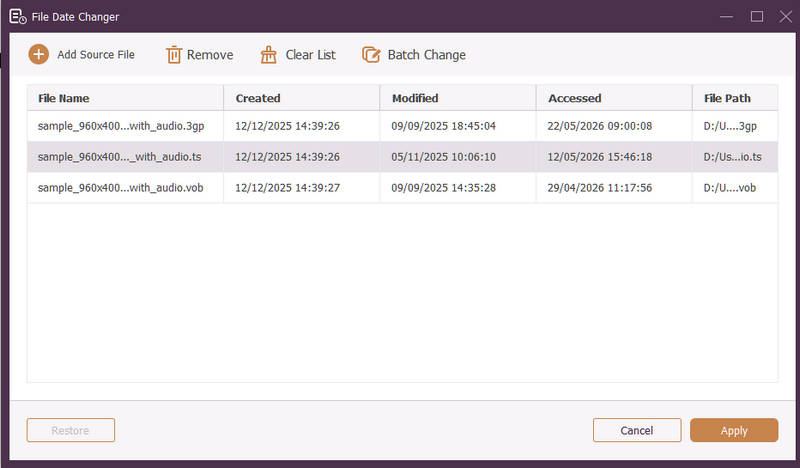
ใช้งานได้ทั้งบน Windows และ Mac AVide Video Converter เป็นแพลตฟอร์มอเนกประสงค์ที่มีเครื่องมือเปลี่ยนวันที่ไฟล์ในตัวอันทรงพลัง คุณสมบัติที่ใช้งานง่ายนี้ช่วยให้คุณสามารถแก้ไขรายละเอียดเวลาได้อย่างครบถ้วน รวมถึงวันที่สร้าง วันที่แก้ไข และวันที่เข้าถึงล่าสุด
- รองรับรูปแบบสื่อหลากหลายประเภทได้อย่างราบรื่น ทั้งวิดีโอ เสียง และภาพ
- นำเข้าและอัปเดตไฟล์หลายไฟล์พร้อมกันเพื่อประหยัดเวลาและเพิ่มประสิทธิภาพการทำงานของคุณ
- มาพร้อมอินเทอร์เฟซที่สะอาดตาและใช้งานง่าย ช่วยให้คุณเปลี่ยนวันที่ของไฟล์ได้อย่างรวดเร็ว
- ไฟล์ของคุณจะยังคงใช้งานได้อย่างต่อเนื่องแม้หลังจากมีการเปลี่ยนแปลงวันที่แล้ว
2. ตัวเปลี่ยนวันที่ของไฟล์
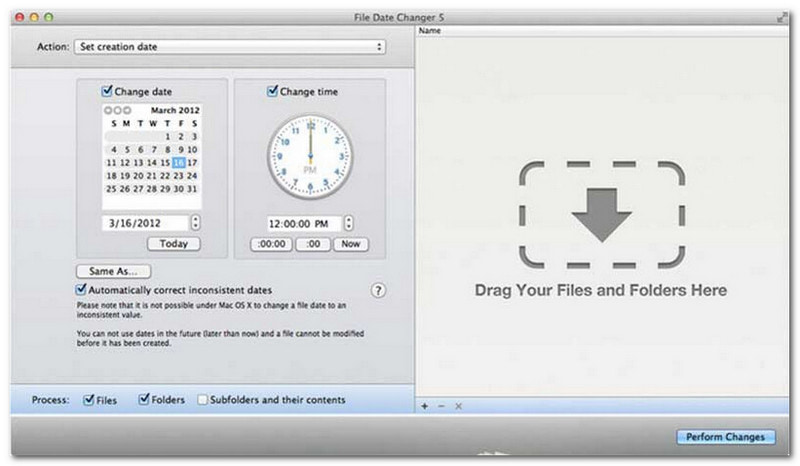
โปรแกรม File Date Changer สมชื่อด้วยการนำเสนอโซลูชันเฉพาะสำหรับการเปลี่ยนวันที่สร้างไฟล์ มีดีไซน์เรียบง่าย ทำให้ผู้ใช้ทุกระดับสามารถใช้งานได้ง่าย รองรับการแก้ไขทั้งวันที่สร้างและวันที่แก้ไข ไม่ว่าคุณต้องการเปลี่ยนวันที่สำหรับไฟล์แต่ละไฟล์หรือทั้งโฟลเดอร์ โปรแกรมเปลี่ยนวันที่ไฟล์บน Mac นี้จะทำให้กระบวนการง่ายขึ้นด้วยฟังก์ชันการทำงานที่มีประสิทธิภาพ
แม้ว่าโปรแกรมเปลี่ยนวันที่ไฟล์จะเป็นเครื่องมือแบบเสียเงิน แต่คุณค่าของมันขึ้นอยู่กับความต้องการเฉพาะของคุณในด้านต้นทุนและฟังก์ชันการใช้งาน ผู้ใช้บางรายอาจพบว่าฟีเจอร์ของมันค่อนข้างพื้นฐานเมื่อเทียบกับราคา อย่างไรก็ตาม สำหรับผู้ที่ให้ความสำคัญกับประสิทธิภาพและขั้นตอนการทำงานที่ราบรื่น โปรแกรมนี้ยังคงเป็นการลงทุนที่น่าเชื่อถือและคุ้มค่าสำหรับโปรแกรมเปลี่ยนวันที่ไฟล์
คุณสมบัติหลักของโปรแกรมเปลี่ยนวันที่ไฟล์:
- แก้ไขวันที่และเวลาในการสร้าง แก้ไข และเข้าถึงครั้งล่าสุดสำหรับไฟล์หลายไฟล์
- รองรับการเพิ่มหรือลบวัน ชั่วโมง นาที หรือวินาทีที่ระบุ
- เปลี่ยนคุณสมบัติของไฟล์ เช่น ตั้งค่าเป็นอ่านอย่างเดียวหรือซ่อนไว้ และอัปเดตข้อมูลเมตา EXIF
- โปรแกรมเปลี่ยนวันที่ในไฟล์ทำงานได้ทันทีและมีอินเทอร์เฟซที่ใช้งานง่าย
3. เครื่องมือ Exif
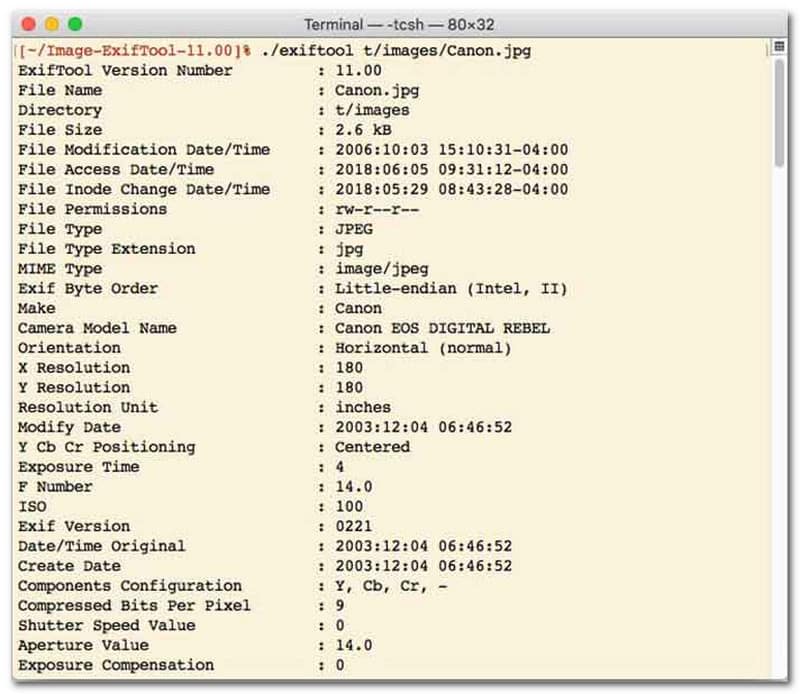
สำหรับผู้ใช้ที่ต้องการเปลี่ยนวันที่ของไฟล์ผ่านอินเทอร์เฟซบรรทัดคำสั่ง (CLI) ExifTool คือมาตรฐานทองคำสำหรับการจัดการไฟล์ที่แม่นยำเป็นพิเศษ เครื่องมือเปลี่ยนวันที่ของไฟล์อเนกประสงค์นี้รองรับไฟล์หลากหลายประเภท รวมถึงรูปภาพ วิดีโอ เอกสาร และไฟล์เสียง นอกเหนือจากการแก้ไขวันที่สร้างและแก้ไขแล้ว ExifTool ยังช่วยให้คุณคัดลอกข้อมูลเมตาของเวลาจากไฟล์หนึ่งไปยังอีกไฟล์หนึ่งได้อย่างราบรื่น ทำให้มั่นใจได้ว่าคลังสื่อทั้งหมดของคุณจะซิงโครไนซ์อย่างสมบูรณ์แบบโดยไม่ต้องยุ่งยาก
คุณสมบัติหลักของ ExifTool:
- อ่านและแก้ไขเวลาประทับของระบบไฟล์ได้อย่างราบรื่น
- คัดลอกวันที่ระหว่างเลเยอร์เมตาเดต้าที่แตกต่างกันโดยสิ้นเชิง
- รองรับการคำนวณวันที่และเวลาขั้นสูงเพื่อช่วยให้คุณเปลี่ยนวันที่ของไฟล์เป็นชุดได้
- ดึงข้อมูลวันที่และสื่อจากไฟล์ทุกประเภท
4. BulkFileChanger
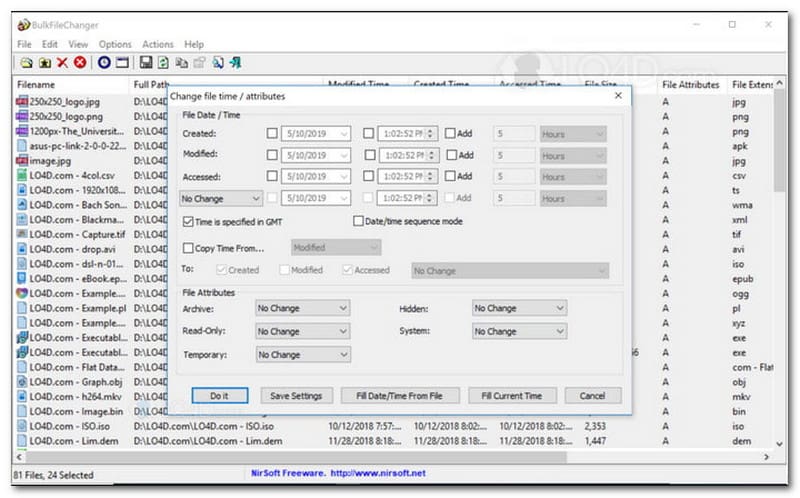
BulkFileChanger เป็นยูทิลิตี้เปลี่ยนวันที่ไฟล์ขนาดเล็กและประสิทธิภาพสูง ออกแบบมาเพื่อการจัดการเวลาประทับไฟล์บน Windows ได้อย่างง่ายดาย ช่วยให้ผู้ใช้สามารถแก้ไขคุณลักษณะวันที่และเวลาต่างๆ ได้อย่างรวดเร็ว รวมถึงเวลาสร้าง เวลาแก้ไข และเวลาเข้าถึงล่าสุด สำหรับไฟล์แทบทุกประเภท ตั้งแต่เอกสารและรูปภาพไปจนถึงวิดีโอ แม้ว่าความสามารถในการทำงานข้ามรูปแบบและความเร็วจะทำให้มันเป็นโปรแกรมเปลี่ยนวันที่ไฟล์ที่ยอดเยี่ยมสำหรับการจัดระเบียบไฟล์ดิจิทัล แต่การใช้งานนั้นจำกัดเฉพาะระบบปฏิบัติการ Windows เท่านั้น หมายความว่าผู้ใช้ macOS และ Linux จะต้องมองหาโปรแกรมอื่น
คุณสมบัติหลักของ BulkFileChanger:
- แก้ไขวันที่สร้างไฟล์ วันที่แก้ไข และวันที่เข้าถึงล่าสุดของไฟล์
- รองรับไฟล์เกือบทุกประเภทได้อย่างราบรื่น รวมถึงเอกสาร รูปภาพ และวิดีโอ
- โดดเด่นด้วยดีไซน์น้ำหนักเบาที่ช่วยให้สามารถอัปเดตข้อมูลเมตาจำนวนมากได้อย่างรวดเร็วเป็นพิเศษ
- เพิ่มหรือดึงข้อมูลวัน ชั่วโมง นาที และวินาทีที่ต้องการ
5. คุณสมบัติเวทย์มนตร์
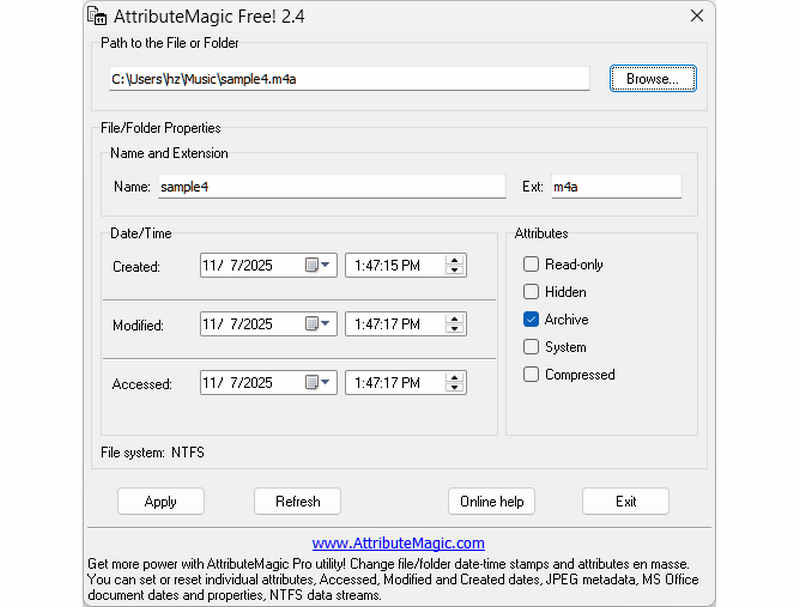
AttributeMagic ไม่ได้เป็นเพียงแค่โปรแกรมเปลี่ยนวันที่ไฟล์ธรรมดา แต่ยังนำเสนอโซลูชันขั้นสูงสำหรับการจัดการคุณสมบัติของทั้งโฟลเดอร์และไฟล์ ยูทิลิตี้ที่ครอบคลุมนี้ช่วยให้สามารถแก้ไขเวลาประทับได้อย่างแม่นยำ ทำให้ผู้ใช้สามารถเขียนทับวันที่สร้าง วันที่แก้ไข และวันที่เข้าถึงล่าสุดได้อย่างง่ายดาย นอกเหนือจากความสามารถในการเปลี่ยนวันที่ไฟล์โดยเฉพาะแล้ว AttributeMagic ยังให้การปรับแต่งเชิงลึกเกี่ยวกับคุณสมบัติของระบบไฟล์เพื่อให้เหมาะกับความต้องการในการจัดเก็บข้อมูลเฉพาะของคุณ ในขณะที่เวอร์ชันฟรีมีฟังก์ชันการแก้ไขเวลาประทับที่จำเป็น การอัปเกรดเป็นเวอร์ชันพรีเมียมจะปลดล็อกการควบคุมเมตาเดต้าขั้นสูงและคุณสมบัติการทำงานอัตโนมัติที่มีประสิทธิภาพยิ่งขึ้น
คุณสมบัติหลักของ AttributeMagic:
- แก้ไขหรือซ่อนเวลาการสร้าง การแก้ไข และการเข้าถึงครั้งล่าสุด
- เปลี่ยนวันที่ของไฟล์ ไม่ว่าจะเป็นไฟล์เดียวหรือทั้งโฟลเดอร์ไฟล์
- เพิ่ม ลด หรือเลื่อนเวลาประทับของไฟล์ไปข้างหน้าหรือข้างหลังได้อย่างง่ายดาย
- ตั้งค่า รีเซ็ต หรือกลับค่าคุณสมบัติของระบบไฟล์หลัก เช่น อ่านอย่างเดียว ซ่อนไว้ และระบบ
ส่วนที่ 2 การเปรียบเทียบโปรแกรมเปลี่ยนวันที่ไฟล์ทั้ง 5 โปรแกรม
| ผลิตภัณฑ์ | แพลตฟอร์มที่รองรับ | หน้าจอผู้ใช้ | การแก้ไขแบบกลุ่ม | ความสามารถพิเศษ |
| AVide Video Converter | วินโดวส์และโอเอสมา | ทันสมัย สะอาดตา และลื่นไหล | ใช่ (เร็วมาก) | ชุดโปรแกรมครบวงจร: แปลงวิดีโอ 8K, คัดลอกข้อมูลจาก DVD, แก้ไขข้อมูลเมตา, สร้าง MV/สไลด์โชว์ |
| โปรแกรมเปลี่ยนวันที่ไฟล์ (NirSoft) | เฉพาะ Mac เท่านั้น | ล้าสมัย (เว็บ/ส่วนติดต่อผู้ใช้แบบเก่า) | ถูก จำกัด | ไม่มี (สำหรับวัตถุประสงค์เดียว) |
| เครื่องมือเอ็กซิฟ | Windows, macOS, Linux | ใช้งานผ่านบรรทัดคำสั่งเท่านั้น (ไม่มี GUI) | ใช่ (แต่ต้องใช้สคริปต์ที่ซับซ้อน) | การอ่าน/เขียนเมตาเดตาเท่านั้น |
| ตัวเปลี่ยนไฟล์จำนวนมาก | เฉพาะ Windows เท่านั้น | ยูทิลิตี้ Windows คลาสสิก | ใช่ | การปรับแต่งคุณสมบัติไฟล์พื้นฐานของ Windows |
| แอตทรีทแมจิก | เฉพาะ Windows เท่านั้น | แข็ง / ซับซ้อน | ใช่ | การจัดการแฟล็กระบบไฟล์เท่านั้น |
ส่วนที่ 3 วิธีการเปลี่ยนข้อมูลไฟล์ใน AVAide Video Converter
คุณเคยจำเป็นต้องเปลี่ยนวันที่สร้างไฟล์เพื่อจัดระเบียบไฟล์ดิจิทัลของคุณให้ดีขึ้นหรือไม่? คุณสามารถทำได้โดยใช้ AVide Video Converter- อ่านต่อเพื่อเรียนรู้วิธีเปลี่ยนวันที่ที่สร้างในไฟล์เพื่อช่วยคุณจัดการไฟล์
ขั้นตอนที่ 1ดาวน์โหลดและติดตั้ง AVAide Video Converter จากเว็บไซต์อย่างเป็นทางการเพื่อการเข้าถึงที่สมบูรณ์

ดาวน์โหลดฟรี สำหรับ Windows 7 หรือใหม่กว่า
 ดาวน์โหลดอย่างปลอดภัย
ดาวน์โหลดฟรี สำหรับ Mac OS X 10.13 หรือใหม่กว่า
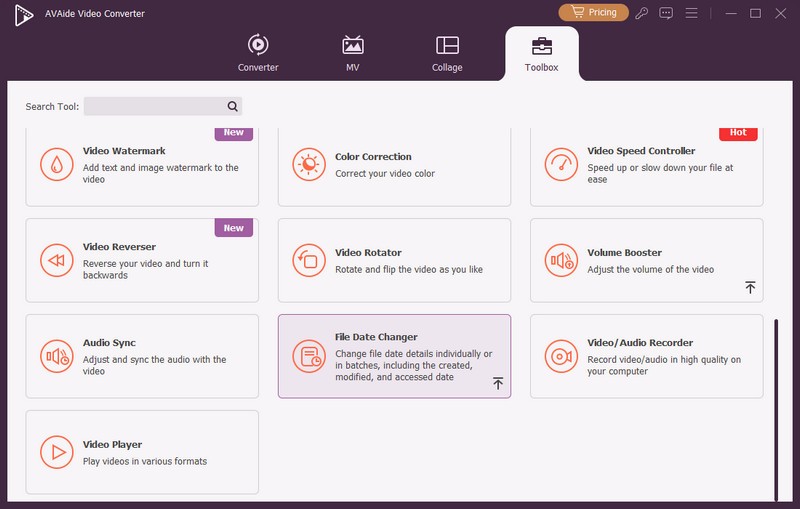
ดาวน์โหลดอย่างปลอดภัยขั้นตอนที่ 1เปิดโปรแกรมบนคอมพิวเตอร์ของคุณเพื่อเริ่มต้น มุ่งหน้าไปที่ กล่องเครื่องมือ แท็บเพื่อเข้าถึงคุณสมบัติต่างๆ เลื่อนเมาส์ลงมองหา ไฟล์เปลี่ยนวันที่ ในตัวเลือกต่างๆ แล้วคลิก เป็นคุณสมบัติที่คุณจะใช้เพื่อเปลี่ยนรายละเอียดวันที่ของไฟล์
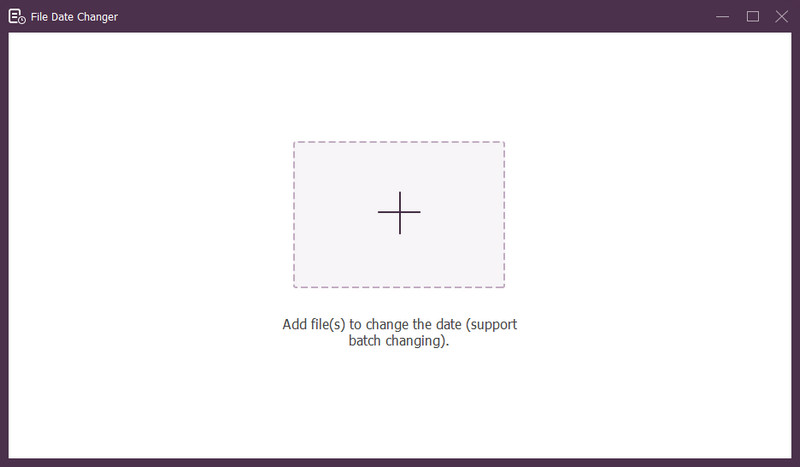
ขั้นตอนที่ 3กด (+) เพื่อนำเข้าไฟล์ อาจเป็นไฟล์เสียง รูปภาพ และเสียง คุณสามารถนำเข้าไฟล์ได้มากกว่าหนึ่งไฟล์เพื่อเปลี่ยนรายละเอียดไฟล์
ขั้นตอนที่ 4คุณสามารถเริ่มเปลี่ยนวันที่ได้เมื่อนำเข้าไฟล์ทั้งหมดแล้ว คุณสามารถเปลี่ยนวันที่สร้าง แก้ไข และเข้าถึงได้ตามลำดับ โดยคลิกที่รายการจนกระทั่ง ลูกศร ปรากฏขึ้นเพื่อแสดงให้แก้ไข
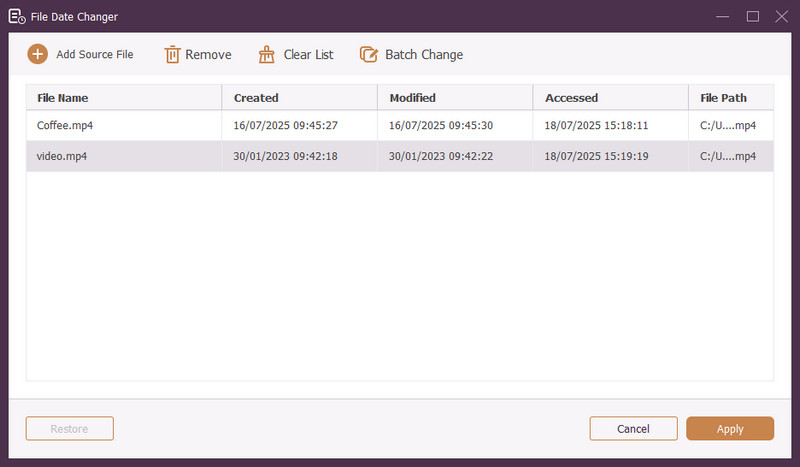
ขั้นตอนที่ 5หลังจากแก้ไขวันที่ของไฟล์ทั้งหมดแล้ว ให้คลิกที่ นำมาใช้ ปุ่มเพื่อยืนยันการเปลี่ยนแปลง หลังจากใช้การเปลี่ยนแปลงแล้ว ให้ตรวจสอบรายละเอียดข้อมูลไฟล์ที่อัปเดตเพื่อให้แน่ใจว่าถูกต้อง
ส่วนที่ 4. คำถามที่พบบ่อยเกี่ยวกับโปรแกรมเปลี่ยนวันที่ไฟล์ที่ดีที่สุด
ฉันจะดูข้อมูลวันที่ของไฟล์ได้อย่างไร?
หากคุณต้องการตรวจสอบว่าไฟล์ถูกสร้างขึ้นหรือแก้ไขครั้งล่าสุดเมื่อใด คุณสามารถทำได้บนคอมพิวเตอร์ของคุณ กรุณาค้นหาไฟล์ คลิกขวาที่ไฟล์ และเลือก Properties จากนั้นคุณจะสามารถดูรายละเอียดทั้งหมดเกี่ยวกับไฟล์ได้ ซึ่งรวมถึงวันที่สร้างและแก้ไขด้วย
จะมีใครรู้บ้างว่าฉันเปลี่ยนวันที่ของไฟล์เมื่อไร?
เลขที่! การเปลี่ยนวันที่ของไฟล์จะไม่ทิ้งร่องรอยใดๆ ดังนั้นจะไม่มีใครรู้ว่าคุณทำการเปลี่ยนแปลงเมื่อใด
สาเหตุที่วันที่และเวลาหายไปจากไฟล์คืออะไร?
มีเหตุผลบางประการที่ทำให้วันที่และเวลาหายไปจากไฟล์ อาจเกิดขึ้นได้เมื่อคุณดาวน์โหลดไฟล์แล้วสูญเสียข้อมูลบางส่วนเนื่องจากการเชื่อมต่ออินเทอร์เน็ตไม่ดี บางครั้งอาจเป็นเพราะเว็บไซต์ที่คุณดาวน์โหลดไฟล์
ฉันสามารถเรียกคืนวันที่สร้างไฟล์ที่แก้ไขได้หรือไม่
ใช่! คุณสามารถคืนค่าวันที่เดิมได้โดยการตั้งค่ากลับเป็นค่าเริ่มต้นด้วยตนเอง เป็นวิธีเดียวที่จะดึงข้อมูลวันที่สร้างไฟล์
การเปลี่ยนวันที่และเวลาของไฟล์ส่งผลต่อความสมบูรณ์ของไฟล์หรือเนื้อหาหรือไม่
เลขที่! การเปลี่ยนวันที่และเวลาของไฟล์จะไม่ส่งผลต่อเนื้อหาหรือความสมบูรณ์ โดยจะเปลี่ยนแปลงเฉพาะข้อมูลเมตา เช่น วันที่สร้างและแก้ไข มันทำให้ไฟล์จริงไม่เปลี่ยนแปลง
ได้แล้ว! คุณได้เรียนรู้แล้ว วิธีเปลี่ยนวันที่ที่สร้างในไฟล์ซึ่งสามารถเป็นประโยชน์ได้ด้วยเหตุผลหลายประการ เพื่อประสบการณ์การใช้งานที่คล่องตัวและเป็นมิตรกับผู้เริ่มต้นมากขึ้น ลองใช้ AVAide Video Converter เป็นตัวเปลี่ยนวันที่ของไฟล์ที่ใช้งาน เป็นตัวเลือกที่ดีที่สุดสำหรับการจัดการไฟล์ดิจิทัลของคุณ ลองใช้และแบ่งปันความคิดของคุณด้านล่าง!
เกี่ยวกับผู้เขียน

ตัวแปลงสื่อที่ครอบคลุมที่สุดในการแปลงวิดีโอและเสียงโดยไม่สูญเสียคุณภาพ