Lucrul cu videoclipuri lungi prezintă adesea o dilemă frustrantă: cum mențineți o calitate video impecabilă fără a ocupa tot spațiul de stocare? Aici intervin standardele de compresie video. Dacă doriți să echilibrați dimensiunea videoclipului, calitatea și compatibilitatea dispozitivelor, veți fi inevitabil nevoit să alegeți între H.264 (AVC) și H.265 (HEVC).
În acest ghid complet, vom analiza principalele diferențe dintre H.264 și HEVC, vă vom ajuta să decideți care se potrivește fluxului dvs. de lucru și vă vom arăta cum să convertiți între ele fără probleme, fără a pierde din calitate.
Partea 1. HEVC vs H264: Ce sunt acestea?
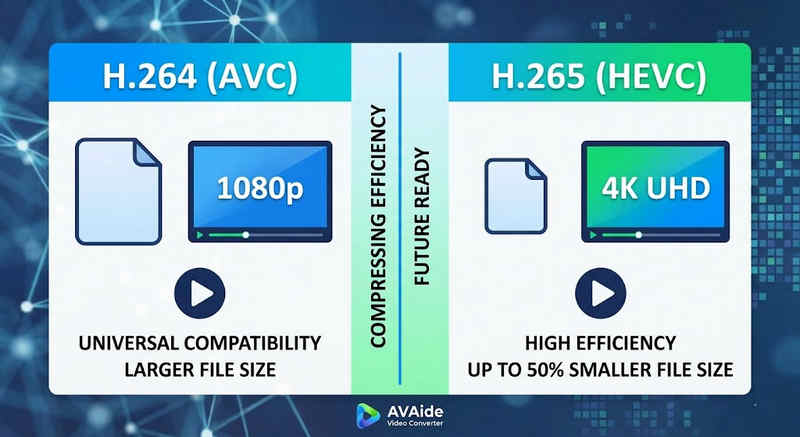
Răspunsul scurt: H.264 (AVC) oferă compatibilitate universală și funcționează pe aproape orice dispozitiv, dar creează fișiere mai mari. H.265 (HEVC) oferă compresie superioară, reducând dimensiunile fișierelor cu până la 50% cu o calitate vizuală identică, dar necesită o putere de procesare mai mare și are suport limitat pe hardware-ul mai vechi.
1. Ce este codecul H.264 (AVC)?
Introdus sub numele de Advanced Video Coding (AVC), H.264 este regele domniei în ceea ce privește compatibilitatea video. Este standardul industriei pentru streaming online, înregistrare mobilă și redare video zilnică. Deoarece necesită foarte puțină putere de procesare pentru decodare, videoclipurile H.264 se redă fără probleme pe aproape orice dispozitiv digital imaginabil, de la smartphone-uri vechi la televizoare inteligente moderne.
2. Ce este codecul H.265 (HEVC)?
Codarea video de înaltă eficiență (HEVC), sau H.265, este succesorul direct al H.264. A fost special conceput pentru a gestiona cerințele masive de date ale conținutului 4K, 8K și VR. HEVC utilizează algoritmi mai avansați pentru a comprima datele video mult mai eficient decât predecesorul său, oferind imagini clare, de înaltă rezoluție, la fișiere cu dimensiuni de până la 50% mai mici. Cu toate acestea, această eficiență are un cost: necesită hardware modern pentru a procesa fără întârzieri.
H.265 vs. H.264: Tabel comparativ rapid
| Caracteristici | H.264 (AVC) | H.265 (HEVC) |
| Formate acceptate | m2ts, evo, 3gp, f4v, mkv, mp4, qtff, asf, avi, mxf, ps, ts | mxf, ps, ts, 3gp, mkv, mp4, qtff, asf, avi |
| Eficiența compresiei | Moderat (fișiere de dimensiuni mai mari) | Superior (25-50% fișiere mai mici) |
| Calitate video | Excelent pentru 1080p | Optimizat pentru 4K, 8K și HDR |
| Compatibilitate dispozitiv | Universal (99% de dispozitive) | Limitat (PC-urile vechi pot să nu fie compatibile) |
| Puterea de procesare | Scăzut (Redare/randare rapidă) | Ridicat (Necesită procesoare/GPU-uri mai noi) |
| Cazuri de utilizare ideale | Streaming web, rețele sociale, dispozitive vechi | Filmări 4K cu dronă, videoclipuri cinematografice pentru iPhone, arhivare care economisește spațiu |
Partea a 2-a. Când să alegeți HEVC vs. H.264
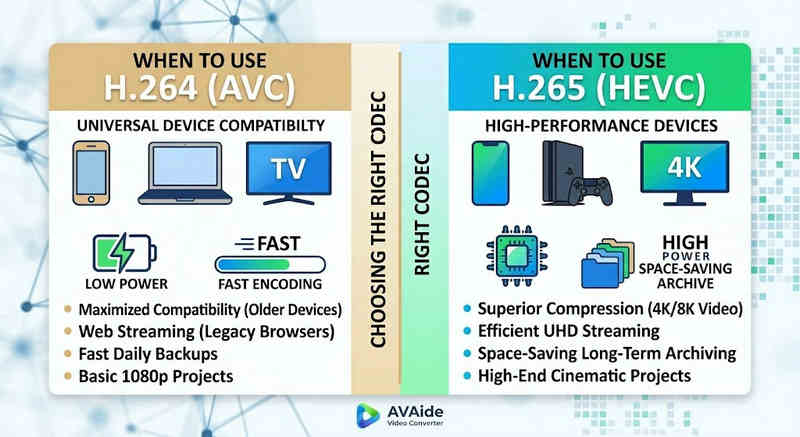
Alegerea codecului potrivit depinde în întregime de obiectivele tale specifice. Iată de ce ai putea avea nevoie de unul în detrimentul celuilalt:
De ce aveți nevoie de HEVC (H.265):
- Economii maximizate de stocare: Dacă faceți backup la videoclipuri lungi sau biblioteci 4K masive, HEVC acționează ca un reducător natural al dimensiunii videoclipurilor, eliberând jumătate din spațiul de pe hard disk.
- Optimizarea lățimii de bandă: HEVC necesită mult mai puțină lățime de bandă pentru streaming, ceea ce îl face ideal pentru redare 4K fluidă chiar și pe conexiuni la internet mai lente, fără buffering.
- Pregătire pentru viitor: Pe măsură ce industria se îndreaptă către conținut ultra-high definition (UHD) și VR, HEVC garantează că videoclipurile tale rămân de înaltă calitate și compatibile cu platformele de generație următoare.
De ce aveți nevoie de H.264 (AVC):
- Redare și editare impecabile: Dacă software-ul de editare video are întârzieri sau playerul media generează o eroare de tip codec neacceptat
- Compatibilitate și partajare fără griji: H.264 este codecul video cu cea mai mare compatibilitate. Indiferent dacă doriți să partajați videoclipurile cu prietenii, NAS-ul sau serverele media precum Plex sau Kodi, H.264 poate asigura partajarea și redarea fără probleme.
Partea 3. Cum să convertiți ușor între HEVC și H.264
În cazul transferului de videoclipuri din și către formatele HEVC(H.265) și H.264, AVaide Convertor video o face mai bine decat restul. Oferă o interfață eficientă și ușor de utilizat, care nu compromite calitatea conversiei și acceptă diverse formate. Indiferent de motiv, ar putea fi pentru eficiența mai mare a HEVC sau pentru adoptarea mai largă a H264, AVAide vă permite să comutați înainte și înapoi între cele două fără probleme.
Procedura detaliata:
Pasul 1Obțineți AVaide Video Converter
Descărcați, instalați și lansați AVaide Convertor video pe computerul tău cu Windows sau Mac.

DESCĂRCARE GRATUITĂ Pentru Windows 7 sau o versiune ulterioară
 Descărcare sigură
DESCĂRCARE GRATUITĂ Pentru Mac OS X 10.13 sau o versiune ulterioară
Descărcare sigurăPasul 2Adăugați videoclipurile dvs. la AVAide Video Converter
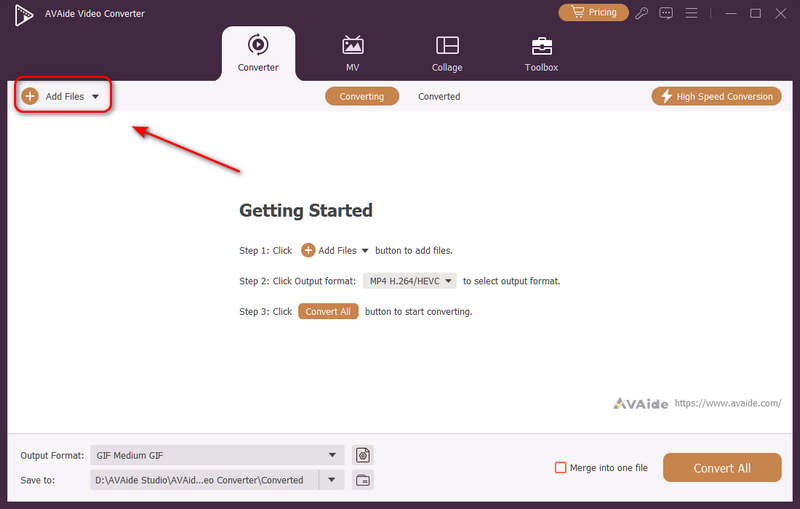
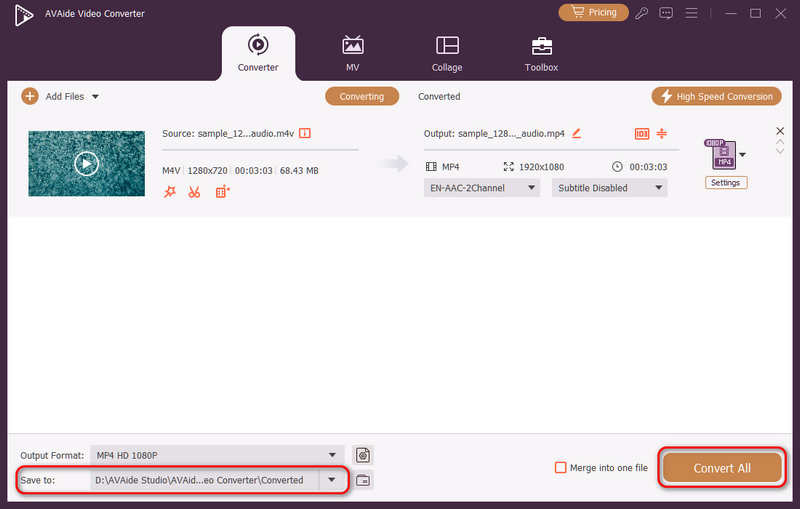
Puteți adăuga mai multe fișiere video și puteți face o conversie în lot. Faceți clic pe Adăugați fișiere butonul din stânga sus pentru a importa fișierele video.
Pasul 3Alegeți codecul H.264 sau H.265
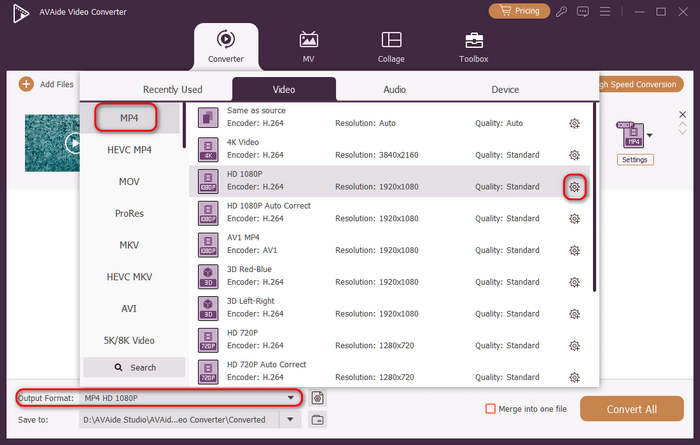
Apasă pe Format de iesire butonul meniului derulant din partea stângă jos. Apoi, puteți selecta mai întâi formatul video dorit. Apoi, faceți clic pe Profil personalizat buton (cu pictogramă roată dințată) în bara de presetări video.
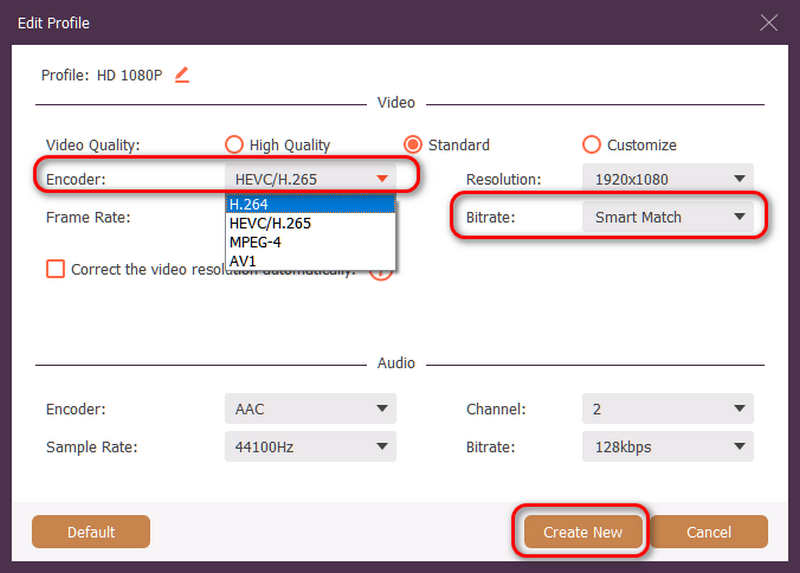
Apoi, în acest panou, puteți face clic pe Codificator buton derulant pentru a selecta H.264 sau HEVC/H.265 codec. Dacă doriți să modificați calitatea video, puteți ajusta Rata de bițiDar recomandăm Potrivire inteligentă pentru a asigura compatibilitatea. Faceți clic pe Creaza nou pentru a salva configurația.
Pasul 4Începeți recodificarea video
În cele din urmă, puteți face clic pe Salveaza in butonul derulant pentru a selecta folderul de ieșire dorit și faceți clic pe Convertiți tot pentru a schimba codecul video la H.264 sau H.265.
Partea 4. Întrebări frecvente despre H.265 și H.264
Care este principala diferență dintre NVENC H.264 și NVENC HEVC?
Principala diferență constă în eficiența compresiei și optimizarea generării hardware. NVENC HEVC (H.265) oferă o compresie cu până la 50% mai bună decât NVENC H.264 (AVC). Aceasta înseamnă că poate produce exact aceeași calitate vizuală la jumătate din rata de biți (și jumătate din dimensiunea fișierului), ceea ce îl face alegerea superioară pentru arhivarea videoclipurilor 4K sau streaming pe lățime de bandă limitată.
Ce este un encoder modular multicanal HEVC/H.264?
Un encoder modular multicanal HEVC/H.264 este un dispozitiv hardware de nivel enterprise, conceput pentru a comprima și transmite simultan mai multe fluxuri video. Spre deosebire de encoderele software pentru consumatori, acesta dispune de un design modular (stil blade), permițând utilizatorilor să schimbe la cald sau să actualizeze plăcile de codificare hardware în funcție de amploarea proiectului lor. Acceptă atât H.264, cât și HEVC/H.265.
Ce este H.265+?
H.265+ (cunoscut și sub numele de Smart H.265+) este o tehnologie avansată de compresie video, dezvoltată de Hikvision, optimizată special pentru monitorizarea securității și a supravegherii.
Acum se poate folosi această analiză cuprinzătoare a HEVC și H.264 pentru a determina ce codec se potrivește cel mai bine cerințelor dvs. video. Indiferent dacă doriți H.264 și vă concentrați pe compatibilitate sau doriți HEVC și vizați o compresie mai bună, ambele codecuri au avantaje. AVAide Video Converter oferă o soluție elegantă și eficientă pentru a rezolva această problemă, oferind rezultate de calitate excelentă, fiind în același timp rapid. AVAide face sarcina de comprimare video și conversie ușoară cu interfețele sale simple și funcțiile avansate.
DESPRE AUTOR

Setul dvs. complet de instrumente video care acceptă peste 350 de formate pentru conversie la calitate fără pierderi.
Convertiți videoclipul