Facebook Messenger procesează datele vocale într-un mod care previne accesul direct; de aceea majoritatea persoanelor încearcă să descărcați fișiere audio de pe Facebook Messenger fără succes. Fișierele sunt integrate și, în majoritatea cazurilor, necesită proceduri specifice pentru extragere și utilizare. Cunoașterea acestei organizări previne greșelile și pierderile de timp. În acest articol, veți afla de ce ar trebui să aveți aceste limite, cum să stocați audio pe diverse dispozitive și ce trebuie să faceți atunci când fișierele nu funcționează corect.
Partea 1. De ce nu poți descărca fișiere audio de pe Facebook Messenger
Conținutul audio de pe Facebook Messenger nu este ușor de descărcat, deoarece nu este conceput ca o platformă de partajare a fișierelor, ci mai degrabă ca un serviciu de redare în aplicație. Messenger stochează mesajele vocale pe serverele sale și le transmite atunci când apeși butonul de redare. Aceasta implică faptul că fișierul audio nu este livrat ca un simplu fișier descărcabil în format MP3 sau WAV.
O altă problemă cheie este formatul și structura fișierelor. Mesajele vocale sunt adesea salvate în formate comprimate, cum ar fi AAC, într-un container MP4. Aceste fișiere sunt ascunse în spatele interfeței Messenger, deci nu vedeți un buton direct de „salvare” sau „descărcare”. Sandboxing-ul este aplicat și pe dispozitivele mobile, unde aplicația împiedică utilizatorul să acceseze directoarele interne de fișiere unde este stocat temporar sunetul.
Adăugarea controalelor de securitate și confidențialitate adaugă un nivel suplimentar. Pe desktop, sunetul este încărcat prin scripturi web, ceea ce face mai dificilă găsirea fișierului original fără instrumente pentru dezvoltatori. Android și iOS nu permit aplicațiilor să extragă cu ușurință fișiere media stocate pe dispozitivele mobile, ceea ce împiedică extragerea ușoară în niciunul dintre sisteme.
Comportamentul browserului și al aplicațiilor joacă, de asemenea, un rol. Pe desktop, sunetul se încarcă prin scripturi web, ceea ce face mai dificilă localizarea fișierului original fără a utiliza instrumente pentru dezvoltatori. Pe mobil, atât Android, cât și iOS restricționează modul în care aplicațiile partajează fișierele media stocate cu utilizatorul, ceea ce blochează extragerea simplă.
Pe scurt, dificultatea provine din trei factori principali: livrarea bazată pe streaming, formatele de fișiere ascunse și restricțiile la nivel de sistem. Înțelegerea acestor limite este esențială înainte de a trece la metodele care vă permit efectiv să salvați sunetul și se aplică... descărcarea și a videoclipurilor de pe Facebook.
Partea 2. Descărcați fișiere audio de pe Facebook Messenger pe PC și Mac
Dacă vrei să știi cum să descarci fișiere audio din Facebook Messenger pe PC și Mac, o soluție convenabilă este un înregistrator de ecran precum AVaide Screen RecorderÎntrucât Messenger nu permite descărcări directe, acest instrument vă permite să înregistrați sunetul în timp ce este redat la o calitate înaltă, fără întârziere. Este ușor de transportat, prietenos cu utilizatorul și acceptă o gamă largă de formate, inclusiv MP3, M4A și FLAC, care pot fi redate cu ușurință. De asemenea, puteți gestiona și organiza fișierele înregistrate în cadrul software-ului, ceea ce îl face o opțiune fiabilă pentru salvarea audio din Messenger fără a vă confrunta cu sisteme de fișiere ascunse sau restricții.
Pasul 1Descărcați înregistratorul de ecran pentru dispozitivul ales făcând clic pe butonul corespunzător aici. Apoi urmați imediat instalarea și lansați instrumentul.

DESCĂRCARE GRATUITĂ Pentru Windows 7 sau o versiune ulterioară
 Descărcare sigură
DESCĂRCARE GRATUITĂ Pentru Mac OS X 10.13 sau o versiune ulterioară
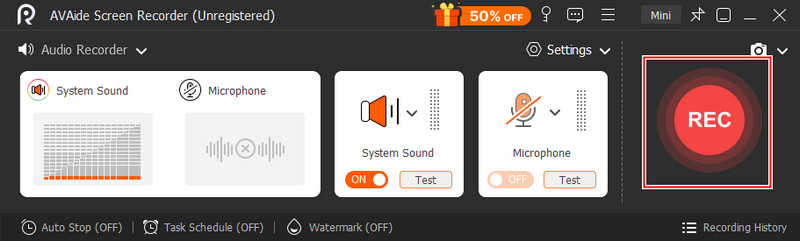
Descărcare sigurăPasul 2Apoi, configurați Inregistrare audio și activați Înregistrare sistem ca să poți înregistra audio pe PC. Deschide Facebook Messenger, accesează Chat-uri și găsește înregistrarea audio pe care vrei să o salvezi.
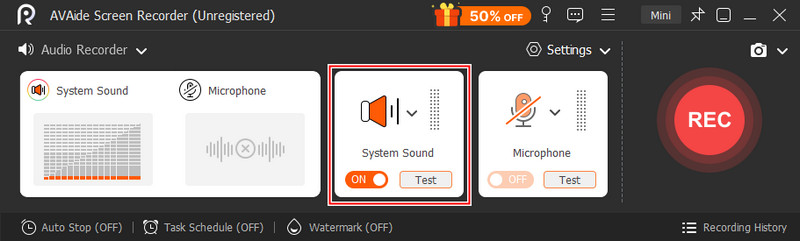
Pasul 3Apoi, faceți clic pe REC pentru a începe înregistrarea, apoi redați clipul audio în Messenger. După ce ați terminat de înregistrat, faceți clic pe butonul Stop buton.
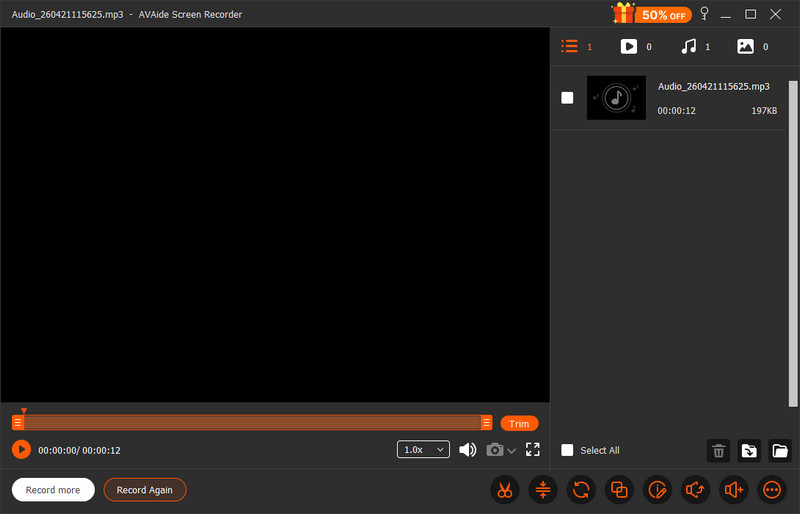
Pasul 4Faceți o previzualizare rapidă a înregistrării pe care ați făcut-o făcând clic pe juca butonul și acum aveți înregistrarea audio din Messenger salvată pe PC.
Partea 3. Descărcați fișiere audio de pe Facebook Messenger pe Android și iOS
Dacă ai nevoie de un program de descărcare audio de încredere pentru Facebook Messenger pe mobil, utilizarea versiunii simple a browserului de pe Facebook este o soluție ingenioasă. Messenger criptează fișierele audio în cadrul aplicației, deși această abordare le dezvăluie ca fișiere .mp4 simple, permițând descărcări fără aplicații suplimentare. Este deosebit de utilă atunci când ai nevoie de o soluție rapidă, fără instalare. Deși implică utilizarea datelor mobile și câțiva pași manuali, îți oferă acces direct la fișier într-un format care poate fi salvat, găsit și redat cu ușurință pe dispozitiv.
Pasul 1Dezactivați Wi-Fi-ul și comutați la datele mobile, apoi deschideți browserul mobil și accesați free.facebook.comConectați-vă la contul dvs.
Pasul 2Apasă pe Mesaje Apăsați fila de sub bara de căutare și deschideți conversația cu clipul audio.
Pasul 3Localizați mesajul audio, care apare ca un link care se termină în .mp4, apoi atingeți linkul.
Pasul 4Selectați opțiunea de descărcare, așteptați finalizarea și verificați managerul de descărcări al browserului pentru a accesa și reda fișierul.
Partea 4. De ce fișierele audio descărcate din Messenger nu pot fi redate
Este posibil ca unele fișiere să nu poată fi redate din cauza unor probleme de format sau compatibilitate, chiar și după ce ați aflat cum să descărcați fișiere audio de pe Facebook Messenger. Fișierele audio din Messenger pot fi stocate într-un container MP4, pe care multe playere implicite nu îl pot citi complet. Fișierul audio este AAC, iar rezultatul va afișa cel mai probabil „Acest fișier nu este compatibil cu QuickTime„dacă sunteți utilizator de Mac, în special atunci când fișierul a fost extras sau înregistrat incorect. Codecurile lipsă sau extensiile de fișiere greșite pot cauza, de asemenea, erori de redare în unele cazuri”
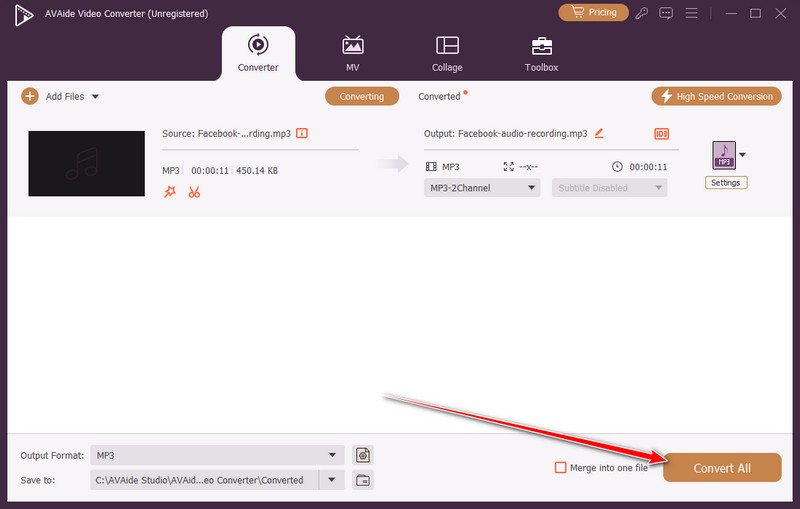
Cea mai ușoară metodă este să convertiți fișierul cu AVaide Convertor video, ceea ce face totul rapid și sigur. De asemenea, poate gestiona formate precum MP3 și WAV, care sunt compatibile cu o gamă mai largă de dispozitive fără a sacrifica calitatea audio, astfel încât fișierele audio descărcate din Messenger pot fi redate și gestionate cu ușurință.
Pasul 1Descărcați convertorul multimedia pe computer făcând clic pe butonul de descărcare de aici, apoi urmați procesul de instalare înainte de a-l putea deschide.
DESCĂRCARE GRATUITĂ Pentru Windows 7 sau o versiune ulterioară
Descărcare sigurăDESCĂRCARE GRATUITĂ Pentru Mac OS X 10.13 sau o versiune ulterioară
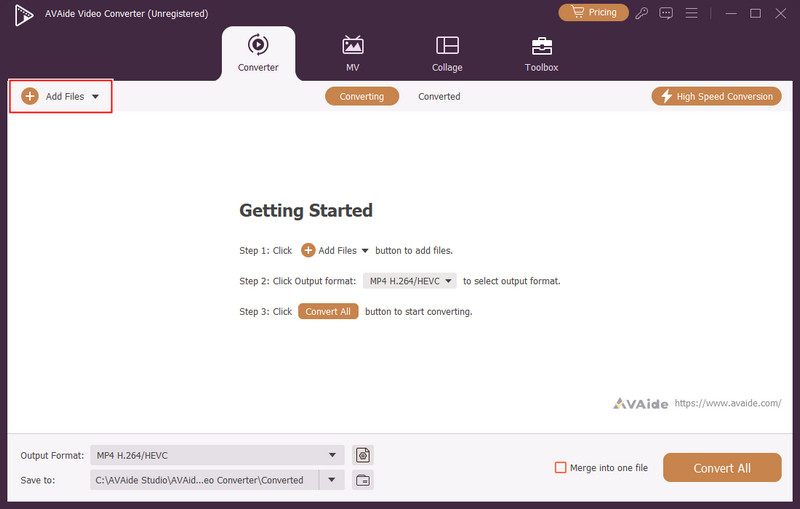
Descărcare sigurăPasul 2După aceea, faceți clic pe + și încarcă fișierul audio descărcat din Messenger în aplicație.
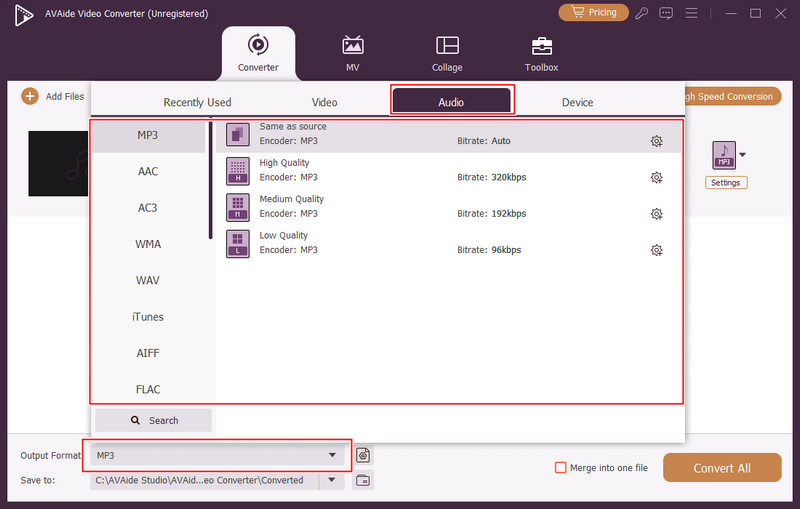
Pasul 3Apoi, faceți clic pe scapă jos și selectați Audio format din opțiuni. Apoi, selectați din vasta bibliotecă de formate audio disponibile aici pentru a face fișierele audio compatibile, cum ar fi MP3.
Pasul 4În cele din urmă, faceți clic pe Convertiți tot butonul pentru a începe procesul de conversie.
Poate părea că descărcarea mesajelor vocale nu este atât de simplă, totuși, odată ce înveți cum să descarci fișiere audio în Facebook Messenger, va fi mult mai ușor să gestionezi această problemă. Fie că este vorba de un înregistrator desktop, o soluție temporară pentru browser pe un dispozitiv mobil sau un convertor pentru corectarea problemelor de redare, toate acestea abordează o anumită deficiență a platformei. Secretul este să selectezi metoda care se potrivește gadgetului și cerințelor tale. Poți salva, accesa și reda cu ușurință fișiere audio din Messenger fără probleme, cu instrumentele și pașii potriviți.
DESPRE AUTOR

Înregistrați ecranul, sunetul, camera web, jocul, întâlnirile online, precum și ecranul iPhone/Android pe computer.
Inregistrare audio
- Înregistrați audio de pe computer
- Cel mai bun software de înregistrare audio
- Înregistrați apelurile iPhone
- Studioul de înregistrări FL
- Cum să înregistrezi podcast
- Descărcați Soundgasm
- Descărcați melodii Audiomack
- Salvează muzică de pe Deezer
- SoundCloud în MP3
- Descărcați X Space Audio
- Descărcare gratuită de muzică