Let's Enhance is among the most reliable tools you can access to upscale, sharpen, and deblur your images effectively. It is perfect for content creators, designers, professionals, and other users who want to achieve high-quality images. With that, if you want to dig deeper into the tool, you must read this review, as we offer all the information you need. After that, we will also give you another tool you can use as an alternative for better image upscaling. Thus, read this review and learn more about the discussion.
Part 1. An Overview of Let's Enhance
Let's Enhance AI is an AI-driven tool that can enhance image quality by sharpening, upscaling, and restoring details. The tool can help you transform low-resolution and blurry images into high-resolution, print-ready output. Plus, it is widely used by marketers, content creators, designers, and e-commerce businesses to make the product photo look professional. Let's Enhance can automatically fix color, enhance textures, and remove compression artifacts without over-processing. Thus, in terms of sharpening, restoring, deblurring, and upscaling images, there is no doubt that this tool is among the best choices you can use.
Core Features
1. AI Upscaling
The main feature of the tool is to upscale and improve the quality of your image. What we like here is that you can upscale your photo up to 4 times better when using the free version and up to 16 times better on the paid version. Plus, the process of upscaling your image is simple, thanks to its comprehensive user interface. The best part here is that the upscaling method, the tool can also automatically deblur, sharpen, and enhance the overall appearance of your photo, making it more reliable.
2. Color Correction
Another good feature the AI image upscaler can offer is its Color Correction. This feature is perfect if you want to adjust the tones of your photo. It can also fix the faded and distorted color, resulting in a better image output.
3. Reduce Image Noise
If you want to get a neat photo, you can also rely on the tool's image noise reducer. This feature is ideal when dealing with image noise and grain. What we like here is that during the upscaling process, the tool can automatically reduce the noise and grain from the image.
4. Batch Processing
The batch processing feature is available on the Let's Enhance tool. This feature is ideal if you want to upscale more than one image. With that, if you want to save more time while dealing with your images, look no further than Let's Enhance IO.
How Let's Enhance Work?
When upscaling an image, Let's Enhance uses AI algorithms to analyze the photo's structure, colors, and textures. It then intelligently adds missing pixels and restores fine details, making the image sharper and more realistic without distortion. Finally, the enhanced version is delivered at a higher resolution, suitable for print or digital use.
Use Cases for Let's Enhance
Here are some use cases for the Let's Enhance tool.
- Improve the image quality - If you want to improve the quality/resolution of the image, it is ideal to use the tool since it can upscale the image up to 16 times better.
- Print media - When printing images, such as posters, flyers, magazines, and more, using the tool is perfect since it ensures the best image output.
- Content creators - The tool is ideal for content creators since it can enhance visuals for blogs, digital art projects, and YouTube thumbnails.
- Real estate listings - The tool can help you enhance property images to look more professional, ideal for attracting buyers/clients.
- Photography restoration - The image upscaler is recommended if you want to restore your old images. It is perfect if you have an old collection of images and want to make it new for a better viewing experience.
Let's Enhance Pricing
If you are interested in the tool's pricing plans, you can check the simple table below.
| Plans | Starter | Pro | Max |
| Pricing | $9.00 | $24.00 | $34.00 |
| Inclusions | • Save up to 600 unused credits • Unused credits roll over • Upscale up to 256 megapixels • Generate AI art • Remove backgrounds • Priority enhancement • Chat support • Early access to new features • Unlimited storage for 3 months • Input image up to 50MB or 64 megapixels • Downgrade, Upgrade, or Cancel anytime | • Save up to 1800 unused credits • Unused credits roll over • Upscale up to 350 megapixels • Unlimited storage for 6 months • Chat support • Early access to new features • Input image up to 50MB or 64 megapixels • Generate AI art • Remove backgrounds • Priority enhancement • Downgrade, Upgrade, or Cancel anytime | • Save up to 3000 unused credits • Unused credits roll over • Upscale up to 512 megapixels • Input image up to 50MB or 64 megapixels • Chat support • Unlimited storage for 6 months • Generate AI art • Remove backgrounds • Priority enhancement • Early access to new features • Downgrade, Upgrade, or Cancel anytime |
Part 2. A Detailed Review to Let's Enhance
To get more details about the tool, you can proceed to this section, as we provide all the information you need.
How to Use Let's Enhance
Check the steps below and learn how to use the tool to upscale your images.
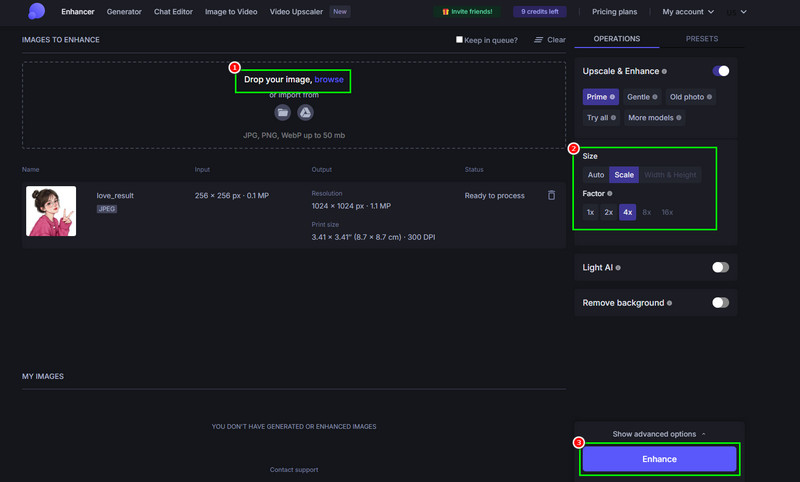
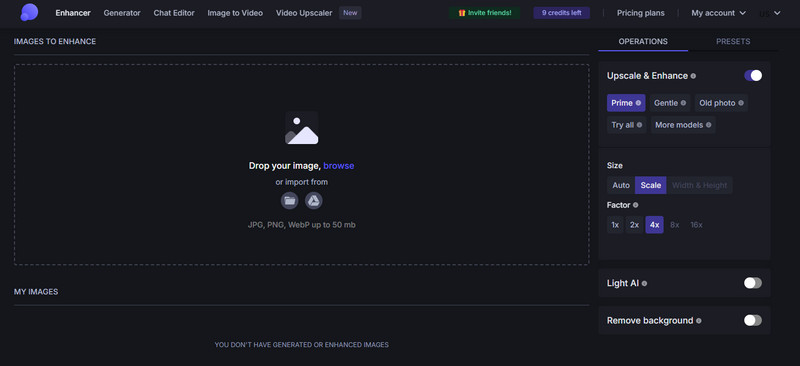
Step 1Go to your browser and proceed to the main website of Let's Enhance. Then, create your account.
Step 2After that, tap the Browse button to add the image you want to upscale. Once done, proceed to the next step.
Step 3Go to the right interface and select the Scale option under the Size section. Then, start upscaling your image up to 4 times and even 16 times better when using the paid version.
Step 4Finally, click the Enhance button below to start the image upscaling process.
- Pros
- The tool is simple to use since it has a neat and comprehensive user interface.
- The image upscaling process is fast.
- It is available on all web platforms.
- The tool can offer more features for obtaining a better version of the photo.
- Cons
- The Upscale process depends on the internet connection.
- When using the free version, there are various restrictions.
Is Let's Enhance Safe?
After using the tool, we can tell that it is safe to use for upscaling and enhancing your images. You can upload the image you have without encountering any issues. Plus, the tool ensures that your data is secured and won't be shared with other users without your consent.
Part 3. Best Let's Enhance Alternative
When upscaling the image on Let's Enhance, you can upscale it up to 4× on the free version. So, if you want to upscale the photo to 8× better, you must access its paid version. So, if you want a free tool that can improve your image up to 8×, we suggest using AVAide AI Image Upscaler. With this exceptional alternative, you can improve and upscale your photo without spending a penny. With its AI-powered technology, you can enhance your images with high accuracy, resulting in better results. The best part here is that it won't insert any watermark on your image after the saving process. It is also available to all web platforms, making it more accessible for all users. Thus, if you are looking for a better Let's Enhance IO alternative, always consider using this tool.
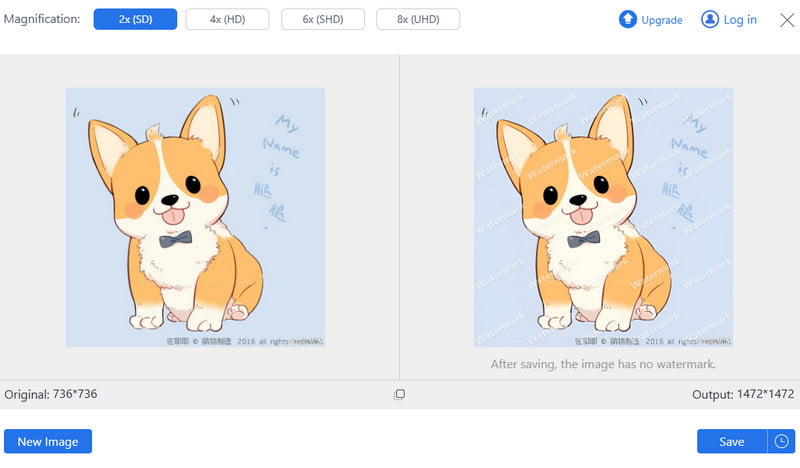
To get more insights about the two tools, you can check the comparison table below.
| AVAide AI Image Upscaler | vs. | Let’s Enhance |
| Upscale up to 8× | Upscaling on the Free Version | Upscale up to 4× |
| Fast | Upscaling Process | Standard |
| Simple | Layout | Simple |
| Free online use without watermark, history check, and UHD support. | Special Features | AI art enhancement, background removal, and print optimization at 300+ DPI. |
| Quick, affordable upscaling for personal photos, portraits, and small business needs. | Best Use Cases | Professional-grade upscaling for e-commerce, marketing, print media, and creative industries. |
There you have it! If you want a detailed Let's Enhance AI Upscaler review, you must read all the information in this post. This review has everything you need, including a simple description, features, a user's guide, use cases, and more. Plus, if you need the best alternative that can upscale your images better, feel free to access AVAide AI Image Upscaler. This perfect photo upscaler ensures that you can achieve the best image resolution after the upscaling process.

Our AI technology will automatically enhance the quality of your images, remove noise and fix blurry images online.
PROCESS NOW