Meskipun perangkat Android dilengkapi dengan perekam suara bawaan, seringkali perangkat tersebut kurang memiliki fitur canggih dan stabilitas yang dibutuhkan untuk penggunaan profesional. Untuk merekam wawancara spontan atau kuliah penting, alat yang andal sangat penting; tidak ada yang lebih merusak rekaman selain gangguan mendadak atau desisan latar belakang yang berlebihan. Untuk membantu Anda menemukan keseimbangan sempurna antara fidelitas dan kinerja, kami telah menyusun dan meninjau 10 aplikasi perekam suara terbaik. Perekam suara Android Aplikasi yang dipercaya oleh para profesional.
Bagian 1: Apa Itu Aplikasi Perekam Suara Android yang Bagus?
Memilih aplikasi perekam suara yang tepat di Android itu penting; ini tentang memastikan integritas data dan presisi akustik. Untuk membedakan utilitas profesional dari aplikasi bawaan generik, Anda dapat mempertimbangkan lima tolok ukur di bawah ini:
Audio Jernih: Ini bukan hanya tentang merekam; ini tentang kejernihan. Aplikasi yang bagus harus mampu menangkap suara berkualitas tinggi sambil secara cerdas menyaring desisan latar belakang dan kebisingan lingkungan agar fokus tetap pada suara.
Opsi Ekspor Fleksibel: Anda tidak seharusnya hanya terpaku pada satu jenis file. Carilah aplikasi perekam suara Android yang mendukung berbagai format, seperti WAV untuk kualitas maksimal, atau MP3 dan AAC untuk menghemat ruang penyimpanan, sehingga file Anda dapat berfungsi sempurna di perangkat apa pun.
Berbagi Instan: Kecepatan itu penting. Anda seharusnya dapat mengirim rekaman Anda ke email, penyimpanan cloud, atau platform media sosial langsung dari aplikasi tanpa langkah tambahan apa pun.
Desain Intuitif: Saat percakapan dimulai secara tak terduga, setiap detik sangat berharga. Antarmuka harus bersih dan bebas gangguan, memungkinkan Anda untuk mulai merekam hanya dengan satu sentuhan dan tanpa perlu mempelajari cara penggunaannya.
Transkripsi Cerdas: Mengetik catatan secara manual sudah ketinggalan zaman. Aplikasi perekam suara Android terbaik kini menyertakan AI bawaan yang mengubah audio Anda menjadi teks akurat dengan cepat, menghemat waktu pemutaran berjam-jam.
Bagian 2: Ulasan 10 Perekam Audio Terbaik untuk Android
Peringkat 1. Perekam Suara Pintar
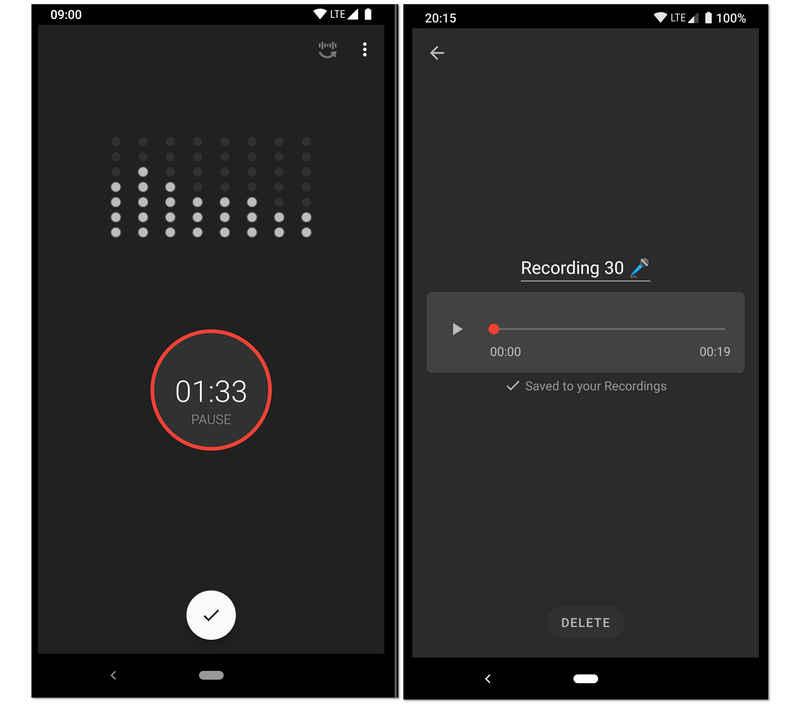
Dirancang untuk perekaman berkualitas tinggi dan durasi panjang, perekam audio untuk Android ini menjadi favorit bagi mahasiswa dan peneliti. Fitur unggulannya adalah mode "Lewati Keheningan", yang menggunakan penganalisis sensitivitas desibel langsung untuk secara otomatis menghentikan perekaman selama momen hening. Hal ini menjadikan perekam suara Android ini pilihan ideal untuk merekam kuliah universitas, rapat bisnis, atau bahkan melacak pikiran saat tidur tanpa harus mengedit secara manual berjam-jam keheningan yang tidak perlu.
- kelebihan
- Algoritma penghilang keheningan secara efektif menghemat ruang penyimpanan dan mengurangi waktu peninjauan setelah perekaman.
- Dilengkapi dengan penganalisis spektrum audio langsung yang memberikan umpan balik visual tentang level perekaman.
- Alat kalibrasi memungkinkan Anda untuk menyesuaikan penguatan mikrofon agar sesuai dengan lingkungan yang berbeda, mulai dari ruangan yang tenang hingga aula yang ramai.
- Kontra
- Desain antarmuka kurang memiliki estetika modern dan minimalis yang ditemukan pada aplikasi produktivitas yang lebih baru.
- Aplikasi ini tidak mendukung perekaman panggilan telepon karena keterbatasan sistem Android.
- Kebisingan latar belakang terkadang dapat memicu fitur lewati keheningan jika tidak dikalibrasi dengan benar.
Peringkat 2. Easy Voice Recorder Pro
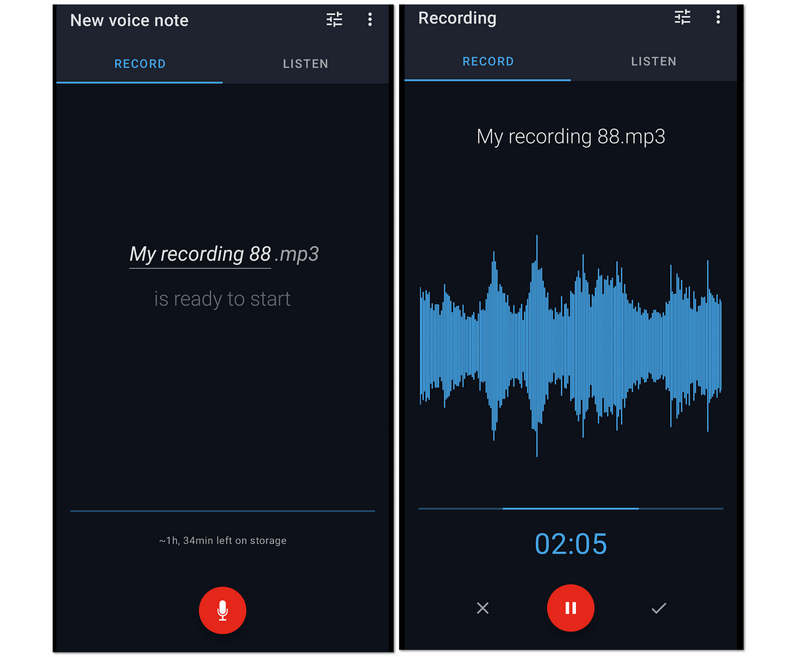
Kedua, dalam daftar, adalah Pro Perekam Suara Mudah ini. Ini adalah aplikasi perekam suara yang fantastis untuk Android karena sesi perekaman tanpa batas yang ditawarkannya kepada pengguna. Untuk alasan ini, kuliah panjang, rapat, dan percakapan panjang lainnya dapat dengan mudah ditangkap saat mengompresnya dalam file yang lebih kecil. Meskipun demikian, Easy Voice Recorder Pro ini memungkinkan pengguna untuk meningkatkan kualitas rekaman dengan memungkinkan mereka menghubungkan mikrofon kelas atas ke rekaman.
- kelebihan
- Hal ini memungkinkan pengguna untuk membuat rekaman mereka sebagai nada dering mereka.
- Ini memiliki dukungan luas untuk berbagai format audio.
- Ini memungkinkan perekaman stereo.
- Menggunakan antarmuka yang mudah digunakan.
- Kontra
- Alat pengeditannya terbatas.
- Ini tidak bebas dari iklan.
3 Teratas. Perekam Suara MP3 Hi-Q
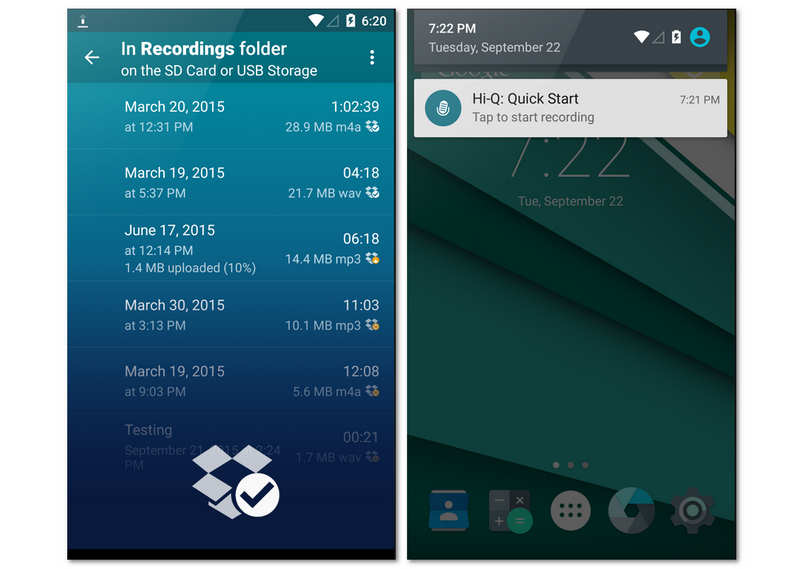
Hi-Q dirancang untuk pengguna yang menginginkan kualitas audio studio dalam format seluler. Dengan merekam dalam MP3 320kbps, aplikasi perekam suara Android ini menyeimbangkan fidelitas tinggi dengan kompatibilitas file universal. Salah satu fitur uniknya adalah kontrol "Shuttle", yang memungkinkan Anda merekam ulang hingga 20 detik audio bahkan sebelum Anda menekan tombol rekam. Fitur ini dapat membantu Anda menemukan kejutan tak terduga dalam rekaman suara Anda.
- kelebihan
- Mendukung perekaman MP3 dengan bitrate tinggi yang kompatibel dengan hampir semua perangkat dan perangkat lunak pemutar.
- Memungkinkan Anda untuk beralih antara mikrofon depan dan belakang untuk mengoptimalkan penangkapan suara terarah.
- Sinkronisasi otomatis dengan Dropbox atau Google Drive memastikan data Anda dicadangkan segera setelah Anda berhenti merekam.
- Kontra
- Versi gratis perekam suara Android ini sangat terbatas pada sesi perekaman 10 menit, sehingga mengharuskan peningkatan berbayar untuk penggunaan yang lebih lama.
- Filter pengurangan kebisingan terkadang dapat membuat suara yang direkam terdengar sedikit "seperti robot" atau terlalu banyak diproses.
- Perangkat lunak ini tidak memiliki fitur pengeditan multi-track tingkat lanjut yang terdapat pada workstation audio yang lebih khusus.
4 Teratas. Perekam Audio Neutron
Neutron Audio Recorder telah menyempurnakan perekaman audio sambil mempertahankan nuansa profesionalnya. Perekam suara untuk Android ini menawarkan peningkatan perekaman dasar, alat, dan fitur canggih seperti equalizer 60-band, filter DSP, detektor keheningan, editor metadata, filter digital yang dapat dikonfigurasi, akses langsung ke USB, dan banyak lagi. Namun, antarmuka pengguna cukup membingungkan bagi pemula.
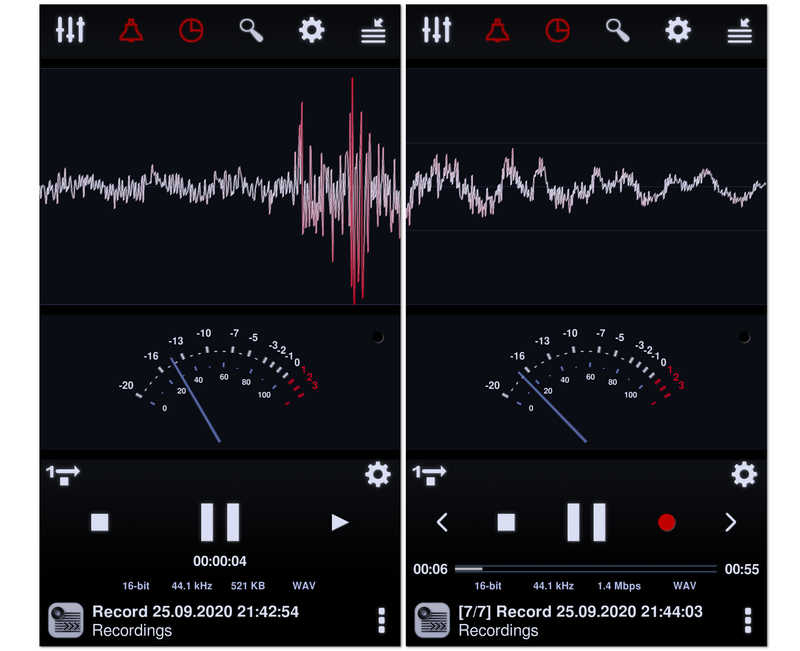
Berawal dari Neutron Music Player yang terkenal, aplikasi ini adalah pilihan para audiophile untuk merekam. Perekam audio untuk Android ini menggunakan mesin audio 32/64-bit yang canggih untuk menghasilkan rekaman yang sempurna. Dengan equalizer parametrik 60-band yang mumpuni dan filter profesional, aplikasi ini memberi Anda kontrol teknis yang lebih besar atas profil suara akhir daripada aplikasi lain dalam daftar ini.
- kelebihan
- Mesin berstandar audiophile memastikan tidak ada kehilangan kualitas audio selama proses pengkodean.
- Fitur DSP canggih seperti Automatic Gain Control (AGC) membantu menormalkan volume di lingkungan yang tidak dapat diprediksi.
- Termasuk antarmuka visual yang sangat dapat disesuaikan dengan penganalisis spektrum, RMS, dan bentuk gelombang.
- Kontra
- Antarmuka pengguna sangat kompleks dan bisa menakutkan bagi pengguna awam.
- Mengonsumsi lebih banyak baterai dan sumber daya CPU dibandingkan dengan aplikasi perekaman yang lebih sederhana.
- Proses pengaturan driver audio resolusi tinggi bisa jadi menantang secara teknis bagi orang awam.
5 Teratas Perekam Suara
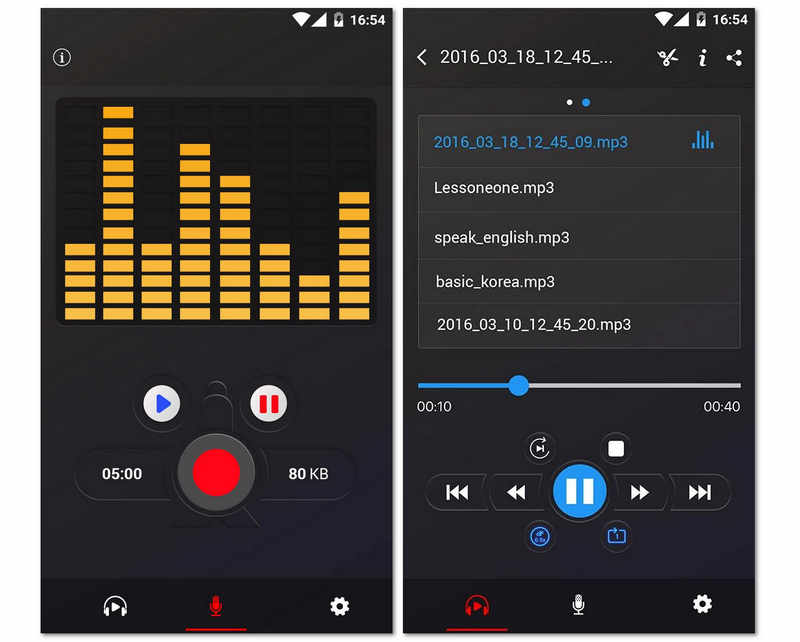
Selanjutnya adalah aplikasi perekam suara gratis ini yang luar biasa tanpa batasan apa pun. Terlebih lagi, aplikasi perekam suara Android gratis ini menawarkan penganalisis spektrum audio yang berfungsi untuk memvisualisasikan suara secara bebas. Belum lagi kemampuannya untuk menghemat baterai ponsel Android Anda dengan melanjutkan perekaman bahkan saat layar mati. Ini adalah salah satu aplikasi perekam suara terbaik untuk Android 16/15/14, ya, tetapi karena ini adalah alat gratis, Anda akan menemukan banyak iklan yang mengganggu. Meskipun demikian, banyak yang masih tertarik dengan aplikasi ini karena kemampuan berbagi tambahannya, yang memungkinkan pengguna untuk dengan mudah mengirim rekaman mereka ke teman-teman mereka.
- kelebihan
- Desain minimalis membuatnya mudah diakses oleh pengguna dari segala usia tanpa perlu mempelajari cara penggunaannya.
- Ukuran aplikasi yang sangat kecil sehingga tidak akan memenuhi penyimpanan internal ponsel Anda.
- Stabilitas latar belakang yang sangat baik, memastikan perekaman tidak dihentikan oleh pengelola tugas sistem Android.
- Kontra
- Tidak memiliki kemampuan untuk mengekspor ke format lossless profesional seperti WAV atau FLAC.
- Tidak ada fitur transkripsi bawaan atau fitur AI canggih untuk membantu mengatur data audio.
- Pengelolaan file dasar menyulitkan untuk menyortir ratusan rekaman dengan cepat.
6 Perekam Audio Terbaik: RecForge II
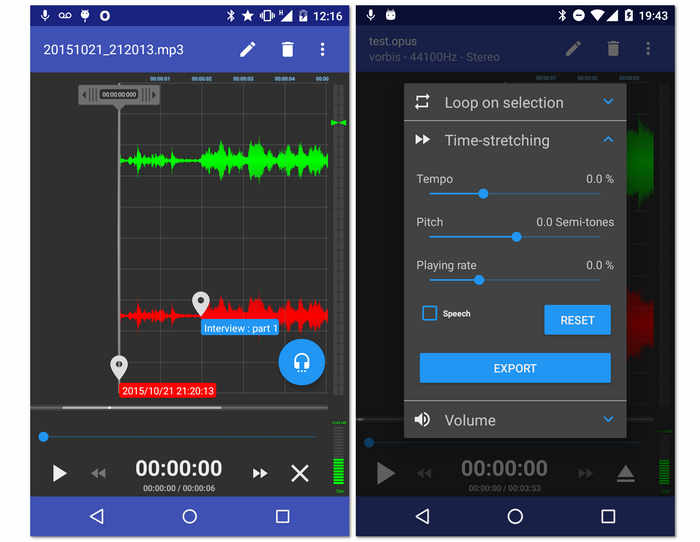
Perekam gratis lainnya untuk Android Anda adalah Perekam Audio RecForge II ini. Ya, alat ini adalah aplikasi gratis yang memungkinkan Anda merekam dalam mode stereo atau mono selain memberi Anda akses untuk menghubungkan berbagai jenis mikrofon eksternal. Selain itu, aplikasi perekam suara untuk Android ini dilengkapi dengan alat penting yang dapat mengedit tempo, nada, dan kecepatan pemutaran file yang direkam. Belum lagi kemampuannya untuk tampil bahkan saat menggunakan aplikasi lain secara bersamaan. Namun, karena ini adalah alat gratis, berharap itu akan berjalan dengan iklan di beberapa titik.
- kelebihan
- Ini menawarkan penambah audio.
- Dengan dukungan luas pada format audio yang berbeda.
- Alatnya serbaguna.
- Hal ini memungkinkan berbagi output secara online.
- Kontra
- Membingungkan bagi pemula.
- Beberapa format file memiliki durasi terbatas.
- Banyak iklan bermunculan.
7 Besar. Music Maker Jam
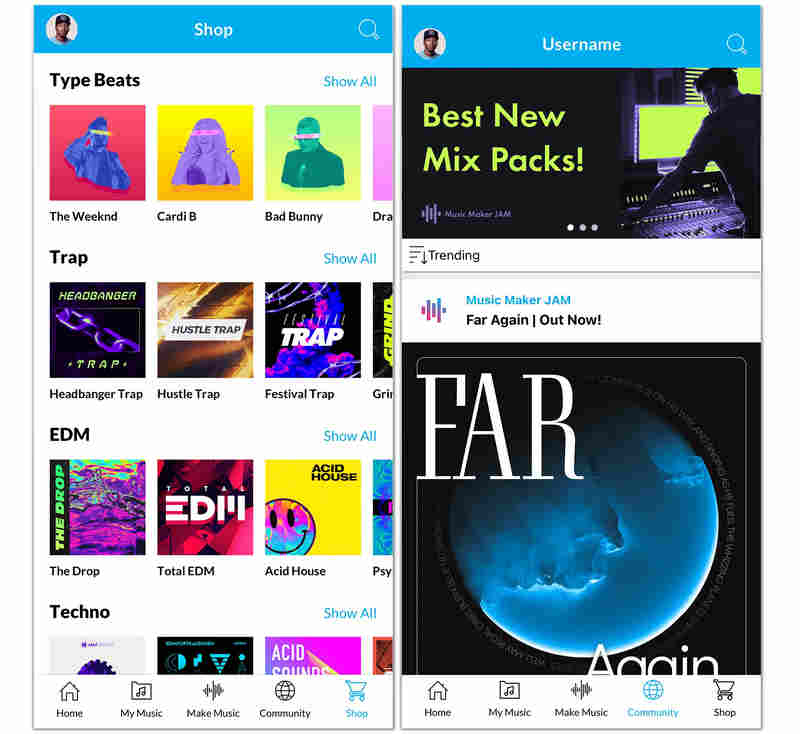
Berbeda dengan perekam suara Android tradisional, Music Maker Jam adalah wadah kreativitas. Aplikasi ini memungkinkan Anda merekam suara atau instrumen Anda di atas loop dan beat yang diproduksi secara profesional. Anda dapat mencampur vokal Anda dengan delapan saluran audio berbeda, menerapkan efek studio secara real-time, dan berbagi kreasi Anda dengan komunitas kreator global. Ini adalah pilihan terbaik bagi siapa pun yang ingin merekam lebih dari sekadar suara.
- kelebihan
- Akses ke perpustakaan besar berisi ribuan loop berkualitas studio di berbagai genre.
- Mixer 8-channel real-time memungkinkan Anda menyeimbangkan vokal dengan musik latar secara sempurna.
- Fitur komunitas bawaan memudahkan kolaborasi dengan seniman lain atau mendapatkan umpan balik atas karya Anda.
- Kontra
- Aplikasi perekam suara Android sangat berat dan membutuhkan perangkat modern agar dapat berjalan lancar tanpa lag.
- Tidak cocok untuk dikte bisnis profesional atau perekaman kuliah sederhana.
- Sangat bergantung pada model freemium di mana banyak paket suara dan fitur memerlukan pembelian dalam aplikasi.
8 Perekam Suara ASR Teratas
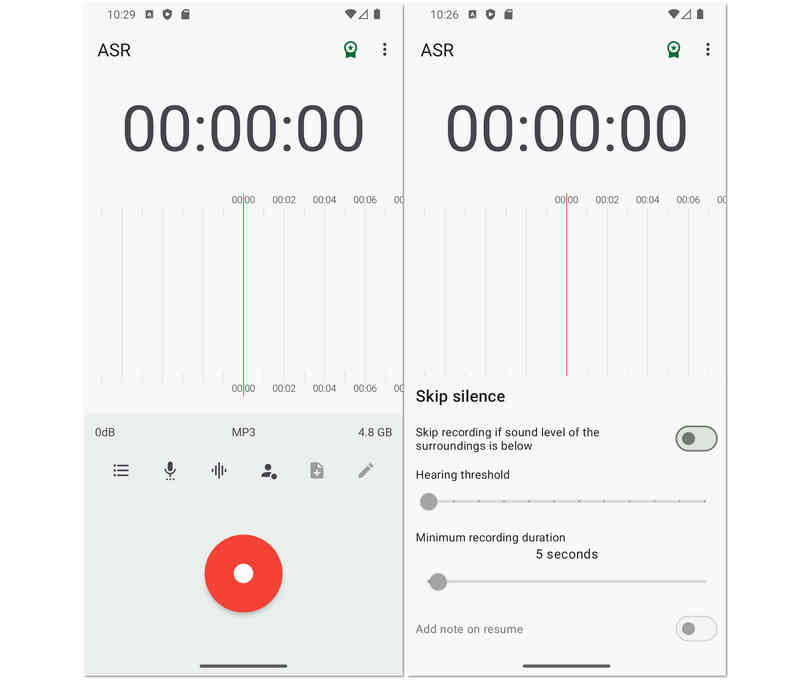
Berikutnya dalam daftar adalah Perekam Suara ASR fleksibel yang kaya akan alat pengeditan untuk file rekaman Anda. Jika Anda ingin merasakan bagaimana merekam suara di Android secara profesional, ASR Voice Recorder bisa menjadi pilihan yang baik. Selain itu, ini memungkinkan Anda untuk mengedit rekaman Anda untuk mengontrol kecepatan pemutarannya, melewati keheningannya, menambahkan catatan ke dalamnya, dan mengatur ulang lebih banyak. Selain itu, dapat dihubungkan ke perangkat eksternal seperti mikrofon dan headset untuk pengalaman yang lebih pribadi dan kualitas yang lebih tinggi.
- kelebihan
- Alat gratis dengan opsi perekaman hebat.
- Mendukung beberapa format file audio.
- Dengan kemampuan berbagi yang mudah.
- Ini memungkinkan berbagai unggahan dari drive yang berbeda.
- Kontra
- Ini tidak bebas iklan.
- Itu tidak memiliki pilihan transkripsi audio.
9 Teratas. OtterAI Transcribe Catatan Suara
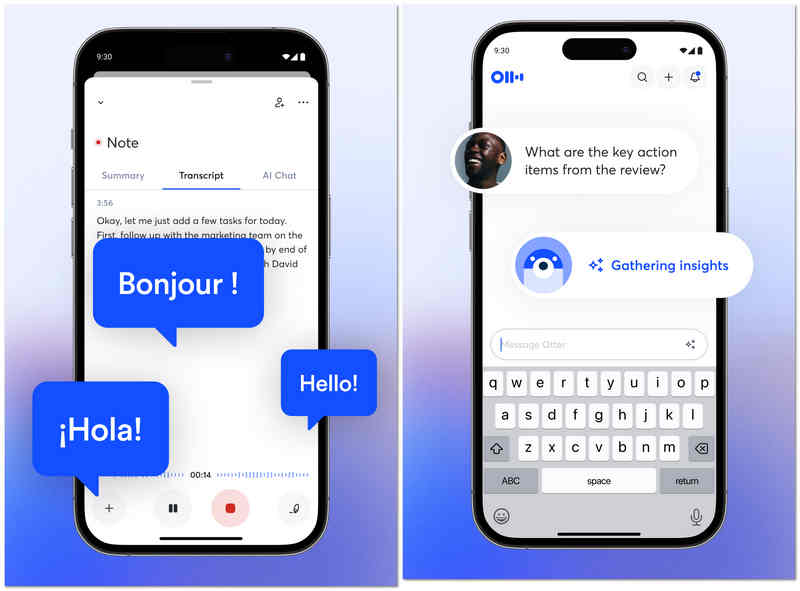
OtterAI adalah pemimpin industri dalam transkripsi berbasis AI. Alih-alih hanya merekam suara di Android, aplikasi ini menangkap transkrip langsung yang dapat Anda baca saat pembicara berbicara. Perekam audio untuk Android ini menggunakan pembelajaran mesin canggih untuk membedakan antara pembicara yang berbeda dan bahkan dapat menghasilkan ringkasan percakapan secara otomatis, menjadikannya "aplikasi wajib" bagi jurnalis dan profesional perusahaan.
- kelebihan
- Transkripsi waktu nyata yang sangat akurat dan mampu menangani berbagai aksen serta kosakata teknis dengan baik.
- Identifikasi pembicara otomatis memudahkan untuk mengikuti wawancara atau rapat yang melibatkan banyak orang.
- Transkrip yang dapat dicari memungkinkan Anda menemukan kata atau topik tertentu di antara rekaman audio selama berjam-jam secara instan.
- Kontra
- Paket gratisnya cukup terbatas dengan batasan transkripsi bulanan.
- Aplikasi ini membutuhkan koneksi internet yang stabil untuk hasil transkripsi terbaik.
- Pengguna yang peduli dengan privasi mungkin khawatir tentang audio mereka yang diproses di server Otter.
10 Teratas. Perekam Suara Tape-a-Talk
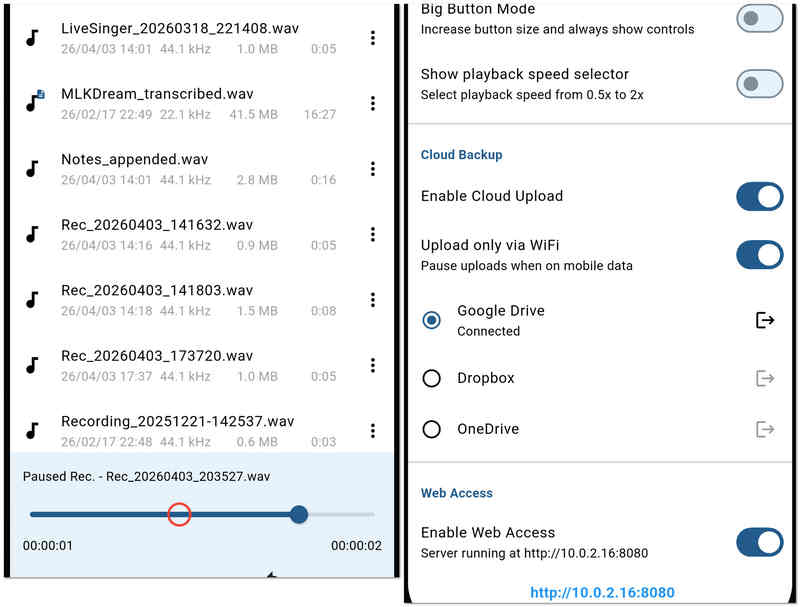
Tape-a-Talk adalah aplikasi perekam suara yang andal yang berfokus pada stabilitas tinggi dan kemudahan penggunaan. Aplikasi ini sangat cocok untuk pekerjaan lapangan di mana Anda membutuhkan perekam yang tidak akan mengalami gangguan dan menawarkan widget satu sentuhan sederhana untuk layar beranda Anda. Perekam audio untuk Android ini juga menyediakan fungsi pengeditan dasar, memungkinkan Anda untuk memperbaiki atau memangkas rekaman secara langsung.
- kelebihan
- Performa perekaman yang sangat stabil dan jarang gagal, bahkan dalam situasi memori rendah.
- Menyediakan widget layar beranda yang canggih untuk memulai dan menghentikan perekaman tanpa membuka aplikasi.
- Mendukung perekaman WAV berkualitas tinggi tanpa kompresi untuk keperluan pengarsipan.
- Kontra
- Versi gratisnya dipenuhi iklan, yang dapat mengganggu pengalaman pengguna.
- Perangkat ini tidak memiliki fitur AI "pintar" seperti peredam kebisingan atau transkripsi otomatis yang terdapat pada pesaingnya.
Bonus: Pengaturan Ulang Audio dan Layar Terbaik untuk Windows dan Mac
Meskipun aplikasi seluler sangat bagus untuk memo singkat, proyek profesional seringkali membutuhkan kemampuan solusi desktop. Jika Anda perlu merekam video berkualitas tinggi bersamaan dengan audio Anda, Perekam Layar AVAide adalah pilihan utama bagi pengguna Windows dan Mac.
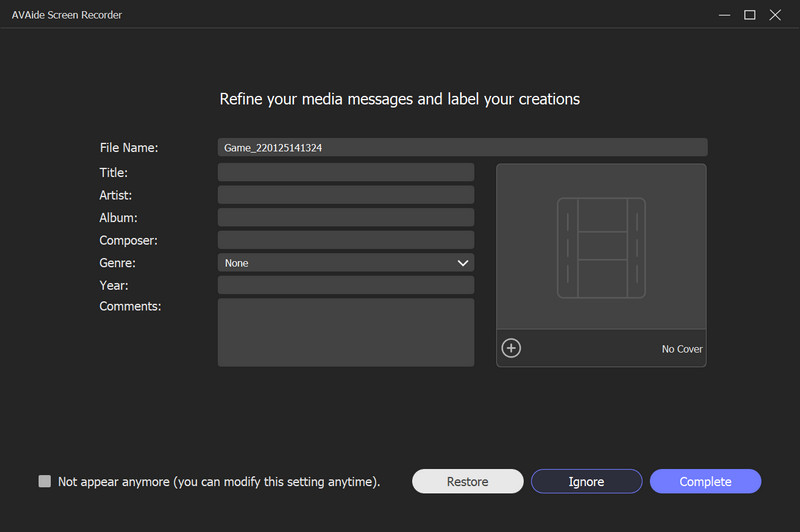
Mengapa Memilih Perekam Layar AVAide?
AVAide melampaui sekadar perekaman layar sederhana dengan menawarkan serangkaian alat profesional yang dirancang untuk kejelasan dan kemudahan penggunaan. Baik Anda merekam webinar penting, tutorial perangkat lunak yang detail, atau permainan yang intens, AVAide memastikan setiap frame dan setiap suara terabadikan dengan kualitas jernih.
- Pilih untuk merekam seluruh layar Anda, jendela tertentu, atau area yang Anda pilih sendiri.
- Memungkinkan Anda melakukan overlay webcam untuk merekam tutorial atau "video reaksi".
- Tambahkan teks, panah, garis, dan bentuk saat Anda merekam untuk menyoroti informasi penting.
- Rekam video berdurasi panjang dengan penggunaan CPU rendah dan tanpa jeda atau gangguan.

 Unduh Aman
Bagian 3: Perbandingan 10 Perekam Suara Android Secara Berdampingan
| Nama Aplikasi | Kasus Penggunaan Utama | Fitur Utama | Format Audio | Terbaik untuk |
| Perekam Suara Pintar | Efisiensi | Lewati Mode Senyap | WAV | Kuliah & Pertemuan Panjang |
| Perekam Suara Mudah Pro | Produktivitas Harian | Dukungan Wear OS | PCM, AAC, FLAC | Memo harian & Siswa |
| Perekam Suara MP3 Hi-Q | Kualitas Audio | Kualitas Tinggi 320kbps | MP3, WAV, OGG | Wawancara berkualitas tinggi |
| Perekam Audio Neutron | Teknik Profesional | Equalizer 60-band | PCM, WAV, FLAC | Pencinta Audio & Profesional Teknologi |
| Perekam suara | Kesederhanaan | Perekaman Sekali Sentuh | MP3, WAV | Pengguna biasa & Lansia |
| RecForge II | Pengeditan Tingkat Lanjut | Pemantauan Waktu Nyata | MP3, OGG, OPUS | Jurnalis & Podcaster |
| Pembuat Musik Jam | Produksi Kreatif | Mixer 8 Saluran | Khusus aplikasi / MP3 | Musisi & Pembuat Beat |
| Perekam Suara ASR | Kegunaan Umum | Integrasi Cloud | FLAC, WAV, MP4 | Pengguna tingkat lanjut dengan anggaran terbatas |
| OtterAI | Transkripsi Cerdas | Teks AI waktu nyata | MP3, WAV | Pertemuan perusahaan |
| Tape-a-Talk | Stabilitas | Keandalan Backend | WAV, OGG | Kerja lapangan & Dikte |
Bagian 4: Pertanyaan yang Sering Diajukan (FAQ) tentang Perekam Audio untuk Android
Apa nama perekam suara bawaan untuk Android?
Perekam suara bawaan Android Anda bernama Perekam. Jika Anda tidak dapat menemukannya di alat, coba cari di aplikasi Anda.
Apa perekam audio gratis terbaik?
Perekam suara gratis terbaik meliputi Audacity di Windows dan Mac, ASR Voice Recorder untuk Android, dan Voice Record Pro untuk iOS.
Bisakah saya merekam panggilan telepon menggunakan Android saya?
Ya. Sebagian besar ponsel Android terbaru memiliki perekam telepon bawaan. Anda akan menemukannya setelah panggilan berlangsung.
Itulah dia, sepuluh yang paling dapat diandalkan. perekam audio untuk Android pada tahun 2026. Masing-masing menawarkan keseimbangan unik antara kejelasan, stabilitas, dan fitur profesional untuk menyesuaikan lingkungan perekaman apa pun. Meskipun aplikasi seluler memberikan portabilitas yang tak tertandingi, proyek tingkat profesional seringkali membutuhkan ketelitian dari perangkat lunak desktop. Bagi mereka yang membutuhkan solusi terpadu di Windows, Mac, dan bahkan iPhone, Perekam Layar AVAide tetap menjadi rekomendasi utama kami. Mulai dari menangkap audio sistem berkualitas tinggi hingga merekam panggilan FaceTime dan input mikrofon dengan mudah, ini adalah alat terbaik bagi pengguna yang menolak berkompromi dengan kualitas.
TENTANG PENULIS

Tangkap aktivitas layar dengan audio, rapat online, video gameplay, musik, webcam, dll.
Ulasan Perekam Video & Audio
- Ulasan Perekam Layar AirShou
- Perekam Layar Sumber Terbuka Terbaik
- Ulasan Perekam Layar Aksi
- Perekam Layar Gratis Terbaik
- Perekam Layar Terbaik untuk Chrome
- Perekam GIF Terbaik
- Perekam Kamera Web Terbaik
- Perekam Layar Terbaik untuk Windows
- Perekam Layar Terbaik untuk Android
- Ulasan tentang Pengambilan Audio Chrome
- Perangkat Lunak Perekaman Audio Terbaik
- Perekam Suara Terbaik untuk Android
- 8 Perekam Layar Online Terbaik Tahun Ini
- 7 Perekam Layar Gratis Luar Biasa Tanpa Tanda Air
- Daftar 8 Perekam Desktop Menakjubkan Tahun Ini
- 12 Pilihan Perekam Layar Terbaik untuk Mac [Online & Offline]
- 8 Perekam Game Terbaik untuk Digunakan di Windows dan Mac
- 10 Perekam MP3 Paling Unggulan di Windows dan Mac
- 5 Aplikasi Perekaman Panggilan Terbaik untuk Android yang Layak Digunakan
- 6 Aplikasi Perekam Suara Terbaik untuk iPhone & Android