कई उपयोगकर्ताओं के लिए एक सामान्य पहचान यह है कि वे बस डाउनलोड कर लें। स्क्रीन रिकॉर्डर एक्सटेंशन वीडियो रिकॉर्डिंग के बाद, वे अक्सर सोचते हैं, 'इसमें लैग क्यों है?' या 'फ़ाइल का साइज़ इतना बड़ा क्यों है?' बेहतरीन वीडियो रिकॉर्डिंग में फ्रेम रेट, परमिशन, कोडेक, सपोर्ट और आसान यूजर कंट्रोल जैसी चीज़ें शामिल होती हैं। ये जानने के बाद आपको बाद में एडिटिंग करने की ज़रूरत नहीं पड़ेगी। यहाँ बताए गए सेक्शन में आप सीखेंगे कि अपने ब्राउज़र के लिए सबसे अच्छे टूल्स का चुनाव कैसे करें।
- त्वरित तुलना: सर्वश्रेष्ठ स्क्रीन रिकॉर्डर
- भाग 1. क्रोम के लिए सर्वश्रेष्ठ स्क्रीन रिकॉर्डर एक्सटेंशन
- भाग 2. फ़ायरफ़ॉक्स के लिए सर्वश्रेष्ठ स्क्रीन रिकॉर्डर एक्सटेंशन
- भाग 3. सफारी के लिए सर्वश्रेष्ठ स्क्रीन रिकॉर्डर एक्सटेंशन
- भाग 4. ओपेरा के लिए सर्वश्रेष्ठ स्क्रीन रिकॉर्डर एक्सटेंशन
- बोनस: सभी ब्राउज़रों के लिए सर्वश्रेष्ठ स्क्रीन रिकॉर्डर
त्वरित तुलना: ब्राउज़र के अनुसार सर्वश्रेष्ठ स्क्रीन रिकॉर्डर एक्सटेंशन
| ब्राउज़र | टॉप पिक | के लिए सबसे अच्छा |
| क्रोम | करघा | यह त्वरित ट्यूटोरियल, टीम संचार और लिंक के माध्यम से तुरंत वीडियो साझा करने के लिए सबसे अच्छा है। |
| फ़ायरफ़ॉक्स | शानदार स्क्रीनशॉट और स्क्रीन रिकॉर्डर | यह एनोटेशन टूल के साथ स्क्रीनशॉट लेने और त्वरित, ब्राउज़र-आधारित रिकॉर्डिंग के लिए सबसे अच्छा है। |
| सफारी | स्क्रीनऐप | यह मैक पर त्वरित कैप्चर और ऑडियो समर्थन के साथ सरल ब्राउज़र-आधारित रिकॉर्डिंग के लिए सबसे अच्छा है। |
| ओपेरा | Scre.io स्क्रीन रिकॉर्डर | यह त्वरित डेमो और वॉकथ्रू के लिए माइक्रोफोन ऑडियो के साथ हल्के स्क्रीन रिकॉर्डिंग के लिए सबसे अच्छा है। |
भाग 1. क्रोम के लिए सर्वश्रेष्ठ स्क्रीन रिकॉर्डर एक्सटेंशन
करघा यह स्क्रीन रिकॉर्डिंग और वीडियो शेयरिंग के लिए एक लोकप्रिय क्रोम एक्सटेंशन है। आप इस टूल से अपने ब्राउज़र टैब, पूरी स्क्रीन, वेबकैम या माइक को रिकॉर्ड कर सकते हैं। रिकॉर्डिंग के बाद यह एक शेयर करने योग्य लिंक बनाता है, जिससे त्वरित संचार, विचारों का आदान-प्रदान और सहयोग आसान हो जाता है। कार्यस्थलों और शिक्षा संस्थानों में इसका व्यापक रूप से उपयोग किया जाता है क्योंकि इससे बड़ी वीडियो फ़ाइलों को स्थानांतरित करने की आवश्यकता कम हो जाती है, जिससे यह एक विश्वसनीय विकल्प बन जाता है। क्रोम स्क्रीन रिकॉर्डरएक ब्राउजर स्क्रीन रिकॉर्डर के रूप में, लूम को इसकी गति, सरलता और टीम के अनुकूल कार्यप्रवाह के लिए सराहा जाता है।

- पेशेवरों
- क्रोम में एक क्लिक में तुरंत रिकॉर्डिंग
- यह स्क्रीन, वेबकैम और माइक्रोफोन को एक साथ रिकॉर्ड करता है।
- तुरंत साझा करने योग्य वीडियो लिंक
- स्वच्छ और उपयोग में आसान इंटरफ़ेस
- टीम संचार और ट्यूटोरियल के लिए अच्छा है
- दोष
- फ्री प्लान में कुछ फीचर्स सीमित हैं।
- साझा करने और क्लाउड एक्सेस के लिए इंटरनेट आवश्यक है
- उन्नत संपादन उपकरण सशुल्क हैं।
- क्लाउड स्टोरेज गोपनीयता को प्राथमिकता देने वाले उपयोगकर्ताओं के लिए उपयुक्त नहीं हो सकता है।
भाग 2. फ़ायरफ़ॉक्स के लिए सर्वश्रेष्ठ स्क्रीन रिकॉर्डर एक्सटेंशन
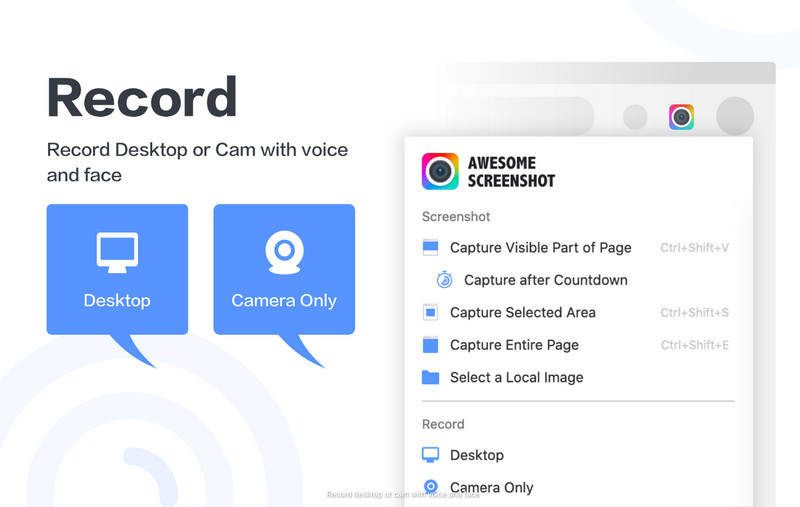
फ़ायरफ़ॉक्स उपयोगकर्ता जो स्क्रीनशॉट लेने और वीडियो रिकॉर्ड करने के लिए एक ही एक्सटेंशन की तलाश में हैं, उन्हें ऑसम स्क्रीनशॉट और स्क्रीन रिकॉर्डर पर विचार करना चाहिए। आप अपने ब्राउज़र टैब, डेस्कटॉप या वेबकैम को रिकॉर्ड कर सकते हैं, इसलिए यह ट्यूटोरियल, अपडेट, कार्य परियोजनाओं, उत्पाद डेमो और ग्राहक सहायता साझा करने के लिए बहुत अच्छा है। इसमें स्क्रीनशॉट लेने और नोट्स जोड़ने की क्षमता भी है, जिससे आप बिना कोई अन्य ब्राउज़र एक्सटेंशन डाउनलोड किए इमेज खींच सकते हैं और कमेंट जोड़ सकते हैं। फ़ायरफ़ॉक्स स्क्रीन रिकॉर्डर के रूप में, यह कई टूल को एक सरल और कुशल कार्यप्रणाली में संयोजित करने के लिए जाना जाता है।
- पेशेवरों
- रिकॉर्ड्स टैब, डेस्कटॉप स्क्रीन और वेबकैम
- इसमें स्क्रीनशॉट और एनोटेशन टूल शामिल हैं।
- रिकॉर्डिंग के बाद आसानी से शेयर करने के विकल्प उपलब्ध हैं
- ट्यूटोरियल और रिमोट वर्क के लिए अच्छा है
- शुरुआती लोगों के लिए सरल इंटरफ़ेस
- दोष
- कुछ उन्नत सुविधाओं के लिए सशुल्क योजना की आवश्यकता होती है।
- व्यापक ब्राउज़र अनुमतियों का अनुरोध कर सकता है
- पुराने उपकरणों पर प्रदर्शन भिन्न हो सकता है
- क्लाउड स्टोरेज गोपनीयता को प्राथमिकता देने वाले उपयोगकर्ताओं के लिए उपयुक्त नहीं हो सकता है।
भाग 3. सफारी के लिए सर्वश्रेष्ठ स्क्रीन रिकॉर्डर एक्सटेंशन
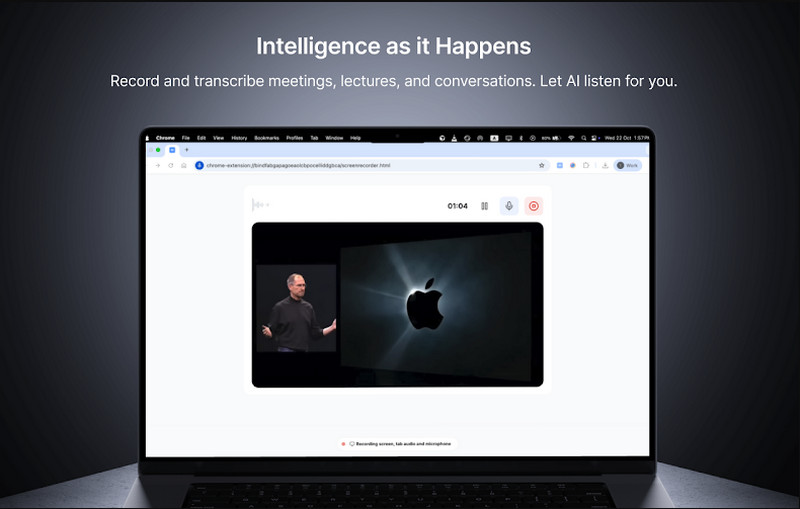
स्क्रीनऐप यह एक ब्राउज़र-आधारित एप्लिकेशन है जो सफारी के साथ एकीकृत होता है और इसे इंस्टॉल करने की आवश्यकता नहीं होती है। उपयोगकर्ता एक ही इंटरफ़ेस में अपने ब्राउज़र टैब, विंडो और सिस्टम साउंड को कैप्चर कर सकते हैं, जिससे यह ट्यूटोरियल, ऑनलाइन पाठ और प्रक्रियाओं को दस्तावेज़ित करने के लिए आदर्श बन जाता है। यह रिकॉर्डिंग टूल को चलाने के लिए ब्राउज़र का उपयोग करता है, जिसमें शेयर करने के लिए तुरंत डाउनलोड करने या सोशल मीडिया पर शेयर करने के विकल्प होते हैं। सफारी स्क्रीन रिकॉर्डर के रूप में, यह उन उपयोगकर्ताओं के लिए डिज़ाइन किया गया है जो अतिरिक्त डेस्कटॉप सॉफ़्टवेयर पर निर्भर हुए बिना त्वरित कैप्चर चाहते हैं।
- पेशेवरों
- यह बिना पूर्ण इंस्टॉलेशन के सीधे सफारी में काम करता है।
- यह ब्राउज़र टैब और सिस्टम ऑडियो को रिकॉर्ड करता है।
- एक क्लिक में रिकॉर्डिंग करने की सरल कार्यप्रणाली
- इंस्टेंट एमपी4 डाउनलोड को सपोर्ट करता है
- ट्यूटोरियल और ऑनलाइन लर्निंग के लिए उपयुक्त
- दोष
- सीमित उन्नत संपादन सुविधाएँ
- सर्वोत्तम प्रदर्शन के लिए स्थिर इंटरनेट कनेक्शन आवश्यक है।
- फ्री प्लान में उपयोग की सीमाएं हो सकती हैं।
- फुल डेस्कटॉप स्क्रीन रिकॉर्डर की तुलना में कम लचीला
भाग 4. ओपेरा के लिए सर्वश्रेष्ठ स्क्रीन रिकॉर्डर एक्सटेंशन
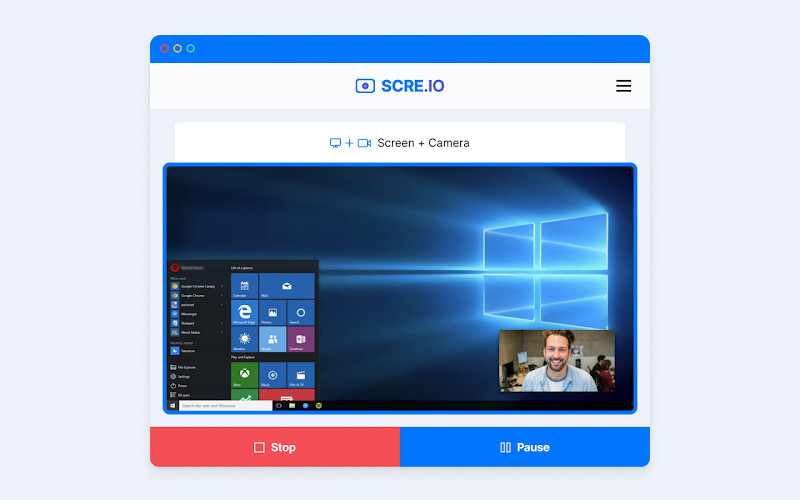
ओपेरा के लिए स्क्रीन रिकॉर्डर या स्क्र.आईओ यह एक एक्सटेंशन है जो आपको ओपेरा में अपनी स्क्रीन को तेज़ी से रिकॉर्ड करने की सुविधा देता है। उपयोगकर्ता बिना किसी विशेष कॉन्फ़िगरेशन के आसानी से ओपेरा टैब, पूरे डेस्कटॉप और यहां तक कि वेबकैम फ़ीड को भी रिकॉर्ड कर सकते हैं। यह सॉफ़्टवेयर अक्सर ट्यूटोरियल, प्रेजेंटेशन और प्रोडक्ट डेमो बनाने के लिए उपयोग किया जाता है क्योंकि यह तेज़ और उपयोग में आसान है। ऑडियो के साथ स्क्रीन रिकॉर्ड एक्सटेंशन होने के नाते, यह माइक्रोफ़ोन इनपुट को सपोर्ट करता है, जिससे उपयोगकर्ता ऑन-स्क्रीन गतिविधियों को रिकॉर्ड करते समय स्पष्ट वॉइस नरेशन जोड़ सकते हैं।
- पेशेवरों
- ओपेरा में एक क्लिक से आसान रिकॉर्डिंग
- स्क्रीन, टैब और वेबकैम रिकॉर्ड करता है
- माइक्रोफ़ोन ऑडियो रिकॉर्डिंग का समर्थन करता है
- कोई जटिल इंस्टॉलेशन या सेटअप नहीं।
- ट्यूटोरियल और त्वरित वॉकथ्रू के लिए उपयोगी
- दोष
- सीमित उन्नत संपादन सुविधाएँ
- कार्य करने के लिए ब्राउज़र की अनुमतियों की आवश्यकता होती है
- निशुल्क संस्करण में कुछ प्रतिबंध शामिल हो सकते हैं।
- कम कीमत वाले उपकरणों पर प्रदर्शन भिन्न हो सकता है
बोनस: सभी ब्राउज़रों के लिए सर्वश्रेष्ठ स्क्रीन रिकॉर्डर
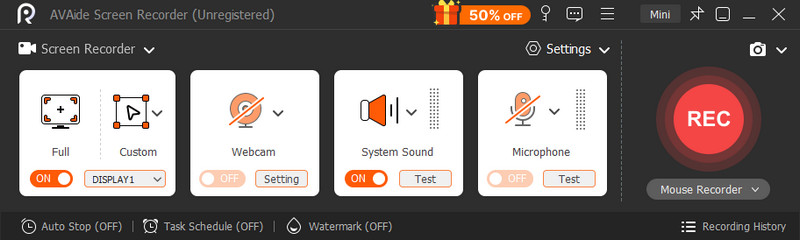
AVAide स्क्रीन रिकॉर्डर यह एक स्टैंडअलोन डेस्कटॉप एप्लिकेशन है जो क्रोम, फ़ायरफ़ॉक्स, ओपेरा और सफारी जैसे सभी प्रमुख वेब ब्राउज़रों को सपोर्ट करता है। यह ब्राउज़र एक्सटेंशन या अनुमतियों का उपयोग किए बिना आपके कंप्यूटर से ऑडियो और वीडियो कैप्चर करता है। इससे यह अधिक विश्वसनीय, बहुमुखी और ट्यूटोरियल, मीटिंग, गेमिंग और प्रस्तुतियों की लंबी या जटिल रिकॉर्डिंग के लिए अधिक सक्षम बनता है।

निःशुल्क डाउनलोड विंडोज 7 या बाद के संस्करण के लिए
 सुरक्षित डाऊनलोड
निःशुल्क डाउनलोड Mac OS X 10.13 या बाद के संस्करण के लिए
सुरक्षित डाऊनलोडअपने ब्राउज़र का विस्तार करना बहुत अच्छा है, लेकिन इसके कुछ नुकसान भी हैं, जैसे रिकॉर्डिंग पर समय सीमा, कम गुणवत्ता या धीमा ब्राउज़र। इस प्रकार का उपकरण, जो इसके समान है... ScreenRecयह एक स्टैंडअलोन ऐप है जो इन समस्याओं से बचाता है। यह एक साथ फुल-स्क्रीन, विंडो, रीजन, सिस्टम ऑडियो, माइक्रोफोन और वेबकैम रिकॉर्डिंग की सुविधा देता है। साथ ही, यह वीडियो के फॉर्मेट और क्वालिटी को बेहतर तरीके से कस्टमाइज़ करने की सुविधा भी प्रदान करता है, जो व्यावसायिक उद्देश्यों के लिए आवश्यक है।
- पेशेवरों
- यह बिना किसी अलग एक्सटेंशन के सभी ब्राउज़रों पर काम करता है।
- ब्राउज़र संबंधी कोई प्रतिबंध या अनुमति संबंधी समस्याएँ नहीं हैं।
- लंबी रिकॉर्डिंग और उच्च रिज़ॉल्यूशन के लिए अधिक स्थिर
- रिकॉर्डिंग सिस्टम ऑडियो, माइक्रोफोन और वेबकैम को एक साथ रिकॉर्ड करता है।
- बेहतर प्रदर्शन नियंत्रण और आउटपुट गुणवत्ता विकल्प
- पेशेवर ट्यूटोरियल, मीटिंग और कंटेंट निर्माण के लिए उपयुक्त।
- दोष
- आपके डिवाइस पर इंस्टॉलेशन आवश्यक है
- एक क्लिक में उपयोग होने वाले त्वरित ब्राउज़र टूल की तुलना में थोड़ा भारी।
- शुरुआत में सेटअप में अधिक समय लग सकता है
रिकॉर्डिंग करने के कई कारण होते हैं, और किसी सरल ट्यूटोरियल, प्रदर्शन या गाइड को रिकॉर्ड करते समय सुविधा और दक्षता के कारण आमतौर पर ब्राउज़र रिकॉर्डिंग टूल को चुना जाता है। ब्राउज़र स्क्रीन रिकॉर्डर यह सरल कार्यों के लिए सुविधाजनक है, क्योंकि यह बिना किसी सॉफ्टवेयर को इंस्टॉल किए आसानी से उपलब्ध है, लेकिन प्रदर्शन, अवधि या कार्यक्षमता के मामले में इसकी कुछ सीमाएँ भी हो सकती हैं।
लेकिन अगर लंबी तकनीकी रिकॉर्डिंग में अधिक स्थिरता, गुणवत्ता और नियंत्रण की आवश्यकता हो, तो एक स्टैंडअलोन स्क्रीन रिकॉर्डर जैसे कि AVAide स्क्रीन रिकॉर्डर यह एक अधिक प्रभावी विकल्प प्रदान करता है। अंततः, यह इस बात पर निर्भर करता है कि आप ब्राउज़र में रिकॉर्डिंग करने की तत्काल आवश्यकता को पूरा कर रहे हैं या आपको उन्नत रिकॉर्डिंग टूल और सुविधाओं की आवश्यकता है।
लेखक के बारे में

ऑडियो, ऑनलाइन मीटिंग, गेमप्ले वीडियो, संगीत, वेब कैमरा आदि के साथ स्क्रीन गतिविधियों को कैप्चर करें।
स्क्रीन रिकॉर्डिंग
- विंडोज़ पर स्क्रीन रिकॉर्ड
- इंस्टाग्राम लाइव रिकॉर्ड करें
- टुबी से वीडियो रिप करें
- YouTube वीडियो को MP3 में बदलें
- Fansly से वीडियो डाउनलोड करें
- JW प्लेयर वीडियो डाउनलोड करना
- बिलिबिली वीडियो डाउनलोड करें
- Patreon वीडियो डाउनलोड करें
- SpankBang वीडियो डाउनलोड करें
- डिस्कॉर्ड वीडियो डाउनलोड करें
- DoodSream वीडियो डाउनलोड करें